
PDFOptim
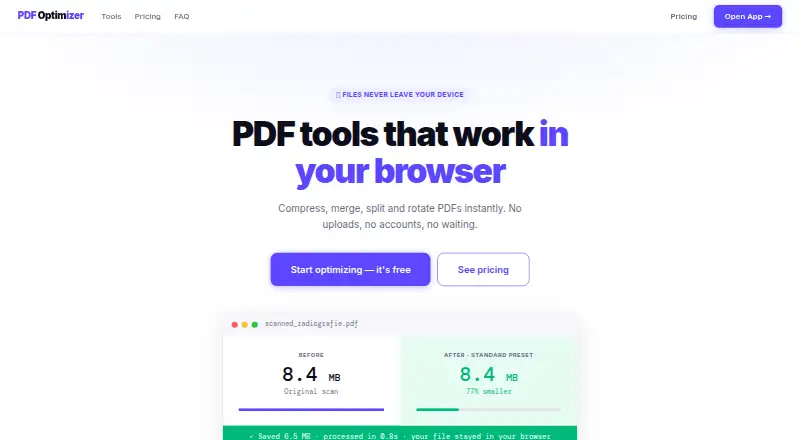
PDFOptim provides browser-based tools to compress, merge, split, rotate, and reorder PDF files.
What PDFOptim is
PDFOptim provides browser-based tools to compress, merge, split, rotate, and reorder PDF files. Its web tools run in the browser using JavaScript and WebAssembly, without uploading, storing, or logging files on PDFOptim servers. They can work offline after the page has loaded, though initial loading and license verification require internet access. Compression presets include Web, Standard, and Print, alongside a custom mode; the compressor can reduce PDF size by up to 90%. Compress Only mode removes metadata and compresses internal streams without re-rendering software-created PDFs, preserving selectable text. Multiple files can be processed in a batch, but downloading all results as a ZIP requires Pro. The free plan allows three operations per day on files up to 25 MB. Pro Monthly costs $4.99/mo and raises the limits to unlimited operations and 200 MB per file. Native offline apps are available for macOS, iOS, iPad, and Windows, and process documents locally. Mac users can set up a Finder Quick Action through Apple Shortcuts for background compression.
Good
- Browser tools do not upload files to its servers.
- Can work offline after the page loads.
- Compression presets include a custom mode.
- Native apps process documents locally.
- Free plan includes all four PDF tools.
Watch out
- Free plan allows three operations per day.
- Free plan limits files to 25 MB.
- ZIP downloads for batch results require Pro.
- Initial loading and license verification need internet.
Who it suits
PDFOptim suits people who need browser-based PDF utilities and prefer processing files locally. Its native apps may suit users who want offline document processing on supported Apple or Windows devices.
Verdict
PDFOptim offers several PDF operations with browser-side processing and native offline apps. Consider the daily and file-size caps on the free plan, and whether batch ZIP downloads justify Pro.
Plans and prices
From PDFOptim's own pricing page, checked 2 Oct 2026.
| Plan | Price | What it gives you |
|---|---|---|
| Free | Free | 3 operations per day · up to 25 MB per file · all 4 PDF tools · private processing · forever, no credit card |
| Pro Monthly | $4.99 a month | unlimited operations · files up to 200 MB · batch ZIP download · all 4 PDF tools · per month · cancel anytime |
| Lifetime | $19, paid once | unlimited operations · files up to 200 MB · batch ZIP download · all future tools · priority email support · one-time · use forever |
The facts
Each one read from PDFOptim's own pages, with the date it was checked.
What it does
- Batch processing
- Users can drop multiple PDFs for batch compression, and Pro users can download all results as a ZIP file.checked 2 Oct 2026
- Compression
- The compressor can reduce PDF size by up to 90% and is intended for scanned documents, radiographs and photos.checked 2 Oct 2026
- Compression presets
- Compression presets are Web at 96 DPI/JPEG 60%, Standard at 150 DPI/JPEG 75% and Print at 200 DPI/JPEG 85%, with a Custom mode.checked 2 Oct 2026
- Core tools
- PDFOptim provides browser tools to compress, merge, split, rotate and reorder PDF files.checked 2 Oct 2026
- Encrypted files
- PDFOptim may not be able to compress all password-protected PDFs and recommends removing the password first.checked 2 Oct 2026
- Offline use
- The web tools work offline after the page has loaded, with internet needed for initial loading and license verification.checked 2 Oct 2026
- Privacy
- The web tools run in the browser with JavaScript and WebAssembly, with no file uploads, storage or logs on PDFOptim servers.checked 2 Oct 2026
- Refunds
- PDFOptim offers a 30-day no-questions-asked money-back guarantee and says refunds are processed within 24 hours by email.checked 2 Oct 2026
- Shortcuts integration
- On Mac, PDFOptim can act as a Finder Quick Action through Apple Shortcuts for background compression.checked 2 Oct 2026
- System requirements
- The native apps require macOS 12 or later, iOS 15.6 or later, or Windows 10 or later.checked 2 Oct 2026
- Vector PDFs
- Compress Only mode strips metadata and compresses internal streams without re-rendering, preserving text selectability for software-created PDFs.checked 2 Oct 2026
Where it runs
- Native apps
- RootRise offers native offline PDFOptim apps for macOS, iOS, iPad and Windows.checked 2 Oct 2026
- On-device security
- The native app processes documents locally, stores information on the device and does not send it to RootRise Technologies or third parties.checked 2 Oct 2026
The full review of PDFOptim
Overview
PDFOptim combines four PDF tools with compression options for both image-heavy scans and software-created documents. It suits people who want private, browser-based processing or native offline apps, especially when their files fit the plan limits.
Its strongest case is local processing paired with useful compression controls; the free plan’s three daily operations and 25 MB file ceiling make it less suited to frequent or large-file work.
Key features
Compression choices
PDFOptim’s compressor is aimed at scanned documents, radiographs and photos, and can reduce file size by up to 90%. That makes it potentially useful when large images are the main obstacle, though the reduction comes with a choice of output settings rather than a single universal quality level. Web uses 96 DPI and JPEG 60%, Standard uses 150 DPI and JPEG 75%, and Print uses 200 DPI and JPEG 85%; Custom mode allows user-set values.
For software-created PDFs, Compress Only strips metadata and compresses internal streams without re-rendering. Preserving selectable text is an important distinction for documents people still need to search or copy from, rather than only view as images.
Batch processing and privacy
Multiple files can be compressed together, but downloading the results as one ZIP is reserved for Pro. That split leaves free users able to batch process while making paid access more compelling for anyone who needs to collect many outputs efficiently.
The browser tools use JavaScript and WebAssembly to process files in the browser, without uploading, server storage or server logs. They can work offline after the page has loaded, though initial loading and license verification need internet access. Password-protected PDFs may not compress; PDFOptim recommends removing the password first.
Native apps
RootRise also offers native offline apps for macOS, iOS, iPad and Windows. The apps process documents locally, store information on the device and do not send it to RootRise Technologies or third parties. Mac users can set PDFOptim as a Finder Quick Action through Apple Shortcuts for background compression. Requirements are macOS 12 or later, iOS 15.6 or later, and Windows 10 or later.
Pricing
The Free plan costs nothing, billed forever, with no credit card required. It includes all four PDF tools and private processing, but caps use at three operations per day and files at 25 MB. That is a sensible starting point for occasional small jobs, not a dependable fit for repeated daily work.
Pro Monthly costs $4.99 a month, billed per month, and can be canceled anytime. It raises the limits to unlimited operations and files up to 200 MB, and adds batch ZIP downloads while retaining all four tools. It fits regular users who need larger files or consolidated batch output, but commits them to a recurring charge.
Lifetime costs $19, paid once, billed one-time, for unlimited operations, files up to 200 MB, batch ZIP downloads, all future tools and priority email support. It is the better fit for someone who expects sustained use and prefers a one-time payment; unlike Pro Monthly, it also includes future tools and priority support. Paid plans are backed by a 30-day no-questions-asked money-back guarantee, with refunds processed by email within 24 hours.
Platforms
PDFOptim supports web, macOS, iOS and Windows. The browser tools provide offline use after initial loading, while native apps are designed for offline document processing. Native system requirements are macOS 12 or later, iOS 15.6 or later, or Windows 10 or later.
Who it's for
PDFOptim is a strong fit for people compressing sensitive or image-heavy PDFs who value local processing, and for Mac users who want a Finder Quick Action. Its free tier works for light use on files up to 25 MB. Frequent users, people handling files up to 200 MB, and anyone who benefits from ZIP downloads should consider a paid plan. Look elsewhere if you need reliable compression of password-protected PDFs or use Android or Linux.
Pros and cons
- Pros: Browser-side and native local processing keeps documents off PDFOptim’s servers, a meaningful advantage for private files.
- Pros: Separate image-oriented presets and a Compress Only mode address different document types, including selectable-text PDFs.
- Pros: Lifetime access costs $19, paid once and includes future tools and priority email support.
- Cons: Free use stops at three operations daily and 25 MB per file, which can quickly constrain routine work.
- Cons: Batch ZIP downloads require Pro, even though batch compression itself is supported.
- Cons: Password-protected PDFs may fail to compress, so those files can require preparation before use.
Alternatives
Compare PDF compression software if you want to weigh PDFOptim against more options in the category.
- PDF2Go is worth considering if you need Android, Linux or browser-extension support alongside its web and desktop platforms; its free plan provides access to most tools with limited file processing.
- Xodo Compress PDF is an option if you want a free online compression action or a free trial, with support across mobile, desktop, web and browser extensions.
- FS PDF Compressor is a free alternative for desktop users on macOS 14+ with Apple Silicon, Windows 11 x64 or Linux x86_64.
- PDF Candy may suit users seeking broad platform coverage, but its free web and desktop plan has page and hourly restrictions, limited file size and no batch processing.
- Smallpdf offers 30 tools on its free plan and a seven-day free trial, making it a candidate when a wider tool set matters more than PDFOptim’s local-processing emphasis.
- PDF.co is a paid web-based alternative with a free trial; its listed Basic plan is $8.99 a month, billed annually.
- presse is a free desktop alternative for Linux, macOS and Windows that includes compression, merging and image conversion under GPL-3.0.
- iText pdfOptimizer is a free API alternative.
Verdict
Choose PDFOptim if local document processing, adjustable compression and offline app use matter more than a generous free quota. The free plan is useful for occasional files below 25 MB, while the 19.00 USD one-time Lifetime plan is the clearest upgrade for sustained use and ZIP batch downloads. Look elsewhere if password-protected files are central to your workflow or you need Android or Linux support.
Alternatives to PDFOptim
- 1

BentoPDF Hyper Compress
Free planOpen sourceWebAPIExtensionLinux8.3From $99 a year - 2
PDF2Go
Free planAndroidiOSWebAPI8.2$6.42 usage-based - 3

Smallpdf
Free planAndroidiOSWebWindows8.1From $10 a month - 4

Xodo Compress PDF
Free planAndroidiOSWebAPI8.1From $7.99 a month - 5

PDF Candy
Free planAndroidiOSWebLinux7.9From $4 a year - 6

Compresto
iOSWebAPIExtension7.5$49 one-time