
LightPDF
LightPDF is a PDF tool for editing, converting, annotating, signing, organizing, and chatting with documents.
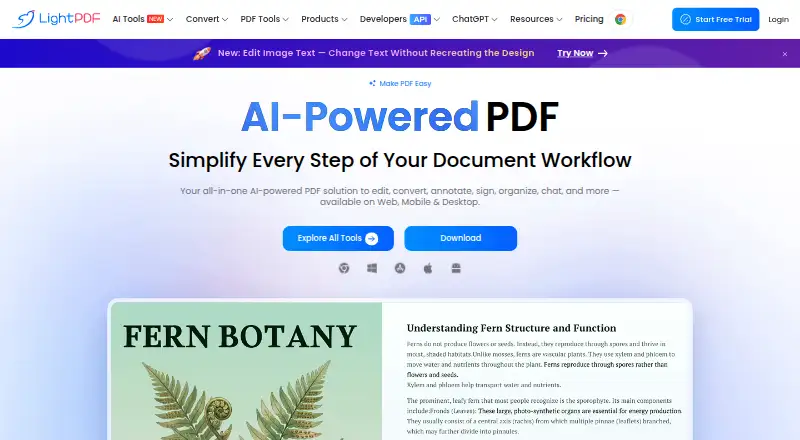
What LightPDF is
LightPDF is a PDF tool for editing, converting, annotating, signing, organizing, and chatting with documents. Its AI Agent accepts requests in chat for tasks such as merging, conversion, watermark removal, page numbering, and compression. Other listed AI functions include translation, image processing, data extraction, invoice generation, and document enhancement. LightPDF is available on the web, Android, iOS, macOS, and Windows, with a Chrome/Edge extension. Its conversion API handles PDFs and office documents in formats including Word, Excel, PowerPoint, images, HTML, and text. The free plan is web-only, supports files up to 10MB, stores five cloud files for one year, and allows three AI Agent questions per day. The Monthly Plan is $5.99 a month; the Yearly Plan is $15.99 a year and includes a 3-day free trial. Paid plans list unlimited file size and cloud storage. Monthly and yearly plans include 1,000 AI credits per month. Premium features work across devices, but can be used on only one device at a time.
Good
- AI Agent handles PDF tasks through chat.
- Offers PDF and office-document conversion API.
- Available on web, mobile, and desktop.
- Free plan includes five cloud files for one year.
Watch out
- Free plan is web-only.
- Free files are limited to 10MB.
- Premium features work on one device at a time.
Who it suits
LightPDF suits people who need PDF editing and conversion alongside document chat and other AI tools. Its free plan is limited to web use, while paid plans list web, mobile, and desktop access.
Verdict
LightPDF combines core PDF tasks with AI document tools and conversion options. Check the free plan's file and storage limits, or choose a paid plan for unlimited file size and cloud storage.
Plans and prices
From LightPDF's own pricing page, checked 15 Oct 2026.
| Plan | Price | What it gives you |
|---|---|---|
| Free Plan | Free | Web only · 10MB maximum file · cloud storage 1 year/5 files · AI Agent 3 questions/day · ChatPDF 1 file/day · AI PDF Generator 1 file · AI Mind Maps/Summaries/Analysis 1 file/day · PDF Translation 1 file · AI Data Extraction 1 file · AI Invoice Generator 1 file · Watermark Remover 1 file · Logo/Text Remover 1 file · Sticker Remover 1 file · Document Enhancement 1 file · Image/Scanned-PDF Text Editor 1 file · Handwriting Remover 1 file · Sign Up Free |
| Monthly Plan | $5.99 a month | Web/mobile/desktop · unlimited file size · unlimited cloud storage · 1,000 AI credits/month · $5.99 /mo |
| Yearly Plan | $15.99 a year | Web/mobile/desktop · unlimited file size · unlimited cloud storage · 1,000 AI credits/month · 3-day free trial · $15.99 /yr |
| Lifetime Plan | $39.99, paid once | Web/mobile/desktop · unlimited file size · unlimited cloud storage · 40,000 lifetime AI credits · $39.99 one-time |
The facts
Each one read from LightPDF's own pages, with the date it was checked.
What it does
- AI Agent
- Its AI Agent accepts natural-language or command-style instructions and can chain operations such as conversion, merging and compression in one chat workflow.checked 15 Oct 2026
- AI credits
- The monthly and yearly plans include 1,000 AI credits per month, and the lifetime plan includes 40,000 credits valid until used.checked 29 Sep 2026
- AI PDF Generator
- The AI PDF Generator creates formatted PDFs from user text or instructions, with basic or advanced models, adjustable length and 20 languages.checked 15 Oct 2026
- AI presentation creation
- The AI PPT Generator turns uploaded documents, audio or video into PowerPoint presentations using slide templates.checked 15 Oct 2026
- AI tools
- The pricing page lists AI chat, generation, translation, image processing, data extraction, invoice generation, and document enhancement features.checked 29 Sep 2026
- API
- LightPDF offers a conversion API for converting PDFs and office documents to and from formats including Word, Excel, PowerPoint, images, HTML, and text.checked 29 Sep 2026
- API deployment
- The API is cloud-based and requires internet access; private deployment is currently offered for PDF-to-Word conversion services.checked 15 Oct 2026
- API file handling
- API source and processed files are physically deleted within 60 to 75 minutes after processing, and LightPDF says staff do not view files.checked 15 Oct 2026
- API metering
- The API charges conversion at one credit per 20 MB or 100 pages, OCR at two credits per page, photo enhancement at one credit per image, editing at one credit per task and ChatPDF per question plus upload.checked 15 Oct 2026
- Chat documents
- Chatdoc accepts PDF, Word, Excel, PowerPoint, EPUB, TXT, webpages and scans for AI analysis, summaries and key-point extraction.checked 15 Oct 2026
- Cloud storage
- The free plan includes cloud storage for five files for one year, while each listed paid plan shows unlimited cloud storage.checked 29 Sep 2026
- Core tools
- The product provides PDF editing, conversion, signing, OCR, annotation, page organization and other document-processing tools.checked 15 Oct 2026
- Downloads
- Official downloads are provided for Windows, macOS, iOS and Android, with web and Chrome/Edge extension access also linked.checked 15 Oct 2026
- File limit
- The free plan supports files up to 10MB, while the listed paid plans show unlimited file size.checked 29 Sep 2026
Where it runs
- Android listing
- The Android listing offers PDF conversion, OCR, compression, merging and batch processing, supports Android 5.0+, and reports 100K+ downloads.checked 15 Oct 2026
- Browser extension
- The maker lists a Chrome/Edge extension among LightPDF platforms.checked 29 Sep 2026
- Cross-device use
- A Premium account works across Windows, Mac, Android, iOS, and web, but Premium features can only be used on one device at a time.checked 29 Sep 2026
Money
- Business plans
- The maker offers custom team and enterprise plans with centralized billing, user management, and volume discounts by quote.checked 29 Sep 2026
- Free plan
- Yeschecked 20 Sep 2026
The company
- Company founding
- LightPDF's about page says its PDF team was formed in January 2015 and the LightPDF brand launched in January 2018.checked 15 Oct 2026
- Company headquarters
- Crunchbase lists Lightpdf headquarters in Shenzhen, Guangdong, China; the Android developer address is in Hong Kong.checked 15 Oct 2026
- Company history
- LightPDF's About page says its team began in January 2015 and launched the LightPDF brand in January 2018.checked 29 Sep 2026
- Company legal name
- LightPDF is identified as a software product provided by Wangxu Technology Co., Ltd.checked 15 Oct 2026
- Founded
- 2018checked 23 Sep 2026
The full review of LightPDF
Overview
LightPDF is a PDF editor and document service with AI tools for working with files through chat and handling related tasks such as conversion. It suits readers who want PDF work, document questions, and conversion in one product, but its free plan is a narrow way to assess it: web-only, 10MB files, and three AI Agent questions a day.
Its strongest case is breadth: paid accounts span web, desktop, and mobile, while an API and browser extension extend its reach. The trade-off is that the clearest limits are on the free tier, and Premium use is restricted to one device at a time.
Key features
- Chat-driven PDF tasks: The AI Agent can handle conversions, merging, watermark removal, page numbering, and compression through chat. That gives occasional document operations a conversational route, though the free plan's three daily questions make sustained use a paid-plan proposition.
- Broader AI toolkit: Listed tools include AI chat, generation, translation, image processing, data extraction, invoice generation, and document enhancement. This makes LightPDF more than a reader or editor, especially for users handling varied documents, although the monthly and yearly plans cap this at 1,000 AI credits per month.
- Conversion and integrations: A conversion API supports PDFs and office documents to and from Word, Excel, PowerPoint, images, HTML, and text. The maker also offers a Chrome/Edge extension and an MCP server configurable in clients such as Cursor and Claude. These are useful extensions for workflows beyond the main interface, but the API is a distinct offer from the consumer plan features.
- Security and support: LightPDF states that data is encrypted in transit and at rest and lists ISO/IEC 27001, ISO/IEC 27701, and GDPR. Support is available by live chat or ticket, with a stated response within 24 hours.
Pricing
The free plan costs nothing and is limited to web, files up to 10MB, five cloud files stored for one year, and three AI Agent questions per day. It is a reasonable fit for light, occasional work, but the file ceiling and small storage allowance are restrictive for regular document use.
The Monthly Plan is $5.99 a month, billed monthly, and adds web, mobile, and desktop access, unlimited file size and cloud storage, and 1,000 AI credits per month. It is the straightforward option for users who need fewer file restrictions without committing for a year.
The Yearly Plan is $15.99 a year, billed yearly, with the same access, storage, file-size allowance, and monthly credits, plus a 3-day free trial. At that stated price it is the lower-cost paid option for readers comfortable with annual billing; the trial is short, so it offers limited time to assess the service.
The Lifetime Plan is priced at $39.99 a month and includes web, mobile, and desktop access, unlimited file size and cloud storage, and 40,000 AI credits valid until used. Unlike the monthly and yearly plans, its credits are a finite total rather than a monthly allowance. The listed price term is monthly, so it should not be treated as a one-time lifetime payment.
Premium works across Windows, Mac, Android, iOS, and web, but Premium features can be used on only one device at a time. Team and enterprise plans have custom pricing, with centralized billing, user management, and volume discounts.
Platforms
LightPDF's platforms include web, Windows, macOS, Android, iOS, an API, and a browser extension. Paid plans cover web, mobile, and desktop; free access is web-only. Premium's cross-device coverage is useful for switching between device types, but the one-device-at-a-time rule limits simultaneous use.
Who it's for
LightPDF is best suited to individuals who regularly edit or convert PDFs and want AI document tools and cloud storage alongside those tasks. Its API and custom team plans also make it relevant to developers and organizations with conversion or team-management needs. It is a weaker fit for someone who needs generous free use, large free uploads, or simultaneous Premium access on several devices.
Pros and cons
- Pro: PDF operations, conversion, and a broad set of AI document tools sit within one service, reducing the need to separate those jobs across products.
- Pro: Paid plans include unlimited file size and cloud storage, addressing the free plan's most consequential constraints.
- Pro: An API, extension, and MCP compatibility give it options for integration beyond the main web interface.
- Con: The free plan allows only 10MB files, five cloud files for one year, and three AI Agent questions per day, which makes it a limited option for ongoing work.
- Con: Premium features are restricted to one device at a time, despite support across desktop, mobile, and web.
- Con: The Lifetime Plan's 40,000 credits are finite, while the plan price is shown per month; it is not an unlimited-credit or one-time-payment alternative.
Alternatives
AskYourPDF is worth considering when document question-and-answer use is the priority: its Premium plan includes 1,200 questions per day, with a 31MB upload limit and 50 documents per day. PDF.chat is another chat-focused choice, with a Starter plan at $5 a month and 750 pages per month; choose it if a defined monthly page allowance better fits your usage than LightPDF's broader PDF toolkit.
docAnalyzer may suit readers who want document analysis, chat, and notes, with its Basic plan at $8 a month. Veryfi API is the alternative to consider for document processing centered on an API, with a free tier of up to 100 documents per month and limited storage.
Myreader is a fit for readers looking for a web-based document and media reading tool; its free plan includes five questions per day, up to 200 pages total, a 10MB file limit, and audiobooks, article links, YouTube videos, OCR, and bulk upload. SciSpace is an alternative with extension, iOS, and web access and a free Basic plan that includes 100 monthly credits.
Explainpaper offers a free web plan with unlimited highlight explanations, follow-up questions, Zotero import, and basic AI models. LandingAI Agentic Document Extraction is another option, with an Explore plan that includes one user seat and 1,000 free credits to start.
For category comparisons, browse AI PDF Tools, PDF Merger Software, and PDF editors.
Verdict
Choose LightPDF if you want a broad PDF workspace that combines editing and conversion with AI document tools, especially when unlimited file size and cloud storage matter. Look elsewhere if free use must handle larger files or regular AI queries, or if you need Premium features available on multiple devices at once.
Getting started
- Visit the LightPDF website to start with the web service.
- Choose the Free Plan, Monthly Plan, or Yearly Plan; the yearly plan includes a 3-day free trial.
- Use the web app, or choose Android, iOS, macOS, Windows, or the Chrome/Edge extension.
- For PDF and office document conversion through an API, use LightPDF's conversion API.
- For team or enterprise use, request a custom plan by quote.
Limits worth knowing
The free plan supports files up to 10MB, five cloud files for one year, and three AI Agent questions per day. The Monthly Plan is $5.99 a month; the Yearly Plan is $15.99 a year and includes a 3-day free trial. Both list unlimited file size and cloud storage, plus 1,000 AI credits per month.
Questions
What does LightPDF cost?
The Free Plan is free. The Monthly Plan is $5.99 a month, and the Yearly Plan is $15.99 a year. The listed Lifetime Plan is $39.99 a month.
What does the free plan include?
It is web-only, supports files up to 10MB, includes cloud storage for five files for one year, and allows three AI Agent questions per day.
Which platforms does LightPDF support?
Its listed platforms are Android, API, extension, iOS, macOS, web, and Windows. The maker also lists a Chrome/Edge extension.
Does LightPDF offer a free trial?
Yes. The Yearly Plan includes a 3-day free trial.
Can I use LightPDF across devices?
A Premium account works across Windows, Mac, Android, iOS, and web. Premium features can be used on only one device at a time.
Does LightPDF have an API or integrations?
It offers a conversion API for PDFs and office documents. Its MCP server can be configured in compatible clients such as Cursor and Claude.
Alternatives to LightPDF
- 1

Smallpdf
Free planAndroidiOSWebWindows8.9From $10 a month - 2
PDF2Go
Free planAndroidiOSWebAPI8.7$6.42 usage-based - 3
Foxit PDF Editor
AndroidiOSWebmacOS8.5 - 4
WPS PDF Editor
Free planAndroidiOSWebExtension8.5From $3 a year - 5

PDF Candy
Free planAndroidiOSWebLinux8.5From $4 a year - 6

HiPDF
Free planAndroidiOSWebAPI8.5Free plan