Pay. Pay by Link
Pay. Pay by Link lets merchants send payment requests through links or QR codes, with options for prepayments, business invoices, and payment reminders.
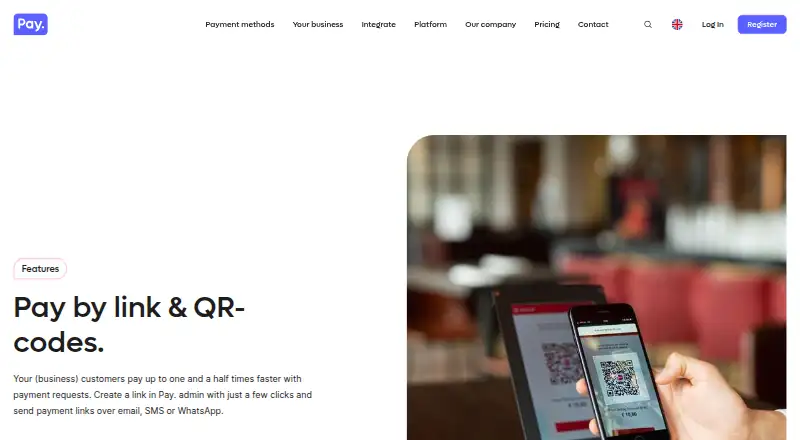
What Pay. Pay by Link is
Pay. Pay by Link lets merchants send payment requests through links or QR codes, with options for prepayments, business invoices, and payment reminders. Links can be shared by email, SMS, or the merchant’s own channels, while QR codes can be placed on receipts or invoices. Merchants can set an expiry date and time for a request. The dynamic link module supports fixed, minimum, maximum, or free amounts, selected payment methods, and up to three optional fields; dynamic links can also remain valid indefinitely. Payment pages can use the merchant’s brand style, and customers pay using methods available on the merchant’s sales channels. Pay. lists over 90 integrations, plugins for over 20 webshop systems, and custom API integrations. Its free Pioneer plan has no monthly charge but applies Professional transaction rates plus €0,05 per transaction and 0,25% of turnover. Professional costs €€35 a month plus transaction fees. Platforms include Android, iOS, web, and API.
Good
- Payment requests can be shared by link or QR code.
- Supports fixed, minimum, maximum, or free amounts.
- Payment pages can use merchant branding.
- Lists over 90 integrations and custom API support.
- Pay. says merchant support is available 24/7.
Watch out
- Pioneer applies transaction fees and a turnover charge.
- Professional costs €€35 a month plus transaction fees.
- No free trial is listed.
Who it suits
It suits merchants who need to request remote payments for invoices, prepayments, or reminders. It also fits businesses that want payment links integrated with webshop systems or custom APIs.
Verdict
Pay. Pay by Link gives merchants configurable requests that can be sent through links or displayed as QR codes. Its free Pioneer plan has no monthly charge, but transaction charges apply; Professional adds a monthly fee plus transaction fees.
Plans and prices
From Pay. Pay by Link's own pricing page, checked 30 Sep 2026.
| Plan | Price | What it gives you |
|---|---|---|
| Pioneer | Free | No setup fees · cancel anytime · No monthly charges; pay per transaction, with Professional transaction rates plus €0,05 per transaction and 0,25% of turnover. |
| Professional | €35 a month | 50+ payment methods · basic chat, email and phone support · free testing included · €35 per month, plus transaction fees. |
| Business | €89 a month | For organizations with annual revenues starting from €2.5 million · personal account manager · service level agreement · €89 per month, plus transaction fees. |
| Premium | Priced on request | For organizations with annual revenues starting from €25 million · specialized industries · priority support · Request a quote. |
The facts
Each one read from Pay. Pay by Link's own pages, with the date it was checked.
What it does
- Branding and use cases
- Payment pages can use the merchant’s brand style, and Pay. describes the feature as useful for prepayments, business invoices and payment reminders.checked 30 Sep 2026
- Data storage
- Pay. says data is stored in Dutch data centers and that it collects only data needed to process payments.checked 30 Sep 2026
- Expiry
- The sender can choose the date and time when a payment request expires.checked 30 Sep 2026
- Integrations
- Pay. says it has over 90 integrations, offers plugins for over 20 webshop systems, and supports custom integrations through APIs.checked 30 Sep 2026
- Link configuration
- The dynamic link module supports fixed, minimum, maximum or free amounts, selected payment methods, and up to three optional fields.checked 30 Sep 2026
- Link duration
- A dynamic payment link remains valid indefinitely, while the product page also describes choosing an expiry for a payment request.checked 30 Sep 2026
- Operating history and reach
- Pay. says it has worked on its payment platform since 2011 and that more than 35,000 businesses in Europe rely on its online and in-store payment solutions.checked 30 Sep 2026
- Payment links
- Merchants create payment links in Pay. admin and can share them with customers by email, SMS or their own channels such as WhatsApp.checked 30 Sep 2026
- Payment methods
- Customers can pay through links using the payment methods available on the merchant’s sales channels.checked 30 Sep 2026
- QR codes
- Merchants can create QR codes for payment requests on receipts or invoices.checked 30 Sep 2026
- Security and compliance
- Pay. states that it is PCI-DSS certified, processes data according to GDPR, holds ISAE 3402 certification, and has ISO 27001:2022 certification.checked 30 Sep 2026
- Support
- Pay. says its team is available 24/7 to support merchants with receiving and processing payments.checked 30 Sep 2026
The company
- Founded
- 2011checked 28 Sep 2026
- Headquarters
- Spijkenisse, Netherlandschecked 28 Sep 2026
Where it runs
- Mobile apps
- Pay. says its app provides insight into webshop or website payment traffic from any location and identifies the app as free.checked 30 Sep 2026
The full review of Pay. Pay by Link
Pay. Pay by Link is a merchant payment-request tool built around shareable links and QR codes. It suits businesses collecting prepayments, invoice balances or reminders outside a standard checkout. Its configurable requests and no-monthly-fee entry plan are appealing, though transaction charges and higher-tier monthly fees make the economics worth weighing against usage.
Overview
Merchants create requests in Pay.’s admin and send them by email, SMS or channels such as WhatsApp. A QR code can put the same route to payment on a receipt or invoice, which is useful when a customer is already dealing with a physical document rather than browsing a webshop.
Payment pages can carry the merchant’s brand style, and customers can use payment methods available through that merchant’s sales channels. That makes Pay by Link a practical extension of an existing payment setup, but the method choice is bounded by what the merchant already offers on those channels.
Pay. supports a dynamic link that can remain valid indefinitely, while also allowing a sender to set an expiry date and time for a payment request. The distinction matters: an enduring reusable link and a time-limited request serve different purposes, and merchants should configure the one that fits the transaction.
Key features
- Configurable requests: Dynamic links can specify a fixed, minimum, maximum or free amount, selected payment methods, and up to three optional fields. This provides useful flexibility for varied requests without implying a full custom checkout.
- Multiple ways to reach customers: Links can be shared directly, while QR codes can be printed on invoices or receipts. This suits both remote payment collection and requests tied to a document.
- Integration breadth: Pay. says it has over 90 integrations, plugins for more than 20 webshop systems, and APIs for custom integrations. That gives businesses several routes to connect payments, though the relevant route depends on their existing systems.
- Mobile visibility and support: Pay.’s free app provides insight into webshop or website payment traffic from any location. Its team says it is available 24/7 to support merchants with receiving and processing payments.
- Security and data handling: Pay. states that it is PCI-DSS certified, processes data according to GDPR, and holds ISAE 3402 and ISO 27001:2022 certifications. It says data is stored in Dutch data centers and that it collects only what is needed to process payments.
Pricing
Pay. uses a freemium model, with no free trial. The Pioneer plan is free, with no monthly charges, no setup fees and cancellation anytime. It charges per transaction at Professional rates plus €0,05 per transaction and 0,25% of turnover. Pioneer is the sensible starting point for merchants with irregular or lower-volume requests who want to avoid a recurring bill, but its transaction surcharge makes it less compelling as payment volume grows.
Professional costs €35 a month, billed €35 per month, plus transaction fees. It includes 50+ payment methods, basic chat, email and phone support, and free testing. The broader method coverage and testing make it a better fit for merchants establishing a regular payment operation, though the monthly charge means occasional users may prefer Pioneer.
Business costs €89 a month, billed €89 per month, plus transaction fees. It is aimed at organizations with annual revenues starting from €2.5 million and includes a personal account manager and service level agreement. Those services are more relevant to larger operations than to a small merchant simply needing payment links.
Premium has custom pricing for organizations with annual revenues starting from €25 million and specialized industries; priority support is included. It is geared toward large or specialist businesses rather than merchants seeking a low-cost way to collect occasional payments. Recurring payments are supported, but the plans still carry transaction fees where stated.
Platforms
Pay by Link lists support for Android, iOS, web and API. The mobile apps and API give businesses options beyond browser-based administration, while web support remains the straightforward fit for teams managing requests at a desk.
Who it's for
Pay by Link is strongest for merchants that need payment collection alongside invoices, reminders or prepayments, especially when requests need varying amounts or a QR-code option. Businesses already using Pay.’s payment channels may find the method availability and integration choices particularly useful. It is less suited to businesses seeking a simple flat-cost service: Pioneer still adds transaction charges, and the paid plans add monthly costs on top.
Pros and cons
- Pros: Requests support several amount rules and up to three optional fields, so merchants can adapt a link to different payment situations.
- Pros: Sharing by email, SMS or other channels and displaying QR codes covers both remote requests and printed invoices or receipts.
- Pros: Pioneer has no monthly charge or setup fee, and the broader plans add payment methods, testing or account-level services for businesses that need them.
- Cons: Pioneer adds €0,05 per transaction and 0,25% of turnover to Professional transaction rates, so frequent use can make the no-monthly-fee option less attractive.
- Cons: Professional and Business both add monthly fees as well as transaction fees, making them harder to justify for occasional requests.
- Cons: Customer payment methods depend on those enabled on the merchant’s sales channels, limiting the feature’s value as a standalone way to offer new methods.
Alternatives
Payment Link Software is a useful starting point for comparing services in the category.
- Dojo is worth considering for businesses that want a free plan with a free trial and core tools including major card types and real-time transactions.
- Mollie may suit merchants who prefer pay-as-you-go pricing without a contract or commitment, with stated rates for domestic debit and credit cards and other consumer cards.
- PayPal Invoicing is an alternative for users who want to create and send invoices without setup or subscription fees, paying transaction fees when customers pay.
- Checkout.com may be relevant to registered charities seeking free processing in countries where it operates, or businesses looking for tailored pricing.
- HitPay Payment Links offers a no-setup, no-monthly-fee approach, with a stated 0.2% Payment Links fee plus payment-method processing fees.
- Mercado Pago Payment Link may appeal to sellers who want no monthly fee and processing charges only when they make a sale.
- SumUp Payment Links is another no-monthly-cost option, with a stated 2.50% per-transaction charge.
- DonoLink is a web-based alternative for donation pages and overlays, with a 3.5% donation fee plus Stripe processing fees.
Verdict
Choose Pay. Pay by Link if your business needs adaptable payment requests that can be sent digitally or placed on invoices and receipts, and you value integration options and configurable amounts. Pioneer keeps the monthly commitment at zero, but its added transaction charges are the main reason to compare alternatives; businesses with steady volume should judge whether Professional’s monthly fee and added features fit their actual payment needs.
Alternatives to Pay. Pay by Link
- 1

Mollie
Free planAndroidiOSWebAPI8.2Free plan - 2
Paystack
Free planAndroidiOSWebAPI8.2From 1 NGN a month - 3
Dojo
Free planAndroidiOSWebAPI8.1From £11.99 a month - 4
SumUp Payment Links
Free planAndroidiOSWebAPI7.9From £189 a year - 5

Checkout.com
Free planAndroidiOSWebAPI7.7Free plan - 6

DePay Payment Links
Free planOpen sourceWebAPISelf-hosted7.7From $1.50 a month