OSRMT
OSRMT is a free, configurable open-source tool for defining and managing software requirements.
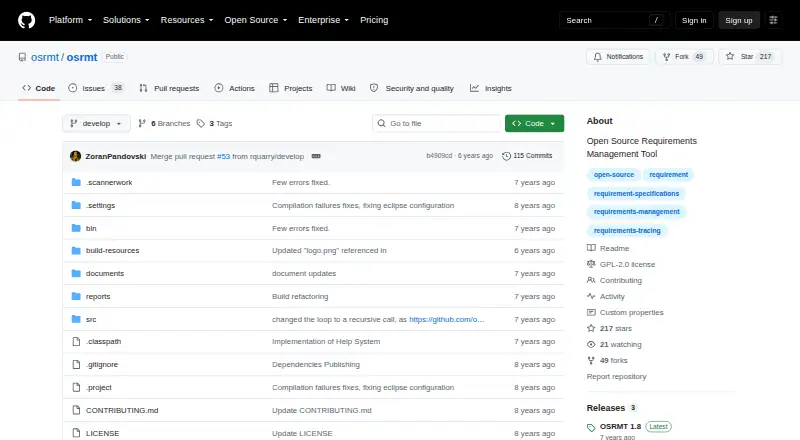
What OSRMT is
OSRMT is a free, configurable open-source tool for defining and managing software requirements. It supports work across features, requirements such as use cases, design, implementation, and test cases, while tracing the links between requirements and their flow. Teams can organize work by phase, configure the tool, and manage multiple projects at once. The project describes two deployment approaches: a single-user desktop application, or a multiuser web application with a centralized server and desktop or web client. Its README lists Windows, Linux (CentOS), and macOS as tested operating systems. Desktop installation requires Windows, Linux, or macOS, an archive utility, and JRE 1.8 or later. The web application deploys on JBoss and is locally accessible on port 8080. Oracle, MySQL, MS SQL, and PostgreSQL are listed as external database options, although no extra database setup is needed for initial use. OSRMT is licensed under GNU GPL-2.0. The project links to issue reports, a request process, an FAQ, online source and documentation, and a community support email address.
Good
- Free to use or distribute
- Tracks requirements across design, implementation, and testing
- Supports multiple projects simultaneously
- Offers desktop and centralized web deployment
- Lists four external database options
Watch out
- Desktop installation requires JRE 1.8 or later
- Web deployment requires JBoss
- No free trial is listed
Who it suits
OSRMT suits software teams that need to define requirements, trace their relationships, and coordinate work across projects. It offers both single-user desktop and centralized multiuser web deployment options.
Verdict
OSRMT provides requirements definition and traceability in a free tool with desktop and web deployment choices. Teams should confirm its JRE or JBoss requirements and database fit for their intended setup.
Plans and prices
From OSRMT's own pricing page, checked 5 Oct 2026.
| Plan | Price | What it gives you |
|---|---|---|
| OSRMT | Free | Hardware required to run it · Free; can be used or distributed at no cost |
The facts
Each one read from OSRMT's own pages, with the date it was checked.
What it does
- Community support
- The project wiki says source code and documentation are available online and provides a community email address for support.checked 5 Oct 2026
- Database support
- The README lists Oracle, MySQL, MS SQL, and PostgreSQL as external database options, with no additional database setup required for initial use.checked 5 Oct 2026
- Deployment modes
- The project describes use as a single-user desktop app or a multiuser web application with a centralized server and desktop or web client.checked 5 Oct 2026
- Installation requirement
- The documented desktop prerequisites include Windows, Linux, or macOS, an archive utility, and JRE 1.8 or later.checked 5 Oct 2026
- License
- The repository identifies the project license as GNU GPL-2.0.checked 5 Oct 2026
- Operating systems
- The README says OSRMT was tested on Windows, Linux (CentOS), and macOS.checked 5 Oct 2026
- Projects
- It supports defining work by phase, configuring the tool, and managing multiple projects simultaneously.checked 5 Oct 2026
- Purpose
- OSRMT is a configurable open source tool for defining and managing software requirements.checked 5 Oct 2026
- Requirements workflow
- It supports defining features, requirements including use cases, design, implementation, and test cases.checked 5 Oct 2026
- Security and compliance
- The opened project pages do not state security certifications or compliance claims.checked 5 Oct 2026
- Support
- The README directs users to existing issue reports or to create a request and also links to an FAQ.checked 5 Oct 2026
- Traceability
- It manages interconnections and traces the flow of requirements.checked 5 Oct 2026
- Web deployment
- The README says the web application deploys on JBoss and is accessible locally on port 8080.checked 5 Oct 2026
The full review of OSRMT
Overview
OSRMT is an open-source tool for defining and managing software requirements, with workflows that connect requirements to design, implementation and test cases. It suits teams that want to manage traceability across projects using a desktop or self-hosted web deployment. Its main appeal is a free, configurable workflow; the trade-off is that deployment calls for compatible runtime and database choices.
Key features
OSRMT covers the path from features and use cases through design, implementation and testing, while tracing the links between those work items. That makes it a fit for teams that need to follow how requirements move through a project, rather than keep requirements in isolation.
Teams can organize work by phase, configure the tool and manage multiple projects simultaneously. The desktop option supports a single user; a centralized-server web deployment supports multiple users through desktop or web clients. The latter offers a shared working environment, but requires a JBoss deployment.
Pricing
The OSRMT plan costs nothing and can be used or distributed at no cost. There is no free-trial distinction to weigh: OSRMT is free software, not a time-limited trial. The plan requires hardware to run it, so free licensing does not remove the practical costs of hosting or maintaining a deployment.
Platforms
OSRMT supports Linux, macOS and Windows, and can be deployed on-premises. Desktop installation requires JRE 1.8 or later. The web application runs on JBoss and is accessible locally on port 8080, making it a more involved choice than a standalone desktop install.
For external databases, the README names Oracle, MySQL, MS SQL and PostgreSQL, while noting no additional database setup is needed for initial use. The project identifies GNU GPL-2.0 as its license. Support paths include issue reports, requests, an FAQ, online source and documentation, and a community email address. The project makes no security certification or compliance claims.
Who it's for
OSRMT is best suited to software teams that need requirements traceability across phases and projects, can manage a desktop runtime or JBoss server, and value a no-cost open-source tool. It is less suitable for teams that want to avoid deployment work or need stated security or compliance credentials.
Pros and cons
- Pro: Requirements, design, implementation and test cases can be connected, helping teams follow requirement flow through development.
- Pro: Single-user desktop and multiuser web deployment options accommodate different working arrangements.
- Pro: The free plan permits use and distribution at no cost, and the project names four external database options.
- Con: Desktop use requires JRE 1.8 or later, while web deployment requires JBoss; teams must be prepared to handle those dependencies.
- Con: The project states no security certifications or compliance claims, which may rule it out where those assurances are required.
Alternatives
For a broader comparison, see Requirements Management Software.
- MATLAB Grader is another free option, but requires a MATLAB license current under maintenance; LMS integration requires a qualifying academic license.
- ReqView may suit users who want a free plan with a defined cap of one document, 150 objects per document and one custom attribute, or a paid per-user plan at €440 a year.
- Doorstop is another open-source, free choice for teams comfortable with its Python and version-control-system requirements.
- Innoslate offers a free plan for educators and students who sign up with a .edu account; its Enterprise plan uses custom pricing.
- RequirementONE has a free Try plan limited to one user and three sources from a shortlist, with predefined topic filters and a personalised newsletter.
- NETVIBES is an alternative.
- QSC QS1 is an alternative.
- Siemens Polarion REQUIREMENTS is an alternative with custom pricing.
Verdict
Choose OSRMT if your team needs cross-phase requirements traceability and can support its desktop or JBoss deployment: the no-cost license and multi-project workflow are compelling for that use. Look elsewhere if setup dependencies are a poor fit or your procurement requires security and compliance credentials.
Getting started
- Open the OSRMT project website on GitHub
- Choose a desktop installation or multiuser web deployment
- For desktop use, prepare Windows, Linux, or macOS, an archive utility, and JRE 1.8 or later
- Extract and run the desktop application
- For web use, deploy the application on JBoss and access it locally on port 8080
- Connect an external Oracle, MySQL, MS SQL, or PostgreSQL database if needed
Limits worth knowing
OSRMT is free, but it requires hardware to run. Desktop use requires JRE 1.8 or later, while web use requires a JBoss deployment.
Questions
Is OSRMT free?
Yes. The OSRMT plan is free and can be used or distributed at no cost.
Which platforms does OSRMT support?
It supports Windows, Linux, macOS, web deployment, and self-hosted use.
Can OSRMT serve multiple users?
Yes. It can run as a multiuser web application with a centralized server and desktop or web client.
Which databases can OSRMT use?
The listed external database options are Oracle, MySQL, MS SQL, and PostgreSQL.
What license does OSRMT use?
The project identifies its license as GNU GPL-2.0.
How can users get support?
The project provides issue reports, a request process, an FAQ, online source and documentation, and a community support email address.
Alternatives to OSRMT
- 1
RequirementONE
Free planAndroidiOSWebAPI7.9From $12 a month - 2
Doorstop
Free planOpen sourceWebAPILinuxmacOS7.5Free plan - 3

ReqView
Free planWebLinuxmacOSWindows7.1From €440 a year - 4

DocSheets
iOSWebmacOSWindows6.8$2,000 one-time - 5
in-STEP BLUE
WebAPISelf-hostedWindows6.6 - 6

CATIA
WebWindows6.5From $6,537 a year