Open Network Diagram
Open Network Diagram is a free, self-hosted tool for visualizing and managing home lab and network infrastructure.
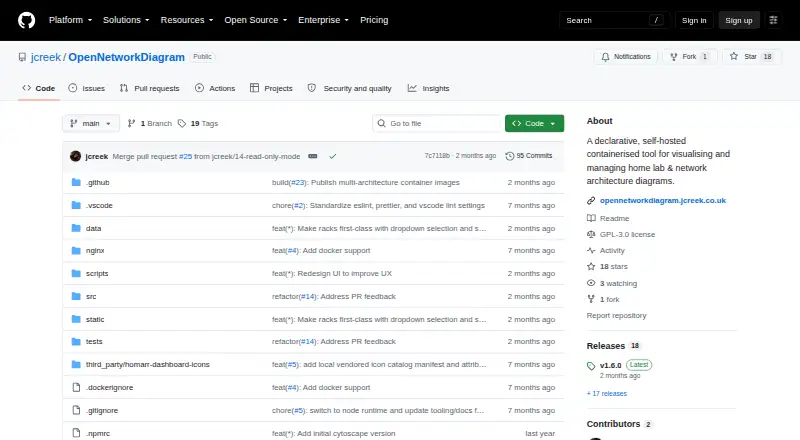
What Open Network Diagram is
Open Network Diagram is a free, self-hosted tool for visualizing and managing home lab and network infrastructure. It offers network, Hosts & VMs, and rack views for mapping devices, virtual machines, and rack placement. Subnets and VLANs can be declared, while connections can record cable type, colour, and length. Its IPAM panel reports subnet utilization, detects duplicate IP addresses, and suggests the next available address. The application uses JSON as its source of truth, so topology data can be backed up, reused, and optionally versioned. In self-hosted mode, changes autosave, writes are persisted atomically, and the last five rolling backups are retained. Deployment is Docker-first, with writable data volumes and Docker Compose support; its runtime exposes GET and PUT operations at /api/network-data. The project is licensed under GNU GPL v3 and has no runtime dependency on external APIs. It does not include authentication or TLS, and topology details may expose sensitive infrastructure information, so deployment access should be restricted or protected by an authenticated TLS-terminating reverse proxy.
Good
- Network, Hosts & VMs, and rack views
- IPAM flags duplicate addresses and suggests free IPs
- Autosaves JSON and keeps five rolling backups
- Docker Compose deployment support
Watch out
- No authentication or TLS
- Topology data may expose sensitive infrastructure details
- Writable public access is discouraged
Who it suits
Open Network Diagram suits home lab users who want to keep a map of machines, VMs, devices, and rack placement. It is intended for people comfortable with self-hosting and restricting access to the deployment.
Verdict
Open Network Diagram provides detailed infrastructure mapping with a portable JSON data model. Its lack of built-in authentication and TLS makes access controls an important deployment consideration.
Plans and prices
From Open Network Diagram's own pricing page, checked 2 Oct 2026.
| Plan | Price | What it gives you |
|---|---|---|
| Open Network Diagram | Free | Self-hosted · Docker deployment · GNU GPL v3 |
The facts
Each one read from Open Network Diagram's own pages, with the date it was checked.
What it does
- API
- The documented runtime API endpoint is GET/PUT /api/network-data.checked 2 Oct 2026
- Audience
- The project is positioned for home lab users who need an up-to-date map of machines, virtual machines, devices and rack placement.checked 1 Oct 2026
- Cabling
- Connections can track cable type, colour and length with colour-coded links and hover details.checked 1 Oct 2026
- Data model
- The application keeps a JSON source of truth that can be backed up, reused and optionally versioned.checked 1 Oct 2026
- Deployment
- The project provides Docker and Docker Compose deployment instructions with writable data volume support.checked 2 Oct 2026
- Integrations
- The project says it has no runtime dependency on external APIs and includes a locally vendored icon catalog for offline-friendly behavior.checked 2 Oct 2026
- IPAM
- The IPAM panel shows per-subnet utilization, detects duplicate IP conflicts, and suggests the next free IP when adding machines, devices, or VMs.checked 2 Oct 2026
- JSON source of truth
- The app documents infrastructure in a visual UI while keeping a JSON source of truth that users can back up, reuse, and optionally version after reviewing for sensitive information.checked 2 Oct 2026
- License
- The repository identifies the software as GNU GPL v3 licensed.checked 2 Oct 2026
- Network and host views
- It provides a network view with Ethernet labels and a Hosts & VMs view for inventory and service mapping.checked 2 Oct 2026
- Persistence
- Self-hosted mode autosaves JSON data and keeps the last five rolling backups.checked 1 Oct 2026
- Persistence and backups
- In self-hosted mode, changes autosave to JSON, writes are persisted atomically, and rolling backups retain the last five files.checked 2 Oct 2026
- Purpose
- Open Network Diagram is a declarative, self-hosted tool for visualising and managing home lab and network architecture diagrams.checked 2 Oct 2026
- Rack inventory
- Rack view supports managed racks with U positions and heights, side-by-side shelf items, and click-through to the editor.checked 2 Oct 2026
- Read-only mode
- Optional read-only mode prevents changes and is offered for public demonstrations and sharing.checked 2 Oct 2026
- Security
- Open Network Diagram does not include authentication or TLS.checked 1 Oct 2026
- Security limit
- The README advises against exposing a writable deployment directly to the internet and recommends a firewall, LAN or VPN, or an authenticated TLS-terminating reverse proxy.checked 1 Oct 2026
- Security limitation
- The project does not include authentication or TLS, and its documentation advises restricting access or using an authenticated reverse proxy that terminates TLS.checked 2 Oct 2026
- Sensitive data
- The project notes that topology data may expose host names, addresses, MAC addresses, and other sensitive infrastructure details.checked 2 Oct 2026
- Supported image architectures
- Published Docker images support AMD64 and 64-bit ARM, including Raspberry Pi systems.checked 2 Oct 2026
- Topology details
- Users can declare subnets and VLANs, track cable type, colour, and length, and expand VM lists per machine.checked 2 Oct 2026
- Views
- It provides network, Hosts & VMs, and rack views for infrastructure inventory and topology mapping.checked 1 Oct 2026
Where it runs
- Platforms
- Published Docker images support AMD64 and 64-bit ARM, including Raspberry Pi systems.checked 1 Oct 2026
The full review of Open Network Diagram
Open Network Diagram is a self-hosted network mapping and inventory tool for home-lab users who want to keep infrastructure records as structured data. Its combination of topology, IPAM and rack views suits a compact environment, provided you can secure access at the deployment level.
Overview
Rather than keeping infrastructure details in a diagram alone, the application uses JSON as its source of truth. You can back up, reuse and optionally version that data, making it useful as a maintained record of hosts, virtual machines, devices and their relationships. The project is licensed under GNU GPL v3.
Its scope is deliberately centered on network documentation and inventory, rather than broad infrastructure management. That focus makes it a practical fit for a home lab, but the lack of built-in authentication and TLS is a serious limitation for shared or internet-accessible deployments.
Key features
The network view maps topology with Ethernet labels, subnets and VLANs. Hosts & VMs adds machine inventory and service mapping, with expandable VM lists for each machine. Rack view captures managed racks, U positions and equipment height; it also supports side-by-side shelf items and click-through to the editor. These views give a small environment a useful mix of logical and physical context.
The IPAM panel reports subnet utilisation, flags duplicate addresses and suggests the next free IP. That helps with routine address tracking, though it is best understood as part of a documentation tool rather than a standalone network-management system. Cable records can include type, colour and length, with colour-coded connections and hover details to clarify physical links.
In self-hosted mode, changes autosave to JSON, writes persist atomically and rolling backups keep the five latest files. Docker Compose and writable data volumes support deployment; published images support AMD64 and 64-bit ARM, including Raspberry Pi systems. The runtime exposes GET and PUT operations at /api/network-data, and its locally vendored icon catalogue and lack of external API dependencies support offline-friendly use.
Security needs deliberate planning. The project has no authentication or TLS, and topology records may contain host names, addresses, MAC addresses and other sensitive details. Its documentation recommends restricting access to a LAN or VPN, using a firewall, or placing an authenticated TLS-terminating reverse proxy in front. NETWORK_READ_ONLY=true can prevent edits for public demonstrations, but it neither conceals the topology nor authenticates viewers.
Pricing
Open Network Diagram: free. The free plan includes self-hosted Docker deployment under GNU GPL v3, with no separate paid tier described. It is a straightforward choice for users comfortable operating their own deployment; it does not remove the security work that self-hosting entails.
Platforms
Open Network Diagram is available as a web application and API, deployed on a self-hosted Docker setup. Its published images support AMD64 and 64-bit ARM hardware.
Who it's for
Choose it if you run a home lab and want one structured record for network topology, machines, VMs, IP addresses, cabling and rack placement. The JSON model and rolling backups suit users who value portable, locally managed data. It is a poor fit for deployments that require built-in user authentication or encrypted transport without adding infrastructure around the application.
Pros and cons
- Pros: Network, host and rack views bring topology and physical inventory together, including U positions and shelf equipment.
- Pros: IPAM checks duplicate addresses and suggests the next free IP, while reporting subnet utilisation.
- Pros: JSON persistence, atomic writes and five rolling backups help keep the self-hosted record reusable and recoverable.
- Pros: Docker images for AMD64 and 64-bit ARM make deployment possible on common server hardware and Raspberry Pi systems.
- Cons: No built-in authentication or TLS means operators must restrict access or supply a protected proxy themselves.
- Cons: Read-only mode blocks changes but does not hide topology data, so it is not a safe substitute for access control.
Alternatives
For other options, see Network Documentation Software.
- Scanopy is worth considering if you want a freemium alternative with a hosted-platform range spanning Linux, macOS, Windows and web as well as self-hosting; its free Community Edition is limited to one network and one user seat.
- LOGINventory may suit readers prioritizing device inventory: its Forever-Free plan covers up to 20 devices, while Open Network Diagram emphasizes diagrams, IPAM and rack mapping.
- GestióIP is the alternative to consider when IP address management is the primary need; Open Network Diagram combines basic IPAM with topology and inventory views.
- Danbyte is another free, open-source, self-hosted option for readers comparing no-cost tools.
- Nautobot offers an open-source, self-managed Community edition for exploring, initial workflows and limited production deployments.
- Obelinf may appeal if you want a personal plan with stated limits of one user, one organization, one site, four racks and 30 devices.
- ITFlow is a free, open-source self-hosted alternative; hosting and sponsor support are paid services.
- phpIPAM is a free self-hosted option if you want software focused on IP address management.
Verdict
Open Network Diagram is a strong fit for home-lab users who want a free, Docker-based way to maintain network, host and rack records as portable JSON. Its most compelling advantage is the combination of practical mapping views and lightweight IPAM in one self-hosted tool. Look elsewhere—or add a properly secured proxy—if authentication and TLS must be built in rather than managed as part of deployment.
Alternatives to Open Network Diagram
- 1

Scanopy
Free planOpen sourceWebAPILinuxmacOS8.3Free plan - 2
GestióIP
Free planOpen sourceWebAPILinuxSelf-hosted8.2From $400 a year - 3
i-doit
Open sourceAndroidiOSWebAPI8.1From €48.65 a month - 4
NinjaOne
AndroidiOSWebAPI7.9From $1.50 a month - 5

NetBox
Free planOpen sourceWebAPILinuxSelf-hosted7.6Free plan - 6

Danbyte
Free planOpen sourceWebAPILinuxSelf-hosted7.4Free plan