
ONLYOFFICE PDF Editor
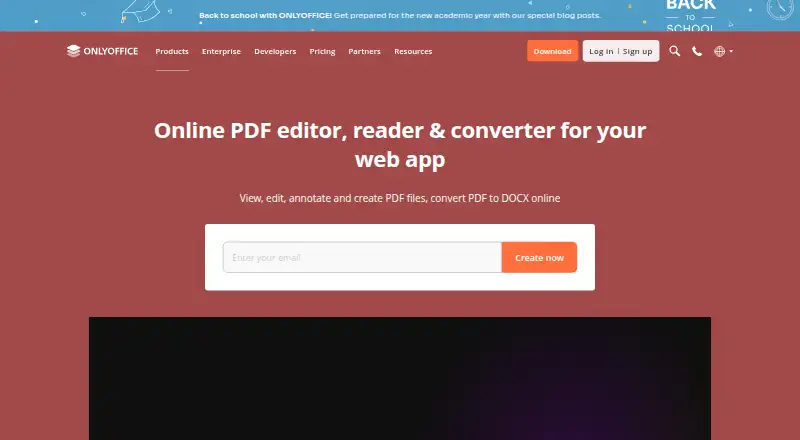
ONLYOFFICE PDF Editor lets users view, edit, annotate, create, and convert PDF files to DOCX online.
What ONLYOFFICE PDF Editor is
ONLYOFFICE PDF Editor lets users view, edit, annotate, create, and convert PDF files to DOCX online. It can revise text and add or adjust tables, shapes, images, SmartArt, charts, hyperlinks, and pages. Annotation options include highlights, underlining, strikethrough, comments, freehand drawings, and stamps, while form tools create or fill fields such as text areas, combo boxes, drop-down lists, and check boxes. Teams can co-edit in real time or paragraph-locking mode, with comments, built-in chat, Telegram, and Jitsi calls. The editor can extract text from scanned PDFs, connect AI assistants, and permanently remove selected material with redaction. Free desktop apps support offline editing and conversion on Windows, Linux, and macOS; free Documents apps provide PDF viewing on iOS and Android. It is available on web, Windows, Linux, macOS, iOS, Android, and self-hosted deployments.
Good
- Edits and annotates PDF files.
- Creates and fills PDF forms.
- Supports co-editing and team communication.
- Free desktop apps work offline.
Watch out
- Mobile apps support viewing, not editing.
- ISO certification is not standalone.
Who it suits
It suits individuals or teams who need PDF editing, annotation, forms, or conversion across desktop, mobile, and web platforms. Its collaboration and self-hosting options may also fit organizations with shared document workflows.
Verdict
ONLYOFFICE PDF Editor combines PDF editing, forms, annotations, and team collaboration, with desktop offline use and mobile viewing. Check the platform and pricing details against the specific workflow you need.
Plans and prices
From ONLYOFFICE PDF Editor's own pricing page, checked 28 Sep 2026.
| Plan | Price | What it gives you |
|---|---|---|
| Business | $3,020 a month | unlimited users · unlimited guests · unlimited rooms · 250 GB per admin · professional support · Per admin per month |
| Startup | Free | up to 3 admins · unlimited users · unlimited guests · up to 12 rooms · 2 GB storage |
| Enterprise | Priced on request | pay per connections · unlimited admins/users/guests/rooms · on-premises · SLA with guaranteed response times |
The facts
Each one read from ONLYOFFICE PDF Editor's own pages, with the date it was checked.
What it does
- AI and scanned PDFs
- The product can connect AI assistants and extract text from scanned PDFs.checked 28 Sep 2026
- Annotation
- The editor supports highlighting, underlining, strikethrough, comments, freehand drawings, and stamps.checked 28 Sep 2026
- Annotation tools
- Yeschecked 20 Sep 2026
- Collaboration
- Teams can co-edit PDFs in real-time or paragraph-locking mode and use comments, built-in chat, Telegram, and Jitsi calls.checked 28 Sep 2026
- Core use
- ONLYOFFICE PDF Editor lets users view, edit, annotate, create, and convert PDF files to DOCX online.checked 28 Sep 2026
- Form creation
- Yeschecked 20 Sep 2026
- Forms
- Users can create and fill PDF forms with text areas, images, combo boxes, drop-down lists, and check boxes.checked 28 Sep 2026
- Integrations
- ONLYOFFICE advertises 40+ ready integrations including Box, Moodle, Nextcloud, Odoo, and WordPress.checked 28 Sep 2026
- ISO status
- ONLYOFFICE states that it is not currently ISO-certified as a standalone product, although its Docs are included in ISO-certified products and infrastructures.checked 28 Sep 2026
- OCR
- Yeschecked 20 Sep 2026
- Offline and mobile
- Free desktop apps support offline PDF conversion and editing on Windows, Linux, and macOS, while free Documents apps support PDF viewing on iOS and Android.checked 28 Sep 2026
- PDF conversion
- Yeschecked 20 Sep 2026
- PDF editing
- Users can edit PDF text and insert or adjust tables, shapes, images, SmartArt, charts, hyperlinks, and pages.checked 28 Sep 2026
- Privacy compliance
- ONLYOFFICE states that its products are fully compliant with GDPR and support on-premises deployment to keep data within an organization’s infrastructure.checked 28 Sep 2026
- Redaction
- Its Redact feature permanently removes selected text, words, phrases, pages, or page ranges from a PDF.checked 28 Sep 2026
- Security
- ONLYOFFICE supports AES-256 encryption, end-to-end encryption in Private Rooms, JWT access protection, granular permissions, and restrictions on downloading, printing, and copying.checked 28 Sep 2026
- Support
- DocSpace Enterprise offers email support, training courses, a free demo, and enterprise support with SLA response times.checked 28 Sep 2026
- Text editing
- Yeschecked 20 Sep 2026
Money
- Free plan
- Yeschecked 20 Sep 2026
The company
- Headquarters
- Riga, Latviachecked 28 Sep 2026
Where it runs
- Supported platforms
- web,Windows,Linux,macOS,iOS,Android,self-hostedchecked 20 Sep 2026
The full review of ONLYOFFICE PDF Editor
ONLYOFFICE PDF Editor is a PDF editing and collaboration tool for people and teams who need more than basic markup. It is strongest for organizations that want to edit, review, and manage PDFs across web, desktop, and self-hosted environments. Its free desktop editing makes it useful for individuals too, but paid plans are aimed at shared team workspaces.
Overview
PDF editing spans text, tables, images, charts, links, and pages, alongside annotations, forms, conversion, and collaboration. That breadth makes ONLYOFFICE a practical choice for document-heavy teams, especially those that need on-premises deployment. For occasional conversions or simple viewing, its collaboration and administration features may be more than the job requires.
Key features
Editing, review, and forms
Users can revise PDF text and adjust embedded content including tables, shapes, images, SmartArt, charts, hyperlinks, and pages. This is more capable than a markup-only reader, though the feature set will matter most to people who routinely revise existing documents. Annotation tools include highlighting, underlining, strikethrough, comments, freehand drawings, and stamps. Forms can be created and filled using text areas, images, combo boxes, drop-down lists, and check boxes, making the editor suitable for preparing reusable paperwork as well as reviewing it.
Collaboration and document controls
Teams can co-edit in real time or use paragraph-locking mode, with comments, built-in chat, Telegram, and Jitsi calls available for coordination. This is a meaningful advantage for group review, but less relevant to solo users. Redaction permanently removes selected text, words, phrases, pages, or page ranges. Security features include AES-256 encryption, end-to-end encryption in Private Rooms, JWT access protection, granular permissions, and controls over downloading, printing, and copying.
Scanned documents and integrations
OCR extracts text from scanned PDFs, and users can connect AI assistants. ONLYOFFICE advertises more than 40 ready integrations, including Box, Moodle, Nextcloud, Odoo, and WordPress. That range may suit organizations already working in those systems, while readers with a standalone PDF workflow may not benefit from the connections.
Pricing
ONLYOFFICE uses a freemium model with a free plan, a free trial, and paid pricing from $20/mo. Free desktop apps support offline PDF conversion and editing on Windows, Linux, and macOS; the free Documents apps on iOS and Android support PDF viewing, not editing. That gives individuals a useful offline option, but mobile users who need to edit PDFs should check whether this setup meets their needs.
The Startup plan has custom pricing and includes 3 admins, unlimited users and guests, 12 rooms, and 2 GB of file storage. It suits smaller teams that need shared rooms, though its storage limit is modest for document-heavy work. Business costs $3,020 a month, billed per admin per month, and includes unlimited users, guests, and rooms, 250 GB per admin, and professional support. It is better suited to teams that need more storage and support, but the per-admin billing makes seat count an important cost factor. Enterprise has custom pricing, unlimited admins, users, guests, and rooms; it is the option for organizations that need unlimited administration and workspace capacity.
Platforms
ONLYOFFICE PDF Editor supports web, Windows, Linux, macOS, iOS, Android, and self-hosted deployments. Desktop apps support offline editing and conversion, while the free mobile Documents apps are for viewing PDFs. Self-hosting is a particular advantage for organizations that need to keep data within their own infrastructure; mobile users seeking free editing should look elsewhere.
Who it's for
Choose ONLYOFFICE if your team needs collaborative PDF editing, form creation, redaction, and deployment choices that include self-hosting. Its free desktop apps also make sense for individuals who need offline editing on a computer. It is a weaker fit for people who mainly want a free mobile editor or a lightweight tool for occasional file conversion.
Pros and cons
- Pros: Broad editing, annotation, form, OCR, and redaction features make it useful for more than simple PDF review.
- Pros: Real-time and paragraph-locking co-editing, plus multiple communication options, support coordinated team workflows.
- Pros: Offline desktop editing and conversion are free, and self-hosting supports organizations keeping data on their own infrastructure.
- Cons: Free mobile apps support viewing rather than editing, limiting their use for people who work on PDFs from a phone or tablet.
- Cons: Business is billed per admin, so the quoted monthly rate can rise with the number of administrators.
- Cons: Startup includes only 2 GB of file storage, which may constrain teams with larger document collections.
Alternatives
For a broader comparison, see PDF editors.
- WPS PDF Editor is another freemium option with a free plan and a broader listed platform range that includes browser extensions; its Standard plan includes 1 GB of cloud storage, 47 file formats, and 46 languages.
- Smallpdf may suit users who want a freemium web and mobile option with a 7-day free trial; its free plan includes 30+ tools and two Sign.com documents per month.
- PDF Candy is another freemium choice with desktop apps, though its free Web + Desktop plan has page and hourly restrictions, no batch processing, and limited file size.
- PDFgear is worth considering if a free plan is the priority; its online editor has a 100 MB per-PDF limit.
- iLovePDF offers a free Basic plan with limited tools and document processing, making it an alternative for readers whose needs fit those limits.
- Foxit PDF Editor is a paid alternative with no free plan; its annual subscription costs $129.99 a year and includes DMS and 300 AI credits per month.
- DocHub is a freemium option with a free plan capped at three uses per month across core features.
- Sejda PDF Editor is another freemium PDF editor.
Verdict
ONLYOFFICE PDF Editor is a strong choice for teams that need collaborative editing, forms, document controls, and a self-hosted option, with free offline editing for desktop users as a bonus. Choose it when those capabilities are central to the workflow; look elsewhere if you need free PDF editing on mobile or only occasional, simple PDF tasks.
Getting started
- Visit https://www.onlyoffice.com/pdf-editor.
- Use the web editor or install a free desktop app for Windows, Linux, or macOS.
- Use the free Documents app on iOS or Android to view PDFs.
- Choose a free plan or trial, or review the paid plans starting at $20/mo.
Limits worth knowing
Free Documents apps on iOS and Android support PDF viewing. The Business plan costs $3,020 a month, billed per admin per month, and includes 250 GB per admin.
Questions
Is there a free plan?
Yes, the pricing model is freemium and a free plan is available.
How much does it cost?
The listed Business plan is $3,020 a month, billed per admin per month.
What platforms does it support?
Supported options include web, Windows, Linux, macOS, iOS, Android, and self-hosted deployment. API is also listed among its platforms.
Can it work offline?
Free desktop apps support offline PDF editing and conversion on Windows, Linux, and macOS.
Does it support integrations?
Yes. ONLYOFFICE advertises more than 40 ready integrations, including Box, Moodle, Nextcloud, Odoo, and WordPress.
Is it ISO-certified?
ONLYOFFICE states that the standalone product is not currently ISO-certified, although its Docs are included in ISO-certified products and infrastructures.
Alternatives to ONLYOFFICE PDF Editor
- 1

Smallpdf
Free planAndroidiOSWebWindows8.9From $10 a month - 2

LightPDF
Free planAndroidiOSWebAPI8.8From $15.99 a year - 3
PDF2Go
Free planAndroidiOSWebAPI8.7$6.42 usage-based - 4
Foxit PDF Editor
AndroidiOSWebmacOS8.5 - 5
WPS PDF Editor
Free planAndroidiOSWebExtension8.5From $3 a year - 6

PDF Candy
Free planAndroidiOSWebLinux8.5From $4 a year