NovaClip
NovaClip is a free, open-source toolkit for creating, editing, repurposing, and packaging video, with web, desktop, API, and self-hosted options.
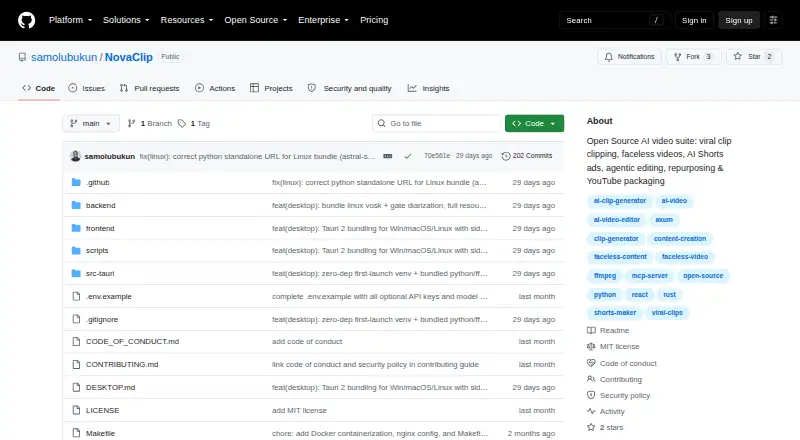
What NovaClip is
NovaClip is a free, open-source toolkit for creating, editing, repurposing, and packaging video, with web, desktop, API, and self-hosted options. Nova Clipper transcribes video, scores candidate clips, crops and captions them, then exports clips individually or as a ZIP. Nova Studio creates faceless videos from topics or scripts and UGC-style AI Shorts ads from product URLs. Nova Edit proposes edits for human approval, renders them, and scores the result; its stated targets are short-form videos of 20–90 seconds and long-form videos of 2–60 minutes. Nova Repurpose makes variants for TikTok, Instagram, YouTube, LinkedIn, and X, along with newsletter or blog copy and campaign PDFs. Generated videos can be published to YouTube, TikTok, or Instagram through Upload-Post. The pipeline is also exposed through an MCP endpoint for clients such as Claude Desktop and Cursor. Speech options include cloud and offline transcription, while text-to-speech choices include Edge-TTS, ElevenLabs, and Deepgram Aura. Desktop packages are listed for Windows, macOS, and Linux. FFmpeg is required at runtime. The project is prototype-heavy, and some pipelines and integrations can break; Nova Edit is not a full NLE.
Good
- Transcribes, crops, captions, and exports candidate clips.
- Creates faceless videos and product-based AI Shorts ads.
- Repurposes video for five social platforms.
- Offers cloud and offline transcription options.
- Web, desktop, API, and self-hosted deployment options.
Watch out
- FFmpeg is required at runtime.
- Some pipelines and integrations can break.
- Nova Edit is not yet a full NLE.
- Provider keys must be brought by the user.
Who it suits
NovaClip may suit video creators who want one toolkit for clip generation, short video creation, editing proposals, and social repurposing. It is also relevant to users comfortable configuring provider keys and working with a young project.
Verdict
NovaClip covers several stages of a video workflow, from clipping to repurposing and publishing. Its prototype-heavy maturity and editing limits are worth weighing before relying on it.
Plans and prices
From NovaClip's own pricing page, checked 9 Oct 2026.
| Plan | Price | What it gives you |
|---|---|---|
| Open source (MIT License) | Free | Bring your own provider keys; no hosted plan or usage quota is stated |
The facts
Each one read from NovaClip's own pages, with the date it was checked.
What it does
- Agentic editing
- Nova Edit analyzes footage, proposes an edit plan for human approval, renders the cut, and scores it; the README says transitions, color grading, keyframed motion graphics, and detailed audio mixing are roadmap items.checked 9 Oct 2026
- AI assistant access
- NovaClip exposes its pipeline through an HTTP Model Context Protocol endpoint and documents connecting Claude Desktop, Cursor, or another MCP client.checked 9 Oct 2026
- AI video creation
- Nova Studio creates faceless videos from a topic or script and can make UGC-style AI Shorts ads from a product URL.checked 9 Oct 2026
- Automation API
- NovaClip exposes its pipeline through a Model Context Protocol endpoint at POST /mcp and documents connections for Claude Desktop, Cursor, or any MCP client.checked 9 Oct 2026
- Clip generation
- Nova Clipper transcribes video, scores candidate clips for virality, crops and captions them, and exports clips individually or as a ZIP.checked 9 Oct 2026
- Credentials
- The project describes itself as BYOK and says configured keys are stored only in the browser.checked 9 Oct 2026
- Deployment
- The project documents Docker Compose and native local setup, with a frontend at localhost:3000 and backend at localhost:8000 for the Docker option.checked 9 Oct 2026
- Editing
- Nova Edit proposes edits for human approval, renders them, and scores the result; its listed targets are short-form videos of 20–90 seconds and long-form videos of 2–60 minutes.checked 9 Oct 2026
- Integrations
- The project lists Gemini, OpenRouter, Deepgram, ElevenLabs, Pexels, Pixabay, WaveSpeed, and Upload-Post as providers or integrations.checked 9 Oct 2026
- Key handling
- The README says provider keys are stored only in the user's browser.checked 9 Oct 2026
- License and maturity
- The repository is distributed under the MIT License and describes the project as young and prototype-heavy, noting that some pipelines and integrations can break.checked 9 Oct 2026
- Limitations
- The README says Nova Edit is not yet a full NLE and lists transitions, color grading, keyframed motion graphics, and detailed audio mixing as roadmap items.checked 9 Oct 2026
- Local speech options
- Speech transcription can use cloud Deepgram Nova-3 or offline Vosk and Whisper; text-to-speech options include Edge-TTS, ElevenLabs, and Deepgram Aura.checked 9 Oct 2026
- Other integrations
- The README lists Gemini, OpenRouter, Deepgram, ElevenLabs, Pexels, Pixabay, WaveSpeed, and Upload-Post as provider integrations requiring user keys where applicable.checked 9 Oct 2026
- Product
- NovaClip is an open-source toolkit for clipping, creating, editing, repurposing, and packaging videos.checked 9 Oct 2026
- Project maturity
- The README describes NovaClip as a young, prototype-heavy project and says AI Shorts, YouTube Studio, Nova Edit, and integrations can break.checked 9 Oct 2026
- Publishing
- Generated videos can be published to YouTube, TikTok, or Instagram through Upload-Post.checked 9 Oct 2026
- Publishing integration
- Generated videos can be published to YouTube, TikTok, and Instagram through Upload-Post.checked 9 Oct 2026
- Repurposing
- Nova Repurpose creates video variants for TikTok, Instagram, YouTube, LinkedIn, and X, plus newsletter or blog copy and a campaign PDF.checked 9 Oct 2026
- Requirements
- The desktop guide says FFmpeg is required at runtime, while Python-based reframe is optional and the backend degrades gracefully without it.checked 9 Oct 2026
- Speech options
- Speech-to-text options include cloud Deepgram Nova-3 and local Vosk or Whisper, while text-to-speech options include Edge-TTS, ElevenLabs, and Deepgram Aura.checked 9 Oct 2026
Where it runs
- Desktop platforms
- The README lists Windows NSIS/MSI installers, a universal macOS DMG, and Linux deb, AppImage, and rpm packages.checked 9 Oct 2026
The company
- License and maker
- The repository states that NovaClip is distributed under the MIT License, copyright Samuel Olubukun.checked 9 Oct 2026
The full review of NovaClip
NovaClip is a free, open-source video toolkit that combines clipping, AI video creation, editing assistance and repurposing. It is best suited to technically comfortable creators who want flexible local or self-hosted workflows and can bring their own provider keys. Its unusually broad pipeline is appealing, but prototype-heavy maturity and the absence of full editing controls make it a poor fit for production teams that need dependable, polished post-production.
Overview
NovaClip spans several jobs that often require separate tools: extracting clips from existing footage, generating videos from prompts or scripts, proposing edits, and preparing material for multiple channels. That breadth can help independent creators move from source video toward campaign-ready assets in one project. The trade-off is that it remains a young project, and the README warns that several pipelines and integrations can break.
It is distributed under the MIT License and can be run through Docker Compose or a native local setup; desktop packages are provided for Windows, macOS and Linux. The Docker guide uses a frontend at localhost:3000 and backend at localhost:8000. FFmpeg is required at runtime, while Python-based reframe is optional and the backend can degrade gracefully without it. This flexibility will matter most to users comfortable managing a local stack, rather than those seeking a turnkey hosted editor.
Key features
Clipping and video creation
Nova Clipper transcribes footage, scores possible highlights for virality, reframes and captions clips, then exports clips individually or as a ZIP. Automatic highlight detection and social presets give creators a useful route from longer footage to channel-ready short-form edits, though the virality score should be treated as a selection aid rather than a guarantee of audience response.
Nova Studio can create faceless videos from a topic or script and generate UGC-style AI Shorts ads from a product URL. That makes the toolkit relevant to creators producing explanatory or promotional short videos; it does not remove the need to review generated material before publishing.
Editing and repurposing
Nova Edit analyzes footage, proposes an edit plan for human approval, renders the cut and scores the result. Its stated targets cover short videos of 20–90 seconds and long videos of 2–60 minutes. The approval step keeps a person in control, but Nova Edit is not a full NLE: transitions, color grading, keyframed motion graphics and detailed audio mixing remain roadmap items. Editors who depend on those controls should keep a conventional editor in their workflow.
Nova Repurpose prepares variants for TikTok, Instagram, YouTube, LinkedIn and X, and can also create newsletter or blog copy and a campaign PDF. Social presets and brand templates support repeatable packaging, while the range of outputs is useful for creators adapting one source across channels.
Providers, speech and automation
Provider integrations include Gemini, OpenRouter, Deepgram, ElevenLabs, Pexels, Pixabay, WaveSpeed and Upload-Post. Speech-to-text can use cloud Deepgram Nova-3 or local Vosk and Whisper; text-to-speech options include Edge-TTS, ElevenLabs and Deepgram Aura. The mix of cloud and offline speech options gives users some choice about how transcription and voice generation are handled, but configured provider keys are part of the setup. NovaClip describes itself as BYOK and says keys are stored only in the browser.
Generated videos can be published to YouTube, TikTok or Instagram through Upload-Post. An HTTP Model Context Protocol endpoint at POST /mcp exposes the pipeline to Claude Desktop, Cursor or another MCP client, making NovaClip more interesting to developers and automation-minded creators than a standard standalone editor.
Pricing
NovaClip is free under the MIT License. The Open source (MIT License) plan costs nothing and requires users to bring their own provider keys. There is no stated hosted plan or usage quota, so free software should not be confused with free access to the underlying cloud providers. This model suits developers and creators willing to configure services themselves; users seeking a managed subscription or bundled provider usage should look elsewhere.
Platforms
NovaClip supports API, Linux, macOS, self-hosted, web and Windows use. The desktop guide provides Windows installers, a universal macOS DMG, and Linux AppImage, deb and rpm packages. Local deployment and desktop availability broaden the options beyond a browser-only workflow, but FFmpeg remains a runtime requirement.
Who it's for
NovaClip is a good fit for creators who need to clip, generate and repurpose video, and for developers who want to expose video workflows to MCP clients. It is particularly compelling for technically confident users who value open-source deployment choices and can supply their own provider credentials. It is less suitable for editors who need mature NLE controls or teams whose publishing workflow cannot tolerate experimental integrations.
Pros and cons
- Pro: Clipping, prompt-based video creation, editing assistance and cross-channel repurposing live in one toolkit, reducing the need to assemble every stage from separate projects.
- Pro: MIT licensing, local and self-hosted options, and desktop packages give technically capable users deployment flexibility.
- Pro: Local Vosk and Whisper transcription options sit alongside cloud speech providers, while the MCP endpoint opens the pipeline to automation clients.
- Con: Nova Edit lacks transitions, color grading, keyframed motion graphics and detailed audio mixing, limiting its usefulness as a replacement for a full editor.
- Con: The project is young and prototype-heavy, with AI Shorts, YouTube Studio, Nova Edit and integrations identified as areas that can break.
- Con: BYOK means users must configure provider credentials, and cloud services may carry their own costs even though NovaClip itself is free.
Alternatives
For a wider set of options in this category, browse AI Video Repurposing Tools.
- CapsAI is worth considering for a mobile-and-web workflow; its Starter plan costs ₹49, paid once and includes a 20-minute upload and 1080p export.
- Headliner is a better fit for podcast-style audiograms and captioned clips: its Forever Free plan includes unlimited video clips and captioned clips, plus one unwatermarked audiogram per month.
- ScreenApp AI Meeting Notes is the alternative to consider when meeting transcription and AI chats are the primary need rather than video production.
- Flowjin may suit creators who prefer a dedicated clipping service with a stated 60-minute one-time free credit and 720p output, though its free projects expire after five days.
- reap offers a defined free clipping allowance of one hour per month, but free exports are watermarked at 720p and projects expire after seven days.
- Splicora is an option for social-content work built around monthly credits and brand voice; its Free plan includes 25 credits per month and 1 GB of storage.
- Kinocut is a free, local-processing alternative for users who want a core video tool without a credit meter.
- OpusClip is worth comparing for a dedicated clipping service; its free plan includes 60 credits per month and up to 1080p clips, with watermarks and a three-day export window.
Verdict
Choose NovaClip if you want a free, open-source toolkit that can take video from clipping through creation and repurposing, and you are comfortable supplying keys and managing a local or self-hosted setup. Its range and automation access are the strongest reasons to pick it. Look elsewhere if you need a stable production platform or complete editing controls: its prototype-heavy state and missing NLE features are meaningful limits.
Getting started
- Open the NovaClip project website on GitHub.
- Choose web use, a desktop package, or a self-hosted setup.
- For desktop, use the Windows installer, macOS DMG, or Linux package listed in the desktop guide.
- For Docker Compose, follow the project setup for the frontend at localhost:3000 and backend at localhost:8000.
- Install FFmpeg for runtime use.
- Configure provider keys in the browser when using services that require them.
Limits worth knowing
The free MIT-licensed plan has no stated usage quota or hosted plan. FFmpeg is required at runtime, and Nova Edit does not yet include transitions, color grading, keyframed motion graphics, or detailed audio mixing.
Questions
How much does NovaClip cost?
The listed MIT-licensed plan is free. The project describes NovaClip as free and open source.
Which platforms does NovaClip support?
The listed platforms are API, Linux, macOS, self-hosted, web, and Windows. Desktop packages include Windows installers, a universal macOS DMG, and Linux AppImage, deb, and rpm packages.
Can NovaClip publish videos to social platforms?
Generated videos can be published to YouTube, TikTok, or Instagram through Upload-Post.
Which speech options does NovaClip offer?
Transcription can use cloud Deepgram Nova-3 or offline Vosk and Whisper. Text-to-speech options include Edge-TTS, ElevenLabs, and Deepgram Aura.
Is NovaClip open source?
Yes. The repository states that NovaClip is distributed under the MIT License, with copyright Samuel Olubukun.
Can I connect NovaClip to an MCP client?
NovaClip exposes its pipeline through an HTTP Model Context Protocol endpoint at POST /mcp. The project documents connections for Claude Desktop, Cursor, or another MCP client.
Alternatives to NovaClip
- 1
ScreenApp AI Meeting Notes
Free planAndroidiOSWebAPI8.2From $19 a month - 2
Vizard
Free planAndroidiOSWebAPI8.2From $29 a month - 3

Headliner
Free planAndroidiOSWebAPI8.1Free plan - 4

OpusClip
Free planAndroidiOSWebAPI8.1From $15 a month - 5

Flowjin
Free planAndroidiOSWeb8.0Free plan - 6

reap
Free planAndroidiOSWebAPI8.0From $9.99 a month