Nestalgia
Nestalgia is a free, open-source emulator project for NES and Famicom systems, built in Kotlin and marked as a work in progress.
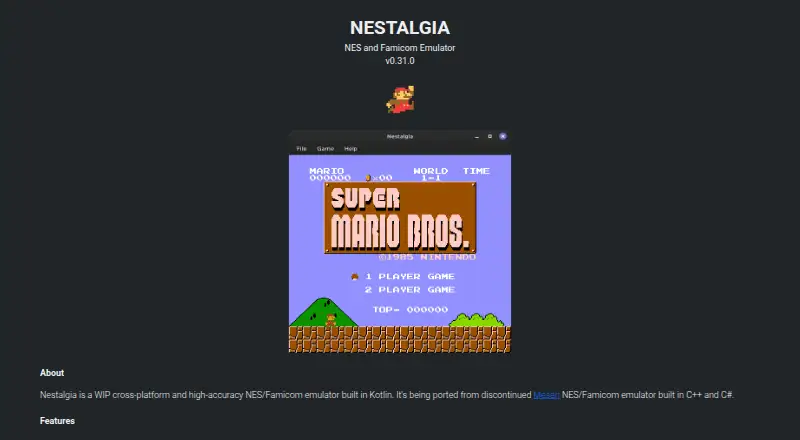
What Nestalgia is
Nestalgia is a free, open-source emulator project for NES and Famicom systems, built in Kotlin and marked as a work in progress. It also emulates Famicom Disk System, Dendy, Vs. System, NSF, and NSFe, and the project lists support for 305 mappers. Features include save states, battery saves, overclocking, cheat codes, fullscreen display, screenshots, and configurable audio, video, controller, and emulation settings. The project lists support for more than 20 controllers, including the NES Controller, Zapper, Power Pad, and Four Score. It also reports passing CPU, video, audio, mapper, and input accuracy tests. Builds are linked for Windows, Linux, and macOS; running them requires Java 21 or newer. Android is listed with an uncertain coming-soon note. The repository provides Gradle instructions for adding the emulator core through JitPack. Nestalgia implements the emulator but has no debugging tools. Its repository identifies the project as GPL-3.0 licensed.
Good
- Emulates NES, Famicom, and several related systems.
- Lists support for 305 mappers.
- Includes save states and cheat codes.
- Supports over 20 listed controllers.
- Free and GPL-3.0 licensed.
Watch out
- Requires Java 21 or newer to run.
- Android availability is uncertain.
- Project is marked work in progress.
- No debugging tools are included.
Who it suits
Nestalgia may suit players looking for a free desktop emulator for NES and related listed systems, with save states and cheat codes. Developers may also be interested in adding its core library through JitPack.
Verdict
Nestalgia covers several NES-related systems and includes a broad set of listed emulator features. Desktop users need Java 21 or newer, and Android is not presented as a confirmed available build.
Plans and prices
From Nestalgia's own pricing page, checked 8 Oct 2026.
| Plan | Price | What it gives you |
|---|---|---|
| Free | Free | No pricing or plan limits stated |
The facts
Each one read from Nestalgia's own pages, with the date it was checked.
What it does
- Accuracy tests
- The site lists CPU, video, audio, mapper and input test ROM results, with the displayed tests marked Pass.checked 8 Oct 2026
- Capture and display
- Fullscreen and screenshot support are listed.checked 8 Oct 2026
- Compatibility
- The site lists support for NES, Famicom, Famicom Disk System, Dendy, Vs. System, NSF and NSFe emulation.checked 8 Oct 2026
- Configuration
- Audio, video, controller and emulation configuration are supported.checked 8 Oct 2026
- Controllers
- The site says more than 20 controllers are supported, including NES Controller, Zapper, Power Pad and Four Score.checked 8 Oct 2026
- Downloads
- The download section links Windows, Linux and Mac versions.checked 8 Oct 2026
- Features
- Features include save states, battery saves, overclocking, cheat codes, fullscreen and screenshots.checked 4 Oct 2026
- Gamepad behavior
- The first detected gamepad is used as Standard Controller 1 and the second as Standard Controller 2; buttons are mapped to screenshots and save-state controls.checked 8 Oct 2026
- Library
- The repository README gives Gradle instructions for adding Nestalgia's core library through JitPack.checked 4 Oct 2026
- License
- The GitHub repository identifies the project as GPL-3.0 licensed.checked 4 Oct 2026
- Limitations
- The repository README says Nestalgia implements only the emulator and has no debugging tools.checked 4 Oct 2026
- Product
- Nestalgia is a work-in-progress, cross-platform, high-accuracy NES and Famicom emulator built in Kotlin.checked 8 Oct 2026
- Runtime requirement
- The site says Java 21 or newer should be installed before running the download.checked 8 Oct 2026
- Save and cheat features
- Features include save states, battery saves, overclocking and cheat codes.checked 8 Oct 2026
- Supported systems
- It emulates NES, Famicom, Famicom Disk System, Dendy, Vs. System, NSF and NSFe.checked 4 Oct 2026
Where it runs
- Android
- The page lists Android with the note “Coming soon...or not :(”.checked 4 Oct 2026
- Android status
- An Android entry appears with the status “Coming soon...or not :(”.checked 8 Oct 2026
- Mappers
- The site claims support for over 300 mappers and lists 305 as supported.checked 8 Oct 2026
The company
- Maker
- The GitHub profile identifies the account as Tiago and lists Itajubá, Minas Gerais, Brazil.checked 4 Oct 2026
The full review of Nestalgia
Nestalgia is a cross-platform emulator for NES-era systems, with a wide range of controller and playback options. It is best suited to players comfortable with a work-in-progress desktop project; Java 21 or newer is required, and debugging tools are outside its scope.
Overview
Built in Kotlin, Nestalgia emulates NES and Famicom, along with Famicom Disk System, Dendy, Vs. System, NSF and NSFe. Its reported support for 305 mappers and passing CPU, video, audio, mapper and input accuracy tests point to broad coverage across the formats it targets. That scope is a strong reason to consider it for varied NES-era software, though its work-in-progress status may make a more established emulator preferable for users who prioritize maturity.
Nestalgia focuses on emulation rather than development tools: it has no debugging tools. Developers can add its core library to a project through JitPack using Gradle. The project is GPL-3.0 licensed, a relevant consideration when incorporating it into other software.
Key features
Save states offer a way to preserve progress outside a game's own save system, while battery saves support persistent in-game saves. Overclocking and cheat codes give players additional control over playback. Fullscreen and screenshots cover display and basic capture needs, and audio, video, controller and emulation settings allow configuration across the main parts of the experience.
Support for more than 20 controllers includes the NES Controller, Zapper, Power Pad and Four Score. The first detected gamepad is assigned to Standard Controller 1 and the second to Standard Controller 2. Buttons are also mapped to screenshot and save-state controls, so players should account for those actions when configuring a gamepad.
Pricing
Nestalgia is free and open source. Its Free plan costs nothing; no trial is offered, and no plan limits are stated. The GPL-3.0 license matters most to developers considering reuse of the core; players can use the emulator without a subscription cost.
Platforms
Windows, Linux and macOS builds are linked, and each requires Java 21 or newer to run. That prerequisite is a practical drawback for anyone who would rather install a standalone desktop app. Android is not a confirmed option: its status is “Coming soon...or not :(”.
Who it's for
Nestalgia suits desktop players who want coverage beyond NES and Famicom, configurable controls, save states and cheats without paying for a plan. It is also relevant to developers who want to add the core library through Gradle and JitPack, provided its GPL-3.0 license fits their project. Choose another emulator if you need debugging tools, or if Java 21 or newer is not workable on your system.
Pros and cons
- Pros: Support for NES, Famicom and several related systems, backed by a stated 305 mappers and passing accuracy tests, offers broad stated compatibility.
- Pros: Save states, battery saves, cheats, overclocking and configuration options give players meaningful control over play and progress.
- Pros: More than 20 supported controllers, including the Zapper and Power Pad, accommodate a range of input setups.
- Cons: The project is a work in progress, which may not suit players looking for a mature, settled option.
- Cons: Java 21 or newer is required to run the desktop builds.
- Cons: There are no debugging tools, limiting its usefulness for development and investigation.
- Cons: Android is not confirmed as a usable platform.
Alternatives
For a broader comparison, browse NES Emulators.
- GoNES is another free option for Linux, macOS, Windows and the web.
- NESER is a free, MIT-licensed option for Linux, macOS, Windows and the web.
- HalfNES is a free desktop alternative for Linux, macOS and Windows; choose it if Java 8 or newer is a better fit, but it has no savestates.
- JSNES is a free JavaScript NES emulator library for Linux and the web.
- binjnes is free, with web and build-from-source versions for Linux, macOS and the web.
- FCEUX is a free open-source choice for NES, Famicom, Famicom Disk System and Dendy emulation, with Win32 and Qt/SDL ports for Linux, macOS and Windows.
- Nestopia Undead Edition is a free GPL-2.0 alternative for Linux, macOS and Windows.
- NET-NES is free MIT-licensed software for Linux, macOS and Windows.
Verdict
Nestalgia is a strong fit for desktop players who want broad NES-related system support, flexible controls and useful save and cheat features at no cost. Its key trade-offs are the Java 21 requirement, work-in-progress status and lack of debugging tools; look elsewhere if any of those are deal-breakers.
Getting started
- Visit https://tiagohm.github.io/nestalgia/
- Install Java 21 or newer
- Download the build for Windows, Linux, or Mac
- Run the downloaded build
Limits worth knowing
The project implements the emulator but does not include debugging tools. Running the available downloads requires Java 21 or newer; Android is shown as a possible future platform.
Questions
Is Nestalgia free?
Yes. The listed Free plan costs nothing, and the project is open source.
Which platforms can run Nestalgia?
Downloads are linked for Windows, Linux, and Mac. Android is shown with a possible future status.
What systems does Nestalgia emulate?
It supports NES, Famicom, Famicom Disk System, Dendy, Vs. System, NSF, and NSFe.
What license does Nestalgia use?
The project is licensed under GPL-3.0.
Does it support controllers and save states?
It lists support for more than 20 controllers and includes save states. Gamepad buttons are mapped to screenshot and save-state controls.
What is required to run the downloads?
Java 21 or newer is required.