JSNES
JSNES is a JavaScript library for emulating NES games in browsers and Node.js.
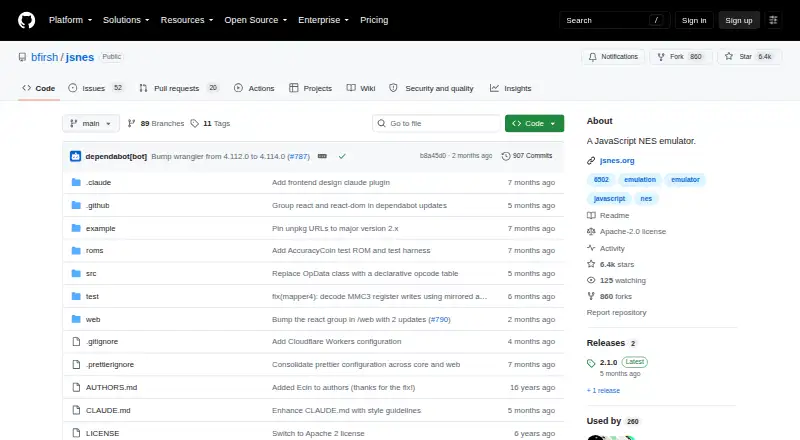
What JSNES is
JSNES is a JavaScript library for emulating NES games in browsers and Node.js. Its Browser helper handles canvas rendering, audio, keyboard and gamepad input, and frame timing; the lower-level NES class can instead use custom rendering and audio handling in Node.js. ROM data can be loaded from a URL or from a string, Uint8Array, or ArrayBuffer. The API runs frames, accepts input for either player, resets, adjusts frame rate, and includes methods to move and trigger the Zapper light gun. Applications can serialize and restore emulator state with toJSON() and fromJSON(). The onBatteryRamWrite callback lets applications capture battery-backed SRAM writes for persistent saves. Sound emulation is enabled by default, with a default sample rate of 48000 Hz, and an audio callback is available. The README offers npm installation for Node.js or Webpack, an unpkg script for browsers, and React embedding guidance, including a fuller React frontend in the repository’s web/ directory. JSNES is free and licensed under Apache-2.0. Its README suggests calling nes.frame() at 60 fps, while reliable timing is left to the integrator. Project issues list accuracy and compatibility work involving mapper coverage, graphics, audio, and ROM loading.
Good
- Browser helper supports keyboard and gamepad input.
- ROM data can be loaded from several data types or a URL.
- Provides methods to save and restore emulator state.
- Supports two-player input and Zapper controls.
- Free and licensed under Apache-2.0.
Watch out
- Reliable frame timing is the integrator’s responsibility.
- Project issues list accuracy and compatibility work.
- Persistent game saves require applications to handle SRAM writes.
Who it suits
JSNES suits developers building browser or Node.js applications that need NES emulation. It may also fit React projects or applications that need to manage save states and persistent SRAM data.
Verdict
JSNES provides browser and Node.js integration paths, along with controls, audio, and state-management APIs. Developers should plan for timing and account for the project’s listed compatibility work.
Plans and prices
From JSNES's own pricing page, checked 8 Oct 2026.
| Plan | Price | What it gives you |
|---|---|---|
| JSNES | Free | Open-source JavaScript NES emulator library |
The facts
Each one read from JSNES's own pages, with the date it was checked.
What it does
- Audio
- The API supports an audio callback and has sound emulation enabled by default with a default sample rate of 48000 Hz.checked 7 Oct 2026
- Controllers
- The browser interface supports keyboard and gamepad controls, and exposes remapping for both.checked 8 Oct 2026
- Emulation controls
- The NES API includes loading ROM data, running frames, button input, reset, and frame rate methods.checked 7 Oct 2026
- Frame rate
- The README says to call nes.frame() at 60 fps and makes reliable timing the integrator's responsibility.checked 8 Oct 2026
- Input support
- The Browser helper supports keyboard and gamepad input, and its keyboard bindings can be customized at runtime.checked 7 Oct 2026
- Installation
- The README documents installation with npm install jsnes and browser use through an unpkg script.checked 8 Oct 2026
- Known limitations
- Open project issues list emulator accuracy and compatibility work, including mapper coverage, graphics, audio, and ROM loading issues.checked 7 Oct 2026
- License
- The repository identifies its license as Apache-2.0.checked 8 Oct 2026
- Maintainer
- The package metadata names Ben Firshman as the author.checked 7 Oct 2026
- Node integration
- The lower-level NES class supports custom rendering and audio handling and can be used in Node.js.checked 8 Oct 2026
- Persistent game saves
- The API calls `onBatteryRamWrite` when battery-backed SRAM is written so applications can persist save data.checked 7 Oct 2026
- Purpose
- JSNES is a JavaScript NES emulator library that works in browsers and Node.js.checked 8 Oct 2026
- React
- The README provides a React embedding example and says a full-featured React frontend is in the repository's web directory.checked 8 Oct 2026
- ROM loading
- The library can load ROM data from a URL or from a string, Uint8Array, or ArrayBuffer.checked 8 Oct 2026
- Save data
- The onBatteryRamWrite callback allows applications to persist battery-backed SRAM data.checked 8 Oct 2026
- Save states
- The API can serialize emulator state with toJSON() and restore it with fromJSON().checked 8 Oct 2026
- Support channel
- The project provides a GitHub Issues tracker for bug reports and feature requests.checked 7 Oct 2026
- Two players
- The API accepts controller input for player 1 or player 2.checked 8 Oct 2026
Where it runs
- Browser frontend
- The Browser helper handles canvas rendering, audio, keyboard input, gamepad input, and frame timing.checked 7 Oct 2026
- Browser setup
- The browser interface handles canvas rendering, audio, keyboard and gamepad input, and frame timing.checked 8 Oct 2026
- Zapper
- The API includes methods to move and trigger the Zapper light gun.checked 8 Oct 2026
The full review of JSNES
JSNES is a JavaScript NES emulator library for developers building browser or Node.js applications rather than a finished desktop player. It suits teams that need direct control over graphics, input, sound, and emulator state, provided they can handle integration details and uneven compatibility.
Overview
JSNES offers a browser-oriented helper alongside a lower-level NES class. In a browser, the helper covers canvas rendering, audio, keyboard and gamepad input, and frame timing. Node.js projects can use the core class with their own rendering and audio paths, which makes the package adaptable but puts more implementation work on the developer.
Installation is straightforward through npm install jsnes for Node.js or Webpack, while browser projects can load it with an unpkg script. A React embedding example is included, and the repository contains a more complete React frontend in its web/ directory. Apache-2.0 licensing permits use as a free component, with GitHub Issues serving for bug reports and feature requests.
Key features
ROMs, frames, and controllers
The API accepts ROM data from a URL or from a string, Uint8Array, or ArrayBuffer. Applications can run frames, reset the emulator, and set frame-rate behavior. Controller input can target player one or player two. The browser helper supports keyboard and gamepad devices, and bindings can be remapped while the application is running. Zapper movement and trigger methods add light-gun support for projects that need that control model.
This breadth favors custom interfaces and embedded players over users seeking an immediately configured emulator. Reliable scheduling remains the integrator's responsibility: the README calls for nes.frame() at 60 fps, so a host application must provide dependable timing rather than assuming the library will solve it.
Audio and saved state
Sound emulation is enabled by default, with a default sample rate of 48000 Hz, and an audio callback lets an application decide how output is handled. State can be serialized with toJSON() and restored with fromJSON(), useful for save-state menus, testing, or session recovery. For cartridge saves, onBatteryRamWrite notifies the host when battery-backed SRAM changes so it can persist that data externally.
Compatibility considerations
Open project issues identify continuing accuracy and compatibility work involving mapper coverage, graphics, audio, and ROM loading. JSNES can therefore be a practical foundation for controlled deployments, but it is a risky choice when broad ROM coverage or cycle-level fidelity is non-negotiable.
Pricing
| Plan | Price | Best for |
|---|---|---|
| JSNES | free | Any developer needing the open-source JavaScript NES emulator library |
There is no paid tier or free trial. The free plan has no stated seat or usage quota, but it also provides no hosted service or turnkey support; your project still supplies timing, persistence, and any custom frontend work.
Platforms
JSNES supports browser environments and Node.js. The package is suitable for web applications and server-side JavaScript integrations, while the browser helper supplies the interface plumbing that the lower-level Node.js path leaves to the host application.
Who it's for
Choose JSNES for a JavaScript or React project that needs programmable NES emulation, custom rendering, remappable controls, two-player input, audio callbacks, and serializable state. It is especially appropriate when browser delivery or Node.js integration matters and the team can own frame scheduling and save-data persistence.
It is not the best fit for someone who simply wants a polished desktop emulator, or for a product that cannot accommodate unresolved mapper, graphics, audio, or ROM-loading compatibility issues.
Pros and cons
Pros
- Free Apache-2.0 package: usable without subscription charges as an application component.
- Flexible integration layers: browser conveniences coexist with a lower-level class for custom Node.js rendering and audio.
- Broad control surface: two players, keyboard and gamepad remapping, frame controls, and Zapper methods support tailored interfaces.
- State and save hooks: JSON state transfer and battery-RAM notifications support both emulator snapshots and persistent cartridge saves.
Cons
- Timing is your responsibility: applications must call frames reliably at 60 fps, adding work for integrators.
- Compatibility remains uneven: ongoing issues cover mapper support, graphics, audio, and ROM loading.
- Not a finished player: Node.js users must provide rendering and audio handling, and all users may need to build their own product UI.
Alternatives
GoNES is another free option spanning Linux, macOS, web, and Windows if broad desktop and browser platform coverage matters more than JSNES's JavaScript library integration.
NESER is a free, MIT-licensed alternative for projects where that license and cross-platform availability are preferable.
Nestalgia is a free Linux, macOS, and Windows choice when a desktop emulator, rather than a browser and Node.js component, is the priority.
HalfNES is free for desktop use but has no savestates and requires Java 8 or newer, so JSNES is the stronger fit when state serialization and JavaScript deployment are required.
binjnes offers free NES emulation through web and build-from-source versions across Linux, macOS, and web.
FCEUX is a free open-source emulator covering NES, Famicom, Famicom Disk System, and Dendy through Win32 and Qt/SDL ports, making it a better desktop-oriented alternative.
Nestopia Undead Edition is free desktop software under GPL-2.0 for users who prefer that established desktop-oriented licensing and platform model.
NET-NES is free MIT-licensed software for readers considering another desktop NES emulator.
Verdict
JSNES is a strong choice for developers embedding NES emulation into browser or Node.js products, chiefly because its API exposes rendering, input, audio, ROM, save, and state controls without a license fee. Look elsewhere if you need a ready-to-play desktop application, hands-off frame scheduling, or dependable compatibility across a wide ROM library.