Nerfstudio
Nerfstudio is a free, open-source project for creating, training, and testing Neural Radiance Fields (NeRFs) through modular components and an API.
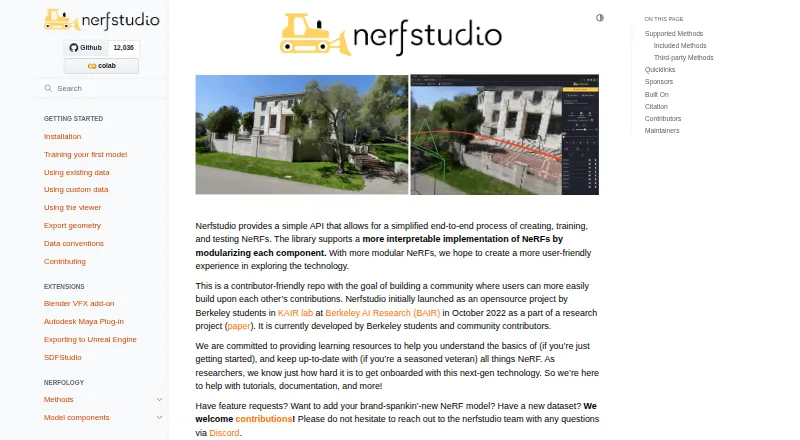
What Nerfstudio is
Nerfstudio is a free, open-source project for creating, training, and testing Neural Radiance Fields (NeRFs) through modular components and an API. Its included methods are Nerfacto, Instant-NGP, NeRF, Mip-NeRF, TensoRF, and Splatfacto, its Gaussian Splatting implementation. Command-line tools handle data processing, model training and evaluation, video rendering, viewing trained scenes, and model export. A web viewer can display training as it happens, let users interact with scenes, render custom camera paths, and make videos from trained models. Shared viewer links let others follow training progress, but are publicly accessible and can add latency. Documented capture workflows use COLMAP, Polycam, or Record3D to turn phone video into a 3D render. Installation options include pip, source, and Docker; Docker requires NVIDIA GPU drivers capable of CUDA 11.8, and the quickstart requires an NVIDIA video card with CUDA installed. Nerfstudio launched in October 2022 and is developed by Berkeley students and community contributors. Windows installation is less tested and more fragile, with Linux recommended when available.
Good
- Free and open-source, with an API.
- Includes six named NeRF and splatting methods.
- Viewer shows training progress in real time.
- Capture workflows include COLMAP, Polycam, or Record3D.
- Offers pip, source, and Docker installation options.
Watch out
- Quickstart requires an NVIDIA video card with CUDA.
- Windows installation is less tested and more fragile.
- Public share links can introduce latency.
Who it suits
Nerfstudio suits people building or studying NeRF and Gaussian Splatting workflows, especially those who want capture-to-render tools, training visualization, and model export. It is also a fit for users who can work with its NVIDIA GPU requirement and prefer Linux where possible.
Verdict
Nerfstudio brings model training, visualization, capture workflows, and export into one toolset. Check its GPU requirement and Windows limitations before choosing an installation path.
The facts
Each one read from Nerfstudio's own pages, with the date it was checked.
What it does
- Capture integrations
- The project describes a capture-to-render pipeline using Colmap, Polycam, or Record3D.checked 30 Sep 2026
- Data workflows
- The project documents full pipeline support with COLMAP, Polycam, or Record3D for turning phone video into a 3D render.checked 29 Sep 2026
- Development
- Nerfstudio launched as an open-source project by Berkeley students in October 2022 and is developed by Berkeley students and community contributors.checked 30 Sep 2026
- GPU requirement
- The repository quickstart requires an NVIDIA video card with CUDA installed; it says the library was tested with CUDA 11.8.checked 30 Sep 2026
- Included Gaussian splatting
- Splatfacto is Nerfstudio’s Gaussian Splatting implementation.checked 30 Sep 2026
- Included methods
- Included methods are Nerfacto, Instant-NGP, NeRF, Mip-NeRF, TensoRF, and Splatfacto.checked 29 Sep 2026
- Installation
- The documentation provides installation instructions using pip, source code, Pixi, and Docker.checked 30 Sep 2026
- License
- The project’s GitHub page identifies its license as Apache-2.0.checked 30 Sep 2026
- Logging and debugging
- The project supports Tensorboard and Wandb logging interfaces, code profiling, and built-in debugging tools.checked 30 Sep 2026
- Methods
- Included methods include Nerfacto, Instant-NGP, NeRF, Mip-NeRF, TensoRF, and Splatfacto.checked 30 Sep 2026
- Project
- The documentation describes Nerfstudio as an open-source project launched by Berkeley students in October 2022 and developed by Berkeley students and community contributors.checked 29 Sep 2026
- Purpose
- Nerfstudio provides a modular API for creating, training, and testing Neural Radiance Fields (NeRFs).checked 30 Sep 2026
- Remote viewing
- The viewer supports share URLs that let others view training progress, and the documentation says these links are publicly accessible and introduce latency.checked 29 Sep 2026
- Support
- The project directs users with questions to its Discord and provides documentation, tutorials, and a feedback form.checked 30 Sep 2026
- Training tools
- Its command line includes tools to process data, train and evaluate models, render videos, view trained NeRFs, and export models.checked 29 Sep 2026
- Viewer
- Its web-based visualizer can show training in real time, let users interact with scenes, and render custom camera trajectories.checked 30 Sep 2026
- Viewer integrations
- The web viewer is built using Viser and ThreeJS and packaged as a ReactJS application that connects to a server through a websocket.checked 29 Sep 2026
- Web viewer
- The viewer displays training in real time and can create content videos from trained models.checked 29 Sep 2026
The company
- Founded
- 2022checked 28 Sep 2026
Where it runs
- Platform limits
- The documentation says Windows installation is less tested and more fragile, and recommends Linux when available.checked 29 Sep 2026
- Platform support
- The installation guide says Nerfstudio on Windows is less tested and more fragile, and recommends Linux when available.checked 30 Sep 2026
The full review of Nerfstudio
Nerfstudio is an open-source toolkit for creating, training, and evaluating neural radiance fields and related 3D representations. It suits developers and technically minded 3D creators who can work with an NVIDIA CUDA GPU; its strongest draw is bringing model workflows, capture pipelines, and interactive viewing together without a software fee.
Overview
Launched in 2022 by Berkeley students, Nerfstudio is now developed by students and community contributors. Its modular API and command-line tools cover data processing, model training and evaluation, video rendering, viewing, and export. That breadth makes it a capable foundation for building a 3D capture workflow, but it is a developer-oriented project rather than a turnkey consumer scanning app.
The method lineup includes Nerfacto, Instant-NGP, NeRF, Mip-NeRF, TensoRF, and Splatfacto, its Gaussian Splatting implementation. This gives users several approaches to work with in one toolkit, rather than committing to a single representation. The tradeoff is that getting useful results still depends on a compatible GPU and comfort with a technical workflow.
Key features
Training and visualization
The command line handles processing, training, evaluation, rendering, and export. In the web viewer, users can watch training progress in real time, inspect scenes interactively, and render custom camera trajectories. That combination is valuable for iterating on a model and presenting a scene without separating training from visualization.
Share URLs let others view training progress, which can help with remote review. Those links are publicly accessible and introduce latency, so they are less suitable when access should be private or a responsive local view is essential. The viewer is a web application that connects to a server over a websocket.
Capture pipeline and development tools
Nerfstudio documents a capture-to-render workflow using COLMAP, Polycam, or Record3D to turn phone video into a 3D render. Tensorboard and Wandb logging, code profiling, and built-in debugging tools support more systematic experiments. Textured mesh output and exports in PLY, OBJ, PNG, and JPEG formats make the project useful beyond viewing a trained scene; it does not include measurement tools.
Pricing
Nerfstudio is free, with a free plan and no paid tier described. Its Apache-2.0 license suits users who want an open-source project they can incorporate into their work. The main cost is practical rather than financial: users need an NVIDIA video card with CUDA installed, and the repository quickstart says the library was tested with CUDA 11.8.
Installation is available through pip, from source, or with Docker. Docker requires NVIDIA GPU drivers capable of CUDA 11.8. The project directs questions to its Discord community and also provides tutorials, documentation, and a feedback form, giving new users several routes into a toolset that is more technical than a consumer app.
Platforms
Nerfstudio supports Linux, Windows, web, API access, and self-hosting. Linux is the safer installation choice: Windows installation is less tested and more fragile, and the project recommends Linux when available. The web viewer adds browser-based scene viewing, but it is connected to a server rather than replacing the GPU-backed workflow.
Capture input and mobile platforms are both supported. The documented COLMAP, Polycam, and Record3D pipeline is particularly relevant to users starting with phone video and moving toward model training on a computer.
Who it's for
Choose Nerfstudio if you want an open-source, GPU-backed environment for experimenting with NeRF and Gaussian Splatting methods, or need a documented route from capture to training, visualization, and export. Its logging and debugging support also suits users refining models as part of a development workflow.
Look elsewhere if you need a polished phone-first scanner, Windows reliability, or measurement tools. Nerfstudio’s CUDA requirement and command-line-centered workflow make it a poor fit for casual capture without compatible hardware or technical setup.
Pros and cons
- Pro: Multiple methods, including Splatfacto, let users explore NeRF and Gaussian Splatting workflows within one project.
- Pro: Training, evaluation, video rendering, interactive viewing, and export are covered in one command-line and web-viewer workflow.
- Pro: COLMAP, Polycam, and Record3D workflows connect phone-video capture to 3D rendering.
- Con: An NVIDIA CUDA GPU is required, narrowing the audience and making hardware a prerequisite rather than an optional upgrade.
- Con: Windows is less tested and more fragile than Linux, so Windows users face a less dependable installation path.
- Con: Public share URLs add latency, and there are no measurement tools for users who need to take measurements from scenes.
Alternatives
For a broader comparison of tools in this category, see AI 3D Scanning Software.
- WebODM is worth considering if you want a free, locally installed tool that can run offline, or need macOS support; its Starter plan is $24 a month billed yearly and includes 12 maps per 30 days.
- COLMAP is a free option for users who want a separate tool in the same capture workflow and support for macOS.
- Polycam is a better fit for a mobile-first capture app on iOS or Android; its free plan has limited space, object, and AI captures, with GLTF exports and public link sharing.
- RealityScan is an alternative for users seeking a freemium option with Android and iOS support.
- KIRI Engine may suit users who want a mobile and web scanning app with a free plan allowing up to 150 photos per scan, a 2 GB scan limit, unlimited scans, and free exports.
- OpenDroneMap is another free-software option for users who need macOS support or a self-hosted workflow.
- 3DF Zephyr is a Windows alternative with a free personal-use edition capped at 50 photos or video frames, one GPU, and limited exports and editing.
- Luma AI Video Generator is an alternative for users considering an API-based tool with paid monthly plans.
Verdict
Nerfstudio is a strong choice for developers and 3D creators who want a free, open-source toolkit spanning model training, scene viewing, capture workflows, and export. Its GPU requirement is the central hurdle, while Windows users also face a less dependable installation path. Choose it for a technical, extensible workflow on compatible hardware; look elsewhere for a simpler mobile scanner or a more reliable Windows-first experience.
Alternatives to Nerfstudio
- 1

WebODM
Free planOpen sourceWebAPILinuxmacOS8.3From $24 a month - 2
KIRI Engine
Free planAndroidiOSWebAPI8.1From $79.99 a year - 3
OpenMVG
Free planOpen sourceAndroidiOSAPILinux7.8Free plan - 4
Polycam
Free planAndroidiOSWeb7.5From $150 a year - 5
PIX4Dcatch
Free planAndroidiOSWindows7.4From $132.50 a month - 6
RealityScan
Free planAndroidiOSLinuxWindows7.4From $1,250 a year