Neiro
Neiro is a free local audio worksuite for separating sound sources, restoring recordings, transcribing audio, and editing waveforms.
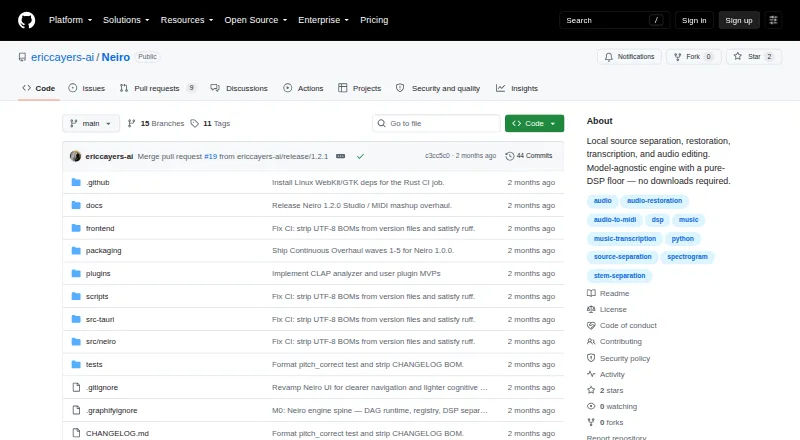
What Neiro is
Neiro is a free local audio worksuite for separating sound sources, restoring recordings, transcribing audio, and editing waveforms. Processing stays on the user's machine. It provides a Tauri desktop app and a browser interface launched with `neiro ui`; the interface binds to the local machine. Separation options include vocals, instrumentals, harmonic and percussive parts, four- or six-stem mixes, and drum kits, with a null-test residual for each result. Restoration tools address clipping, hum, noise, reverberation, bandwidth extension, and reference mastering. Transcription can export MIDI, MusicXML, ASCII tablature, and LRC lyrics. Studio supports non-destructive waveform edits, while Learn includes practice tools such as loop regions, count-in, metronome, step mode, WebMIDI, and DAW wait mode. VST2 and CLAP injectors can capture DAW audio into Neiro. Core DSP works without model downloads, but optional neural backends download weights on first use. Those models have separate licenses, some limited to non-commercial or research use. The Python package requires Python 3.10–3.12; compressed or video inputs also require ffmpeg on PATH.
Good
- Audio processing remains on the user's machine
- Core DSP works without model downloads
- Includes restoration and source separation tools
- Supports DAW capture through VST2 and CLAP
Watch out
- Some model licenses are non-commercial or research-only
- Compressed or video inputs require ffmpeg
- Python package requires Python 3.10–3.12
- Third-party model weights can be dangerous
Who it suits
Neiro suits audio creators who want local source separation, restoration, transcription, and waveform editing. It may also appeal to users who prefer core processing without model downloads, provided they review optional model licenses and requirements.
Verdict
Neiro offers a broad local audio workflow, including restoration, transcription, editing, and practice tools. Users considering neural models should check their individual licenses and download requirements.
The facts
Each one read from Neiro's own pages, with the date it was checked.
What it does
- DAW integration
- Shared-window VST2 and CLAP injectors can capture audio into Neiro's interface.checked 29 Sep 2026
- Desktop downloads
- The release page lists Windows MSI/EXE, macOS DMG, and Linux AppImage/DEB installers.checked 30 Sep 2026
- Editing and practice
- Its Studio supports non-destructive audio edits, while Learn offers loop regions, count-in, metronome, WebMIDI, and DAW wait mode.checked 30 Sep 2026
- Evaluation limits
- Full MUSDB18-HQ and MAESTRO evaluation numbers require user-provisioned datasets.checked 30 Sep 2026
- Extension limits
- Neiro documents a local Python adapter plugin MVP, but granted adapters run in the Neiro process without a sandbox.checked 30 Sep 2026
- Integrations
- The project documents VST2 and CLAP injectors for shared-window DAW capture, and a VST2 effect that works as a pass-through injector in a DAW.checked 30 Sep 2026
- Interfaces
- The worksuite is available as a Tauri desktop app or through `neiro ui` in a browser, using the same modules and local cache.checked 30 Sep 2026
- License
- The repository license is MIT for the Neiro engine source, while model weights have separate licenses.checked 30 Sep 2026
- Local interface security
- The UI binds to 127.0.0.1, and the desktop shell restricts its connections to the local engine origin.checked 30 Sep 2026
- Local network boundary
- The interface binds to 127.0.0.1, and the security policy says the app has no outbound network activity by default apart from user-initiated model downloads and updates.checked 29 Sep 2026
- Local processing
- The maker says audio is processed locally and not transmitted; outbound network activity is limited to user-initiated model downloads and application updates.checked 30 Sep 2026
- Model downloads and licensing
- Neural weights are not bundled with desktop releases and download on first use; each model carries its own license, which can include non-commercial or research-only terms.checked 30 Sep 2026
- Model options
- The core DSP floor works without model downloads; neural backends such as Demucs, Basic Pitch, and AudioSR are optional.checked 29 Sep 2026
- Model security
- Model weight downloads are checked against manifest SHA-256 values, and the security policy warns that third-party weights can be dangerous.checked 29 Sep 2026
- Purpose
- Neiro is a local audio worksuite for source separation, restoration, transcription, and audio editing.checked 30 Sep 2026
- Requirements
- The Python package requires Python 3.10–3.12, and compressed or video inputs require ffmpeg on PATH; WAV and FLAC work without it.checked 29 Sep 2026
- Restoration
- Its restoration features include declipping, hum removal, denoising, dereverberation, bandwidth extension, and reference mastering.checked 30 Sep 2026
- Separation
- It separates vocals, karaoke, harmonic and percussive parts, and 4- or 6-stem audio, and provides a null-test residual.checked 30 Sep 2026
- Studio and learning
- Studio supports non-destructive waveform edits, while Learn includes loop regions, count-in, metronome, step mode, WebMIDI, and DAW wait mode.checked 29 Sep 2026
- Support
- The maker directs users to documentation and public GitHub Discussions or Issues, and asks security reports to be sent privately.checked 30 Sep 2026
- Transcription
- Neiro transcribes audio to MIDI and can also export MusicXML, ASCII tablature, and LRC lyrics.checked 30 Sep 2026
The full review of Neiro
Overview
Neiro is a local audio suite for musicians and anyone repairing or working with recordings. It is best suited to users who want restoration, source separation, transcription, editing, and practice tools in one workflow. Its breadth and on-device processing are compelling, though optional model licenses and downloads deserve attention before use.
Key features
Audio repair and separation
Neiro covers declipping, hum removal, denoising, dereverberation, bandwidth extension, and reference mastering, alongside noise reduction, click and crackle removal, and batch processing. That range makes it useful for varied cleanup jobs without limiting the app to restoration. It can also split audio into vocals, instrumentals, harmonic and percussive parts, four- or six-stem mixes, and drum kits. A null-test residual accompanies each separation result, giving users a way to inspect what remains rather than treating a split as a black box.
Transcription, editing, and practice
Transcription to MIDI, with MusicXML, ASCII tablature, and LRC lyrics exports, gives Neiro a role beyond repair. Studio's non-destructive waveform edits suit users who want to make changes without replacing the original audio. Learn adds loop regions, count-in, metronome, step mode, WebMIDI, and DAW wait mode for practice workflows. The combination is unusually broad, but users seeking only a focused repair utility may not need the wider toolkit.
DAW capture and models
VST2 and CLAP injectors can capture audio from a shared DAW window into Neiro, and a documented VST2 effect acts as a pass-through injector. The core DSP floor works without model downloads; neural backends such as Demucs, Basic Pitch, and AudioSR are optional and their weights download on first use. The project checks downloaded weights against manifest SHA-256 values, but warns that third-party weights can be dangerous. Each model retains its own license, which may be non-commercial or research-only, so users should check terms before adopting a model in commercial work.
Pricing
Neiro is free, with a free plan and no paid tier described. Its core DSP functions work without model downloads, while neural weights are not bundled with desktop releases and download when first used. That keeps the base workflow accessible, but users should account for model-specific licensing and download requirements if they need neural processing.
Platforms
Neiro supports Linux, macOS, Windows, self-hosted use, and a browser interface launched with neiro ui. Desktop releases include Windows MSI/EXE, macOS DMG, and Linux AppImage/DEB installers. The UI binds to 127.0.0.1, and the desktop shell restricts connections to the local engine origin. Audio stays on the user's machine; the security policy says there is no outbound network activity by default apart from user-initiated model downloads and updates.
The Python package requires Python 3.10–3.12. Compressed or video inputs require ffmpeg on PATH, while WAV and FLAC work without it. This is a practical constraint for users who want to process those formats through the Python package.
Who it's for
Neiro suits musicians and audio editors who want local processing across repair, separation, transcription, waveform editing, or music practice, particularly those willing to manage optional model downloads. It is less suited to users who need a single-purpose repair app without model-license checks, or those who require full evaluation benchmarks without supplying datasets: full MUSDB18-HQ and MAESTRO evaluation numbers require user-provisioned datasets.
Support comes through documentation and public GitHub Discussions or Issues, with private reporting for security vulnerabilities. The engine, desktop shell, and frontend are MIT licensed, but that does not override the separate licenses attached to individual models. Neiro documents a local Python adapter plugin MVP; granted adapters run inside the Neiro process without a sandbox, so that extension path calls for care.
Pros and cons
- Pros: Broad restoration and separation tools, plus transcription, non-destructive editing, and practice features, give users multiple audio workflows in one suite.
- Pros: Local processing and a localhost-bound interface keep the normal workflow on the user's machine.
- Pros: Core DSP works without model downloads, so neural weights are not a prerequisite for the basic processing floor.
- Cons: Optional neural weights have individual licenses, some non-commercial or research-only, and download on first use.
- Cons: Compressed or video input through the Python package requires ffmpeg, unlike WAV and FLAC.
- Cons: Python adapters run without a sandbox, and full MUSDB18-HQ and MAESTRO evaluation numbers depend on user-provisioned datasets.
Alternatives
For a focused restoration comparison, browse Audio Restoration Software.
- Cathar is a free option for Linux and macOS users.
- CEDAR Cambridge is a paid modular hardware and software system for macOS and Windows, with custom pricing and configurations that vary.
- VinylRest is a free choice for web, macOS, and Linux.
- Wave Corrector is a free option for Windows and Linux.
- PD Cleaner is a free Windows option.
- Wave Arts Master Restoration Suite 6 costs $99, paid once and offers five restoration plug-ins; choose it if a host-based plug-in suite is a better fit. It requires a host that supports audio plug-ins.
- SpectraLayers Pro is a paid macOS and Windows alternative with spectral audio editing, audio repair and restoration, and AI-assisted processing.
- LANDR ReHance is a paid macOS, web, and Windows choice for users who want ReHance through LANDR Studio; the annual-billed plan is $11.99 a month and requires a LANDR Studio subscription.
Verdict
Choose Neiro if you want a free, local audio workspace that spans repair, separation, transcription, editing, and practice. Its strongest case is that range without requiring neural models for core DSP. Look elsewhere if your workflow depends on a narrowly focused restoration tool, or if model licensing, downloads, or unsandboxed adapters are unacceptable constraints.
Alternatives to Neiro
- 1
Avidemux
Free planOpen sourceWebLinuxmacOSWindows7.3Free plan - 2

@audio/denoise
Free planOpen sourceWeb7.1Free plan - 3
VinylRest
Free planWebAPILinuxmacOS7.1Free plan - 4
PD Cleaner
Free planOpen sourceWindows7.0Free plan - 5

LANDR ReHance
WebmacOSWindows6.5From $11.99 a month - 6
Wave Arts Master Restoration Suite 6
macOSWindows6.5$99 one-time