
@audio/denoise
@audio/denoise is a free browser-based tool for cleaning recordings and listening to or saving the processed audio.
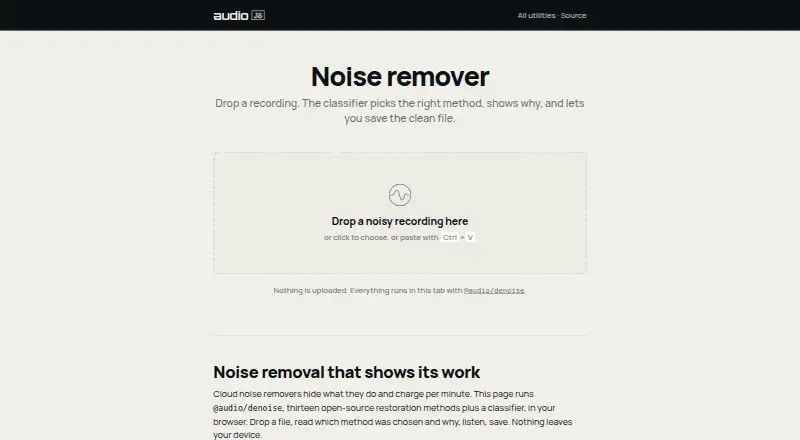
What @audio/denoise is
@audio/denoise is a free browser-based tool for cleaning recordings and listening to or saving the processed audio. It uses classical signal processing rather than AI noise removal, and says audio is processed in the browser without being uploaded. Automatic mode measures a recording, chooses a specialized method, and shows its plan; users can instead select methods such as dehum, declick, declip, or gate. The page describes thirteen open-source restoration methods alongside a classifier. Target problems include steady background noise, mains hum, clicks, pops, vinyl crackle, clipping, wind rumble, plosives, sibilance, room reverb, and noise between phrases. For music, it can address hum, clicks, crackle, and clipping; broadband denoising should be used lightly and compared with the original. The page notes that machine-learning models can do better with heavy speech-over-noise. Automatic mode does not choose dereverb, so users must select it themselves. Developers can install the associated package with npm to process mono Float32Array audio.
Good
- Free to use in a browser with no account.
- Audio processing stays on the device.
- Offers thirteen restoration methods and an auto-classifier.
- Can address hum, clicks, crackle, and clipping.
Watch out
- Batch processing is not available.
- Automatic mode does not select dereverb.
- Machine-learning models can do better with heavy speech-over-noise.
- Broadband denoising should be used lightly on music.
Who it suits
It suits people who want to clean recordings in a browser, especially when addressing hum, clicks, crackle, or clipping. Developers can also use the associated npm package for mono Float32Array audio.
Verdict
@audio/denoise provides browser-based cleanup with automatic or manual method selection and says recordings are not uploaded. It may be less suitable for heavy speech-over-noise, and dereverb requires manual selection.
Plans and prices
From @audio/denoise's own pricing page, checked 7 Oct 2026.
| Plan | Price | What it gives you |
|---|---|---|
| Free | Free | Runs in browser · no account · no upload |
| Free browser noise remover | Free | Local browser processing · no upload · save cleaned file |
The facts
Each one read from @audio/denoise's own pages, with the date it was checked.
What it does
- Automatic API
- The denoise function can return cleaned samples, a classifier plan, or be forced to a named method.checked 15 Oct 2026
- Automatic classifier
- The classifier evaluates hum, click density, rumble, noise-floor stability and sibilance before selecting a method.checked 15 Oct 2026
- Automatic mode
- A classifier selects a specialized method based on measured properties of the recording and shows its plan.checked 7 Oct 2026
- Automatic mode limit
- The repository says automatic mode does not select dereverb; users must choose it explicitly.checked 7 Oct 2026
- Classical DSP
- The product states that its methods use classical signal processing rather than AI models.checked 15 Oct 2026
- Click repair
- Clicks, pops and crackle are detected and reconstructed with LPC-based interpolation.checked 15 Oct 2026
- Clipping repair
- The package can detect clipping levels automatically and reconstruct clipped waveform sections.checked 15 Oct 2026
- Developer demo
- The repository includes a self-contained demo.html for selecting scenarios, choosing methods, viewing waveforms and hearing differences.checked 15 Oct 2026
- Developer use
- The repository documents installing the package with npm and processing mono Float32Array audio in and out.checked 7 Oct 2026
- Hiss processing
- Hiss and fan noise can be treated with Wiener or MMSE-LSA processing, or OM-LSA when speech is present.checked 15 Oct 2026
- Hum processing
- The dehum method tracks 50 or 60 Hz mains frequencies and their harmonics with adaptive notch or sinusoidal subtraction processing.checked 15 Oct 2026
- Input and output
- The JavaScript API accepts and returns mono Float32Array audio; stereo should be processed channel by channel.checked 15 Oct 2026
- Installation
- Installation is documented with npm using `npm install @audio/denoise`.checked 15 Oct 2026
- License
- The repository and npm metadata state that the package is released under the MIT license.checked 15 Oct 2026
- Limit
- The page says machine learning models can do better for heavy speech-over-noise.checked 7 Oct 2026
- Limit: automatic dereverb
- Automatic routing does not select dereverb because the documentation says it lacks a reliable single-pass signature; dereverb must be selected explicitly.checked 15 Oct 2026
- Limit: data shape
- The core API is sample-array based and does not provide a hosted upload service or graphical desktop editor in the package documentation.checked 15 Oct 2026
- Limit: heavy speech noise
- The maker cautions that machine-learning models can outperform these classical methods for heavy speech-over-noise cases.checked 15 Oct 2026
- Limit: single-pass operations
- The package describes itself as single-pass noise reduction, and several operations such as desqueak are documented as whole-clip rather than streaming processors.checked 15 Oct 2026
- Manual selection
- Users can choose methods such as dehum, declick, declip and gate by hand.checked 7 Oct 2026
- Methods
- The page describes thirteen open-source restoration methods plus a classifier.checked 7 Oct 2026
Where it runs
- Browser workflow
- Users can drop or paste a recording, inspect the selected method and plan, audition the result and save the cleaned file.checked 15 Oct 2026
The company
- Maker history
- The home page dates audiojs maintenance to 2016 and describes the stack as cross-runtime JavaScript for browser, Node, Deno and Bun.checked 15 Oct 2026
- Maker scale
- The audiojs home page states more than 300 open-source packages and over 9 million npm downloads per month.checked 15 Oct 2026
The full review of @audio/denoise
Overview
@audio/denoise is a browser-based tool for cleaning recordings and saving the repaired audio. It is best suited to people tackling specific problems such as hum, clicks, crackle or clipping who want processing to stay on their device. For heavy speech-over-noise, a machine-learning-based tool may be a better fit.
Key features
Thirteen open-source restoration methods and a classifier give the tool two useful paths: let automatic mode assess the recording and recommend a method, or choose a treatment yourself. The classifier selects based on measured properties and shows its plan, which makes it a practical starting point when the problem is not obvious. Manual selection suits users who already know they need a targeted repair such as dehum, declick, declip or gating.
The listed targets cover steady background noise, mains hum, clicks and pops, vinyl crackle, clipping, wind rumble, plosives, sibilance, room reverb and noise between phrases. That range supports both speech cleanup and music repair, but the processing is classical signal processing rather than AI noise removal. The stated limitation matters: machine-learning models can do better when speech is heavily buried in noise. Automatic mode also skips dereverb, so users seeking room-reverb treatment need to select it manually.
For music, hum, clicks, crackle and clipping are focused repair jobs. Broadband denoising is less forgiving; the page recommends using it lightly and comparing the result with the original, a useful safeguard when noise reduction may also affect wanted material.
All processing runs in the browser, and the page says audio is neither uploaded nor sent off the device. That is a meaningful advantage for private recordings, though it does not change the tool’s limits on difficult speech noise.
Pricing
The Free plan costs nothing and requires no account. It includes browser-based processing with no upload, noise reduction, click and crackle removal, hum removal, declip repair and spectral repair. Batch processing is not included, so this is better suited to individual cleanup jobs than a repeatable multi-file workflow.
The plan also supports MIDI export, with MIDI, MusicXML and ABC given as output formats. That makes its format coverage broader than an audio-cleanup-only description might suggest, but it does not include stem separation, chord detection or tablature output. The free plan is a straightforward choice for occasional repairs; users needing batch processing or those other music-analysis features will need a different tool.
Platforms
@audio/denoise runs on the web. The package is also documented for developer use through npm, with mono Float32Array audio as both input and output; this is a developer-facing route rather than another listed end-user platform.
Who it's for
Choose it for browser-based cleanup of recordings with hum, clicks, pops, crackle or clipping, especially when keeping audio on-device is a priority. Its manual methods also suit users who want to target a known defect rather than rely entirely on an automatic pass. It is a weaker choice for severe speech masking, and users seeking automatic dereverb should look elsewhere or be prepared to select the method themselves.
Pros and cons
Pros
- Audio stays in the browser, with no account or upload required, which suits privacy-conscious cleanup.
- The free plan includes several distinct repairs, including hum, click and crackle removal, declip repair and spectral repair.
Cons
- Heavy speech-over-noise is a stated weak point compared with machine-learning models.
- Automatic mode does not choose dereverb, adding a manual step for room-reverb repair.
- No batch processing means the free plan is less convenient for cleaning many files in one workflow.
- Broadband denoising should be used sparingly and checked against the original to avoid overprocessing.
Alternatives
Audio Restoration Software is the category list to consult when comparing a broader set of restoration tools. For music-focused transcription options, see Music Transcription Software.
- VinylRest is another free option, with Linux, macOS and web platforms; its listed VinylRest Live plan is a free public beta that requires a license for processing and allows up to three active Mac installations.
- Neiro is a free alternative spanning Linux, macOS, self-hosted, web and Windows platforms.
- PD Cleaner is a free, open-source Windows 64-bit option with no account and no trial.
- CEDAR Cambridge is a paid macOS and Windows modular hardware and software system with custom pricing.
- Cathar is a free alternative for Linux and macOS.
- Wave Arts Master Restoration Suite 6 costs $99, paid once for five restoration plug-ins and requires a host that supports audio plug-ins.
- Accentize DeRoom is a paid macOS and Windows option focused on reverb removal and room resonance suppression; its DeRoom License costs €49, paid once, billed including VAT.
- Algorithmix Sound Rescue is a paid alternative with a $79.90, paid once full version for Windows.
Verdict
@audio/denoise is a strong fit for people who want free, private, browser-based repair of common recording problems, with the added benefit of choosing a specialized method when the automatic recommendation is not enough. Its main reasons to look elsewhere are heavy speech noise, batch processing, or a need for automatic dereverb.
Getting started
- Open the denoise webpage
- Load a recording in the browser
- Use automatic mode or select a restoration method
- Process the audio on the device
- Listen to the result
- Save the cleaned recording
Limits worth knowing
The free plan runs in the browser with no account and no upload, but batch processing is unavailable. Automatic mode does not select dereverb, and heavy speech-over-noise may benefit from machine-learning models.
Questions
Is @audio/denoise free?
Yes. The Free plan costs nothing and runs in the browser without an account or upload.
Does it upload recordings?
No. Processing runs in the browser, and the page says nothing leaves the device.
Which problems can it treat?
Targets include background noise, mains hum, clicks, pops, vinyl crackle, clipping, wind rumble, plosives, sibilance, room reverb, and noise between phrases.
Can I choose a method myself?
Yes. Manual choices include dehum, declick, declip, and gate; automatic mode selects a specialized method based on the recording.
Is there a developer package?
Yes. The associated @audio/denoise package installs with npm and processes mono Float32Array audio in and out.
Alternatives to @audio/denoise
- 1
Avidemux
Free planOpen sourceWebLinuxmacOSWindows7.3Free plan - 2
VinylRest
Free planWebAPILinuxmacOS7.1Free plan - 3
PD Cleaner
Free planOpen sourceWindows7.0Free plan - 4

LANDR ReHance
WebmacOSWindows6.5From $11.99 a month - 5
Wave Arts Master Restoration Suite 6
macOSWindows6.5$99 one-time - 6

SpectraLayers Pro
macOSWindows6.4$359.99 one-time