MozJPEG
MozJPEG is a free, open-source library project designed to improve JPEG compression efficiency, producing smaller files and higher visual quality.
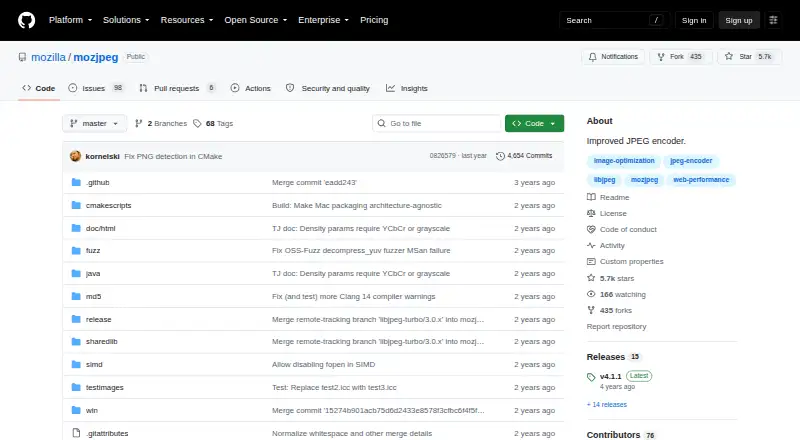
What MozJPEG is
MozJPEG is a free, open-source library project designed to improve JPEG compression efficiency, producing smaller files and higher visual quality. It is intended for graphics programs and image-processing tools, and software using the libjpeg API can integrate it without MozJPEG-specific integration code. It is compatible with the JPEG standard and the vast majority of deployed JPEG decoders. When converting other formats to JPEG, it uses trellis quantization to balance quality and file size. Progressive encoding with jpegrescan optimization can losslessly reduce JPEG size when used with jpegtran. Improvements can be disabled at runtime, after which MozJPEG behaves like libjpeg-turbo. The repository includes a demo cjpeg command-line tool, which the project does not recommend for serious use. Build instructions cover Unix-like systems, macOS, Linux, and Windows with Visual C++ or MinGW. The repository's latest release page identifies version 4.1.1, and the project points to libjpeg-turbo documentation for additional build help.
Good
- Compatible with the JPEG standard and most deployed decoders.
- Integrates with programs using the libjpeg API.
- Progressive encoding can reduce JPEG size losslessly with jpegtran.
- Build instructions cover Linux, macOS, and Windows.
Watch out
- Demo cjpeg tool is not intended for serious use.
- Additional build help is directed to libjpeg-turbo documentation.
Who it suits
MozJPEG suits developers building graphics or image-processing software who want to use a JPEG compression library. Its libjpeg API compatibility may be useful for programs already using that interface.
Verdict
MozJPEG is aimed at integration as a library, with JPEG compatibility and compression-focused features. The included cjpeg tool is only a demo, so it is not the project's recommended serious-use interface.
Plans and prices
From MozJPEG's own pricing page, checked 7 Oct 2026.
| Plan | Price | What it gives you |
|---|---|---|
| MozJPEG | Free | Open-source JPEG encoder library; demo cjpeg tool |
The facts
Each one read from MozJPEG's own pages, with the date it was checked.
What it does
- API access
- Yeschecked 20 Sep 2026
- Command-line tool
- The repository includes a demo cjpeg command-line tool, which the project says is not intended for serious use.checked 7 Oct 2026
- Compatibility
- It is compatible with the JPEG standard and the vast majority of deployed JPEG decoders.checked 7 Oct 2026
- Compression modes
- bothchecked 20 Sep 2026
- Distribution
- The GitHub repository provides a latest release page, which identifies version 4.1.1 as the latest release.checked 7 Oct 2026
- Integration
- Programs using the libjpeg API can integrate MozJPEG without writing MozJPEG-specific integration code.checked 7 Oct 2026
- Library use
- The project is intended as a library for graphics programs and image processing tools.checked 7 Oct 2026
- Metadata controls
- Yeschecked 20 Sep 2026
- Progressive encoding
- Progressive encoding with jpegrescan optimization can losslessly reduce the size of any JPEG when applied with jpegtran.checked 7 Oct 2026
- Purpose
- MozJPEG improves JPEG compression efficiency to achieve smaller files and higher visual quality.checked 7 Oct 2026
- Runtime behavior
- MozJPEG improvements can be disabled at runtime, in which case it behaves exactly like libjpeg-turbo.checked 7 Oct 2026
- Security
- The repository page does not state security certifications or compliance claims.checked 7 Oct 2026
- Support
- The project points users to libjpeg-turbo documentation for additional build help.checked 7 Oct 2026
- Supported formats
- PPM,PGM,BMP,GIF,Targachecked 20 Sep 2026
- Trellis quantization
- Trellis quantization is used when converting other formats to JPEG to maximize the quality-to-file-size ratio.checked 7 Oct 2026
Where it runs
- Build platforms
- The build instructions describe Unix-like systems, macOS, Linux, Windows with Visual C++, and Windows with MinGW.checked 7 Oct 2026
Money
- Free plan
- Yeschecked 20 Sep 2026
The full review of MozJPEG
MozJPEG is an open-source library for developers embedding JPEG encoding in graphics software and image-processing pipelines. It is a strong fit when smaller JPEG files and broad decoder compatibility matter, but less suitable for anyone wanting a finished desktop conversion app. The bottom line is a capable, integration-first encoder whose free license removes procurement friction while leaving setup and product integration to you.
Overview
MozJPEG targets better JPEG compression efficiency: its encoder is designed to produce smaller files at a comparable visual quality. Output remains within the JPEG standard and is compatible with the vast majority of deployed JPEG decoders, so teams can pursue bandwidth or storage savings without asking downstream systems to adopt a new format.
The project is intended to be used as a library by graphics programs and image-processing tools. Applications that already use the libjpeg API can integrate MozJPEG without writing MozJPEG-specific integration code. Improvements can be disabled at runtime, in which case behavior matches libjpeg-turbo; that fallback is useful when an application needs a conservative compatibility mode. The repository also contains a demo cjpeg command-line program, but it is not intended as the serious-use interface, which limits MozJPEG's appeal as a standalone utility.
Key features
- Progressive JPEG optimization: Progressive encoding with jpegrescan can losslessly reduce the size of any JPEG when used with jpegtran. It is therefore useful for optimizing existing JPEG assets without changing their image data, provided your workflow can incorporate those tools.
- Trellis quantization: During conversion from other formats to JPEG, trellis quantization seeks a better quality-to-file-size balance. Supported inputs include PPM, PGM, BMP, GIF and Targa, making it relevant to conversion pipelines rather than only already-compressed JPEG collections.
- Metadata controls: Metadata handling is supported, allowing an integrating application to include metadata decisions in its processing workflow instead of treating them as an unavoidable side effect.
- API compatibility: The libjpeg API integration path avoids MozJPEG-specific glue code for existing libjpeg-based programs. Runtime disabling of MozJPEG improvements provides a practical fallback to libjpeg-turbo-compatible behavior.
- Developer toolchain: The project supports CMake, Cargo and GNU Make, with assembler, C, C++, Rust and GPU-oriented compiler environments including CUDA via nvcc and ROCm HIP. GCC, Clang, MSVC, NVC++ and Wind River Diab are named compiler options. GitHub Actions and Jenkins are supported for continuous integration, with line, branch and function coverage and reports including LCOV, HTML, Markdown and Cobertura XML; pull-request annotations are also supported.
Pricing
MozJPEG — free: The plan is free open-source software and includes the JPEG encoder library plus the demo cjpeg tool. There is no free trial because the offering is already free, and no paid tier, seat charge or usage quota is stated. This is the natural choice for developers able to host, build and maintain the library themselves. It is not a hosted service with managed operations or a supported standalone application, so organizations wanting those conveniences should look elsewhere.
Platforms
MozJPEG is available as an API and supports Linux, macOS and Windows, with self-hosted deployment. Build instructions cover Unix-like systems, macOS, Linux, Windows with Visual C++ and Windows with MinGW. Remote execution is supported, and the project identifies version 4.1.1 as its latest release. Additional build help is directed to libjpeg-turbo documentation. The repository makes no security-certification or compliance claims, so regulated deployments must perform their own assessment.
Who it's for
MozJPEG is best for software teams maintaining image pipelines, graphics applications, web back ends or asset-processing services that already understand native libraries and the libjpeg API. It is particularly persuasive when JPEG compatibility is mandatory and reducing file size has operational value. It is a poor fit for nontechnical users seeking a polished GUI, and the demo command-line encoder should not be treated as a production-facing replacement for a dedicated conversion tool.
Pros and cons
Pros
- Free and open source: There is no license fee, trial expiration or per-seat pricing barrier.
- Broad JPEG compatibility: Standard-compliant output works with the vast majority of deployed decoders.
- Low-friction libjpeg adoption: Existing libjpeg API users can integrate without MozJPEG-specific integration code.
- Useful optimization controls: Progressive jpegrescan processing and trellis quantization address both existing JPEGs and format conversion.
- Flexible engineering support: Multiple build systems, compilers, CI platforms, coverage formats and remote execution options suit varied development environments.
Cons
- Not a finished end-user application: The included cjpeg utility is explicitly a demo, so production workflows require another interface or your own integration.
- Self-hosted responsibility: Teams must handle builds, deployment and maintenance rather than relying on a hosted service.
- No stated compliance assurances: Security certifications and compliance claims are absent, which matters for governed environments.
Alternatives
For a broader image-focused directory, see Image Compression Software. Teams primarily comparing build acceleration can start with Build Cache Software, while instrumentation-focused buyers should consult Test Coverage Tools.
Bitrise is the better choice when you need a hosted, multi-platform mobile CI service with a free Hobby plan and a free trial rather than a JPEG library. Choose Ccache for free compiler caching on Linux, macOS, Windows and self-hosted systems. EngFlow Remote Caching fits teams wanting hosted or in-cluster remote caching, including a free one-machine, 32-CPU plan. cachepot is an Apache-2.0 self-hosted cache server with no hosted plans stated. NativeLink suits organizations seeking an open-source distributed scheduler and remote cache across build systems. FosterStack offers self-hosted caching with a free tier and a paid Team option for multi-user controls. bazel-remote is a configurable-size, Apache-2.0 self-hosted cache. BuildFetch Cache is preferable when you want a hosted cache with explicit storage, traffic, request and retention quotas.
Verdict
Choose MozJPEG if you are a developer integrating JPEG encoding into an existing application and want smaller, standard-compatible files without licensing cost. Its API compatibility, optimization techniques and runtime fallback make it a practical component for serious pipelines. Look elsewhere if your priority is a polished standalone converter, managed hosting or explicit compliance commitments; MozJPEG leaves those concerns to the surrounding product and your engineering team.
Alternatives to MozJPEG
- 1
imgproxy
Free planOpen sourceAndroidiOSWebAPI9.3Free plan - 2
Hive
Free planOpen sourceAndroidiOSWebAPI8.6From $5 a month - 3

Kraken.io
Free planWebAPIExtensionLinux8.4From $50 a year - 4
JPEGmini
Free planWebAPILinuxmacOS8.3From $199 a year - 5
Optimizilla
Free planWeb7.9From $9 a month - 6
Compressify
Free planAndroidiOSWebExtension7.9From $4.99 a month