Minitooler Video Repair
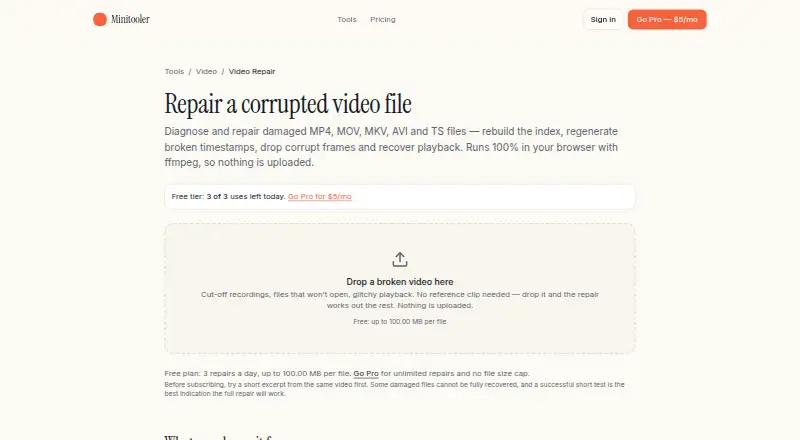
Minitooler Video Repair is a browser tool for diagnosing and repairing videos that fail to play, seek, or show the right duration.
What Minitooler Video Repair is
Minitooler Video Repair is a browser tool for diagnosing and repairing videos that fail to play, seek, or show the right duration. It accepts MP4, MOV, MKV, AVI, WebM, and TS files, including ones that will not open. Automatic repair can rebuild an index, regenerate timestamps, remove corrupt packets, or drop a damaged audio track. It first attempts lossless repacking, carrying the original video and audio into a new container; re-encoding is a last resort. The repair runs in the browser with ffmpeg compiled to WebAssembly. Minitooler says files are not uploaded or stored, and repaired results have no watermark. No signup or email is required. The Free plan is listed as free; the repair page allows 3 repairs a day and files up to 100.00 MB each. Pro costs $5 a month and removes repair-count and file-size caps. It also includes future tools and priority support. Checkout uses Stripe, with tax calculated based on the buyer’s location.
Good
- Supports MP4, MOV, MKV, AVI, WebM, and TS.
- Attempts lossless repacking before re-encoding.
- Files stay on the device during repair.
- No signup, email, or watermark required.
Watch out
- Free plan allows 3 repairs a day.
- Free repairs are limited to 100.00 MB per file.
- Some browser-undecodable streams may cause problems.
- Truncated files without a written index may be problematic.
Who it suits
It suits people trying to recover damaged screen recordings, phone or camera clips, unseekable videos, or drone and dashcam footage. It is also relevant when keeping a recording on the device during repair matters.
Verdict
Minitooler Video Repair offers local, automatic repair with a lossless repacking attempt first. The free allowance is limited, while Pro removes the repair and file-size caps for $5 a month.
Plans and prices
From Minitooler Video Repair's own pricing page, checked 9 Oct 2026.
| Plan | Price | What it gives you |
|---|---|---|
| Free | Free | 3 conversions per day · Files up to 10 MB · No account required · $0 forever |
| Pro | $5 a month | Unlimited conversions · No file-size limit (only your device) · Every future tool included · Priority support · $5/month |
The facts
Each one read from Minitooler Video Repair's own pages, with the date it was checked.
What it does
- Account and watermark
- The page says no signup or email is required and the repaired result has no watermark.checked 9 Oct 2026
- Checkout
- Checkout is handled by Stripe, and tax is calculated automatically based on the buyer’s location.checked 8 Oct 2026
- Compatibility limitation
- The page says a file may contain a stream that the browser simply cannot decode, and identifies truncated files whose index was never written as a possible problem.checked 9 Oct 2026
- Formats
- The page lists MP4, MOV, MKV, AVI, WebM, and TS as supported formats, and also accepts files that will not open at all.checked 9 Oct 2026
- Local processing
- Diagnosis and repair run in the browser using ffmpeg compiled to WebAssembly, and the page says the video is not uploaded or stored.checked 9 Oct 2026
- Paid usage limit
- The Video Repair page says Pro provides unlimited repairs and no file-size cap.checked 9 Oct 2026
- Payment
- The pricing page says checkout is secured by Stripe and tax is calculated at checkout based on the user's location.checked 9 Oct 2026
- Privacy
- The page says the file remains on the user's device during diagnosis and repair, including for sensitive recordings or unreleased material.checked 9 Oct 2026
- Purpose
- The browser-based video repair tool diagnoses and repairs damaged videos that will not play, seek, or show the right length.checked 9 Oct 2026
- Quality
- The repair description says the initial repacking step copies the original video and audio untouched into a new container.checked 9 Oct 2026
- Repair process
- It can repack a video losslessly, rebuild its index, regenerate timestamps, discard corrupt packets, drop a damaged audio track, or re-encode as a last resort.checked 9 Oct 2026
- Runs locally
- Minitooler says its tools run locally in the browser.checked 8 Oct 2026
- Support
- The site invites users who need help or a missing tool to email [email protected], and Pro pricing includes priority support.checked 9 Oct 2026
- Use cases
- The page names crashed screen recordings, interrupted phone or camera clips, unseekable videos, and drone or dashcam footage as use cases.checked 9 Oct 2026
- Video Repair page
- The Video Repair page is titled “Online Video Repair in-browser.”checked 8 Oct 2026
Money
- Free access
- The Free plan provides access to every tool.checked 8 Oct 2026
- Free usage limit
- The Video Repair page says the free plan allows 3 repairs a day and files up to 100.00 MB per file.checked 9 Oct 2026
- Plan coverage
- The Pro plan includes every future tool.checked 8 Oct 2026
The full review of Minitooler Video Repair
Overview
Minitooler Video Repair is a web tool for recovering videos that will not play, seek, or show the right duration. It is best suited to people who want an automatic repair attempt without uploading a recording or creating an account. Its lossless repacking step is a useful first move, but Free's 100.00 MB file limit makes Pro necessary for larger videos.
Key features
The automatic workflow can rebuild an index, regenerate timestamps, discard corrupt packets, remove a damaged audio track, or re-encode as a last resort. It first attempts to repack the file by copying its original video and audio streams untouched into a new container. That is a sensible approach when the container or index is at fault, since the first step does not alter the media; re-encoding remains available when repacking is not enough.
It accepts MP4, MOV, MKV, AVI, WebM, and TS files, including ones that will not open. The named use cases include crashed screen recordings, interrupted phone or camera clips, unseekable videos, and drone or dashcam footage. Repaired files have no watermark, and no account or email is required.
Diagnosis and repair run locally in the browser using ffmpeg compiled to WebAssembly; Minitooler says files are not uploaded or stored. Keeping sensitive or unreleased footage on the device is a clear privacy advantage. The trade-off is that browser decoding can fail for some streams, and truncated files whose index was never written may remain difficult to repair.
Pricing
Free: free, billed $0 forever. It includes access to every tool, no account requirement, and three repairs a day. The Video Repair page caps files at 100.00 MB each, so Free is useful for occasional, smaller clips but unsuitable for larger recordings or repeated batch work.
Pro: $5 a month, billed $5/month. It removes the repair and file-size limits, includes every future tool, and adds priority support. That makes it the practical choice for frequent repairs or large files; because processing is local, the device still sets the practical ceiling. Checkout is handled by Stripe, with tax calculated based on the buyer's location.
Platforms
Minitooler Video Repair runs in a web browser. Its local processing avoids sending the video to a server, but the browser must be able to decode the file's stream for repair to succeed.
Who it's for
This is a good fit for someone troubleshooting a damaged clip who values local processing, a no-signup workflow, and an untouched-stream repacking attempt. Free's daily allowance suits occasional repairs under 100.00 MB. People with larger files or regular repair needs will need Pro, while a file with a stream the browser cannot decode may call for another repair route.
Pros and cons
- Local processing: Diagnosis and repair happen on the device, which suits sensitive footage.
- Preserves streams on the first attempt: Lossless repacking copies the original audio and video into a new container unchanged.
- No signup or watermark: Repaired results are available without an account or branded output.
- Free caps are restrictive for large clips: Three repairs a day and a 100.00 MB per-file limit can rule out longer recordings.
- Browser decoding can be a hard limit: Some streams cannot be decoded, and truncated files without an index may resist repair.
Alternatives
Video Repair Software is the category directory for comparing repair tools. IntactFile is worth considering if broader file recovery matters: its free plan covers video repairs up to 50 MB as well as documents, archives, and photos, and it runs on web, Linux, macOS, and Windows.
Untrunc suits users who want a free, self-hosted tool with no usage or file-size limits and can work with its healthy reference file requirement. RepairMyVideo is another web option, with analysis, repair, preview, and download free during beta and direct uploads up to 25 GB.
VidRepair is a free Windows alternative. Restore.Media may suit someone who prefers a per-file recovery purchase, with a free full-length low-resolution preview before paying for an original-resolution download.
EaseUS Video Repair is an option for users who want a broader repair subscription: its Repair Pro — 1 Month License costs $39.95 a month, auto-renews, and includes unlimited video, photo, file, and audio repairs, 1500 AI Credits per month, and one desktop activation. Fix.Video offers one-time file repair packages for users who prefer paying per batch; its 10 files repair plan is 59.00 USD once.
VideoRepair is another freemium option for readers comparing tools across iOS, macOS, and web.
Verdict
Minitooler Video Repair is a strong first stop for people with a damaged clip who want a private, automatic repair attempt and a chance to preserve the original streams. The lasting free plan is useful for small, occasional jobs; choose Pro when repair volume or file size exceeds its limits. Look elsewhere when the browser cannot decode the footage or you need a recovery tool suited to a different workflow.
Getting started
- Open the Minitooler Video Repair website
- Use the tool without creating an account or providing email
- Select a damaged video in MP4, MOV, MKV, AVI, WebM, or TS format
- Start the automatic repair process
- Choose Pro if you need unlimited repairs or no file-size cap
Limits worth knowing
The Video Repair page states that Free allows three repairs per day and files up to 100.00 MB per file. The listed Free plan separately shows three conversions daily and a 10 MB file limit; Pro removes the repair quota and file-size cap.
Questions
What does Minitooler Video Repair fix?
It diagnoses videos that will not play, seek, or show the correct length, and can rebuild indexes, regenerate timestamps, remove corrupt packets, drop damaged audio, or re-encode as a last resort.
Which video formats are supported?
The listed formats are MP4, MOV, MKV, AVI, WebM, and TS. Files that will not open are also accepted.
Are videos uploaded?
No. Diagnosis and repair run locally in the browser, and the page says the video is not uploaded or stored.
Is an account required?
No signup or email is required, and the repaired result has no watermark.
How much is Pro?
Pro costs $5 per month. It includes unlimited repairs, no file-size cap, every future tool, and priority support.
Alternatives to Minitooler Video Repair
- 1

IntactFile
Free planWebAPILinuxmacOS7.9From €59 a year - 2
Restore.Media
AndroidiOSWebmacOS6.8$4.99 one-time - 3

Stellar Repair for Video
WebmacOSWindows6.8$49.99 one-time - 4

RepairMyVideo
Free planWeb6.6Free plan - 5
Fix.Video
WebmacOSWindows6.4From $99 a month - 6
KwaFlux Video File Repair
Windows6.4From $79.99 a year