Fix.Video
Fix.Video is an online service for repairing corrupted, truncated, unreadable, or damaged video files.
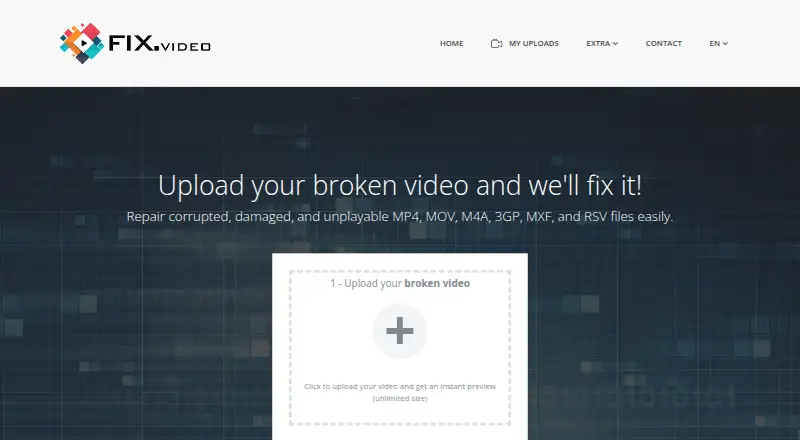
What Fix.Video is
Fix.Video is an online service for repairing corrupted, truncated, unreadable, or damaged video files. It lists MP4, MOV, M4V, 3GP, ProRes, RSV, and MXF video formats, plus M4A on its upload page. The service says it can recover high-definition video from cameras and devices including Canon, Nikon, Sony, Panasonic, Blackmagic, GoPro, iPhone, Android devices, dashcams, and DJI drones. Listed damage causes include battery failure, crashes, water damage, falls, shocks, camera shutdowns, and defective SD cards. Uploads can be previewed, and paid repair plans include engineer support with unlimited duration and file size. A ten-file repair plan costs $59; a 25-file plan is $79, and one month of access is $99. Repair is not guaranteed, and the terms say refunds are not offered whether uploaded content is repaired or recovered. Uploaded videos are deleted automatically after five days, are not shared, and will not be viewed without prior permission. Separate downloads include offline MP4 and MOV repair software marked Shareware, a free video re-encoder, and a read-only memory card recovery tool.
Good
- Lists support for MP4, MOV, and other formats.
- Upload interface offers preview.
- Paid plans include engineer support.
- Uploaded videos are deleted after five days.
Watch out
- Successful repair is not guaranteed.
- The terms state there are no refunds.
- Professional recovery users need special accounts.
Who it suits
Fix.Video may suit people trying to recover damaged footage from supported video formats or listed camera and device types. It also offers separate utilities for re-encoding video and recovering memory cards.
Verdict
Fix.Video lists broad video-format and device support, but a successful repair is not assured. Review the no-refund terms and plan limits before uploading files.
Plans and prices
From Fix.Video's own pricing page, checked 1 Oct 2026.
| Plan | Price | What it gives you |
|---|---|---|
| 10 files repair | $59, paid once | 10 files repair · Unlimited Duration · unlimited file-size · Engineer Support · $ 59 |
| 25 files repair | $79, paid once | 25 files repair · Unlimited Duration · unlimited file-size · Engineer Support · $ 79 |
| 1 Month Access | $99 a month | Unlimited files · Unlimited Duration · unlimited file-size · Engineer Support · $ 99 |
The facts
Each one read from Fix.Video's own pages, with the date it was checked.
What it does
- Camera support
- Fix.Video says it can recover high-definition videos from Canon, Nikon, Sony, Panasonic, Blackmagic, GoPro, iPhone, Android devices, dashcams, and DJI drones.checked 1 Oct 2026
- Contact location
- The privacy policy lists SAS Keerby Application at 60 rue Berruer, 33000 Bordeaux, France.checked 1 Oct 2026
- Core service
- Fix.Video repairs corrupted, truncated, unreadable, and damaged video files online.checked 1 Oct 2026
- GoPro recovery
- The service says it works with GoPro cameras from Hero3 through the latest Hero10, including H.264 and HEVC files.checked 1 Oct 2026
- Memory recovery
- The Memory Card Recovery Tool supports SD, microSD, CF, XD, Memory Stick, and other major card types and operates in read-only mode.checked 1 Oct 2026
- Offline software
- The downloadable Video Repair Tool is offline software for repairing MP4 and MOV files and is marked Shareware.checked 1 Oct 2026
- Online limits
- The upload interface advertises instant preview with unlimited size, while paid plans list unlimited duration and unlimited file size.checked 1 Oct 2026
- Privacy
- The privacy policy says nobody will view uploaded video content without prior permission, uploaded videos are automatically deleted after 5 days, and uploaded content is not shared.checked 1 Oct 2026
- Professional users
- The terms say the public service is intended for end users and that data-recovery professionals require special accounts.checked 1 Oct 2026
- Recovery limits
- The terms state that successful repair is not guaranteed and that the service does not offer refunds whether uploaded content is repaired or recovered.checked 1 Oct 2026
- Repair scope
- Fix.Video states that it can repair files affected by battery failure, crashes, water damage, hard landings, shocks, falls, camera shutdowns, and defective SD cards.checked 1 Oct 2026
- Security disclaimer
- Fix.Video says it uses commercially acceptable safeguards but cannot guarantee absolute security for data transmitted or stored online.checked 1 Oct 2026
- Support
- The site provides engineer support with every listed repair plan and accepts contact requests for large-scale or specialized recovery work.checked 1 Oct 2026
- Supported formats
- The service lists MP4, MOV, M4V, 3GP, ProRes, RSV, and MXF video formats, plus M4A on its upload page.checked 1 Oct 2026
The company
- Company description
- Fix.Video describes SAS Keerby Application as video specialists with more than 30 video software products created over the last 15 years and more than 100 million users worldwide.checked 1 Oct 2026
Money
- Free utility
- Fix.Video offers a Free Video Re-Encoder marked Freeware for diagnosing corrupted files, reducing file size, and converting unsupported formats.checked 1 Oct 2026
The full review of Fix.Video
Fix.Video is an online service for repairing corrupted, truncated, unreadable, or damaged video files. It is best suited to people trying to salvage footage from cameras, phones, drones, or dashcams. Its wide format and device coverage is appealing, but repair is not guaranteed and purchases are nonrefundable.
Overview
The repair service addresses failures ranging from crashes and camera shutdowns to water damage, impacts, falls, battery failure, and defective SD cards. It supports MP4, MOV, M4V, 3GP, ProRes, RSV, and MXF; M4A is also accepted on the upload page. Batch repair and preview before saving are supported, which gives users a chance to assess a result before keeping it.
Fix.Video says it can recover high-definition footage from Canon, Nikon, Sony, Panasonic, Blackmagic, and GoPro cameras, as well as iPhones, Android devices, dashcams, and DJI drones. GoPro support covers Hero3 through Hero10, including H.264 and HEVC files. This range makes the service a plausible option for footage from less common devices or varied failure scenarios, but it does not make a successful repair certain.
The upload interface advertises instant preview with unlimited size; paid plans also specify unlimited duration and file size. Privacy terms say uploaded videos are deleted automatically after five days, are not shared, and will not be viewed without prior permission. Fix.Video also cautions that it cannot guarantee absolute security for data transmitted or stored online, an important consideration for sensitive footage.
Key features
Fix.Video’s supporting tools serve different jobs from its online repair service. The downloadable Video Repair Tool is offline shareware for MP4 and MOV, so it is a narrower choice when offline processing matters. The free Video Re-Encoder can diagnose corrupted files, reduce file size, and convert unsupported formats; it is useful as a no-cost utility, but is not presented as a replacement for paid repair.
The Memory Card Recovery Tool works in read-only mode and supports SD, microSD, CF, XD, Memory Stick, and other major card types. That read-only approach is relevant for users concerned about changing card contents during recovery. Engineer support is included with every repair plan, and Fix.Video accepts contact requests for large-scale or specialized recovery. The public service is intended for end users; data-recovery professionals need special accounts.
Pricing
Fix.Video offers a free plan, but its paid repair plans are the meaningful options for users who need file quotas or unrestricted duration and size. All three paid plans include engineer support and unlimited duration and file size:
- 10 files repair: $59, paid once (billed $ 59) for 10 files. This is the lowest-cost paid option for a small batch, but the ten-file quota may not suit larger recovery jobs.
- 25 files repair: $79, paid once (billed $ 79) for 25 files. It costs more upfront but raises the one-time quota for users with more footage to process.
- 1 Month Access: $99 a month for unlimited files. This suits a concentrated, high-volume repair period; unlike the other plans, it is priced monthly rather than as a one-time purchase.
The terms say successful repair is not guaranteed and refunds are not offered, regardless of whether uploaded content is repaired or recovered. That makes the file quotas and the one-month window important to weigh before paying: there is no refund if the outcome disappoints.
Platforms
The service supports web, Windows, and macOS. Online repair is the broader-format option, while the separate offline Video Repair Tool is limited to MP4 and MOV.
Who it's for
Fix.Video is most relevant to end users with damaged recordings from supported cameras, phones, drones, or dashcams, especially when batch repair, a preview before saving, or engineer support matters. It is less suitable for professional data-recovery businesses without a special account, and it is a poor fit for anyone who needs a guaranteed outcome or refund protection.
Pros and cons
- Pros: Broad video-format and device coverage, including GoPro Hero3–Hero10 and several camera, phone, and drone makers, gives users multiple possible recovery paths.
- Pros: Batch repair and preview before saving help users handle multiple files and assess results before keeping them.
- Pros: Paid plans include unlimited duration and file size, while engineer support comes with every listed repair plan.
- Cons: A successful repair is not assured, and the no-refund terms leave the financial risk with the buyer.
- Cons: The one-time plans cap repairs at 10 or 25 files; unlimited file volume requires the $99 monthly plan.
- Cons: The offline repair utility covers only MP4 and MOV, narrower than the online service’s stated format range.
Alternatives
IntactFile is a better fit when a free daily allowance or support for documents, archives, and photos matters more than Fix.Video’s video-specific device coverage: its free plan allows three repairs per day, with videos up to 50 MB and other file types up to 10 MB.
Untrunc is worth considering for users who want free, self-hosted software with no usage or file-size limits; it is available for Linux, macOS, and Windows under GPL-2.0.
Restore.Media may suit someone who prefers paying per file and wants a free full-length low-resolution preview before downloading at original resolution; its automatic recovery starts at $4.99, paid once, with price varying by repaired file size.
Kernel Video Repair is an alternative for Windows or macOS users seeking a desktop-oriented option: its one-time $29.00 USD Home license covers two computers and includes a 30-day money-back guarantee.
Remo Repair Word repairs .doc and .docx files on Windows.
lzip is a free alternative for Linux, macOS, Windows, or self-hosted use.
3-Heights PDF Analysis & Repair Tool is a paid alternative with a free trial for PDF repair.
PDF Repair Toolbox is a freemium alternative for PDF repair, with personal and business license options.
Browse File Repair Software or Video Repair Software for more options in those categories.
Verdict
Choose Fix.Video if you need online repair across a broad range of video formats and recording devices, and can accept uncertainty in the outcome. Its generous file-size and duration terms and included engineer support are useful, but the no-refund policy is the central drawback. If recovery certainty or a refund guarantee is essential, look elsewhere.
Alternatives to Fix.Video
- 1

IntactFile
Free planWebAPILinuxmacOS7.9From €59 a year - 2
Restore.Media
AndroidiOSWebmacOS6.8$4.99 one-time - 3

Stellar Repair for Video
WebmacOSWindows6.8$49.99 one-time - 4

Recovery Toolbox File Undelete Free
Free planWindows6.7Free plan - 5
Remo Repair Word
Free planWindows6.7Free plan - 6
EaseUS Fixo
WebmacOSWindows6.6From $40.95 a year