
Untrunc
Untrunc is a free program for repairing corrupted or truncated MPEG-4 video files.
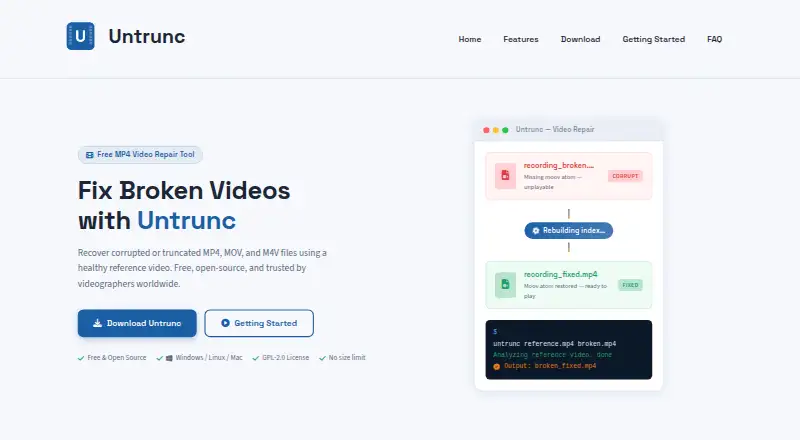
What Untrunc is
Untrunc is a free program for repairing corrupted or truncated MPEG-4 video files. It uses an intact reference clip to reconstruct missing or damaged index information, rebuilding the file structure without re-encoding or altering the raw media. Supported containers are MP4, MOV, M4V, and 3GP. The reference needs to come from the same camera and use the same recording settings as the damaged file. Repairs run locally, with no video uploads or telemetry, and the software has no file-size limit; streaming mode can handle files larger than available RAM. Windows downloads include both a graphical interface and command-line tool, while the site describes command-line use on other platforms. Untrunc is available for Windows, macOS, and Linux, including self-hosted use. The site describes support for GoPro footage and Sony XAVC, and says the anthwlock fork adds compatibility and performance improvements. An optional stretch mode can adjust audio duration to match recovered video. Licensed under GPL-2.0, it is free for personal and commercial use, but cannot recover empty files, damaged raw video data, or non-MPEG-4 containers such as AVI and MKV.
Good
- Free for personal and commercial use.
- Repairs run offline on local files.
- Supports MP4, MOV, M4V, and 3GP.
- No file-size limit; streaming handles files larger than RAM.
- Windows includes a graphical and command-line interface.
Watch out
- A healthy reference from the same camera is required.
- Cannot recover empty files or damaged raw video data.
- Does not support AVI or MKV containers.
- Technical support is directed to the anthwlock GitHub Issues page.
Who it suits
Untrunc may suit action-camera users, drone pilots, dashcam owners, screen recorders, security-camera operators, and videographers with supported damaged files and a matching reference clip.
Verdict
Untrunc offers local repair for supported MPEG-4 containers when a suitable reference clip is available. Its stated limits exclude empty files, damaged raw media, and non-MPEG-4 formats.
Plans and prices
From Untrunc's own pricing page, checked 9 Oct 2026.
| Plan | Price | What it gives you |
|---|---|---|
| Free | Free | No usage or file-size limits · GPL-2.0 · Requires a healthy reference video from the same camera and recording settings · Free to download and use; no license fees or subscriptions. |
The facts
Each one read from Untrunc's own pages, with the date it was checked.
What it does
- Audio sync
- An optional stretch mode can adjust audio duration to match the recovered video track.checked 9 Oct 2026
- Camera compatibility
- The site describes support for GoPro footage and Sony XAVC, with the anthwlock fork adding compatibility and performance improvements.checked 9 Oct 2026
- File-size limit
- The site says Untrunc has no file-size limit and can process files larger than available RAM using streaming mode.checked 9 Oct 2026
- Intended users
- The site names action-camera users, drone pilots, dashcam owners, screen recorders, security-camera operators, and videographers as users.checked 9 Oct 2026
- Interfaces
- The Windows download includes a command-line tool and a graphical interface; the site also describes a command-line workflow for other platforms.checked 9 Oct 2026
- License
- The software is described as open source under the GPL-2.0 license and free for personal and commercial use.checked 9 Oct 2026
- Limitations
- The site says Untrunc cannot recover empty files, raw video data that is itself corrupted, or non-MPEG-4 containers such as AVI and MKV.checked 9 Oct 2026
- Privacy
- The site says repairs run offline on local files, with no video uploads or telemetry.checked 9 Oct 2026
- Purpose
- Untrunc repairs corrupted or truncated MPEG-4 video files by using a healthy reference video to reconstruct missing or damaged index metadata.checked 9 Oct 2026
- Reference requirement
- The reference video should come from the same camera and use the same recording settings as the damaged file.checked 9 Oct 2026
- Repair method
- It rebuilds the file structure without re-encoding or modifying the raw media data.checked 9 Oct 2026
- Support
- The site directs users to the anthwlock GitHub Issues page for technical support and says the informational website does not provide software support.checked 9 Oct 2026
- Supported formats
- The site lists MP4, MOV, M4V, and 3GP as supported container formats.checked 9 Oct 2026
Where it runs
- Platforms
- The site lists Windows binaries and Linux and macOS options through source builds, Docker, Snap, or Homebrew.checked 9 Oct 2026
The full review of Untrunc
Untrunc is a free, open-source tool for repairing damaged or truncated MPEG-4 video files when you have a healthy clip from the same camera and recording settings. It is best suited to people who can supply that reference and are comfortable using a local repair workflow; its narrow format support is the main reason to look elsewhere.
Overview
Untrunc reconstructs missing or damaged index metadata in MP4, MOV, M4V, and 3GP containers. It rebuilds the file structure without re-encoding or altering the raw media, a practical advantage when the underlying video and audio data remain intact. It cannot rescue an empty file or raw media that is itself corrupted, and it does not handle containers such as AVI or MKV.
The reference clip is central to the process: it should come from the same camera with the same recording settings. That makes Untrunc a focused repair option rather than a general-purpose fix for arbitrary broken videos. Repairs run locally and offline, without uploads or telemetry, which suits footage users prefer to keep on their own devices.
Key features
- Container repair: MP4, MOV, M4V, and 3GP are supported. The tool targets container structure and index metadata, not damaged raw video data.
- Reference-based reconstruction: A healthy clip from the same camera and recording settings is required. Users without a suitable sample cannot use the core repair method.
- Large-file handling: There is no file-size limit, and streaming mode can process files larger than available RAM. That avoids a stated memory ceiling, though it does not expand the formats or damage types Untrunc can repair.
- Command line and GUI: The Windows download includes both a command-line tool and graphical interface; other platforms use a command-line workflow. Windows users have a choice of interface, while users elsewhere should be prepared to work at the command line.
- Camera support and audio: The project describes support for GoPro footage and Sony XAVC, with the anthwlock fork adding compatibility and performance improvements. Optional stretch mode can adjust audio duration to match the recovered video track.
- Local, open-source use: Untrunc is GPL-2.0 software, free for personal and commercial use, with offline local-file repairs and no telemetry.
Pricing
Free — free: Download and use the software without license fees or subscriptions. There are no usage or file-size limits, and the GPL-2.0 license permits personal and commercial use. The trade-off is not a quota or seat cap, but the requirement for a healthy reference clip with matching camera and recording settings, plus the supported-container and damage limits.
There is no free trial because the software is free to download and use. Technical support is directed to the anthwlock GitHub Issues page; the informational website does not provide software support.
Platforms
Untrunc supports Windows, macOS, and Linux, and is also categorized as self-hosted. The Windows download offers a graphical interface and command line; the described workflow on other platforms is command-line based.
Who it's for
Untrunc is a sensible choice for action-camera users, drone pilots, dashcam owners, screen recorders, security-camera operators, and videographers whose MPEG-4 footage has damaged or missing index metadata and who can provide a matching reference. Its local processing and lack of file-size limits also suit people handling large clips or footage they do not want to upload.
It is not the right tool for AVI or MKV files, empty files, or footage whose raw media data is corrupted. It is also a poor fit when no suitable reference clip exists or when a non-Windows user needs a graphical workflow.
Pros and cons
- Pro: No usage or file-size limits, with streaming mode for files larger than available RAM, makes it viable for large recordings without a stated quota.
- Pro: Local offline repair without uploads or telemetry keeps footage on the user's device.
- Pro: It repairs container structure without re-encoding or modifying raw media, preserving intact media data.
- Con: The same-camera, same-settings reference requirement can rule it out when no comparable healthy clip is available.
- Con: Support is limited to the anthwlock GitHub Issues page; the informational site does not provide software support.
- Con: AVI, MKV, empty files, and corrupted raw video data are outside its repair scope.
Alternatives
For a broader repair directory, browse File Repair Software or Video Repair Software.
- IntactFile is a better fit for users seeking a multi-category service across web and desktop platforms, but its free tier limits video to three repairs per day and 50 MB per video.
- DiskInternals ZIP Repair is for Windows users repairing ZIP archives of any size, not MPEG-4 video.
- Restore.Media is an option for users who prefer an automatic recovery service across web and mobile platforms; automatic recovery is billed per file at $4.99, paid once, with price varying by repaired file size.
- Recovery Toolbox File Undelete Free is for recovering deleted files from NTFS drives on Windows rather than repairing video containers.
- Remo Repair Word repairs .doc and .docx files on Windows, so it suits document rather than video repair.
- Fix.Video is a paid alternative for users considering file-based video repair; its 10-file plan costs $59, paid once.
- lzip is another free tool available on Linux, macOS, Windows, and self-hosted environments.
- 3-Heights PDF Analysis & Repair Tool is a paid alternative with a free trial for PDF work.
Verdict
Choose Untrunc if you need to repair supported MPEG-4 footage locally, have a matching healthy reference clip, and want an unrestricted free tool that does not re-encode the media. Look elsewhere if the file is an unsupported container, its raw video data is damaged, or you need repair without a suitable reference.
Getting started
- Visit https://untrunc.com/.
- Download the free software for Windows, macOS, or Linux.
- Provide the damaged video and a healthy reference from the same camera and recording settings.
- Use the Windows graphical interface or command-line tool, or the command-line workflow described for other platforms.
- If needed, use stretch mode to adjust audio duration to the recovered video track.
Limits worth knowing
Untrunc cannot repair empty files, raw video data that is itself corrupted, or non-MPEG-4 containers such as AVI and MKV. Repair also requires a healthy reference video from the same camera with matching recording settings.
Questions
How much does Untrunc cost?
It is free to download and use, with no license fees or subscriptions.
Is Untrunc open source?
Yes. It is licensed under GPL-2.0 and is free for personal and commercial use.
Which video containers does it support?
The listed formats are MP4, MOV, M4V, and 3GP.
Which platforms can run it?
Untrunc is available for Windows, macOS, and Linux, including self-hosted use.
Does it upload videos?
No. Repairs run offline on local files, with no video uploads or telemetry.
Where can users seek technical support?
The site directs users to the anthwlock GitHub Issues page; its informational website does not provide software support.
Alternatives to Untrunc
- 1

IntactFile
Free planWebAPILinuxmacOS8.7From €59 a year - 2
Remo Repair Word
Free planWindows7.5Free plan - 3
Restore.Media
AndroidiOSWebmacOS7.5$4.99 one-time - 4

Recovery Toolbox File Undelete Free
Free planWindows7.4Free plan - 5

Stellar Repair for Video
WebmacOSWindows7.3$49.99 one-time - 6
EaseUS Fixo
WebmacOSWindows7.2From $40.95 a year