
EaseUS Video Repair
EaseUS Video Repair is a video repair service with browser-based and desktop options for Windows and macOS.
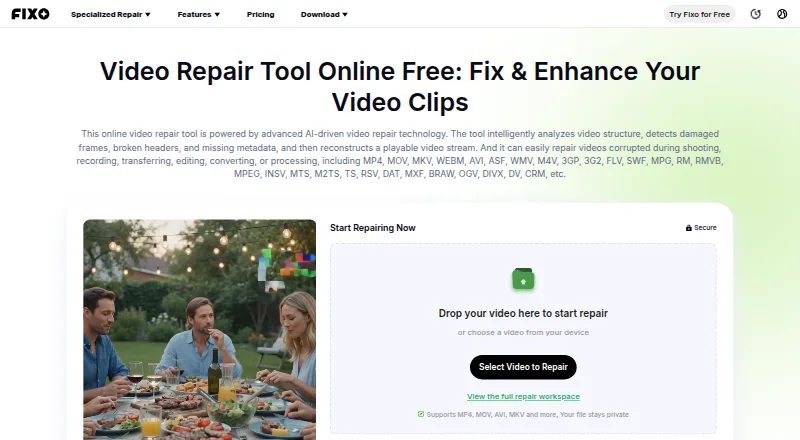
What EaseUS Video Repair is
EaseUS Video Repair is a video repair service with browser-based and desktop options for Windows and macOS. It examines video structure for damaged frames, broken headers, or missing metadata, then rebuilds a playable stream. It lists repair targets ranging from blurry, flickering, corrupted, lagging, or shaky footage to missing audio, subtitles, and metadata. The online process is to upload a video, have its data checked and repaired, preview playback, and download a separate copy. Supported formats include MP4, MOV, MKV, WEBM, AVI, WMV, M4V, 3GP, FLV, MTS, MXF, and BRAW. Browser use needs no installation but requires internet and is limited to files under 100 MB. EaseUS says a few videos can be repaired free; more files or advanced features require an upgrade. Desktop repair offers local, offline processing and unlimited file size. Repair Pro costs $39.95 a month, $40.95 a year, or 99.95 USD one time; each license allows one desktop activation.
Good
- Free repairs available for a few videos
- Previews playback before saving a separate copy
- Supports numerous listed video formats
- Desktop option works offline and locally
Watch out
- Online files must be under 100 MB
- Online repair requires an internet connection
- More files or advanced features require paid upgrade
- A license supports one desktop activation
Who it suits
It suits people trying to restore damaged or unplayable videos from phones, cameras, drones, or SD cards. Choose the browser workflow for smaller files, or desktop repair for offline use and unlimited file size.
Verdict
EaseUS Video Repair offers browser and desktop routes for repairing video files, with preview and a separate repaired download in the online workflow. The online size and internet limits matter, while desktop repair is the option for offline, local processing and larger files.
Plans and prices
From EaseUS Video Repair's own pricing page, checked 28 Sep 2026.
| Plan | Price | What it gives you |
|---|---|---|
| Repair Pro — 1 Month License | $39.95 a month | Unlimited video, photo, file, and audio repairs · +1500 AI Credits/mo · one desktop activation · $39.95/month; auto-renew |
| Repair Pro — 1 Year License | $40.95 a year | Unlimited video, photo, file, and audio repairs · +3600 AI Credits/yr · one desktop activation · $40.95/year; auto-renew |
| Repair Pro — Lifetime License | $99.95, paid once | Unlimited video, photo, file, and audio repairs · +7200 AI Credits · one desktop activation · $99.95 one time |
The facts
Each one read from EaseUS Video Repair's own pages, with the date it was checked.
Where it runs
- Browser access
- The online repair page says it runs in a browser with no installation required.checked 28 Sep 2026
The company
- Company history
- EaseUS says it was formally established in 2004.checked 28 Sep 2026
- Founded
- 2004checked 28 Sep 2026
What it does
- Credits
- The pricing page says included AI Credits can be used for credit-based features such as image generation and video generation, and monthly and yearly plan credits expire at the end of the subscription term.checked 28 Sep 2026
- Desktop operating systems
- EaseUS's product article describes Fixo Video Repair as available for Windows and macOS.checked 28 Sep 2026
- Desktop option
- The product page describes desktop repair as supporting unlimited file size, advanced repair, automatic repair, local processing, offline use, and premium technical assistance.checked 28 Sep 2026
- License use
- Repair Pro can be used on the web and desktop with the same account, and one license supports one desktop activation.checked 28 Sep 2026
- Online limit
- The comparison on the product page lists online repair file size as under 100 MB and says online repair requires an internet connection.checked 28 Sep 2026
- Privacy and security
- The product comparison says online files are processed over an encrypted connection and desktop repair offers privacy and local processing; the page also describes original files as untouched.checked 28 Sep 2026
- Purpose
- The AI-driven repair tool analyzes video structure, detects damaged frames, broken headers, and missing metadata, and reconstructs a playable video stream.checked 28 Sep 2026
- Repair issues
- The service describes repairs for blurry, flickering, corrupted, unplayable, lagging, stuttering, slow, shaky, or glitchy videos, as well as missing audio, subtitles, and metadata.checked 28 Sep 2026
- Supported formats
- The online tool lists support for formats including MP4, MOV, MKV, WEBM, AVI, WMV, M4V, 3GP, FLV, MTS, MXF, BRAW, and others.checked 28 Sep 2026
- Supported sources
- The service says it can repair videos from cameras, phones, drones, and SD cards, and names Canon, Nikon, Sony, GoPro, and DJI among camera brands.checked 28 Sep 2026
- Workflow
- Its online workflow is to upload the video, check and repair its data, preview playback, and download a separate repaired copy.checked 28 Sep 2026
Money
- Free use
- EaseUS says users can repair a few videos for free, with a paid upgrade required for more files or advanced features.checked 28 Sep 2026
Alternatives to EaseUS Video Repair
- 1

IntactFile
Free planWebAPILinuxmacOS7.9From €59 a year - 2
Minitooler Video Repair
Free planWeb6.8From $5 a month - 3
Restore.Media
AndroidiOSWebmacOS6.8$4.99 one-time - 4

Stellar Repair for Video
WebmacOSWindows6.8$49.99 one-time - 5

RepairMyVideo
Free planWeb6.6Free plan - 6
Fix.Video
WebmacOSWindows6.4From $99 a month