MiniMeters
MiniMeters is an audio metering application and plug-in suite for Windows, macOS, and Linux.
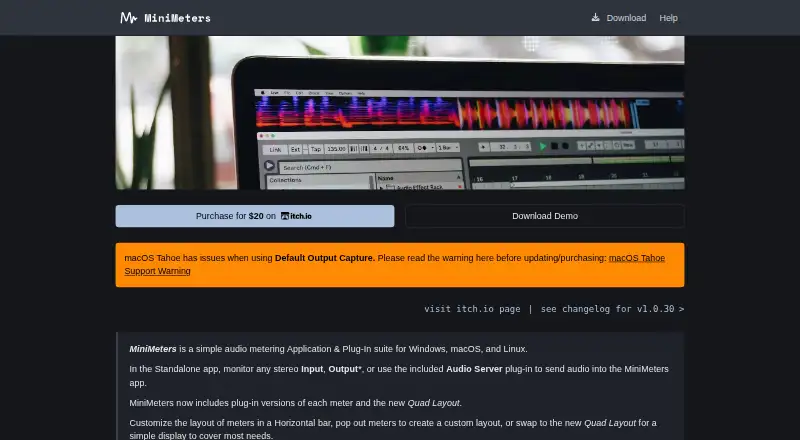
What MiniMeters is
MiniMeters is an audio metering application and plug-in suite for Windows, macOS, and Linux. It can monitor stereo input or supported system output, or receive audio through its Audio Server plug-in. Its displays include VU, waveform, spectrogram, spectrum, stereometer, loudness, and oscilloscope views. Meters can sit in a horizontal bar, in separate windows, or in Quad Layout. The app can record audio and clip the previous 10 or 60 seconds of received audio. Individual plug-ins are offered in VST3, CLAP, and Audio Unit formats, though a compatible host is required. MiniMeters shows measurements rather than changing the audio. Its demo has no time limit, but includes only Waveform and Loudness modules and displays demo text on screen. The paid product costs 20.00 USD once, with a minimum price of $20 USD, and includes the standalone app, Audio Server plug-in, and meter plug-ins. Listed minimums include Windows 10, macOS 10.15, or Linux kernel 5.4.0-174; macOS 14.2 is required for audio output capture.
Good
- Offers seven types of audio meter displays.
- Meters can be arranged in three layouts.
- Can capture the previous 10 or 60 seconds.
- Includes standalone and plug-in components.
- Demo has no time limit.
Watch out
- Demo is limited to Waveform and Loudness modules.
- Demo text appears in the middle of the screen.
- Audio plug-ins require a compatible host.
- macOS 14.2 is required for output capture.
Who it suits
MiniMeters suits people who want to inspect stereo audio with several meter views on Windows, macOS, or Linux. It may also suit users who want to record audio or capture a recent segment for review.
Verdict
MiniMeters offers a range of ways to inspect audio, along with recording and recent-audio clipping. The demo is useful for trying its two included modules, but the full meter set is part of the paid product.
Plans and prices
From MiniMeters's own pricing page, checked 15 Oct 2026.
| Plan | Price | What it gives you |
|---|---|---|
| Demo | Free | Waveform and Loudness modules only · on-screen demo text · no time limit |
| MiniMeters | $20, paid once | Standalone app · Audio Server plug-in · VST3, Audio Unit and CLAP meter plug-ins · Windows, macOS and Linux · $20.00 USD or more; minimum $20 |
The facts
Each one read from MiniMeters's own pages, with the date it was checked.
What it does
- Audio capture
- The standalone app can capture default audio devices on Windows, macOS 14.2 or later and Linux, subject to system support.checked 15 Oct 2026
- Audio monitoring
- The standalone app can monitor stereo input or supported system output, or receive audio from the Audio Server plug-in.checked 9 Oct 2026
- Audio routing integrations
- The help pages provide setup guides for Audio Hijack, SoundSource, Sound Siphon, and Sonarworks SoundID on macOS.checked 9 Oct 2026
- DAW routing
- The Audio Server plug-in sends audio from a DAW or plug-in host into MiniMeters.checked 15 Oct 2026
- Demo limits
- The no-time-limit demo provides only Waveform and Loudness modules and places demo text in the middle of the screen.checked 9 Oct 2026
- Documentation
- The help center covers installation, audio routing, updates, window management, themes, troubleshooting, crash reports and known limitations.checked 15 Oct 2026
- Independent review
- Polarity describes MiniMeters as both a standalone visualizer and a DAW plug-in for real-time analysis and persistent meter visibility.checked 15 Oct 2026
- Initial release
- The EULA states that MiniMeters version 1.0.0 was released on August 1, 2025.checked 15 Oct 2026
- Layouts
- Meters can be arranged in a horizontal bar, separate pop-out windows or a Quad layout.checked 15 Oct 2026
- Licence
- The EULA gives purchasers installation rights on personally owned computers, restricts redistribution and states that MiniMeters owns its software and intellectual property.checked 15 Oct 2026
- Limit: analyzer orientation
- The developer said changing the orientation of plug-in analyzers was not supported at the time of the discussion.checked 15 Oct 2026
- Limit: input switching
- A user requested automatic switching between Audio Server and main outputs; the developer said a more convenient switch was planned for version 1.1.checked 15 Oct 2026
- Limit: no processing
- An itch.io user response explains that MiniMeters only measures audio and cannot limit or otherwise change a track.checked 15 Oct 2026
- Limit: timeline API
- Waveform timeline bar numbers can be wrong after automated time-signature changes in VST3 and Audio Unit plug-ins because of host API limitations.checked 15 Oct 2026
- Meter modules
- The product includes VU, Waveform, Spectrogram, Spectrum, Stereometer, Loudness and Oscilloscope modules.checked 15 Oct 2026
- Meters
- Its modules include VU, Waveform, Spectrogram, Spectrum, Stereometer, Loudness, and Oscilloscope.checked 9 Oct 2026
The company
- Company profile
- The maker describes himself as a Chicago-based independent software developer and electronic musician.checked 15 Oct 2026
- Headquarters
- Joseph Lyncheski's GitHub profile lists Chicago, Illinois.checked 15 Oct 2026
- Maker
- The product is made by Direct, identified on the developer's site as Joseph Lyncheski.checked 15 Oct 2026
Where it runs
- Limit: macOS Tahoe
- The official issue page reports unstable output capture on macOS Tahoe, especially with CPU-intensive Ableton Live projects, and says workarounds are incomplete.checked 15 Oct 2026
- Limit: missing mobile app
- An itch.io commenter requested an iPhone meter app, indicating that the published product is desktop-focused.checked 15 Oct 2026
- Linux requirements
- Linux requires kernel 5.4.0-174 or newer and x86_64 or arm64; the product is tested on Ubuntu 20.04 or newer.checked 15 Oct 2026
- macOS requirements
- macOS requires version 10.15 or newer on Intel or Apple Silicon; output capture requires macOS 14.2 or later.checked 15 Oct 2026
- macOS Tahoe issue
- The maker warns that macOS Tahoe has issues with Default Output Capture and advises users to read its support warning.checked 9 Oct 2026
The full review of MiniMeters
MiniMeters is an audio metering app and plug-in suite for people who need to inspect stereo audio on Windows, macOS, or Linux. It is best suited to users who want several measurement views and flexible monitoring in one package. Its appeal is breadth; its free demo is limited to two modules and keeps demo text on screen.
Overview
MiniMeters displays audio measurements rather than processing or changing the sound. The standalone app can monitor stereo input, supported system output, or audio received through its Audio Server plug-in. It supports real-time and offline file analysis, with a maximum of two channels.
That makes it a focused choice for stereo inspection, not multichannel analysis or audio processing. System output capture requires macOS 14.2 or later, and the maker warns of Default Output Capture issues on macOS Tahoe.
Key features
- Seven meter modules: VU, Waveform, Spectrogram, Spectrum, Stereometer, Loudness, and Oscilloscope offer distinct ways to examine level, frequency, stereo, and waveform behavior. The variety is valuable when one monitoring setup needs more than a single view.
- Flexible layouts: Arrange meters in a horizontal bar, separate windows, or Quad Layout. That gives users a choice between a compact overview and a spread-out workspace.
- Recording and clipping: MiniMeters can record audio directly or clip the previous 10 or 60 seconds of received audio. The clipping option is useful for retaining a recent passage without starting a recording beforehand.
- Standalone and plug-in use: Individual plug-ins are available in VST3, CLAP, and Audio Unit formats, but require a compatible host. macOS setup guides cover Audio Hijack, SoundSource, Sound Siphon, and Sonarworks SoundID, which can help users route audio into the app.
- Stick Mode: This works on Windows and supported Linux window systems, but not Gnome Wayland. Linux users on that desktop environment should not count on this window behavior.
Pricing
The no-time-limit Demo costs nothing and includes only Waveform and Loudness, with demo text over the middle of the screen. It is a practical way to see whether those two views suit your workflow, but not a clean or complete substitute for the paid suite.
The MiniMeters plan costs $20, paid once, billed at $20.00 USD or more, with a $20 USD minimum price. It includes the standalone app, Audio Server plug-in, and meter plug-ins for Windows, macOS, and Linux. This is the plan for users who need the full meter set or the included plug-in options; the demo gives up most modules and has a persistent visual overlay. The maker says the product has no copy protection and can be downloaded and installed.
Platforms
MiniMeters supports Windows, macOS, and Linux. Minimum requirements include Windows 10, macOS 10.15, or Linux kernel 5.4.0-174; macOS 14.2 is required for audio output capture. The product page offers support through Discord and email.
Who it's for
Choose MiniMeters if you want a set of complementary stereo meters, layout options, and a way to record or clip incoming audio across desktop platforms. It is less suitable if you need more than two channels, a processor that changes audio, or reliable Default Output Capture on macOS Tahoe.
Pros and cons
- Pro: Seven modules cover a broad range of measurement views in one suite.
- Pro: The standalone app, Audio Server plug-in, and individual meter plug-ins support different monitoring setups.
- Pro: Recording and 10- or 60-second clipping provide ways to retain audio directly from a monitoring session.
- Con: The two-channel maximum rules it out for multichannel analysis.
- Con: The free demo omits five modules and overlays the display, so it is limited for ongoing use.
- Con: macOS output capture has version-specific constraints, including a Tahoe warning; Stick Mode also excludes Gnome Wayland.
Alternatives
MediaInfo is a free alternative from MediaArea, an open-source software company focused on digital media analysis; consider it when a free option across desktop, mobile, web, and self-hosted platforms is a better fit.
Open Audio Analyzer is a free alternative published by Jonas Grunau; consider it when you want to compare another no-cost option available across desktop and mobile platforms.
Open Sound Meter offers a free Community desktop version, which its maker describes as open source and invites contributions to on GitHub; choose it if open-source desktop software is a priority.
Room EQ Wizard offers a free plan with single-channel capture, room and audio measurement, a real-time analyzer, and EQ tools; it is a better fit when those room-measurement and EQ capabilities matter more than MiniMeters' seven-module stereo suite.
Spek is free and open source, with no paid plans stated; consider it if that model is preferable to MiniMeters' paid full suite.
Blue Cat's FreqAnalyst is a free real-time spectrum analyzer plug-in for macOS and Windows; choose it when a focused spectrum-analysis plug-in is enough.
Dusk Audio Spectrum Analyzer is another free alternative for Linux, macOS, and Windows.
Friture is free and open source for Windows, macOS, and Linux; consider it if you want a no-cost, open-source desktop alternative.
For a broader category comparison, see Audio Analysis Software.
Verdict
MiniMeters is a strong fit for stereo-focused users who want multiple measurement views, flexible layouts, and direct recording or recent-audio clipping in a cross-platform package. The full suite is the reason to pay; look elsewhere if two channels are not enough, you need audio processing, or the demo's two modules and screen overlay are deal-breakers.
Alternatives to MiniMeters
- 1
MediaInfo
Free planOpen sourceAndroidiOSWebAPI8.4From $2.99 a year - 2

Open Audio Analyzer
Free planOpen sourceAndroidiOSWebAPI7.8Free plan - 3
ACRCloud
AndroidiOSWebAPI7.1 - 4
Smaart
AndroidiOSAPImacOS6.8From $159 a year - 5
SpectraView Meter
Free planiOSmacOS6.8Free plan - 6

Decibel
AndroidiOSmacOSWindows6.7$89.40 one-time