MediaInfo
MediaInfo displays technical and tag data for video and audio files.
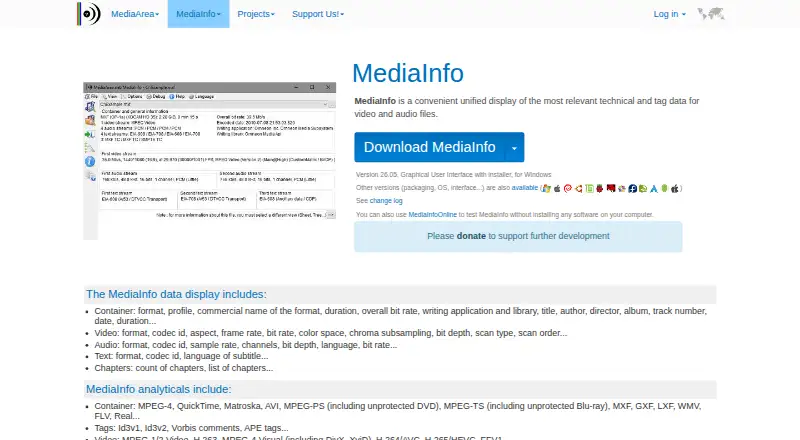
What MediaInfo is
MediaInfo displays technical and tag data for video and audio files. It reports container, video, audio, text, and chapter details, and reads formats such as MPEG-4, Matroska, AVI, MXF, H.264/AVC, H.265/HEVC, MP3, AAC, FLAC, SRT, and ASS. Results are available in text, sheet, tree, or HTML views and can be exported as text, CSV, or HTML. MediaInfo comes as a graphical interface, command-line tool, and library, and can connect with the operating system shell through drag-and-drop and context-menu actions. The software is open source under a BSD-style license and is listed at 0.00 USD. MediaInfoOnline provides a browser option and says files remain on the user's machine rather than being uploaded to MediaArea's servers; it is identified as a technology preview. Downloads are listed for Windows, macOS, iOS, Android, and multiple Linux distributions, alongside a JavaScript module and source builds. MediaArea offers integration, maintenance, custom development, and customized support services, with prices not listed.
Good
- Reports container, stream, text, and chapter data
- Offers text, sheet, tree, and HTML views
- Available as GUI, command-line tool, and library
- Open-source software under a BSD-style license
Watch out
- MediaInfoOnline is a technology preview
- Professional services are priced separately
Who it suits
It suits people who need technical details about media files, including users who prefer a graphical interface, command line, or library. Developers can also use the SDK and source build instructions.
Verdict
MediaInfo is a free, open-source option for inspecting technical audio and video metadata in several interface styles. Treat the online version as a preview rather than a finished service.
Plans and prices
From MediaInfo's own pricing page, checked 14 Oct 2026.
| Plan | Price | What it gives you |
|---|---|---|
| Free MediaInfo | Free | GUI, CLI and library editions · desktop and mobile downloads · source available |
| MediaInfo | Free | Free software; BSD-style license |
| macOS app | $0.99, paid once | macOS app · core features included · one-time Mac App Store price |
| More features (yearly) | $2.99 a year | additional preferences · multi-file comparison · yearly |
| More features (lifetime) | $7.99, paid once | additional preferences · multi-file comparison · one-time in-app purchase |
| Professional services | Priced on request | Development and consulting · Support with guaranty of service · Non-regression tests · Services priced separately; contact MediaArea |
The facts
Each one read from MediaInfo's own pages, with the date it was checked.
What it does
- API and SDK
- Developers can embed MediaInfoLib through static or dynamic interfaces, with SDK guidance for supported languages, initialization, file opening and field retrieval.checked 14 Oct 2026
- Dependencies
- The licence page identifies ZenLib under zlib terms and optional Qt, WxWidgets, TinyXML-2, zlib, libcurl, libmms and other components.checked 14 Oct 2026
- Distribution options
- The download page lists distro packages, a JavaScript module and source builds for other operating systems or CPU architectures.checked 14 Oct 2026
- Documentation and support
- The support area provides FAQs, format lists, SDK and source-build material, issue trackers, forums and paid integration or maintenance services.checked 14 Oct 2026
- Downloads
- The download page lists releases for Windows, macOS, iOS, Android, and multiple Linux distributions, plus a JavaScript module and source builds.checked 30 Sep 2026
- Export
- Reports can be exported as text, CSV or HTML from the desktop product.checked 14 Oct 2026
- Formats
- Supported analysis includes families such as MP4, QuickTime, Matroska, AVI, MPEG, MXF, MPEG-TS, WMV, FLV, Real, FLAC, AAC, DTS and many subtitle formats.checked 14 Oct 2026
- Integration
- MediaInfo can integrate with the operating system shell through drag and drop and context menus.checked 30 Sep 2026
- Interfaces
- MediaInfo is distributed as graphical, command-line and dynamic-library interfaces.checked 14 Oct 2026
- Internationalization
- The software supports displaying languages across operating systems and accepts volunteer localization.checked 14 Oct 2026
- Language bindings
- The DLL documentation gives examples for C, C++, GCC, MinGW, Borland, Visual C++, Visual Basic, C# and J#.checked 14 Oct 2026
- Licence
- MediaInfo is open source under a BSD-style two-clause licence permitting redistribution and modification with required notices and warranty disclaimers.checked 14 Oct 2026
- License
- MediaInfo is open-source software under a BSD-style license.checked 30 Sep 2026
- Limit: detection accuracy
- VideoHelp reviews report occasional missing or inaccurate bitrate, MKV, DVD and MPEG-TS information, including crashes in older versions.checked 14 Oct 2026
- Limit: installer history
- SourceForge and Free-Codecs reviews complain that older installers bundled OpenCandy or unrelated offers and that portable builds were unavailable at times.checked 14 Oct 2026
- Limit: interface
- VideoHelp reviewers repeatedly criticize the graphical interface as dated, ugly or awkward and request a redesign.checked 14 Oct 2026
- Limit: paid features
- A Mac App Store reviewer objects to unclear Pro feature boundaries and extra payment for preferences or comparison functionality.checked 14 Oct 2026
- Metadata
- It reports container, video, audio, text, and chapter information.checked 30 Sep 2026
Where it runs
- Browser option
- MediaInfoOnline runs in a browser and states that files stay on the user's machine and are not uploaded to MediaArea's servers.checked 30 Sep 2026
The company
- Company
- MediaArea.net SARL is described as a French company founded in 2007 and wholly held by Jérôme Martinez, with reported shareholder equity of €125,000.checked 14 Oct 2026
- Company profile
- LinkedIn lists MediaArea as self-owned, headquartered in Curienne, France, founded in 2007 and employing 2–10 people.checked 14 Oct 2026
- Founded
- 2007checked 28 Sep 2026
- Headquarters
- Pignan, Francechecked 28 Sep 2026
- Maker
- MediaArea describes itself as an open-source software company focused on digital media analysis.checked 30 Sep 2026
The full review of MediaInfo
Overview
MediaInfo examines technical and tag metadata in audio and video files, making it a practical choice for anyone who needs to check what a file contains. Its strongest case is breadth: several ways to inspect and export reports, with graphical, command-line, and library versions for different workflows.
It is a metadata inspector, not a real-time analysis tool. Choose it to identify a file’s streams and properties; look elsewhere for live audio measurement.
Key features
Metadata across common media formats
MediaInfo reports container, video, audio, text, and chapter information. It reads formats including MPEG-4, Matroska, AVI, MXF, H.264/AVC, H.265/HEVC, MP3, AAC, FLAC, SRT, and ASS. That range makes it useful for checking a file’s composition and tags, rather than relying on its filename or a single summary.
Views and workflows
Reports can be viewed as text, sheet, tree, or HTML, then exported as text, CSV, or HTML. The choice is useful when a quick readable report is enough as well as when results need to be passed into another workflow. A graphical interface suits direct inspection; command-line and library versions offer other ways to work with the software. Drag-and-drop and context-menu integration can also fit file checks into the operating system’s shell.
MediaInfo can analyze files offline, but it does not offer real-time analysis. MediaInfoOnline provides a browser option and says files stay on the user’s machine rather than being uploaded to MediaArea’s servers. It is described as a technology preview, so it is better treated as an option to explore than as a finished service.
Open-source project and support
MediaInfo is open-source software under a BSD-style license. MediaArea describes itself as an open-source company focused on digital media analysis; the project dates to 2007 and is based in Pignan, France. Users can turn to FAQs, bug reports, feature requests, issue trackers, and a forum. Developers can use the SDK and source build instructions. MediaArea also offers paid integration, maintenance, custom development, and customized support. It says it collects minimal personal data, does not use it to track users, and does not sell it to other companies.
Pricing
The MediaInfo software costs nothing, with free software under a BSD-style license. There is no paid software tier or free trial to weigh against that offer. The free option is a strong fit for individuals and teams that need metadata inspection without a software charge.
Professional services have custom pricing and are billed separately. They cover development and consulting, support with a guarantee of service, and non-regression tests. This is the route for organizations that need paid integration or tailored assistance; it is not a required upgrade for using the free software.
Platforms
MediaInfo lists support for Android, iOS, Linux, macOS, self-hosted use, web, and Windows. Downloads include releases for Windows, macOS, iOS, Android, and multiple Linux distributions, along with a JavaScript module and source builds. The browser-based MediaInfoOnline preview is distinct from the downloadable software and carries its technology-preview caveat.
Who it's for
MediaInfo suits people who need to inspect or share technical details about audio and video files: media handlers checking streams, developers integrating analysis, and anyone trying to understand a file’s contents. Its multiple report views and export formats serve both quick checks and more structured workflows. It is not the right pick when the main need is live signal analysis.
Pros and cons
- Pros: Broad metadata coverage across container, video, audio, text, and chapter data helps reveal more than a basic file summary.
- Pros: Text, sheet, tree, and HTML views, plus text, CSV, and HTML exports, give readers practical ways to inspect or reuse results.
- Pros: Free, open-source software with graphical, command-line, and library versions supports a range of users and workflows.
- Cons: No real-time analysis means it cannot replace a live analyzer.
- Cons: MediaInfoOnline is a technology preview, making the browser option less suitable as a dependable finished service.
Alternatives
For audio-focused choices, Audio Analysis Software is the broader category to browse. Among individual options, Open Audio Analyzer is another free choice with Android, iOS, Linux, macOS, and Windows support. Open Sound Meter may fit readers who want a free desktop version described by its maker as open source, or its freemium model across iOS, Linux, macOS, and Windows.
Room EQ Wizard is the better match for room and audio measurement, real-time analysis, and EQ tools; its free plan includes single-channel capture, with a separate Pro upgrade at custom pricing. Youlean Loudness Meter suits readers who need loudness readouts and film, TV, and gaming presets; its free plan never expires and supports mono, stereo, and 5.1 channels, but has no command-line tool.
Voxengo SPAN is a free real-time FFT spectrum analyzer plugin for macOS and Windows. Blue Cat's FreqAnalyst is another free option for macOS and Windows. For API recognition, ACRCloud offers a 14-day free trial with full API access and no credit card required, rather than a free plan. Stoplight Elements is an open-source option for building API documentation blocks, not a media metadata inspector.
Verdict
Choose MediaInfo if you need a free, open-source way to inspect and export technical metadata from audio and video files, especially across a mix of file types or workflows. Its breadth and interface choices are the reason to pick it; its lack of real-time analysis is the reason to look elsewhere when live measurement is the goal.
Getting started
- Visit the MediaInfo website.
- Choose a listed release for Windows, macOS, iOS, Android, or a Linux distribution, or use the JavaScript module or source build.
- Install or run the version suited to your platform.
- Open a media file to inspect its details, or use MediaInfoOnline in a browser.
- Choose a text, sheet, tree, or HTML view, then export as text, CSV, or HTML if needed.
Questions
How much does MediaInfo cost?
The MediaInfo free plan is listed as free. MediaArea also offers professional services, which are priced separately.
Is MediaInfo open source?
Yes. MediaInfo is open-source software under a BSD-style license.
Which platforms are available?
The listed platforms are Android, iOS, Linux, macOS, self-hosted, web, and Windows. Releases are listed for Windows, macOS, iOS, Android, and multiple Linux distributions.
Can I use MediaInfo in a browser?
MediaInfoOnline runs in a browser and is described as a technology preview. It says files remain on the user's machine and are not uploaded to MediaArea's servers.
What can MediaInfo export?
It can export information as text, CSV, or HTML. Results can also be viewed as text, sheet, tree, or HTML.
Who makes MediaInfo?
MediaArea describes itself as an open-source software company focused on digital media analysis. It was founded in 2007 and is based in Pignan, France.
Alternatives to MediaInfo
- 1

Open Audio Analyzer
Free planOpen sourceAndroidiOSWebAPI7.8Free plan - 2
MiniMeters
Free planAPILinuxmacOSWindows7.3$20 one-time - 3
ACRCloud
AndroidiOSWebAPI7.1 - 4
Smaart
AndroidiOSAPImacOS6.8From $159 a year - 5
SpectraView Meter
Free planiOSmacOS6.8Free plan - 6

Decibel
AndroidiOSmacOSWindows6.7$89.40 one-time