Open Sound Meter
Open Sound Meter is a sound-measurement application for tuning audio systems in real time.
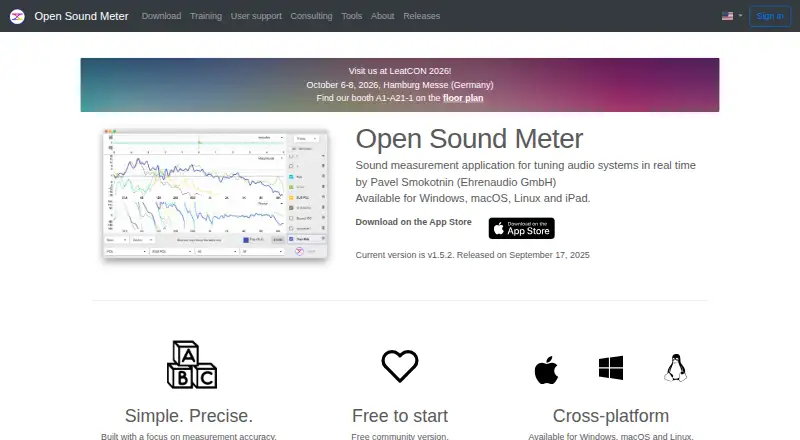
What Open Sound Meter is
Open Sound Meter is a sound-measurement application for tuning audio systems in real time. Its analysis views include spectrum, sound pressure level, magnitude and phase response, impulse response, coherence, group delay, and spectrogram. Measurement projects can be saved and reopened, with each measurement retaining its settings. Other tools include a signal generator, wavelength calculator, equalization and modelling, plus virtual summation, difference, and averaging. The desktop version is described by its maker as open source, and contributions are invited on GitHub. Desktop versions run on Windows, macOS, and Linux; the iPad app is separate. The Remote API can share active or stored measurements between Open Sound Meter instances and with third-party applications. Cloud services store measurement and settings data, while the maker says audio recordings and raw audio data are not transmitted to or stored in the Cloud. Results depend on microphones, audio hardware, calibration, settings, and measurement conditions; the software alone does not replace calibration or certification of the measurement chain. The Community desktop version is free for registered users.
Good
- Provides real-time spectrum and SPL analysis.
- Saves measurements with their settings.
- Includes signal generation, equalization, and modelling tools.
- Desktop version is described as open source.
- Remote API shares measurements with third-party applications.
Watch out
- iPad app is sold separately.
- Cloud data is retained for a limited period after subscription ends.
- Results depend on hardware, calibration, settings, and conditions.
- Software alone does not replace measurement-chain calibration or certification.
Who it suits
Open Sound Meter suits people tuning audio systems who need real-time measurement views and tools for comparing or modelling measurements. It may also suit users who want to save projects or share measurements through its Remote API.
Verdict
Open Sound Meter offers a wide set of measurement views and project tools for audio-system tuning. Results still depend on the measurement chain, and the maker says the software itself does not replace its calibration or certification.
Plans and prices
From Open Sound Meter's own pricing page, checked 2 Oct 2026.
| Plan | Price | What it gives you |
|---|---|---|
| Community | Free | Free desktop version for registered users · Windows, macOS, Linux |
| Desktop Pro | — | Windows, macOS, Linux · Cloud services not included · One-time payment; perpetual Pro entitlement |
| iPad app | — | iPad · Not included in Desktop Pro or Pro + Cloud · Sold separately on the Apple App Store |
| Pro + Cloud | — | Desktop Pro features and Cloud services during subscription · Up to five simultaneously activated devices for one user · Monthly or yearly; subscription renews automatically unless cancelled |
The facts
Each one read from Open Sound Meter's own pages, with the date it was checked.
What it does
- Accounts
- The privacy policy says account passwords are stored only as a hash and account data is retained while the account exists.checked 2 Oct 2026
- Additional tools
- Additional features include a wavelength calculator, virtual summation, difference and averaging, a signal generator, equalization and modelling.checked 2 Oct 2026
- Analysis
- Its measurements include real-time spectrum analysis, magnitude and phase response, impulse response, coherence, group delay, spectrogram and SPL.checked 2 Oct 2026
- Calibration caveat
- The maker says measurement results depend on microphones, audio hardware, calibration, settings and measurement conditions, and the software alone does not replace required calibration or certification of the measurement chain.checked 2 Oct 2026
- Cloud data
- Cloud features store measurement and settings data, but the maker says audio recordings and raw audio data are not transmitted to or stored in the Cloud.checked 2 Oct 2026
- Cloud retention
- After a Cloud subscription ends, data remains viewable for six months, hidden for a further six months, and then is deleted if the subscription is not renewed.checked 2 Oct 2026
- Hosting
- The maker says its website, accounts and Cloud services are hosted on a dedicated server in Germany operated by Hetzner Online GmbH.checked 2 Oct 2026
- Open source
- The maker describes the desktop version as open source and invites contributions on GitHub.checked 2 Oct 2026
- Project files
- Measurement projects can be saved and reopened, with each stored measurement including its settings.checked 2 Oct 2026
- Purpose
- Open Sound Meter is a sound measurement application for tuning audio systems in real time.checked 2 Oct 2026
- Remote API
- The Remote API shares active and stored measurements between Open Sound Meter instances and is also available to third-party applications.checked 2 Oct 2026
- Support
- Users can contact support by email or post in the Facebook group, and the maker offers paid consultations in Russian or English.checked 2 Oct 2026
Money
- Consultation price
- Paid consultations are listed from $100 for one session lasting 1–1.5 hours.checked 2 Oct 2026
Where it runs
- Device limit
- Desktop Pro and Pro + Cloud entitlements are for one user on up to five simultaneously activated devices.checked 2 Oct 2026
The company
- Founded
- 2018checked 28 Sep 2026
The full review of Open Sound Meter
Overview
Open Sound Meter is a real-time sound-measurement application for tuning audio systems. It best suits audio professionals and technically minded users who need several kinds of system measurements in one project. Its breadth is a strength, but the results are only as dependable as the measurement chain and setup behind them.
Key features
Analysis spans spectrum and SPL readings, magnitude and phase response, impulse response, coherence, group delay, phase delay, spectrogram, step response, impedance, Nyquist plots and crest factor. Real-time measurement and offline file analysis serve different workflows: live system tuning and reviewing recorded material. The range is useful for detailed work, though it makes this a specialist tool rather than a simple loudness meter.
Projects can be saved and reopened, with settings preserved for each measurement. A wavelength calculator, virtual summation, difference and averaging, signal generation, equalization and modelling add practical tools for comparing and shaping system measurements.
The Remote API can share active and stored measurements between Open Sound Meter instances and connect them to third-party applications. The desktop version is described by its maker as open source, with contributions invited on GitHub. Cloud services store measurement and settings data; audio recordings and raw audio data are not transmitted to or stored in the Cloud.
The maker says measurement quality depends on microphones, audio hardware, calibration, settings and conditions. The software alone does not replace required calibration or certification of the measurement chain. That caveat matters: the many analysis views cannot compensate for unsuitable or uncalibrated equipment.
Pricing
The Community plan is free for registered users on Windows, macOS and Linux. It is the no-cost way to use the desktop version, while Pro features require a separate entitlement.
Desktop Pro is a one-time payment for a perpetual Pro entitlement on Windows, macOS and Linux; pricing is custom pricing. It suits desktop users who want Pro without an ongoing Cloud subscription, but Cloud services are excluded.
Pro + Cloud uses custom pricing, billed monthly or yearly. It includes Desktop Pro features and Cloud services during the subscription, with automatic renewal unless cancelled. One user can activate it on up to five devices simultaneously. Cloud data remains viewable for six months after the subscription ends, hidden for a further six months, then deleted if the subscription is not renewed.
The iPad app is sold separately on the Apple App Store at custom pricing and is not included in either desktop entitlement. Paid consultations in Russian or English start at $100 for one session lasting 1–1.5 hours; support is also available by email or through the Facebook group.
Platforms
The Community and desktop Pro versions run on Windows, macOS and Linux. The iPad app is a separate purchase. The platform range covers major desktop systems, but an iPad user must budget separately.
Who it's for
Choose Open Sound Meter if you tune audio systems and want a broad set of measurement views, persistent project settings and tools for comparing measurements. It is less suitable if you need a straightforward meter, or expect software alone to certify a measurement chain.
Pros and cons
- Pro: A wide range of real-time views and offline file analysis supports system tuning beyond spectrum and SPL checks.
- Pro: Saved projects retain each measurement's settings, making measurement work easier to revisit.
- Pro: The Remote API can share measurements with other instances and third-party applications.
- Con: Pro entitlements are custom pricing, and Cloud services require a renewing subscription.
- Con: The iPad app is sold separately, not bundled with either desktop plan.
- Con: Reliable results still depend on the hardware, calibration and measurement conditions.
Alternatives
Audio Analysis Software is the category list for comparing more tools.
- Open Audio Analyzer is worth considering if you want a free option with Android support as well as desktop and iOS platforms.
- Room EQ Wizard suits users seeking free room and audio measurement, single-channel capture, a real-time analyzer and EQ tools on Linux, macOS or Windows.
- Youlean Loudness Meter is a better fit for loudness-focused work, with film, TV and gaming presets and LU, INT, TP, LRA, PLR and DR readouts; its free plan supports mono, stereo and 5.1 channels.
- MeldaProduction MAnalyzer is a free macOS and Windows effect included in MFreeFXBundle.
- Voxengo SPAN is a free real-time FFT spectrum analyzer plugin for macOS and Windows.
- Smaart is a paid alternative for Windows, macOS, iOS and Android.
- MediaInfo is a free option for digital media analysis across desktop, mobile, web and self-hosted platforms.
- AFMG SysTune is a paid Windows alternative.
Verdict
Open Sound Meter is a strong choice for audio-system tuning when a broad set of measurement views, reusable projects and integration tools matter. Its central limitation is that sound results depend on a properly calibrated measurement chain, while Pro and Cloud costs are custom-priced. Look elsewhere for a simpler meter or a tool whose scope better matches a narrower analysis task.
Getting started
- Open the Open Sound Meter website
- Register for the free Community desktop plan
- Install the desktop version on Windows, macOS, or Linux
- Choose Desktop Pro or Pro + Cloud if required
- Install the separately sold iPad app when using iPad
- Create or reopen a measurement project
Limits worth knowing
The Community plan is the free desktop version for registered users. Desktop Pro and Pro + Cloud entitlements allow one user on up to five simultaneously activated devices, while the iPad app is separate and Cloud services are excluded from Desktop Pro.
Questions
Is there a free plan?
Yes. The Community plan is a free desktop version for registered users on Windows, macOS, and Linux.
Which platforms are supported?
Desktop support covers Windows, macOS, and Linux. An iPad app is sold separately on the Apple App Store.
What does Pro + Cloud include?
It includes Desktop Pro features and Cloud services during a monthly or yearly subscription that renews automatically unless cancelled.
Does Desktop Pro include Cloud services?
No. Desktop Pro is a one-time perpetual entitlement, and Cloud services are not included.
Is Open Sound Meter open source?
The maker describes the desktop version as open source and invites contributions on GitHub.
What happens to Cloud data after a subscription ends?
Data remains viewable for six months, hidden for another six months, then deleted if the subscription is not renewed.
Alternatives to Open Sound Meter
- 1
MediaInfo
Free planOpen sourceAndroidiOSWebAPI8.4From $2.99 a year - 2

Open Audio Analyzer
Free planOpen sourceAndroidiOSWebAPI7.8Free plan - 3
MiniMeters
Free planAPILinuxmacOSWindows7.3$20 one-time - 4
ACRCloud
AndroidiOSWebAPI7.1 - 5
Smaart
AndroidiOSAPImacOS6.8From $159 a year - 6
SpectraView Meter
Free planiOSmacOS6.8Free plan