Friture
Friture is a free, open-source real-time audio analyzer for examining audio signals and room or receiver behavior.
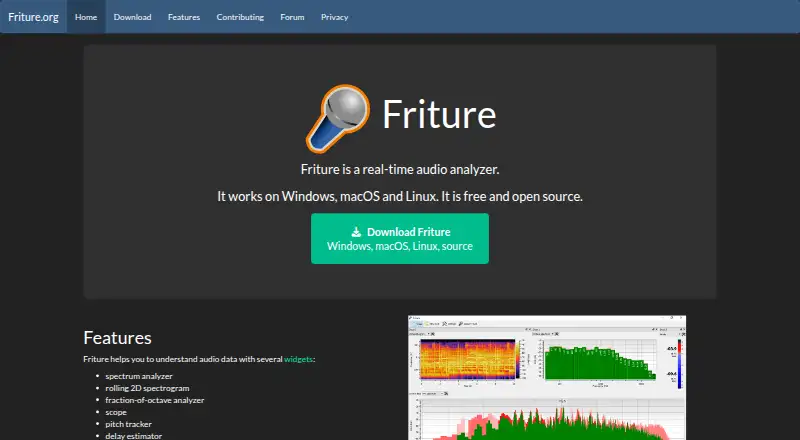
What Friture is
Friture is a free, open-source real-time audio analyzer for examining audio signals and room or receiver behavior. Its analysis views include a spectrum analyzer, rolling 2D spectrogram, fraction-of-octave analyzer, scope, pitch tracker, delay estimator, and level display. The spectrum widget shows frequency components, recent peaks, and the frequency of the global maximum, with configurable response time. The delay estimator uses cross-correlation to measure delay between two input channels and works only in two-channel mode. The level widget displays peak and RMS power in dBFS, with response times of 25 ms and 300 ms respectively. Friture also includes a generator for sine, pink noise, white noise, sweep, and burst signals. Downloads are offered for Windows, macOS, and Linux, including a Windows Microsoft Store option and a Linux AppImage. The project recommends checking distribution packages or using its PyPI package for other platforms, though some dependencies may need manual installation. Friture is licensed under GPLv3+. The application does not collect microphone or other personal data; the site says it uses no cookies and does not store or analyze user activity. The Windows installer is unsigned, and the macOS app is not notarized and may need manual whitelisting in Security settings.
Good
- Includes spectrum, spectrogram, scope, and pitch views.
- Signal generator offers five listed signal types.
- Free and open source under GPLv3+.
- Available for Linux, macOS, and Windows.
Watch out
- Delay estimation works only in two-channel mode.
- Windows installer is unsigned.
- macOS app is not notarized and may need whitelisting.
- Some dependencies may need manual installation.
Who it suits
Friture may suit people who need real-time views of audio signals, levels, or two-channel delay. It is available across Linux, macOS, and Windows, though users should note the platform-specific installation caveats.
Verdict
Friture provides a range of real-time audio analysis views and a signal generator without charge. Its installation caveats and two-channel restriction for delay estimation are worth considering for your setup.
Plans and prices
From Friture's own pricing page, checked 11 Oct 2026.
| Plan | Price | What it gives you |
|---|---|---|
| Friture | Free | Free and open source; Windows, macOS, and Linux |
The facts
Each one read from Friture's own pages, with the date it was checked.
What it does
- Analysis widgets
- It provides a spectrum analyzer, rolling 2D spectrogram, fraction-of-octave analyzer, scope, pitch tracker, and delay estimator.checked 11 Oct 2026
- Audio generator
- It includes a generator for sine, pink noise, white noise, sweep, and burst signals.checked 11 Oct 2026
- Audio levels
- The level widget displays peak power with a 25 ms response time and RMS power with a 300 ms response time, in dBFS.checked 11 Oct 2026
- Audio technology
- Friture uses PortAudio through sounddevice for cross-platform audio capture, and NumPy and SciPy for audio processing.checked 11 Oct 2026
- Delay estimation
- The delay estimator uses cross-correlation to measure delay between two input channels and works only in two-channel mode.checked 11 Oct 2026
- Documentation
- The project says there is not much documentation currently and points contributors to its Sphinx manual and wiki.checked 11 Oct 2026
- Downloads
- The download page offers Windows, macOS, and Linux versions, with a Windows Microsoft Store option and a Linux AppImage.checked 11 Oct 2026
- License
- Friture is free and open source under GPLv3+.checked 11 Oct 2026
- Other distribution
- The site recommends checking distribution packages or using the PyPI package for other platforms, and notes some dependencies may need manual installation.checked 11 Oct 2026
- Privacy
- The application does not collect microphone data or other personal data; the website says it uses no cookies and does not store or analyze user activity.checked 11 Oct 2026
- Purpose
- Friture is a real-time audio analyzer for understanding audio signals and room or receiver behavior.checked 11 Oct 2026
- Security limitation
- The Windows installer is unsigned, and the macOS app is not notarized and may need to be manually whitelisted in macOS Security settings.checked 11 Oct 2026
- Spectrum
- The spectrum widget shows frequency components, recent peaks, and the frequency of the global maximum; its response time is configurable.checked 11 Oct 2026
- Support
- Users can report installation or runtime problems and submit feature requests through GitHub Issues.checked 11 Oct 2026
Alternatives to Friture
- 1
MediaInfo
Free planOpen sourceAndroidiOSWebAPI8.4From $2.99 a year - 2

Open Audio Analyzer
Free planOpen sourceAndroidiOSWebAPI7.8Free plan - 3
MiniMeters
Free planAPILinuxmacOSWindows7.3$20 one-time - 4
ACRCloud
AndroidiOSWebAPI7.1 - 5
Smaart
AndroidiOSAPImacOS6.8From $159 a year - 6
SpectraView Meter
Free planiOSmacOS6.8Free plan