Microsoft Clarity
Microsoft Clarity is a behavior analytics tool for websites and apps.
What Microsoft Clarity is
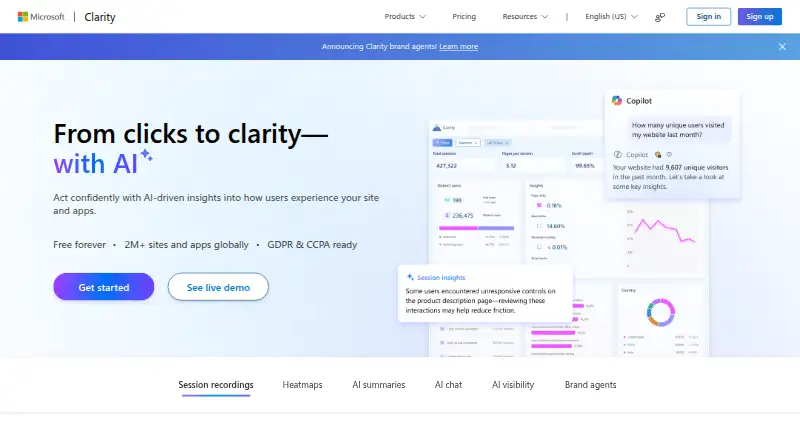
Microsoft Clarity is a behavior analytics tool for websites and apps. Its heatmaps show where users click, scroll, focus and drop off, while rage-click and dead-click insights can call attention to interaction problems. Clarity also includes session recordings, AI summaries, AI chat, AI visibility and brand agents. Its mobile SDK supports Android, iOS, Flutter and React Native, with low-code setup described as having minimal performance or bandwidth impact. Clarity integrates with Google Analytics to connect behavior data with analytics, and also offers an MCP server and a live browser extension. Microsoft says the tool is free forever with all features, unlimited heatmaps, websites and team members, and no traffic limits. Session recordings are retained for 30 days. Microsoft says it does not share user data with third parties and presents Clarity as GDPR and CCPA ready. AI chat can provide product guidance through built-in support.
Good
- Free with no traffic limits
- Unlimited heatmaps, websites and team members
- Includes session recordings and interaction insights
- Mobile SDK supports four platforms or frameworks
Watch out
- Session recordings are retained for 30 days
Who it suits
Clarity suits people analyzing interaction patterns across websites and apps, including those who want heatmaps or session recordings. Its mobile SDK supports teams building with Android, iOS, Flutter or React Native.
Verdict
Clarity offers heatmaps, recordings and AI features at no cost, with no stated traffic limit. Its 30-day recording retention is worth considering when reviewing user behavior over time.
Plans and prices
From Microsoft Clarity's own pricing page, checked 21 Sep 2026.
| Plan | Price | What it gives you |
|---|---|---|
| Free | Free | Unlimited heatmaps · Unlimited websites · Unlimited team members · No traffic limits |
| Free forever | Free | All Clarity features are available at no cost with no traffic limits. |
The facts
Each one read from Microsoft Clarity's own pages, with the date it was checked.
What it does
- AI capabilities
- Clarity includes AI summaries, AI chat, AI visibility, and brand agents.checked 27 Sep 2026
- Click insights
- Clarity provides rage click and dead click insights.checked 27 Sep 2026
- Connected tools
- Clarity offers an MCP server and a live browser extension.checked 27 Sep 2026
- Contact support
- The page lists [email protected] as a contact email.checked 27 Sep 2026
- Data sharing
- Microsoft says it will never share user data with third parties.checked 27 Sep 2026
- Global adoption
- Clarity is used by more than 2 million sites and apps globally.checked 27 Sep 2026
- Google Analytics
- Clarity integrates with Google Analytics to connect behavior data with analytics.checked 27 Sep 2026
- Heatmap analysis
- Heatmaps show where users click, scroll, drop off, and focus.checked 27 Sep 2026
- Mobile capture
- Yeschecked 21 Sep 2026
- Mobile SDK
- The mobile SDK uses low-code setup with minimal performance or bandwidth impact.checked 27 Sep 2026
- Monthly sessions
- No monthly session limit is stated; the page says there are no traffic limits.checked 27 Sep 2026
- Privacy readiness
- Clarity is presented as GDPR and CCPA ready.checked 27 Sep 2026
- Product support
- AI chat provides product guidance through built-in support.checked 27 Sep 2026
- Rage-click detection
- Yeschecked 21 Sep 2026
- Recording retention
- 30 dayschecked 21 Sep 2026
- Session recordings
- Session recordings show real user sessions and key journey moments.checked 27 Sep 2026
- Traffic limits
- Clarity has no traffic limits.checked 27 Sep 2026
The company
- Company builder
- Clarity is built by Microsoft.checked 27 Sep 2026
Money
- Free plan
- Yeschecked 21 Sep 2026
- Free pricing
- Clarity is available free forever with all features included.checked 27 Sep 2026
- Free usage scope
- Unlimited heatmaps, websites, and team members are supported.checked 27 Sep 2026
Where it runs
- Mobile platforms
- The mobile SDK supports Android, iOS, Flutter, and React Native.checked 27 Sep 2026
The full review of Microsoft Clarity
Overview
Microsoft Clarity is a behavior analytics tool for teams that want to understand how people use websites and mobile apps. Its mix of heatmaps, session recordings and interaction signals makes it particularly useful for finding friction in a product journey.
The trade-off is time: recordings are retained for 30 days, which may be short for teams revisiting behavior over a longer cycle.
Key features
Heatmaps and session recordings
Click, scroll, area and conversion heatmaps show where users interact, how far they move through a page, where they drop off and where they focus. Session recordings add individual journeys to those aggregate views. Rage-click and dead-click insights help point teams toward frustrating or ineffective interactions, rather than leaving them to infer every problem from a heatmap alone.
Mobile capture
The SDK supports Android, iOS, Flutter and React Native, extending Clarity beyond websites. Microsoft describes its low-code setup as having minimal performance or bandwidth impact, a practical fit for teams that want mobile behavior data without adding a heavier integration burden.
AI and connected tools
Clarity includes AI summaries, AI chat, AI visibility and brand agents. Its AI chat also provides product guidance, while an MCP server and live browser extension offer additional ways to work with the product. Google Analytics integration connects behavior data with analytics, making Clarity more useful alongside an existing measurement workflow than as a replacement for it.
Privacy and scale
Microsoft says it will not share user data with third parties and presents Clarity as GDPR and CCPA ready. It is used by more than 2 million sites and apps globally. Those assurances and reach are useful context for adoption, though the 30-day recording window remains a constraint for longer-term review.
Pricing
Clarity's Free plan costs nothing and includes unlimited heatmaps, websites and team members, with no traffic limits. All features are available at no cost, and Clarity is described as free forever. That removes the common need to trade team access or traffic volume for a lower tier; no monthly session limit is stated.
The Free forever plan is also described as providing all features at no cost and no traffic limits, with custom pricing not applicable. For individuals and teams that need behavior analytics without a usage ceiling, the free offer is unusually broad. The meaningful limitation is retention: session recordings last 30 days, so teams needing a longer replay history should consider another tool.
Platforms
Clarity is available on Android, iOS and as an extension. Its mobile SDK also supports Flutter and React Native, covering cross-platform app development as well as native mobile apps.
Who it's for
Clarity suits product, marketing and UX teams seeking heatmaps, recordings and interaction signals across web and mobile without budgeting for traffic or team growth. Google Analytics integration is especially relevant for teams that want to connect behavior observation with analytics. It is less suitable when a project depends on keeping recordings for longer than 30 days.
Pros and cons
- Pro: No-cost access includes all features, unlimited heatmaps, websites and team members, and no traffic limits, so growing usage does not trigger a stated traffic cap.
- Pro: Heatmaps, recordings, rage-click and dead-click insights combine broad patterns with clues to specific interface friction.
- Pro: Android, iOS, Flutter and React Native support gives mobile teams a route to capture behavior beyond the web.
- Con: Recordings are retained for only 30 days, limiting how far back teams can revisit individual user journeys.
Alternatives
For a broader shortlist, browse heatmap and session replay tools, session recording software, session replay software or mobile app analytics software.
- Crazy Egg is worth considering for web-focused teams that want web analytics, instant heatmaps, conversion analytics and website surveys in its free plan.
- Fullstory may suit teams for whom a longer replay history matters: its free plan includes one year of session replay retention, alongside 30,000 sessions and 10 user seats.
- Zoho PageSense is an option for teams that can work within a free plan capped at 5,000 monthly tracked users, one project, one month of data retention and five goals.
- OpenReplay fits teams seeking an on-premises, self-managed option, with storage and retention under their control and community support.
- Matomo offers a free Community plan with unlimited users and hits for teams looking for an alternative analytics platform.
- UXCam may fit app teams whose needs stay within its free allowance of 3,000 sessions per month and two app keys.
- Inspectlet is a web-only alternative with a free allowance of 2,500 recorded sessions per month across up to three websites.
- Mouseflow is an option for smaller web projects that can stay within 500 sessions per month, one website project, one conversion funnel and one month of data retention.
Verdict
Clarity is a strong choice for teams that want full-featured behavior analytics across web and mobile without traffic, website or team-member limits. Its combination of heatmaps, recordings and interaction insights is compelling at no cost. Look elsewhere if a 30-day recording window is too short for the way your team reviews user behavior.
Getting started
- Open the Clarity website.
- Use the website or the Android and iOS platforms.
- For mobile apps, use the low-code SDK for Android, iOS, Flutter, or React Native.
- Connect Google Analytics if you want behavior data alongside analytics.
- Use the live browser extension or MCP server for connected tools.
Limits worth knowing
The free plan has no traffic limits and supports unlimited heatmaps, websites, and team members. Session recordings are retained for 30 days.
Questions
How much does Microsoft Clarity cost?
The Free plan is free. Clarity is described as free forever with all features included.
Does Clarity limit traffic or the number of websites?
No traffic limits are stated, and the free plan supports unlimited websites, heatmaps, and team members.
Which mobile platforms does Clarity support?
Its mobile SDK supports Android, iOS, Flutter, and React Native. The platforms list also includes Android and iOS.
Does Clarity integrate with Google Analytics?
Yes. It connects behavior data with Google Analytics.
Who makes Microsoft Clarity?
Clarity is built by Microsoft.
Alternatives to Microsoft Clarity
- 1

Contentsquare
Free planAndroidiOSWebAPI9.0Free plan - 2

Zoho PageSense
Free planAndroidiOSWebAPI8.9From $20 a month - 3

Fullstory
Free planAndroidiOSWebAPI8.5Free plan - 4

OpenReplay
Free planAndroidiOSWebAPI8.5Free plan - 5
DeepSync
Free planAndroidiOSWebAPI8.5From ₹1,999 a month - 6

Crazy Egg
Free planWebAPIExtension8.4From $348 a year