MeetNotes
MeetNotes records meetings and produces speaker-labelled transcripts and minutes with summaries, decisions, and action items.
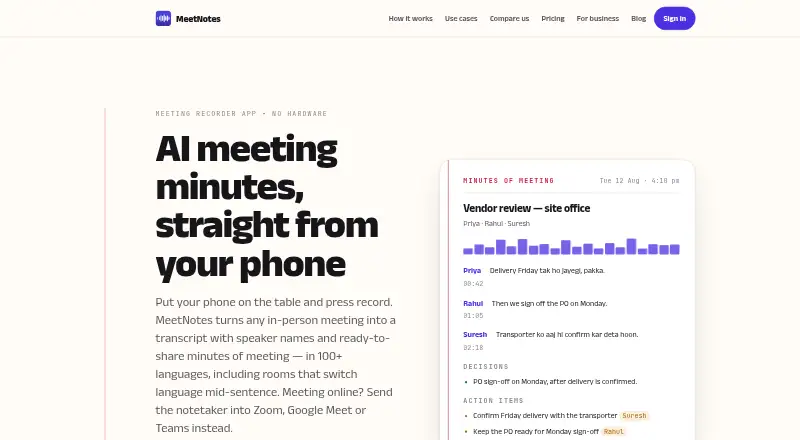
What MeetNotes is
MeetNotes records meetings and produces speaker-labelled transcripts and minutes with summaries, decisions, and action items. Users can record in-person conversations with a phone, or have its notetaker join Zoom, Google Meet, and Microsoft Teams through a meeting link or calendar invite. Mac and Windows apps capture computer playback and microphone audio for services including those three, Webex, and WhatsApp calls. The product says minutes can be written in any of 110 languages, and transcription can handle language changes mid-sentence. Minutes can be edited and shared as PDF or Word files, including by WhatsApp or email; web users can read, search, and export meetings. Teams share a pool of recording minutes, while meetings remain private to their recorder until shared. The free plan includes 100 minutes once. MeetNotes says recordings are encrypted in transit with TLS and at rest with AES-256; audio and transcript content goes to third-party AI providers solely to produce transcripts and minutes.
Good
- Speaker-labelled transcripts and action items
- Phone recording for in-person meetings
- Minutes support 110 languages
- Exports as PDF or Word files
- Recordings encrypted in transit and at rest
Watch out
- Free plan includes 100 minutes once
- Minute packs are purchased once, not recurring allowances
- No formal SOC 2 or ISO 27001 certification
Who it suits
MeetNotes is aimed at founders and managers at small and mid-size businesses, consultants, chartered accountants, site and project teams, and housing society committees. It can suit people who need speaker-labelled minutes they can share or export.
Verdict
MeetNotes covers in-person and online meeting capture, with editable minutes and team sharing controls. Consider its one-time free allowance and stated lack of formal certifications when choosing it.
Plans and prices
From MeetNotes's own pricing page, checked 3 Oct 2026.
| Plan | Price | What it gives you |
|---|---|---|
| Free | Free | Speaker-labelled transcript · PDF and Word minutes · 100+ languages · Self mode · Web access · 100 minutes included, once |
| Minute pack - 30 minutes | ₹99 a month | 30 minutes · Bought once; minutes never expire |
| Minute pack - 100 minutes | ₹299 a month | 100 minutes · Bought once; minutes never expire |
| Minute pack - 500 minutes | ₹1,450 a month | 500 minutes · Bought once; minutes never expire |
| Minute pack - 2,000 minutes | ₹4,999 a month | 2,000 minutes · Bought once; minutes never expire |
| Minute pack - 25,000 minutes | ₹55,900 a month | 25,000 minutes · Bought once; minutes never expire |
| Pro monthly | — | 1,000 minutes per month |
| Pro yearly | — | 1,000 minutes per month |
| Max monthly | — | 2,000 minutes per month |
| Minute packs | ₹5,955,900, paid once | 15 to 25,000 minutes · Prices include applicable taxes · Bought once; minutes never expire |
| Pro | — | 1,000 minutes per month · Allowance resets each billing period · Monthly or yearly; price shown in app varies by country |
| Max yearly | — | 2,000 minutes per month |
| Max | — | 2,000 minutes per month · Ask and Summarise · Allowance resets each billing period · Monthly or yearly; price shown in app varies by country |
The facts
Each one read from MeetNotes's own pages, with the date it was checked.
What it does
- AI processing
- Audio and transcript content is sent to third-party AI providers solely to produce transcripts and minutes.checked 3 Oct 2026
- Certifications
- MeetNotes says it does not currently hold formal certifications such as SOC 2 or ISO 27001.checked 3 Oct 2026
- Desktop recording
- The Mac and Windows apps capture computer playback and microphone audio for services including Zoom, Google Meet, Teams, Webex, and WhatsApp calls.checked 3 Oct 2026
- Encryption
- The security page states recordings are encrypted in transit with TLS and at rest with AES-256.checked 3 Oct 2026
- Exports
- Minutes can be edited and shared as PDF or Word files, including through WhatsApp or email.checked 3 Oct 2026
- In-person recording
- Users can record an in-person meeting with their phone without buying recording hardware.checked 3 Oct 2026
- Languages
- The product says minutes can be written in any of 110 languages, and transcription can handle meetings that switch languages mid-sentence.checked 3 Oct 2026
- Online meeting integrations
- The notetaker can join Zoom, Google Meet, and Microsoft Teams calls through a meeting link or calendar invite.checked 3 Oct 2026
- Partner API
- The Partner API accepts audio uploads up to 300 MB and returns transcripts and minutes in PDF, Word, or Markdown formats.checked 3 Oct 2026
- Purpose
- MeetNotes records meetings and produces speaker-labelled transcripts and minutes with summaries, decisions, and action items.checked 3 Oct 2026
- Speaker labels
- Yeschecked 21 Sep 2026
- Support
- The support page says users can email support and expects to reply within a day.checked 3 Oct 2026
- Target users
- MeetNotes describes its audience as founders and managers at small and mid-size businesses, consultants, chartered accountants, site and project teams, and housing society committees.checked 3 Oct 2026
- Web access
- Users can sign in on the web with the same account to read, search, and export meetings.checked 3 Oct 2026
Money
- Free plan
- Yeschecked 21 Sep 2026
The company
- Headquarters
- Indiachecked 28 Sep 2026
- Team workspaces
- Teams share a pool of recording minutes, and meetings remain private to their recorder until explicitly shared with the team.checked 3 Oct 2026
The full review of MeetNotes
MeetNotes is a meeting recorder and minutes tool for people who need a searchable record of conversations, whether they happen in a room or online. It suits small and mid-size teams, consultants, and project groups especially well. Its unusual strength is flexible capture paired with minutes that can be edited and shared; its main trade-off is a one-time free allowance and no formal security certifications.
Overview
MeetNotes carries a meeting from capture through to editable minutes. Users can record in-person conversations with a phone, use a notetaker on supported video calls, or capture computer playback and microphone audio on Mac and Windows. The same account works on the web to read, search, and export meetings, which is useful when a phone recording needs to be reviewed or shared from another device.
Minutes include summaries, decisions, and action items, alongside speaker-labelled transcripts. MeetNotes says minutes can be written in any of 110 languages and transcription can handle conversations that switch languages mid-sentence. That makes it a practical candidate for multilingual teams, though buyers should weigh its stated security posture before putting sensitive discussions into the service.
Key features
Recording and meeting capture
Phone-based in-person recording avoids the need to buy recording hardware. For online meetings, the notetaker can join Zoom, Google Meet, and Microsoft Teams via a meeting link or calendar invitation. Mac and Windows apps capture computer playback and microphone audio for those services, as well as Webex and WhatsApp calls. This variety is valuable for teams whose meetings do not all happen in one room or one conferencing app.
Minutes, exports, and sharing
Users can edit minutes and share them as PDF or Word files, including through WhatsApp or email. Team workspaces pool recording minutes, but meetings stay private to the person who recorded them until that person explicitly shares them. That default is a sensible privacy control for teams, although sharing requires an intentional extra step rather than making every meeting automatically visible to colleagues.
The Partner API accepts audio uploads up to 300 MB and returns transcripts and minutes in PDF, Word, or Markdown. This is a focused option for partners that need to pass audio through MeetNotes without using its standard recording flow.
Security and support
MeetNotes says it encrypts recordings in transit with TLS and at rest with AES-256. It also says audio and transcript content goes to third-party AI providers solely to produce transcripts and minutes. The company does not currently hold formal certifications such as SOC 2 or ISO 27001, a meaningful drawback for organizations that require those credentials for vendor approval. Support is available by email, with an expected reply within a day.
Pricing
MeetNotes is freemium and has no free trial. The Free plan costs nothing and includes 100 minutes once, speaker-labelled transcripts, PDF and Word minutes, 100+ languages, Self mode, and web access. It is enough to try the core workflow, but the single 100-minute allowance is a finite starting credit rather than a recurring monthly quota.
Minute packs are bought once, and the minutes never expire. The 30-minute pack is ₹99 a month; the 100-minute pack is ₹299 a month; the 500-minute pack is ₹1,450 a month; the 2,000-minute pack is ₹4,999 a month; and the 25,000-minute pack is ₹55,900 a month. Despite the per-month price wording, each pack is described as bought once, so the key advantage is that unused minutes do not expire. Smaller packs suit occasional users who want to pay for recording capacity as needed; larger packs fit heavier usage but require a larger upfront purchase. Minute packs are also offered from 15 to 25,000 minutes for ₹5,955,900, paid once, with applicable taxes included.
Pro offers 1,000 minutes per month, while Max offers 2,000 minutes per month. Both have monthly and yearly options, and each allowance resets every billing period. Their prices are custom pricing: the Pro price shown in the app varies by country. These recurring plans may fit regular users who want a fresh monthly allowance, but they do not carry over unused minutes as the packs do.
Platforms
MeetNotes supports Android, iOS, macOS, web, and Windows, as well as an API. Phone apps cover in-person recording, desktop apps capture system playback and microphone audio, and web access supports reading, searching, and exporting. The broad device coverage suits teams with mixed hardware, while the Partner API serves audio-upload workflows.
Who it's for
MeetNotes describes its audience as founders and managers at small and mid-size businesses, consultants, chartered accountants, site and project teams, and housing society committees. It is best suited to groups that need minutes from both in-person and online meetings, want control over when recordings are shared, or benefit from multilingual transcription. Organizations that require formal security certifications should look elsewhere.
Pros and cons
- Pro: Phone recording supports in-person meetings without separate recording hardware.
- Pro: A notetaker, desktop capture, and web access cover several common ways to record, revisit, and export meetings.
- Pro: Editable minutes and PDF or Word sharing make the output usable beyond the app.
- Pro: One-time minute packs never expire, which suits users with uneven recording needs.
- Con: The free plan grants just 100 minutes once, so it will not support ongoing free use.
- Con: Pro and Max allowances reset monthly, and their prices are custom pricing, making them harder to compare upfront.
- Con: MeetNotes lacks formal certifications such as SOC 2 or ISO 27001, which can rule it out for compliance-sensitive buyers.
Alternatives
For broader category comparisons, browse Meeting Assistant Software and Meeting Notes Software.
- Fellow is worth comparing if a free plan with a trial matters; its free plan includes five AI notes per user for life.
- Notta may suit a user who wants a defined monthly free allowance: its free plan includes one seat and 120 transcription minutes per month.
- Laxis is an alternative with a free Basic plan providing 300 transcription minutes per month, 30 days of conversation history, and a 45-minute maximum per recording.
- Read AI is a fit for those whose needs align with its free allowance of five meetings per month and support for 20+ languages.
- Grain may suit users who want a free plan with a trial; its free tier includes one notetaker seat and 45-minute meetings.
- Wudpecker is another option for a free monthly allowance, with ten notetaker-bot meetings and three Ask AI questions per recording.
- DoodleNote is an alternative with an MIT-licensed monorepo that includes desktop, iPhone, and sync server code.
- Noota offers a free plan with 300 minutes per month, one month of storage, and up to three workspace seats.
Verdict
MeetNotes is a strong fit for small and mid-size teams that need one workflow for in-person and online capture, editable minutes, and deliberate team sharing. Its broad capture options and non-expiring minute packs are compelling for uneven workloads. Choose another service if a recurring free allowance or formal security certification is essential.
Getting started
- Visit https://getmeetnotes.com/.
- Choose the Android, iOS, Mac, Windows, or web option that fits your device.
- Use the free plan, which includes 100 minutes once, or choose a minute pack starting at ₹99 for 30 minutes.
- For an in-person meeting, record with your phone; for supported online calls, let the notetaker join through a meeting link or calendar invite.
- Sign in on the web with the same account to read, search, or export meetings.
Limits worth knowing
The free plan includes 100 minutes once. Minute packs are purchased once, with minutes that never expire; listed packs range from 30 to 25,000 minutes.
Questions
Is MeetNotes free?
Yes. Its free plan includes 100 minutes once, speaker-labelled transcripts, PDF and Word minutes, 100+ languages, Self mode, and web access.
How much do minute packs cost?
The listed 30-minute pack costs ₹99, bought once, and its minutes never expire. Other listed packs include 100 minutes for ₹299, 500 for ₹1,450, 2,000 for ₹4,999, and 25,000 for ₹55,900.
Which platforms does MeetNotes support?
It lists Android, iOS, macOS, web, Windows, and API. The Mac and Windows apps capture computer playback and microphone audio.
Which online meetings can the notetaker join?
It can join Zoom, Google Meet, and Microsoft Teams through a meeting link or calendar invite. Desktop recording also supports Webex and WhatsApp calls.
Does MeetNotes offer a trial?
No free trial is listed; the pricing model is freemium.
How does MeetNotes handle meeting privacy and AI processing?
Team meetings stay private to their recorder until explicitly shared. Audio and transcript content is sent to third-party AI providers solely to produce transcripts and minutes.
Alternatives to MeetNotes
- 1

Fellow
Free planAndroidiOSWebAPI9.1From $7 a month - 2

Fathom
Free planiOSWebAPIExtension9.1From $15 a month - 3
tl;dv
Free planAndroidiOSWebAPI9.1From $18 a month - 4

Avoma
Free planAndroidiOSWebAPI9.1From $19 a month - 5

Notta
Free planAndroidiOSWebExtension9.0From $8.17 a month - 6

Read AI
Free planAndroidiOSWebAPI9.0From $15 a month