MediaPipe
MediaPipe Solutions provides libraries and tools for adding AI and machine learning to applications, including ready-to-run models and customizable APIs.
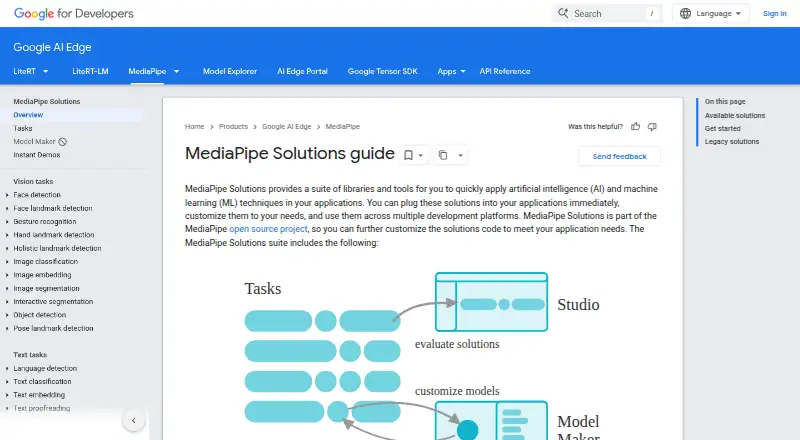
What MediaPipe is
MediaPipe Solutions provides libraries and tools for adding AI and machine learning to applications, including ready-to-run models and customizable APIs. Its vision tasks cover face and hand landmarks, gesture recognition, image classification and segmentation, object detection, and pose landmarks. Text capabilities include language detection, classification, embeddings, proofreading, and summarization, alongside an audio classification task. MediaPipe Tasks supports Android, Web/JavaScript, Python, and iOS, and its cross-platform APIs are described as enabling inference with as few as five lines of code. The Tasks pipelines are optimized for on-device machine learning, with CPU, GPU, and TPU acceleration for real-time uses. Model Maker can retrain compatible models using transfer learning, but it is deprecated and cannot change a model’s original task. Solution API inputs are processed on-device and not sent to Google; usage and performance metrics are sent to Google. The low-level Framework supports building on-device pipelines, and installation guidance covers building from source on Linux, macOS, Windows, and Docker, with some configurations marked experimental.
Good
- Ready-to-run models and customizable APIs.
- Includes vision, text, and audio tasks.
- Tasks APIs support Android, Web, Python, and iOS.
- Describes CPU, GPU, and TPU acceleration.
- Solution API inputs are processed on-device.
Watch out
- Model Maker is deprecated and unmaintained.
- Retraining cannot change the model's original task.
- Legacy Solutions support ended March 1, 2023.
- Some desktop operating-system configurations are experimental.
Who it suits
It suits developers adding on-device machine-learning tasks to applications across mobile, web, and Python environments. Teams considering model retraining should account for Model Maker's deprecated status and task constraint.
Verdict
MediaPipe offers application developers a broad set of on-device AI tasks and framework tools. Its deprecated Model Maker and ended Legacy Solutions support distinguish current tooling from older options.
Plans and prices
From MediaPipe's own pricing page, checked 4 Oct 2026.
| Plan | Price | What it gives you |
|---|---|---|
| MediaPipe | Free | On-device ML solutions and framework; no price listed |
| MediaPipe open-source package | Free | Apache 2.0 licensed · on-device libraries and models · no hosted service pricing stated |
The facts
Each one read from MediaPipe's own pages, with the date it was checked.
What it does
- Acceleration
- MediaPipe Tasks describes optimized on-device ML pipelines with end-to-end acceleration on CPU, GPU, and TPU for real-time use cases.checked 4 Oct 2026
- API extensibility
- MediaPipe Tasks exposes cross-platform APIs, while the lower-level Framework uses packets, graphs and calculators to build custom pipelines.checked 21 Oct 2026
- Audio feature
- MediaPipe provides an audio-classification task for categorizing sounds.checked 21 Oct 2026
- Community support
- The web setup guide directs users to Google AI discussions and Stack Overflow for questions and GitHub for bugs and feature requests.checked 21 Oct 2026
- Current Python release
- PyPI lists MediaPipe 1.1.1, released October 14, 2026.checked 21 Oct 2026
- Customization
- Model Maker uses transfer learning to retrain compatible models with a developer’s data, and the guide suggests aiming for about 100 samples per class.checked 4 Oct 2026
- Customization limits
- Model Maker is deprecated and no longer actively maintained; retraining cannot change the task the original model was built to perform.checked 4 Oct 2026
- Desktop and self-hosted use
- The installation guide documents building and running the framework from source on Linux, macOS, Windows, and Docker, with some operating-system configurations marked experimental.checked 4 Oct 2026
- Documentation depth
- The official site provides task guides, platform setup guides, API references, examples, framework concepts and build-from-source material.checked 21 Oct 2026
- Framework
- The low-level MediaPipe Framework is used to build efficient on-device ML pipelines and provides concepts including packets, graphs, and calculators.checked 4 Oct 2026
- Generative AI API
- The catalog includes an LLM Inference API and other generative-AI tasks, with LLM Inference currently listed for web.checked 21 Oct 2026
- Hardware acceleration
- The web BaseOptions delegate can select CPU or GPU execution, with CPU as the default.checked 21 Oct 2026
- Independent technical assessment
- GitNux describes MediaPipe as producing general pose and landmark outputs for motion-estimation workflows rather than application-specific event statistics.checked 21 Oct 2026
- Independent use case
- A Japanese academic prototype used MediaPipe Hands for real-time ten-finger landmark tracking, handedness, key mapping and typing-status visualization.checked 21 Oct 2026
- Legacy support
- Support for listed MediaPipe Legacy Solutions ended on March 1, 2023, though their repository code and prebuilt binaries remain available as-is.checked 4 Oct 2026
- Legacy support limit
- Google ended support for listed legacy solutions on March 1, 2023; unsupported legacy binaries remain available only on an as-is basis.checked 21 Oct 2026
- License
- The repository and Python distribution identify the software as Apache License 2.0.checked 21 Oct 2026
- Limit: contributor onboarding
- Good First Issue reports no open beginner issues, no beginner labels and no merged pull requests in the preceding 30 days.checked 21 Oct 2026
Where it runs
- Browser evaluation
- MediaPipe Studio lets users test on-device models and pipelines in a browser, adjust settings and use camera, image or text inputs.checked 21 Oct 2026
- Developer platforms
- MediaPipe Tasks supports Android, Web/JavaScript, Python, and iOS; the Solutions guide’s availability table lists supported tasks by Android, Web, Python, and iOS.checked 4 Oct 2026
- Limit: Android crash
- Good First Issue indexes an open Android HolisticLandmarker crash involving protobuf-javalite.checked 21 Oct 2026
The company
- Company founding
- Google's official history says Google Inc. was established in August 1998.checked 21 Oct 2026
- Company headquarters
- LinkedIn lists Google's headquarters in Mountain View, California.checked 21 Oct 2026
- Company size
- LinkedIn lists Google as a public software-development company with 10,001+ employees.checked 21 Oct 2026
The full review of MediaPipe
Overview
MediaPipe is a toolkit for developers adding machine-learning capabilities to applications, with ready-to-run models, APIs and lower-level pipeline tools. It suits teams building on-device experiences across mobile, browser and desktop environments. Its breadth is useful, but the current Tasks APIs are a better starting point than deprecated Model Maker or unsupported Legacy Solutions.
Key features
MediaPipe Solutions covers vision tasks including face and hand landmarks, gesture recognition, image classification and segmentation, object detection, and pose landmarks. Text options include language detection, classification, embeddings, proofreading and summarization, alongside audio classification. This range makes it a practical foundation for apps that need several kinds of inference rather than a single image-recognition endpoint.
MediaPipe Tasks offers APIs for Android, Web/JavaScript, Python and iOS, and developers can run inference with as few as five lines of code. Its pipelines are optimized for on-device work with CPU, GPU and TPU acceleration aimed at real-time use cases. That combination favors responsive, edge-based features; it also means developers must build and integrate the application around the APIs rather than treat MediaPipe as a hosted turnkey service.
MediaPipe Studio lets developers evaluate web samples using text, webcam input or uploaded images, and adjust settings such as confidence thresholds. Model Maker can use transfer learning on compatible models and a developer’s data, with about 100 samples per class suggested as a target. However, Model Maker is deprecated and no longer actively maintained, and it cannot change the task a model was built to perform. It is therefore a poor choice for a new customization workflow.
Solution inputs such as images, video and text are processed on-device and are not sent to Google; usage and performance metrics are sent to Google. Where applicable law requires it, app developers are responsible for obtaining informed consent for Google’s processing of those metrics. Technical questions go to Stack Overflow, while GitHub issues are for bugs or feature requests that benefit the community.
Pricing
MediaPipe is free and open source. The MediaPipe plan costs nothing and covers on-device ML solutions and the framework; there is no paid tier or trial. The lack of a subscription makes it accessible for developers, but does not remove the engineering work of integrating and operating models in their own applications.
Platforms
MediaPipe lists Android, iOS, Linux, macOS, self-hosted, web and Windows support. Tasks targets Android, Web/JavaScript, Python and iOS. The framework installation guide documents building and running from source on Linux, macOS, Windows and Docker, though some operating-system configurations are experimental. Desktop and self-hosted options offer flexibility, with a less uniform path than the supported Tasks APIs.
Who it's for
Choose MediaPipe if you are a developer who wants to embed varied ML tasks in an app and values on-device processing, real-time acceleration and control over deployment. It is especially suitable for teams comfortable working with APIs or building pipelines from packets, graphs and calculators in the lower-level framework. It is less suitable for buyers seeking a managed service, extensive vendor support or a maintained low-code model-retraining route.
Pros and cons
- Pro: Vision, text and audio tasks give developers a broad set of ready-to-run capabilities in one toolkit.
- Pro: On-device inference and CPU, GPU and TPU acceleration suit responsive edge applications, while inputs stay on-device.
- Pro: Free, open-source access avoids a software subscription.
- Con: Model Maker is deprecated, and retraining is limited to compatible models without changing their original task.
- Con: Usage and performance metrics go to Google, so developers may need to secure user consent depending on applicable law.
- Con: Legacy Solutions support ended on March 1, 2023; remaining repository code and binaries are provided as-is.
- Con: Some desktop configurations are experimental, and support is community-directed rather than a conventional vendor help desk.
Alternatives
For a wider comparison of image-focused tools, browse AI Image Recognition Software.
Choose Google Cloud Vision API if you want an API-based, freemium alternative billed per image and by feature, rather than MediaPipe’s on-device toolkit.
LandingLens is a freemium alternative with a free plan that includes 1,000 credits per month, unlimited projects, three users and one active project; consider it when those project and team limits fit your workflow.
Roboflow offers a free tier with 10 credits a month, described as enough to train about 30 models or run 80,000 inferences, plus a Core plan at $39 a month. Pick it if that credit-based model workflow better matches your needs.
DeepDetect offers an open-source single-machine option on CPU or GPU, with no GPU included, as well as an Amazon AWS plan. It is an alternative for developers who want that deployment setup.
Amazon Rekognition Content Moderation has a paid model and a free tier lasting 12 months from account creation, including 60 free video-analysis minutes per month. Consider it if that time-limited allowance meets your moderation needs.
Imagga API has a free plan with 100 API requests and basic tagging, categorization, cropping and color solutions. It may fit a smaller API-based image workflow.
Nyckel offers 100 invokes per month, up to 200 samples and five functions on its free plan, with extra invokes at $0.005 each; choose it if those usage limits suit your API needs.
PaddleOCR is another free option, with its official API free tier capped at 20,000 document pages per day.
Verdict
MediaPipe is a strong fit for developers who want free, flexible on-device ML building blocks across mobile, web and desktop, especially when real-time inference matters. Its core appeal is the breadth of tasks and edge-oriented pipeline support; look elsewhere if you need maintained model retraining, managed service simplicity or a stronger support commitment.
Getting started
- Open the MediaPipe Solutions guide.
- Choose a supported task and developer platform: Android, Web/JavaScript, Python, or iOS.
- Use MediaPipe Studio to try web samples with text, webcam input, or uploaded images.
- Customize a compatible model if needed, noting Model Maker is deprecated.
- Build and run the application with the selected MediaPipe tools.
Limits worth knowing
Model Maker is deprecated and no longer actively maintained, and retraining cannot change the task of the original model. Support for listed Legacy Solutions ended on March 1, 2023; repository code and prebuilt binaries remain available as-is.
Questions
What does MediaPipe cost?
MediaPipe is listed as free and open source.
Which developer platforms does MediaPipe Tasks support?
It supports Android, Web/JavaScript, Python, and iOS.
What kinds of tasks are available?
Vision tasks include landmarks, gesture recognition, image classification and segmentation, object detection, and pose landmarks. Text tasks include language detection, classification, embeddings, proofreading, and summarization; audio classification is also listed.
Are API inputs sent to Google?
Solution API inputs such as images, video, and text are processed on-device and are not sent to Google. Usage and performance metrics are sent to Google.
Can developers retrain models?
Model Maker uses transfer learning to retrain compatible models with developer data. It is deprecated and cannot change the task the original model was built to perform.
Where can developers get support?
Google directs technical questions to Stack Overflow and bug reports or feature requests to GitHub issues; issue reports are limited to community-benefiting problems.
Alternatives to MediaPipe
- 1

Roboflow
Free planAndroidiOSWebAPI8.3From $39 a month - 2
Sighthound AI
Free planAndroidiOSWebAPI8.1From $2,500 a year - 3
Google Cloud Vision API
Free planWebAPILinuxmacOS7.9$0.60 usage-based - 4
DeepFace
Free planOpen sourceWebAPILinuxmacOS7.8Free plan - 5
CompreFace
Free planOpen sourceWebAPILinuxmacOS7.7Free plan - 6

Face++
Free planAndroidiOSWebAPI7.7Free plan