mcIVASmaker
mcIVASmaker is a free Windows program that converts images and videos into Minecraft block-based outputs; audio conversion is unfinished.
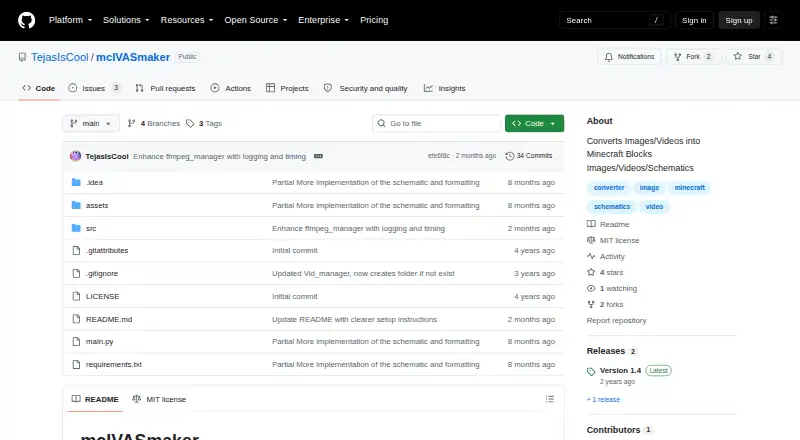
What mcIVASmaker is
mcIVASmaker is a free Windows program that converts images and videos into Minecraft block-based outputs; audio conversion is unfinished. For images, it compares pixel RGB values with average colors for Minecraft blocks and chooses matches using selectable algorithms. Users can restrict image conversion to blocks available up to version 1.20, then export a block-textured image or a schematic for use with a schematic mod. It can also create redstone lamp displays as images or schematics. Video conversion turns frames into block images and joins them into a video, with controls for frame rate and process count. Video conversion does not create schematics. Both the executable and ZIP versions require FFmpeg and FFProbe on the system path. The ZIP/source option also requires Python 3.8 or later and the libraries listed in `requirements.txt`. The project warns that video processing can take a long time, output may have a very high bitrate, and FFmpeg has trouble with high-resolution footage, especially at 32k and above. The repository includes an MIT license.
Good
- Exports image conversions as schematics or images.
- Can restrict image blocks to versions up to 1.20.
- Creates redstone lamp displays.
- Video conversion offers frame-rate and process-count controls.
Watch out
- Requires FFmpeg and FFProbe on the system path.
- ZIP/source option requires Python 3.8 or later.
- Video conversion does not create schematics.
- Audio conversion is unfinished.
Who it suits
It suits Windows users who want to turn images into Minecraft block visuals or schematics, or videos into block-style video output. Users interested in audio conversion should note that support is unfinished.
Verdict
mcIVASmaker offers image and video conversion with distinct output options for each. Check its dependencies and video limitations before choosing a download route.
The facts
Each one read from mcIVASmaker's own pages, with the date it was checked.
What it does
- Audio status
- Audio conversion is described as unfinished.checked 3 Oct 2026
- Block selection
- Image conversion supports Minecraft blocks up to version 1.20 and lets users restrict the selection to chosen blocks.checked 3 Oct 2026
- Conversion method
- For images, the program compares each pixel's RGB value with average colors for Minecraft blocks and selects a closest match using selectable algorithms.checked 3 Oct 2026
- Dependencies
- Both the executable and zip versions require FFmpeg and FFProbe on the system path.checked 3 Oct 2026
- Image output
- It can convert images into block-textured images or schematic files for placement in a Minecraft world.checked 3 Oct 2026
- License
- The repository lists an MIT license.checked 3 Oct 2026
- License warranty
- The MIT license provides the software “as is” and disclaims warranties.checked 2 Oct 2026
- Purpose
- mcIVASmaker converts images, videos, or unfinished audio input into Minecraft blocks.checked 3 Oct 2026
- Python download
- The README provides instructions to download the source ZIP, install its requirements, and run main.py.checked 2 Oct 2026
- Python requirements
- The Python/zip version requires Python 3.8 or later and the libraries listed in requirements.txt.checked 3 Oct 2026
- Redstone lamps
- Images can also be converted into redstone lamp displays in image or schematic form.checked 3 Oct 2026
- Requirements
- The README requires FFmpeg and FFProbe on the system path; the Python/ZIP version also requires Python 3.8 or later and the listed libraries.checked 2 Oct 2026
- Schematic limitation
- Video conversion does not create schematics.checked 3 Oct 2026
- Video conversion
- Video conversion supports changing the frame rate and using multiple processes to speed up conversion.checked 2 Oct 2026
- Video limits
- The README warns that video conversion can take a long time, output videos may have a bitrate some players do not support, and FFmpeg has problems with very high resolutions including 32k and above.checked 3 Oct 2026
- Video processing
- Video conversion processes frames into Minecraft block images and rejoins them into a video; users can change frame rate and process count.checked 3 Oct 2026
Where it runs
- Windows download
- The README offers a Windows executable and a zip source-code version; it says the executable may work on Wine but that is untested.checked 3 Oct 2026
The full review of mcIVASmaker
Overview
mcIVASmaker is a Windows tool for turning images and videos into Minecraft block visuals. It is best suited to players who want control over block selection or need schematic output from still images; its video workflow is more limited and brings extra setup.
Image conversion matches pixels to Minecraft block colors, producing either a block-textured image or a schematic for use with a schematic mod. You can choose matching algorithms and restrict the palette to selected blocks, which helps when a build must use a particular set of materials. Redstone lamp displays are another still-image option.
Key features
Block matching compares each pixel's RGB value with average colors for Minecraft blocks, then selects a close match using the chosen algorithm. Block support goes up to Minecraft 1.20. The ability to constrain the selection makes the output more practical for builds with material restrictions, though it also narrows the available palette.
Video conversion processes frames into block images and rejoins them as a video. Frame rate and process count are adjustable, so users can trade output smoothness against conversion speed. It does not create schematics from video. The README also cautions that conversion can take a long time, output bitrate can be very high, and FFmpeg can struggle with high-resolution footage, particularly at 32k and above. Audio conversion remains unfinished.
Pricing
mcIVASmaker is free, with a free plan. There are no paid tiers to weigh against its limitations; the practical costs are setup and conversion time. The MIT license permits use, modification, distribution, and sale of copies subject to its conditions, and provides the software as is without warranties.
Platforms
The supported platform is Windows. The project provides a Windows executable, which may work through Wine, though that route is untested. Both the executable and ZIP versions require FFmpeg and FFProbe on the system path. The ZIP route also requires Python 3.8 or later and the libraries in requirements.txt; users download the source ZIP, install those requirements, and run main.py. That flexibility will suit technically comfortable users better than anyone seeking a self-contained install.
Who it's for
Choose mcIVASmaker if you want a free Windows workflow for converting still images into block art or schematics, particularly when a project calls for a restricted block palette or redstone lamps. It is less suitable if you need video schematics, finished audio support, effortless setup, or dependable handling of very high-resolution video.
Pros and cons
- Pros: Still images can become either block-textured images or schematics, giving builders a useful choice of output.
- Pros: Selectable matching algorithms and block restrictions offer meaningful control over how images map to Minecraft materials.
- Pros: The free price and MIT license allow broad use and modification, subject to the license conditions.
- Cons: FFmpeg and FFProbe are required for both download routes, while the ZIP version adds Python and library setup.
- Cons: Video conversion can be slow, produce high-bitrate files, and struggle with very high resolutions; it also cannot export schematics.
- Cons: Audio conversion is unfinished, and Wine compatibility is untested.
Alternatives
For a browser-based option, MinecraftArt is free and runs on the web; choose it when you prefer not to use a Windows download. BlockArtLab Minecraft Image Converter also offers free browser conversion with no account, a PNG blueprint, and a CSV material list; its one-time Starter plan is 9.99 USD for 300 credits. Pick it if those browser outputs fit your project better.
Image2Pixel Minecraft Converter is a free web option with no signup, watermark, or limits, while Minecraft Pixel Art Generator is free in a browser without an account or paywall, with image size limited only by the device. Either is a better fit if you want a browser workflow rather than mcIVASmaker's dependencies.
PixelCraft is another free Windows alternative, suited to readers who want a Windows-native option. For browser-based controls over palette, dimensions, and orientation plus .litematic export, choose mc-pixel. MC Build Tools Pixel Art Generator is free to use on the web without an account or sign-up, and Minecraft Image Converter is also a free web alternative.
For more options, browse Minecraft Pixel Art Generators.
Verdict
mcIVASmaker is a strong fit for Windows users who want free still-image conversion with schematic output and control over the block palette. Choose it for that combination; look elsewhere if you need browser convenience, video schematics, finished audio conversion, or a workflow without external dependencies.
Alternatives to mcIVASmaker
- 1

BlockArtLab Minecraft Image Converter
Free planWeb7.3$1.99 one-time - 2
Pixvael Minecraft Pixel Art Generator
Free planWebExtension6.6Free plan - 3

Coffee & Fun Minecraft Pixel Art Generator
Free planWeb6.0Free plan - 4

Image2Pixel Minecraft Converter
Free planWeb6.0Free plan - 5
Minecraft Image Converter
Free planWeb6.0Free plan - 6

Minecraft Pixel Art Generator
Free planWeb6.0Free plan