mcblend
mcblend is a free Blender add-on for making and modifying models for Minecraft Bedrock Edition.
What mcblend is
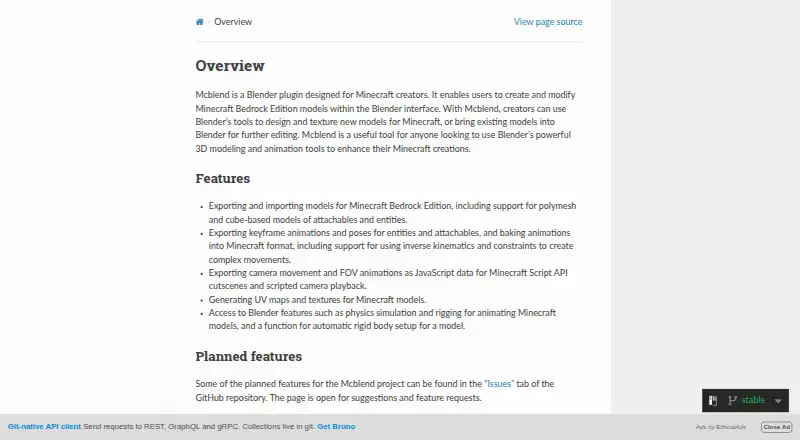
mcblend is a free Blender add-on for making and modifying models for Minecraft Bedrock Edition. It imports and exports Bedrock entity and attachable models, including cube-based models and polymeshes. For animation, it exports keyframes and poses and can bake animations into Minecraft format, including work using inverse kinematics and constraints. It can also turn Blender camera movement and field-of-view animation into JavaScript data for Minecraft Script API cutscenes and scripted camera playback; game logic is needed to apply that data to a player’s camera. The add-on arranges cube-face UV coordinates and can create a template texture, while polymeshes use Blender’s regular texturing features. It uses Blender rigging and physics tools and can configure rigid bodies automatically. Installation involves downloading a ZIP from the project’s GitHub releases and adding it through Blender’s Add-ons preferences; the documentation instructs users to install Blender 5.2. Models must use exactly one armature, with each cube or polymesh as a separate object parented to armature bones. Polymeshes are experimental in Minecraft and could lose support. Updating requires uninstalling the old add-on and installing a new version.
Good
- Imports and exports Bedrock entity and attachable models.
- Can bake animations with inverse kinematics and constraints.
- Creates cube-face UV layouts and template textures.
- Supports Blender rigging and physics features.
Watch out
- Polymeshes are experimental in Minecraft.
- Camera animation data needs game logic to apply it.
- Updates require replacing the installed add-on.
- Models require exactly one armature.
Who it suits
mcblend suits Minecraft Bedrock creators who want to use Blender for modeling and animation. It is intended for users comfortable with the documented armature and object-parenting requirements.
Verdict
mcblend brings Blender modeling and animation workflows to Minecraft Bedrock projects. Check the armature requirements and experimental status of polymeshes, and note that updates are manual.
Plans and prices
From mcblend's own pricing page, checked 9 Oct 2026.
| Plan | Price | What it gives you |
|---|---|---|
| Mcblend | Free | Blender add-on; download from GitHub releases |
The facts
Each one read from mcblend's own pages, with the date it was checked.
What it does
- Animation
- It exports keyframe animations and poses and can bake animations into Minecraft format, including with inverse kinematics and constraints.checked 9 Oct 2026
- Audience
- The documentation describes Mcblend as a tool for Minecraft creators who want to use Blender’s 3D modeling and animation tools on Minecraft creations.checked 5 Oct 2026
- Blender tools
- It supports using Blender features such as physics simulation and rigging, and includes automatic rigid-body setup for a model.checked 9 Oct 2026
- Camera animation
- It exports camera movement and field-of-view animations as JavaScript data for Minecraft Script API cutscenes and scripted camera playback.checked 9 Oct 2026
- Current Blender version
- The installation page instructs users to install Blender 5.2, which it identifies as the current LTS version.checked 9 Oct 2026
- Download
- The documentation directs users to download Mcblend from the project's GitHub releases.checked 9 Oct 2026
- Experimental feature
- The documentation warns that Minecraft polymeshes are experimental and may be removed from the game in the future.checked 9 Oct 2026
- Installation
- The documentation instructs users to download Mcblend from its GitHub releases and install the ZIP through Blender’s Add-ons preferences.checked 5 Oct 2026
- Integration
- Mcblend installs as a Blender add-on through Blender Preferences and exports models for Minecraft Bedrock Edition.checked 9 Oct 2026
- Merge limitation
- The Merge Models feature requires each model to have a render controller and assigned texture, and may not work properly with complex render controllers or multiple textures.checked 5 Oct 2026
- Model export constraint
- An object marked as a cube is skipped during export if its mesh is not cuboid or is not aligned to the object’s rotation.checked 5 Oct 2026
- Model import and export
- It imports and exports Bedrock models, including cube-based and polymesh models for entities and attachables.checked 9 Oct 2026
- Modeling constraint
- A model must use exactly one armature, with each cube and polymesh as a separate object parented to the armature bones.checked 9 Oct 2026
- Polymesh caveat
- Polymesh is described as experimental in Minecraft, may not be supported by all modeling tools, and is not guaranteed to remain supported by Minecraft.checked 5 Oct 2026
- Purpose
- Mcblend is a Blender add-on for creating and modifying Minecraft Bedrock Edition models.checked 9 Oct 2026
- Security and compliance
- The opened official documentation pages do not state security or compliance certifications.checked 5 Oct 2026
- Security and warranty
- The project publishes an MIT license that provides the software as-is without warranty.checked 9 Oct 2026
- Support
- The project README invites questions and comments in the #mcblend channel of the Bedrock OSS Discord.checked 9 Oct 2026
- Target users
- The project describes itself as a tool for Minecraft creators who want to use Blender to design and animate Bedrock models.checked 9 Oct 2026
- Updates
- Updating requires uninstalling the old add-on and installing the new version; the documentation says there is no in-Blender update system.checked 9 Oct 2026
- UV and textures
- It generates UV maps and textures for Minecraft models.checked 9 Oct 2026
Where it runs
- UV mapping
- Automatic UV mapping arranges cube-face UV coordinates and can create a template texture; polymeshes require regular Blender texturing features.checked 5 Oct 2026
The full review of mcblend
Mcblend is a free Blender add-on for creating Minecraft Bedrock Edition models, animations, and camera data. It is best for Minecraft creators who already rely on Blender’s modeling and rigging tools and are willing to follow a strict armature-based structure. Its broad export support is compelling, but experimental polymeshes and manual maintenance make it less suitable for creators seeking a turnkey editor.
Overview
Mcblend connects Blender’s visual workflow to Bedrock model formats instead of replacing Blender with a Minecraft-specific workspace. It imports and exports cube-based and polymesh models for entities and attachables, allowing creators to keep familiar Blender techniques for shaping and rigging assets.
That flexibility comes with a firm organization rule: every model must contain exactly one armature, while each cube or polymesh remains a separate object parented to an armature bone. Existing Blender scenes that do not follow this arrangement may need restructuring before export. The instructions target Blender 5.2, identified as the current LTS release. Updating means removing the previous add-on and installing the replacement because there is no in-Blender updater.
Key features
Model conversion and UV work
Import and export cover Bedrock cube models as well as polymesh entities and attachables. Automatic UV mapping lays out cube-face coordinates and can generate a template texture, which cuts repetitive preparation for conventional Minecraft geometry. Polymeshes instead use Blender’s regular texturing tools, so they do not receive the same specialized UV convenience.
Export behavior is sensitive to object setup. An object marked as a cube is skipped when its mesh is not actually cuboid or is not aligned with the object’s rotation. That rule rewards disciplined scene preparation and can otherwise produce missing geometry in the exported result.
Animation and rigging
Mcblend exports keyframe animations and poses for entities and attachables, and can bake Blender animation into Minecraft format. Inverse kinematics and constraints are included in that baking workflow, making the add-on a stronger fit for articulated characters than a basic format converter. It also uses Blender capabilities such as physics simulation and rigging, with automatic rigid-body setup available for a model.
Camera and merge tools
Camera movement and field-of-view animation can be exported as JavaScript data for Minecraft Script API cutscenes and scripted camera playback. The output is data rather than a self-contained in-game sequence, so applying it to a player’s camera still requires Script API game logic and scripting knowledge.
The Merge Models feature can combine models only when each source has a render controller and an assigned texture. Complex render controllers or projects using multiple textures may not merge correctly, limiting the feature’s value for elaborate packs.
Polymesh status
Polymesh support should be treated as provisional. Minecraft describes polymeshes as experimental; some modeling tools may not support them, and the format could be removed from the game in the future. Choose cube geometry when long-term Bedrock compatibility matters more than mesh flexibility.
Pricing
| Plan | Price | Includes |
|---|---|---|
| Mcblend | free | Blender add-on downloaded from GitHub releases; open source |
There is no paid tier or free trial. The MIT license supplies the software as-is without warranty, so creators receive no commercial support or uptime commitment as part of the price. Questions and comments are directed to the #mcblend channel on the Bedrock OSS Discord.
Platforms
Mcblend runs within Blender on Linux, macOS, and Windows. The workflow is visual and includes scripting support for the JavaScript camera data, but version targeting beyond the Blender 5.2 installation guidance is unspecified.
Who it's for
This is a strong choice for Minecraft Bedrock creators who already model, rig, animate, or simulate in Blender and want direct Bedrock import/export. It particularly suits projects needing inverse-kinematics animation, physics-assisted setup, or scripted camera sequences. It is a weaker fit for beginners wanting a Minecraft-first editor, for scenes that cannot be reorganized around one armature, or for teams that need automatic updates and guaranteed polymesh longevity.
Pros and cons
Pros
- Full Blender-centered workflow: modeling, rigging, physics, and animation stay in one established application.
- Broad Bedrock export: supports cube and polymesh entities and attachables, baked keyframes, poses, constraints, and inverse kinematics.
- Useful camera output: produces movement and field-of-view data for Script API cutscenes.
- Free and open source: the MIT-licensed add-on costs nothing to download or use.
Cons
- Strict scene structure: exactly one armature and separately parented geometry are mandatory.
- Manual lifecycle: installation and every update require ZIP management outside Blender.
- Polymesh uncertainty: support is experimental and may disappear from Minecraft.
- Export and merge edge cases: misaligned or non-cuboid cube objects are skipped, while complex render controllers and multiple textures can hinder merging.
- Camera scripting required: exported data does not apply itself in-game.
Alternatives
Blockbench is the better pick when you want a free, Minecraft-oriented editor available on Android, iOS, Linux, macOS, the web, and Windows, without committing to Blender’s armature rules.
Minecraft Add-on Editors is useful when you want to compare several Bedrock creation tools before choosing a workflow.
Minecraft Launcher is for installing and starting Minecraft rather than authoring models; its download is free, while game access requires ownership or a time-limited demo.
Snowstorm offers a free version across desktop, mobile, web, and extension environments for creators who prefer a different toolchain.
Visual Studio Code is the stronger choice when your work is primarily script and text editing across Linux, macOS, Windows, or the web.
JsonForge suits users seeking a free, MIT-licensed web or Electron app for JSON-focused work.
Bedrocken is a free VS Code extension for Bedrock work when you already use VS Code 1.87.0 or newer.
Blockception Minecraft Bedrock Development is a free VS Code extension aimed at Minecraft Bedrock Addons and Minecraft Education Edition.
bridge. is another free, cross-platform option for Bedrock creation.
Verdict
Choose Mcblend if Blender is already your creative hub and you need serious Bedrock model, animation, or camera-data export at no cost. Look elsewhere if you want a simpler Minecraft-native editor, automatic updating, or a safer long-term bet than experimental polymesh support.
Alternatives to mcblend
- 1

Blockbench
Free planOpen sourceAndroidiOSWebAPI8.1Free plan - 2

Visual Studio Code
Free planWebLinuxmacOSWindows7.4Free plan - 3
Snowstorm
Free planAndroidiOSWebExtension7.0Free plan - 4

mcbCode
Free planAndroidWeb6.9From $4 a month - 5

Tynker
AndroidiOSWeb6.8From $10 a month - 6

Addons Maker for Minecraft PE
Free planAndroidiOS6.7From $3.99 a month