
Minecraft Launcher
Minecraft Launcher is a free PC hub for bringing Minecraft games together, downloading versions, managing profiles, and accessing multiplayer servers and mod…
What Minecraft Launcher is
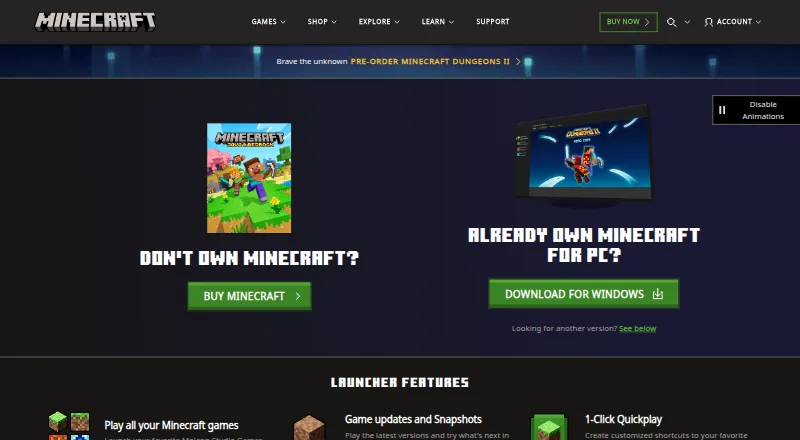
Minecraft Launcher is a free PC hub for bringing Minecraft games together, downloading versions, managing profiles, and accessing multiplayer servers and mod support. It includes Java and Bedrock editions on PC, though the games can also be launched without the Launcher. Players can use current game versions, try snapshots, and create one-click Quick Play shortcuts to favorite worlds. The Launcher provides language and accessibility settings, Java skin management, account information, and Minecraft news and promotions. It can be installed through the Microsoft Store or from the Minecraft download page. On Windows, installing from Minecraft.net still requires signing into the Microsoft Store with the account intended for the Launcher. A Microsoft account is required to play Minecraft versions. The free Java and Bedrock trial includes the core Survival experience and about 100 minutes of in-game play, with duration varying by device; it supports offline play and LAN multiplayer, but not online servers. Java Edition cross-play is limited to Windows, Mac, and Linux, while Bedrock supports cross-play across Windows, consoles, and mobile.
Good
- Free launcher brings Java and Bedrock together on PC.
- Supports snapshots and one-click Quick Play shortcuts.
- Includes language and accessibility settings.
- Supports offline play and LAN multiplayer in the trial.
Watch out
- Playing Minecraft versions requires a Microsoft account.
- Windows installation from Minecraft.net requires Microsoft Store sign-in.
- Free trial disables online multiplayer servers.
- Java Edition cross-play is limited to Windows, Mac, and Linux.
Who it suits
The Launcher suits PC players who want Java and Bedrock access, version downloads, profile management, and Quick Play shortcuts. The official page describes Java Edition as suited to players seeking mods and custom servers, and Bedrock as suited to cross-platform play.
Verdict
Minecraft Launcher brings game access, version selection, profiles, and shortcuts into one PC hub, while remaining optional for launching games. The trial provides a limited Survival experience, but online multiplayer servers are disabled.
Plans and prices
From Minecraft Launcher's own pricing page, checked 30 Sep 2026.
| Plan | Price | What it gives you |
|---|---|---|
| Minecraft Launcher | Free | Launcher download is free; access to games requires ownership or a time-limited demo |
The facts
Each one read from Minecraft Launcher's own pages, with the date it was checked.
What it does
- Account requirement
- Installing the Launcher from Minecraft.net on Windows still requires signing into the Microsoft Store with the account intended for the Launcher.checked 29 Sep 2026
- Account safety
- Minecraft's account guide says a child account allows adults to modify certain safety settings, including enabling or disabling multiplayer, and requires an adult Microsoft account linked to it.checked 30 Sep 2026
- Automatic updates
- Yeschecked 19 Sep 2026
- Compatibility limit
- Java Edition cross-play is limited to Windows, Mac, and Linux; Bedrock Edition supports cross-play across Windows, consoles, and mobile.checked 29 Sep 2026
- Game access
- The Launcher can launch Minecraft games without requiring players to use the Launcher, though it puts the games in one place.checked 29 Sep 2026
- Game launching
- The Launcher can launch Minecraft games from one place, and the page says Minecraft games can also be launched without it.checked 30 Sep 2026
- Games
- The Launcher brings together Minecraft games, including Java and Bedrock editions on PC.checked 29 Sep 2026
- Installation
- The Launcher can be installed through the Microsoft Store or from the Minecraft download page.checked 29 Sep 2026
- Java runtime management
- Yeschecked 19 Sep 2026
- Microsoft account
- The Minecraft account guide says players need a Microsoft account to play all Minecraft versions and that the account helps secure purchases, identify players in multiplayer, report disruptive players, and get support.checked 30 Sep 2026
- News
- The Launcher includes Minecraft news and promotions.checked 30 Sep 2026
- Profile
- Players can manage Java skins and access account information in the Launcher.checked 29 Sep 2026
- Publisher
- The Minecraft site identifies Mojang AB as the copyright holder and Microsoft Corporation as the trademark holder.checked 29 Sep 2026
- Purpose
- The Launcher is a PC hub for accessing Minecraft games, downloading game versions, accessing multiplayer servers, managing profiles, and getting mod support.checked 30 Sep 2026
- Quickplay
- The Launcher supports customized shortcuts to favorite worlds with 1-Click Quickplay.checked 29 Sep 2026
- Quick Play
- The Launcher supports one-click Quick Play shortcuts to favorite worlds.checked 30 Sep 2026
- Security and parental controls
- Minecraft says parental control settings can govern multiplayer access, friend permissions, and communication, and recommends keeping the game updated for security fixes and player safety features.checked 29 Sep 2026
- Separate instances
- Yeschecked 19 Sep 2026
- Settings
- Launcher settings include language, accessibility, features, and Quick Play.checked 29 Sep 2026
- Settings and profile
- The Launcher offers language and accessibility settings, Java skin updates, and account information access.checked 30 Sep 2026
- Support
- The Launcher page links to Minecraft Help Center articles for installation, Quick Play, sign-in connection errors, and Launcher crashes.checked 30 Sep 2026
- Supported downloads
- The downloads page lists Launcher options for Windows 10/11, Windows legacy, Mac, Arch-based Linux, Debian-based Linux, other Linux distributions, Raspberry Pi, Android, and iOS.checked 30 Sep 2026
Money
- Free plan
- Yeschecked 19 Sep 2026
- Trial game content
- The free trial includes the core Survival mode experience, including crafting, exploration, and combat.checked 30 Sep 2026
The full review of Minecraft Launcher
Overview
Minecraft Launcher is a desktop hub for launching Minecraft editions, choosing game versions, and organizing profiles. It best suits PC players who want Java and Bedrock access, version choices, or shortcuts together; players who already launch games another way can skip it.
The free download brings launcher tools together, but it does not unlock the games: ownership or a time-limited demo is required. The demo is a narrow introduction rather than a substitute for the full game.
Key features
On PC, the Launcher brings Java and Bedrock editions into one place. Players can select current releases or snapshots, which is useful for trying new builds, while separate instances and Java runtime management offer organization for players maintaining distinct setups. Automatic updates reduce manual upkeep, though the Launcher remains optional for starting Minecraft.
One-click Quick Play shortcuts can take players directly to favorite worlds. The app also covers language and accessibility settings, Java skin management, account information, and Minecraft news and promotions. These conveniences make it a useful control point, but do not change the underlying access requirement: games still need to be owned or played through the demo.
Installing on Windows from Minecraft.net still requires signing into the Microsoft Store with the account intended for the Launcher. A Microsoft account is required to play Minecraft versions; Minecraft says it supports purchase security, multiplayer identity, reporting, and support. For families, a child account can be linked to an adult Microsoft account, which can modify certain safety settings. Parental controls can govern multiplayer access, friend permissions, and communication, and keeping the game updated is recommended for security fixes and safety features.
Pricing
| Plan | Price | What it includes |
|---|---|---|
| Minecraft Launcher | free | Free Launcher download; games require ownership or a time-limited demo. |
The Java and Bedrock trial offers roughly 100 minutes of in-game play, or about five in-game days, with duration varying slightly by device. It includes core Survival play—crafting, exploration, and combat—and supports offline play and LAN multiplayer. Online multiplayer servers are disabled, so players seeking public server access need the full game.
Platforms
Launcher downloads cover Windows 10/11 and legacy Windows, Mac, Arch-based and Debian-based Linux, other Linux distributions, Raspberry Pi, Android, and iOS. The download options span more devices than the Launcher’s listed supported-platform entry of Windows 10 or later, so players should choose the download for their device rather than assume every listed launcher feature is shared across platforms.
Edition choice matters for multiplayer: Java cross-play is limited to Windows, Mac, and Linux, while Bedrock supports cross-play across Windows, consoles, and mobile. Players choosing a version for friends should confirm everyone is on a compatible edition.
Who it's for
Java Edition is the better fit for PC players interested in mods and custom servers. Bedrock is aimed at players who want cross-platform play across console, PC, or mobile. The Launcher is most useful when version selection, profile management, Java runtime tools, and Quick Play shortcuts are part of the routine; it is less compelling for someone who only needs to start an already-installed game.
Pros and cons
- Pro: Java and Bedrock access, snapshots, and version selection share one PC hub, reducing the need to manage those choices separately.
- Pro: Separate instances, Java runtime management, and automatic updates provide practical tools for players maintaining multiple setups.
- Pro: A free download and a Survival trial let newcomers try the core loop before buying.
- Con: The Launcher itself does not grant game access; ownership or the limited demo is still needed.
- Con: Trial players cannot join online multiplayer servers, which rules out a major reason many players choose Minecraft.
- Con: Java and Bedrock have different cross-play reach, so the Launcher does not remove edition compatibility constraints.
Alternatives
For other launcher options, browse Minecraft Launchers or Game Launcher Software. Players focused on customizing game content can compare Game Modding Tools, Minecraft Add-on Editors, and Minecraft Character Customizers.
Armourer's Workshop is a free option for Linux, macOS, and Windows. Yes Steve Model is free and supports Android, Linux, and Windows. For browser-based skin work, Monster MCPE Skin Editor is a free web editor with no installation or account needed; SkinForge Minecraft Skin Studio offers a free pixel editor, 3D preview, and PNG export, with a one-time 0.99 USD Starter option for 10 AI credits and generations. mcskn provides its web editor tools free, but requires an account to publish a skin. ClothesPlus is a self-hosted free version with a basic wardrobe and commands, limited overlay slots, cross-server sync, and Nexo/ItemsAdder support. Minecraft Skin Merger is a free web fan project with no account requirement, while NeedCoolerShoes is another free web option.
Verdict
Minecraft Launcher is a sensible free hub for PC players who want Java and Bedrock, version choices, profile tools, and quick world shortcuts in one place. Choose it for that convenience, not for access to the games themselves: the demo is brief and excludes online servers, and players satisfied with launching games another way have little reason to add another step.
Getting started
- Visit the Minecraft download page.
- Install the Launcher through the Microsoft Store or from the Minecraft download page.
- On Windows, sign into the Microsoft Store with the account intended for the Launcher if installing from Minecraft.net.
- Sign in with a Microsoft account to play Minecraft versions.
- Choose a game version or try the free Java and Bedrock trial.
Limits worth knowing
The free Launcher download does not include ownership of Minecraft games; game access requires ownership or a time-limited demo. The Java and Bedrock trial provides approximately 100 minutes of in-game play, supports offline and LAN multiplayer, and disables online multiplayer servers.
Questions
Is Minecraft Launcher free?
Yes. The Launcher download costs nothing. Access to Minecraft games requires ownership or a time-limited demo.
How long is the free trial?
The Java and Bedrock trials provide approximately 100 minutes of in-game play, about five in-game days. The duration varies slightly by device.
Can I play multiplayer in the trial?
The trial supports LAN multiplayer, but online multiplayer servers are disabled.
Which platforms have Launcher downloads?
The downloads page lists Windows 10/11, Windows legacy, Mac, Arch-based Linux, Debian-based Linux, other Linux distributions, Raspberry Pi, Android, and iOS. The Launcher is described as a PC hub.
Do I need a Microsoft account?
Yes. A Microsoft account is required to play all Minecraft versions. Installing the Launcher from Minecraft.net on Windows also requires signing into the Microsoft Store with the intended account.
Where can I get help with Launcher problems?
Minecraft directs players to its Help Center and Minecraft Support Team for Launcher troubleshooting.
Alternatives to Minecraft Launcher
- 1
 9.7Free plan
 - 2
Modrinth
Free planOpen sourceWebAPILinuxmacOS8.7From $4.99 a month - 3

LabyMod
Free planAndroidiOSLinuxmacOS7.8Free plan - 4

Thendrask Launcher
Free planLinuxmacOSWindows7.8From $3 a month - 5

Prism Launcher
Free planLinuxmacOSWindows7.7Free plan - 6
FLauncher
Free planOpen sourceLinuxmacOSWindows7.6Free plan