Monster MCPE Skin Editor
Monster MCPE Skin Editor is a browser-based tool for making and editing Minecraft skins without installing software or creating an account.
What Monster MCPE Skin Editor is
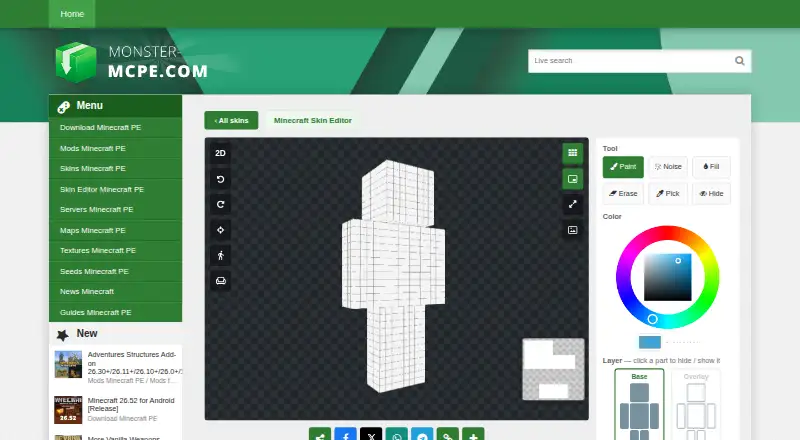
Monster MCPE Skin Editor is a browser-based tool for making and editing Minecraft skins without installing software or creating an account. Users can paint on a 3D character or switch to a flat 2D texture map, with Paint, Noise, Fill, Erase, Pick, and Hide tools plus undo, redo, and reset. It supports Classic and Slim models and Base and Overlay layers. Users can upload a PNG skin or select one from the site collection, then download the result as a PNG. Standard 64×64 skins work in Bedrock and Java Edition; 128×128 HD skins are supported only in Bedrock, while Java accepts only 64×64. Transparency also differs by edition: overlay transparency works across editions, but Java renders erased base-layer pixels black. The editor supports touch controls on phones, including painting, movement, and pinch zoom. The site says it is not an official Minecraft product and is not approved by or associated with Mojang. It is free to use.
Good
- Works in a browser without installation or an account
- Offers 3D painting and a 2D texture map
- Supports Classic and Slim models
- Phone controls support painting, movement, and zoom
Watch out
- Java Edition accepts only 64×64 skins
- Java renders erased base pixels black
- 128×128 HD skins work only in Bedrock Edition
Who it suits
It suits Minecraft players who want to edit skins in a browser, including on a phone. Java Edition users should work with 64×64 skins and account for how erased base pixels render.
Verdict
Monster MCPE Skin Editor offers browser-based skin editing with both 3D and 2D workflows. Check the edition-specific size and transparency behavior before exporting.
Plans and prices
From Monster MCPE Skin Editor's own pricing page, checked 30 Sep 2026.
| Plan | Price | What it gives you |
|---|---|---|
| Free | Free | Online editor; no installation or account needed |
The facts
Each one read from Monster MCPE Skin Editor's own pages, with the date it was checked.
What it does
- 3D and 2D editing
- Users can paint directly on a 3D model or switch to a flat 2D texture map.checked 30 Sep 2026
- Affiliation
- The editor page states that it is not an official Minecraft product and is not approved by or associated with Mojang.checked 30 Sep 2026
- Drawing tools
- Tools include Paint, Noise, Fill, Erase, Pick, and Hide, plus undo, redo, and reset actions.checked 30 Sep 2026
- Game compatibility
- The page says standard 64×64 skins work in Bedrock and Java Edition; Java accepts only 64×64.checked 30 Sep 2026
- Image and merge tools
- The Merge tool copies chosen parts from another skin, and the Image tool prints a picture onto the skin.checked 30 Sep 2026
- Import and export
- Users can upload a PNG skin or load a skin from the site collection, then download the result as a PNG.checked 30 Sep 2026
- Models and layers
- Users can choose Classic or Slim models and edit Base and Overlay layers.checked 30 Sep 2026
- Phone support
- The editor supports touch controls on phones, including one-finger painting, two-finger movement, and pinch zoom.checked 30 Sep 2026
- Privacy and cookies
- The site says it uses cookies and Google Analytics, and that Google AdSense uses interest-based advertising cookies.checked 30 Sep 2026
- Resolution limit
- Skins can be saved as 64×64 PNG, while 128×128 HD skins work only in Bedrock Edition.checked 30 Sep 2026
- Security statement
- The privacy policy says the site has physical, electronic, and managerial procedures to safeguard information collected online.checked 30 Sep 2026
- Support
- The site provides a contact form for feedback and inquiries.checked 30 Sep 2026
- Transparency limitation
- Overlay transparency works across editions; base-layer transparency works in Bedrock, while Java renders erased base pixels black.checked 30 Sep 2026
Where it runs
- Browser editor
- The editor works in a browser and requires no installation or account.checked 30 Sep 2026
The full review of Monster MCPE Skin Editor
Monster MCPE Skin Editor is a browser-based Minecraft skin editor for players who want to create or modify a skin without installing software or signing up. Its strongest fit is someone who wants both a character-view editing workflow and direct access to the texture map.
Overview
Start with a PNG upload or a skin from the site collection, then edit and download the result as a PNG. Classic and Slim models and separate Base and Overlay layers accommodate common skin layouts. This is a focused skin editor, not a general-purpose image tool.
The editor is free, works in a browser, and requires no account. That low-friction setup is useful for occasional edits as well as players who would rather not install a dedicated app.
Key features
Painting on the 3D model helps place details in character context, while the flat 2D texture map offers direct pixel-level control. Paint, Noise, Fill, Erase, Pick, and Hide cover common edits; undo, redo, and reset provide ways to recover or start over. Merge copies selected parts from another skin, and Image places a picture onto the skin.
Phone touch controls include one-finger painting, two-finger movement, and pinch zoom. That makes mobile editing possible in the browser, though it is not a separate mobile app.
Exports are PNG. Standard 64×64 skins work in both Bedrock and Java; 128×128 HD skins work only in Bedrock, and Java accepts only 64×64. Transparency needs particular care: Overlay transparency works across editions, but erased Base pixels appear black in Java. For Java players, edits that depend on transparent base pixels are therefore a poor fit.
Pricing
The Free plan costs nothing and includes the online editor without installation or an account. There is no paid tier or free trial to weigh against it. The key limit is compatibility rather than a stated plan cap: Java users must stick to 64×64 and account for black rendering of erased Base pixels.
Platforms
The editor runs on the web, including in phone browsers with touch controls. It exports PNG skins; standard 64×64 files are compatible with both Bedrock and Java, while 128×128 HD files are Bedrock-only.
Who it's for
Choose it if you want a free, account-free way to paint a Minecraft skin in either 3D or 2D, or to make focused edits from a phone browser. It is less suitable if your Java skin needs 128×128 resolution or transparent Base-layer pixels.
The site says it uses cookies and Google Analytics, and that Google AdSense uses interest-based advertising cookies. Its privacy policy describes physical, electronic, and managerial safeguards for information collected online. A contact form is available for feedback and inquiries. The editor page says it is not an official Minecraft product and is not approved by or associated with Mojang.
Pros and cons
- Pros: Free browser access with no installation or account lowers the barrier to making a quick edit.
- Pros: 3D and 2D workflows, Classic and Slim models, and Base and Overlay layers give users different ways to work on a skin.
- Pros: Merge and Image tools can bring in selected skin parts or a picture, beyond manual drawing.
- Cons: Java is limited to 64×64, and erased Base pixels render black, restricting resolution and transparency choices.
- Cons: Phone support uses touch controls in a browser rather than a dedicated mobile app.
Alternatives
Minecraft Character Customizers is a useful starting point for comparing tools across the category. Choose Minecraft Launcher instead if you need the free launcher across desktop and mobile platforms; access to games still requires ownership or a time-limited demo.
For generated skins rather than direct browser editing, Minecraft Skin Generator offers five free generations and a 2.49 USD one-time Hobbyist plan with 50 additional generations. Skin Maker is an Android option for creating, saving, exporting, and sharing skins free, with ads; AI generation and premium packs use credits.
SkinForge Minecraft Skin Studio is another web editor, with a free pixel editor, 3D preview, and PNG export, plus a 0.99 USD one-time Starter plan that includes AI credits and generations. mcskn is a free web editor whose tools work without payment, but publishing requires an account.
Minecraft Skin Merger is a free, no-account web option for users focused on merging skins. Armourer's Workshop is a free alternative for Linux, macOS, and Windows. ClothesPlus is a self-hosted choice with a free version for basic wardrobe and commands, limited overlay slots, and MySQL/cross-server sync.
Verdict
Monster MCPE Skin Editor is a strong choice for players who want free, no-account skin editing with both 3D context and 2D texture control. Its main reason to choose another tool is the edition-specific constraint: Java users must use 64×64 skins and cannot rely on transparent Base pixels.
Alternatives to Monster MCPE Skin Editor
- 1

NeedCoolerShoes
Free planOpen sourceAndroidiOSWeb7.9Free plan - 2

ClothesPlus
Free planWebAPILinuxSelf-hosted7.3$24.99 one-time - 3
Customizable Player Models
Free planOpen sourceWebAPISelf-hosted7.0Free plan - 4

Minecraft Skin Generator
Free planWeb6.6$2.49 one-time - 5
SkinForge Minecraft Skin Studio
Free planWeb6.6$0.99 one-time - 6
SkinForge: AI Skin Maker
Free planiOS6.6From $39.99 a year