SkinForge: AI Skin Maker
SkinForge: AI Skin Maker generates Minecraft skins from text descriptions.
What SkinForge: AI Skin Maker is
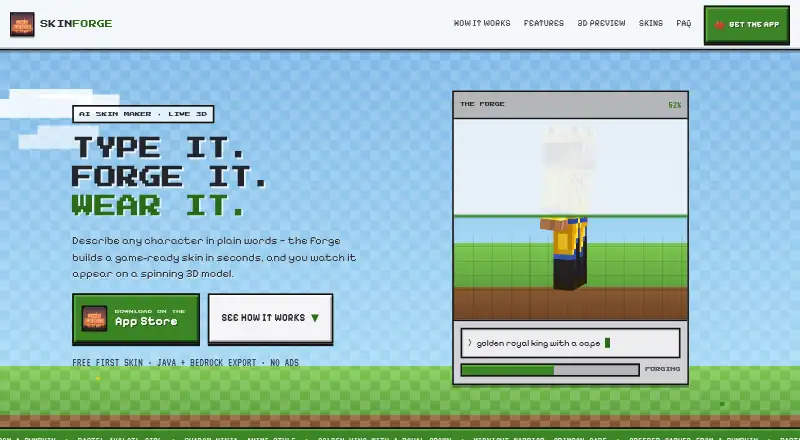
SkinForge: AI Skin Maker generates Minecraft skins from text descriptions. Users can also provide a picture or sketch as a visual input. During generation, a rotating 3D model shows the skin taking shape, and users can request chat-based changes that update the design in place. The app supports body, clothing, capes, and wings, including requested equippable cape designs. It exports PNG files for Java and one-tap .mcpack files for Bedrock and Pocket Edition. Users can browse community creations, follow creators, and remix skins; published creations are public with the user’s username. The app is for iOS and supports both Minecraft editions. The first skin is free; afterward, the site describes using tokens or ForgePass, without stating their limits. Listed purchases include 100 tokens for $1.99, paid once, 300 tokens for $4.99, paid once, SkinForge Pro for $6.99 a month, and SkinForge: AI Skin Maker for $29.99, paid once. SkinForge says prompts and uploaded photos are processed by Google Gemini and Modal and are not used to train its own models. It is an unofficial Minecraft app, not approved by or affiliated with Mojang AB or Microsoft.
Good
- Generates skins from text, pictures, or sketches.
- Chat requests can revise a skin in place.
- Exports PNG and .mcpack files.
- Supports both Minecraft editions.
- The first skin is free.
Watch out
- Available on iOS only.
- After the first skin, tokens or ForgePass are used.
- Published skins are public with the user's username.
Who it suits
It suits iOS users who want to create Minecraft skins from prompts, images, or sketches and export them for either Java or Bedrock/Pocket Edition. It may also appeal to users interested in browsing and remixing public community creations.
Verdict
SkinForge offers several inputs and editing options for making Minecraft skins, with exports for Java and Bedrock/Pocket Edition. Review the listed purchases and the public-creation setting before using the app.
Plans and prices
From SkinForge: AI Skin Maker's own pricing page, checked 5 Oct 2026.
| Plan | Price | What it gives you |
|---|---|---|
| First skin | Free | one free first skin |
| 100 Tokens | $1.99, paid once | 100 tokens |
| 300 Tokens | $4.99, paid once | 300 tokens |
| SkinForge Pro | $6.99 a month | — |
| 650 Tokens | $9.99, paid once | 650 tokens |
| 1,400 Tokens | $19.99, paid once | 1,400 tokens |
| SkinForge: AI Skin Maker | $29.99, paid once | — |
| SkinForge Pro | $39.99 a year | — |
| 3,500 Tokens | $49.99, paid once | 3,500 tokens |
The facts
Each one read from SkinForge: AI Skin Maker's own pages, with the date it was checked.
What it does
- Advertising and tracking
- The site says it has no third-party ads or cross-app tracking, and the privacy policy says it does not sell personal information.checked 5 Oct 2026
- Affiliation
- SkinForge states that it is an unofficial Minecraft app and is not approved by or affiliated with Mojang AB or Microsoft.checked 5 Oct 2026
- Capes and wings
- The site says users can request an actual equippable cape design and also advertises wings.checked 5 Oct 2026
- Chat editing
- Users can request changes in chat and the skin updates in place without a pixel grid.checked 5 Oct 2026
- Community
- Users can browse community creations, follow creators, and remix skins; published skins are public with the user's username.checked 5 Oct 2026
- Data handling
- The policy says account and app data are stored with Supabase and images with Cloudflare; purchase processing is handled by Apple.checked 5 Oct 2026
- Exports
- SkinForge exports a PNG for Java and a one-tap .mcpack for Bedrock and Pocket Edition.checked 5 Oct 2026
- Generation limit
- The site describes the first skin as free and says tokens and ForgePass are used after that; it does not state token quantities or ForgePass limits there.checked 5 Oct 2026
- Live preview
- A live reveal shows the skin materializing on a rotating 3D model while it generates.checked 5 Oct 2026
- Photo input
- Users can upload a picture or sketch to generate a matching skin.checked 5 Oct 2026
- Privacy
- The privacy policy says prompts and uploaded photos are processed by Google Gemini and Modal, and are not used to train SkinForge's own models.checked 5 Oct 2026
- Purpose
- SkinForge generates Minecraft skins from text descriptions using AI.checked 5 Oct 2026
- Support
- Support is available by email at [email protected]; the support page says account deletion requests are handled within 30 days.checked 5 Oct 2026
The full review of SkinForge: AI Skin Maker
SkinForge: AI Skin Maker is an iOS app for creating Minecraft skins with AI, from text prompts, photos, or sketches. It suits players who want to describe a character and refine it through chat rather than draw each pixel. Its export options cover Java and Bedrock/Pocket Edition, but generation moves beyond the one free skin into tokens or a subscription.
Overview
SkinForge combines AI generation with a rotating 3D preview and in-place chat edits. That gives players a way to shape a character without working directly on a pixel grid, while the photo and sketch inputs offer a more personal starting point than text alone. The trade-off is that the free offer is narrow: the first skin is free, and subsequent generation uses tokens or ForgePass.
Its community adds browsing, creator follows, and skin remixing. Publishing is public and displays the user's username, so the social features are best for people comfortable sharing their creations under an identifiable account name.
Key features
- Multiple creation inputs: Generate from a text description or upload a picture or sketch. This suits users who have a clear character concept but do not want to build its pixel pattern themselves.
- Live 3D reveal and chat editing: The app shows a skin forming on a rotating model, and users can request changes in chat that update the skin in place. This is a more conversational workflow than direct pixel editing, though it gives less direct control over individual pixels.
- Character components: SkinForge supports body, clothing, capes, and wings. It says users can request an actual equippable cape design, which is useful for players seeking more than a standard outfit.
- Game-ready exports: Export a PNG for Java or a one-tap .mcpack for Bedrock and Pocket Edition. Supporting both editions makes the app relevant across Minecraft's major editions.
- Community sharing: Browse creations, follow creators, and remix skins. Published work is public with the user's username, an important consideration for anyone who prefers private creation.
SkinForge says prompts and uploaded photos are processed by Google Gemini and Modal, and are not used to train its own models. Account and app data are stored with Supabase, images with Cloudflare, and Apple handles purchases. The service says it has no third-party ads or cross-app tracking and does not sell personal information. Support is available at [email protected]; account deletion requests are handled within 30 days.
Pricing
SkinForge is freemium, with one free first skin. Its purchases separate token bundles from a monthly subscription and a one-time purchase:
- First skin: free; one free first skin. This is enough to try the core generation idea, not an ongoing free allowance.
- 100 Tokens: $1.99, paid once; a small top-up for occasional additional generations.
- 300 Tokens: $4.99, paid once; more tokens in one purchase for users expecting to generate repeatedly.
- SkinForge Pro: $6.99 a month. This is the recurring option, but no token quota or generation limit is stated for it.
- 650 Tokens: $9.99, paid once, and 1,400 Tokens: $19.99, paid once. These larger bundles suit users who prefer paying once for a supply of tokens.
- SkinForge: AI Skin Maker: $29.99, paid once. The purchase's included allowance or entitlements are not described, so its value is difficult to compare with token bundles.
- 3,500 Tokens: $49.99, paid once; the largest stated bundle, for frequent generation without a monthly charge.
There is no stated trial or renewal term beyond the monthly price for Pro.
Platforms
SkinForge is available on iOS. It supports both Minecraft editions: PNG export for Java and .mcpack export for Bedrock and Pocket Edition. The app is unofficial and is not approved by or affiliated with Mojang AB or Microsoft.
Who it's for
Choose SkinForge if you play Minecraft on iOS and want AI to turn descriptions, photos, or sketches into skins, then refine them through chat and export them to either major edition. It is less suited to pixel artists who want precise manual control, or to anyone who wants a continuing free generation allowance or private-by-default community publishing.
Pros and cons
- Pro: Text, photo, and sketch inputs provide several ways to start a skin without drawing it pixel by pixel.
- Pro: Chat edits and a rotating 3D preview make iterative, visual refinement part of the creation flow.
- Pro: Java PNG and Bedrock/Pocket Edition .mcpack exports cover both Minecraft editions.
- Con: Only the first skin is free; later generation requires tokens or ForgePass, with no stated token or subscription limits.
- Con: Publishing makes a skin public under the user's username, so sharing is not a private workflow.
- Con: The 29.99 USD one-time purchase has no stated allowance, making it hard to assess against the clearly quantified token packs.
Alternatives
Browse Minecraft Character Customizers for a wider category comparison. Consider these specific alternatives when their platform, editing approach, or pricing suits you better:
- Minecraft Launcher is free to download across Android, iOS, Linux, macOS, and Windows, but access to games requires ownership or a time-limited demo. Pick it to launch Minecraft, not as a direct AI skin-making substitute.
- Minecraft Skin Generator is a web option with five free generations; its 2.49 USD one-time Hobbyist plan adds 50 generations. Pick it if a browser workflow and a stated generation count matter more than SkinForge's photo input and chat editing.
- Monster MCPE Skin Editor is a free web editor with no installation or account needed. Choose it for a no-install option rather than SkinForge's AI-driven creation process.
- Skin Maker is an Android freemium app where creating, saving, exporting, and sharing skins are free, while AI generation and premium packs use credits. Pick it if Android support and free manual skin work are priorities.
- SkinForge Minecraft Skin Studio is a web editor with a free pixel editor, 3D preview, and PNG export, plus a 0.99 USD one-time Starter plan with 10 AI credits and 10 AI generations. Choose it if browser access and an explicitly stated starter generation allowance appeal more.
- mcskn is a free web editor with every editor tool available without payment; an account is required to publish. Choose it for a free, tool-based editing workflow.
- Minecraft Skin Merger is a free web tool with no account required. Choose it if a no-account option is the priority.
- Armourer's Workshop is a free option for Linux, macOS, and Windows users.
Verdict
SkinForge is a strong fit for iOS Minecraft players who want to generate skins from an idea or image, refine them conversationally, and export to either Java or Bedrock/Pocket Edition. Its combination of inputs, chat editing, and 3D preview is the main reason to choose it. Look elsewhere if you need detailed pixel-level control, a clear ongoing free allowance, or a defined generation quota before paying.
Getting started
- Open the SkinForge website
- Install the iOS app
- Describe a skin or upload a picture or sketch
- Generate the free first skin
- Request revisions in chat
- Export PNG for Java or .mcpack for Bedrock and Pocket Edition
Limits worth knowing
The first skin costs nothing. After that, SkinForge describes tokens and ForgePass, but does not state their quantities or limits. Listed paid options include 100 Tokens for $1.99, paid once, SkinForge Pro for $6.99 a month, and larger token packs.
Questions
Is there a free option?
Yes. The First skin plan is free and provides one free first skin.
Which Minecraft editions are supported?
SkinForge supports both editions, exporting PNG for Java and .mcpack for Bedrock and Pocket Edition.
What does SkinForge Pro cost?
SkinForge Pro costs $6.99 a month.
Can I use a photo as input?
Yes. You can upload a picture or sketch to generate a matching skin.
Is SkinForge affiliated with Minecraft makers?
No. SkinForge says it is unofficial and is not approved by or affiliated with Mojang AB or Microsoft.
Are prompts and photos used to train SkinForge models?
The privacy policy says Google Gemini and Modal process prompts and uploaded photos, and they are not used to train SkinForge's own models.
Alternatives to SkinForge: AI Skin Maker
- 1
NeedCoolerShoes
Free planOpen sourceAndroidiOSWeb7.9Free plan - 2

ClothesPlus
Free planWebAPILinuxSelf-hosted7.3$24.99 one-time - 3
Customizable Player Models
Free planOpen sourceWebAPISelf-hosted7.0Free plan - 4

Minecraft Skin Generator
Free planWeb6.6$2.49 one-time - 5
SkinForge Minecraft Skin Studio
Free planWeb6.6$0.99 one-time - 6
MC Skin Creator
Free planWeb6.4Free plan