
Minecraft Skin Merger
Minecraft Skin Merger is a free browser tool for combining two Minecraft skins by choosing which one supplies each body part.
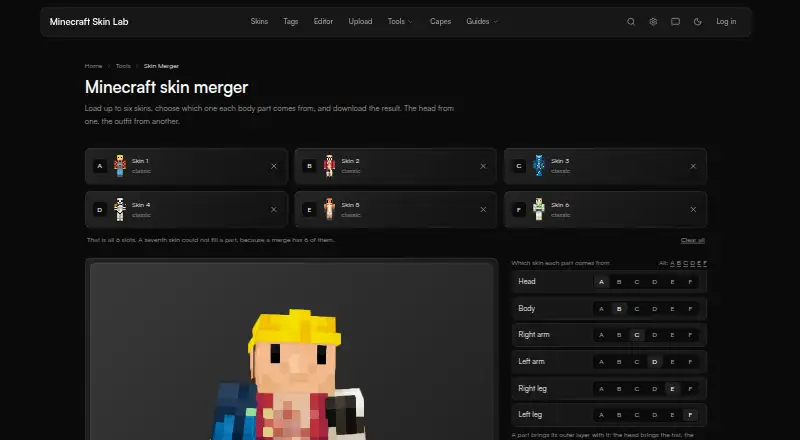
What Minecraft Skin Merger is
Minecraft Skin Merger is a free browser tool for combining two Minecraft skins by choosing which one supplies each body part. Inputs can be PNG files in 64×64 or older 64×32 format, or skins loaded by username. Choose skin A or B for the head, body, each arm, and each leg; each selected part keeps both of its layers, such as hair and a hat. The result can use Classic or Slim arm width, with a mismatched skin converted first. Download the merged skin as a PNG or continue editing it in the skin editor. To combine more than two skins, use one merge result as skin A in another merge. Selection is limited to whole body parts, so choosing only a hat or jacket is not supported. A file opened by the user stays in the browser; username lookup requests that player's skin from Mojang, while merging and downloading happen on the page. The maker says its tools are free and require no account, and describes Minecraft Skin Lab as an independent fan project unaffiliated with Mojang Studios or Xbox Game Studios.
Good
- Choose a source skin for six body parts
- Selected parts retain both layers
- Supports Classic and Slim arm widths
- Exports a PNG or opens the skin editor
Watch out
- Only combines two skins per merge
- Cannot select just a hat or jacket
Who it suits
It suits players who want to combine parts from two skins in a browser, then download the result or edit it further. It is less suited to anyone who needs to select individual clothing layers such as only a hat or jacket.
Verdict
Minecraft Skin Merger provides part-by-part mixing, with both layers preserved for each selected part. Its whole-part selection means it cannot isolate individual items such as a jacket or hat.
Plans and prices
From Minecraft Skin Merger's own pricing page, checked 4 Oct 2026.
| Plan | Price | What it gives you |
|---|---|---|
| Free | Free | All tools are free · no account required |
The facts
Each one read from Minecraft Skin Merger's own pages, with the date it was checked.
What it does
- Arm models
- Users can set the result's arm width to Classic or Slim, and the mismatched skin is converted first.checked 4 Oct 2026
- Inputs
- Each input can be a skin PNG in 64×64 or the older 64×32 format, or a skin loaded by username.checked 4 Oct 2026
- Layers
- Each selected body part includes both of its layers, such as the head's hat and hair.checked 4 Oct 2026
- Multiple skins
- To combine more than two skins, users can merge two, then use that result as skin A for another merge.checked 4 Oct 2026
- Output
- Users can download the result as a PNG or continue editing it in the skin editor.checked 4 Oct 2026
- Privacy
- A skin file opened by the user stays in the browser, while a username lookup asks Mojang for that player's skin; the merge and download happen on the page.checked 4 Oct 2026
- Purpose
- The merger combines two Minecraft skins by letting users choose which skin supplies each body part.checked 4 Oct 2026
- Selectable parts
- Users choose skin A or B for the head, body, each arm, and each leg.checked 4 Oct 2026
- Whole-part limit
- The merger works with whole body parts; selecting only a hat or jacket is not supported there.checked 4 Oct 2026
Money
- Free access
- The maker says all tools are free and none requires an account.checked 4 Oct 2026
The company
- Maker
- Minecraft Skin Lab describes itself as an independent fan project unaffiliated with Mojang Studios or Xbox Game Studios.checked 4 Oct 2026
Alternatives to Minecraft Skin Merger
- 1
NeedCoolerShoes
Free planOpen sourceAndroidiOSWeb7.9Free plan - 2

ClothesPlus
Free planWebAPILinuxSelf-hosted7.3$24.99 one-time - 3
Customizable Player Models
Free planOpen sourceWebAPISelf-hosted7.0Free plan - 4

Minecraft Skin Generator
Free planWeb6.6$2.49 one-time - 5
SkinForge Minecraft Skin Studio
Free planWeb6.6$0.99 one-time - 6
SkinForge: AI Skin Maker
Free planiOS6.6From $39.99 a year