
Visual Studio Code
Visual Studio Code is a free, open-source code editor with AI-assisted development tools for macOS, Linux, Windows and the web.
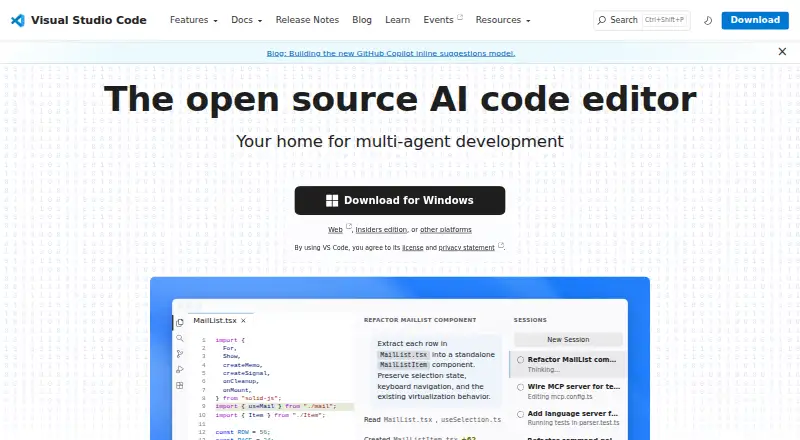
What Visual Studio Code is
Visual Studio Code is a free, open-source code editor with AI-assisted development tools for macOS, Linux, Windows and the web. Its inline suggestions and intelligent completions support everyday coding, while agent workflows can plan tasks, edit code, run commands and iterate. Users can move between agent work and direct coding in the same editor. Agent workflows support Copilot and third-party providers, and users can bring their own model key; building with AI agents requires a GitHub account.
JavaScript, TypeScript, CSS and HTML support is built in, and extensions add support for almost every major programming language. The Visual Studio Marketplace has more than 80,000 extensions. Built-in tools include Git source control, an integrated terminal, code running and debugging, build tasks and local history. VS Code also connects to GitHub Codespaces and remote development environments, including folders in containers on remote machines. Settings Sync and profiles help carry or switch between sets of customizations. The browser editor runs in a limited execution environment. VS Code is free for private or commercial use, and requires agreement to its license and privacy statement.
Good
- Free for private or commercial use.
- Available on Windows, macOS, Linux and the web.
- AI agents can plan, edit code, run commands and iterate.
- Marketplace offers more than 80,000 extensions.
- Built-in Git, terminal, debugging and build tools.
- Settings Sync shares user settings across instances.
Watch out
- AI agent setup requires a GitHub account.
- The web editor has a limited execution environment.
- Extensions can access files, make network requests and run processes.
- Microsoft may not provide support services under the product license.
Who it suits
VS Code suits developers who want a free editor for desktop or browser coding, with built-in tools and a large extension library. It also fits users who want to combine AI agent workflows with direct coding, provided they have a GitHub account to start building with agents.
Verdict
Choose Visual Studio Code for a free, multi-platform editor that brings AI assistance, agent workflows and a broad extension ecosystem together. Look elsewhere if you need a full browser execution environment or guaranteed support services from Microsoft.
Plans and prices
From Visual Studio Code's own pricing page, checked 29 Sep 2026.
| Plan | Price | What it gives you |
|---|---|---|
| Visual Studio Code | Free | Free for private or commercial use |
The facts
Each one read from Visual Studio Code's own pages, with the date it was checked.
What it does
- Account Requirement
- A GitHub account is required to start building with AI agents.checked 27 Sep 2026
- Additional Editions
- The site also offers Visual Studio Code Web, Insiders edition, and other platforms.checked 27 Sep 2026
- Agent Automation
- AI agents can plan, change code, run commands, and iterate on tasks.checked 27 Sep 2026
- Agent Customization
- Custom instructions, agent skills, custom agents, MCP servers, plugins, and extensions are supported.checked 27 Sep 2026
- Agent Workflows
- Users can switch between agent work and hands-on coding in the same editor.checked 27 Sep 2026
- AI agents
- Agents can autonomously plan tasks, make code changes, run commands, and iterate.checked 29 Sep 2026
- AI Editing Features
- The editor includes AI-powered inline suggestions and intelligent completions.checked 27 Sep 2026
- Built-In Languages
- JavaScript, TypeScript, CSS, and HTML are included in the box.checked 27 Sep 2026
- Column editing
- Yeschecked 22 Sep 2026
- Customization
- Settings Sync shares user settings across VS Code instances, and profiles let users create and switch between sets of customizations.checked 29 Sep 2026
- Developer Adoption
- VS Code has been the editor of choice for millions of developers for over a decade.checked 27 Sep 2026
- Editor tools
- Built in features include an integrated terminal, code running and debugging, build tasks, and local history.checked 29 Sep 2026
- Enterprise controls
- Organizations can restrict installable extensions and host a private extension marketplace.checked 29 Sep 2026
- Extension Marketplace
- The Extension Marketplace contains more than 80,000 extensions.checked 27 Sep 2026
- Extensions
- The Visual Studio Marketplace lists more than 80,000 extensions.checked 29 Sep 2026
- Extension security
- The Marketplace signs extensions and VS Code verifies signatures during installation; extensions can still access files, make network requests, and run processes with VS Code's permissions.checked 29 Sep 2026
- Extension support
- Yeschecked 22 Sep 2026
- Integrations
- The editor includes Git source control and can connect to GitHub Codespaces and remote development environments.checked 29 Sep 2026
- Language Coverage
- VS Code supports almost every major programming language.checked 27 Sep 2026
- Languages
- JavaScript, TypeScript, CSS, and HTML support are included, and extensions add support for other languages.checked 29 Sep 2026
- Large-file handling
- Yeschecked 22 Sep 2026
- License Privacy
- Using VS Code requires agreement to its license and privacy statement.checked 27 Sep 2026
Where it runs
- Desktop platforms
- VS Code runs on macOS, Linux, and Windows.checked 29 Sep 2026
Money
- Free plan
- Yeschecked 22 Sep 2026
The full review of Visual Studio Code
Visual Studio Code is an open-source editor for software development, available on desktop and in a browser with optional AI assistance and agent automation. It is best suited to developers who want one highly configurable workspace for many languages, remote environments and coding styles. The free price removes a major barrier, but browser execution limits, extension permissions and the absence of promised Microsoft support matter for some users.
Overview
VS Code combines a conventional code editor with an extensible development workbench. JavaScript, TypeScript, CSS and HTML support are included immediately, while extensions cover almost every major programming language. Git source control, an integrated terminal, code running and debugging, build tasks and local history make it capable of handling daily development rather than simple text editing.
Its open-source editor model and long adoption by millions of developers make it a familiar foundation, but the breadth also creates responsibility: users must choose extensions carefully, manage customizations and understand how AI and remote workflows fit their projects.
Key features
Editing tools include multi-cursor and column editing, plus large-file handling. These are practical advantages for repetitive changes, data-shaped text and projects that would strain a basic editor. Profiles let users switch between groups of customizations, while Settings Sync shares user settings across VS Code installations.
The Extension Marketplace contains more than 80,000 extensions, allowing the editor to cover specialist languages and workflows. Marketplace extensions are signed and VS Code verifies signatures during installation, but installed extensions can still read files, make network requests and run processes with the editor's permissions. Organizations can restrict installable extensions and host a private marketplace.
AI-powered inline suggestions and intelligent completions assist ordinary editing. Agent workflows go further: agents can plan tasks, modify code, run commands and iterate. Copilot and third-party providers are supported, with an option to bring your own model key. A GitHub account is required to start building with AI agents.
Remote Development can open a folder in a container on a remote machine, and VS Code connects with GitHub Codespaces and other remote development environments. This is useful when dependencies or compute belong on another system. Workspace Trust can block automatic execution of workspace code by placing a project in Restricted Mode, adding a meaningful safeguard for unfamiliar repositories.
Privacy-conscious users should note that VS Code collects telemetry, although it can be disabled with the telemetry.telemetryLevel setting. Extensions may collect telemetry separately, so changing the editor setting does not necessarily cover every installed component.
Pricing
Visual Studio Code — free, free for private or commercial use. There is no free trial because the editor itself is free, and no paid tier or seat charge is given. This makes it a strong fit for individuals, teams and businesses that need a capable editor without licensing expenditure. The trade-offs are practical rather than plan-based: AI agent use requires a GitHub account, and Microsoft may not provide support services under the product license.
Platforms
Desktop downloads cover macOS, Windows and Linux, including DEB and RPM packages. Visual Studio Code for the Web runs in a browser, and the product also offers an Insiders edition and other platform options. The web editor is convenient for lightweight access, but its execution environment is limited, so projects requiring full local tooling should use a desktop installation or remote environment.
Who it's for
Choose VS Code if you develop across several languages, want a large extension ecosystem, or need integrated Git, terminals, debugging and remote containers in one place. It also suits developers interested in configurable AI assistance and agent workflows. It is less suitable when you need a browser editor with unrestricted execution, a tightly controlled extension surface without administrative setup, or guaranteed Microsoft support services.
Pros and cons
Pros
- Free for private and commercial use: there is no stated license cost or seat fee.
- Broad language and extension coverage: built-in web languages and more than 80,000 extensions support varied projects.
- Strong remote workflow: containers, Codespaces and remote environments extend work beyond the local machine.
- Flexible AI automation: agents can plan, edit, run commands and iterate, with support for third-party providers and personal model keys.
Cons
- Browser limitations: VS Code for the Web has a limited execution environment.
- Extension risk: signed extensions still receive file, network and process permissions.
- Telemetry considerations: editor telemetry is collected unless disabled, and extensions may collect their own.
- Support is not guaranteed: the license says Microsoft may not provide support services.
Alternatives
For a broad directory of comparable tools, see Code editors and Text Editors. Developers focused on game add-ons or language-specific tooling can browse Minecraft Mod Development Tools, PHP IDEs, Go IDEs and Minecraft Add-on Editors.
Neovim is a free, multi-platform alternative for users who prefer its editor approach and Apache 2.0 licensing. Choose Zed if you want a free personal plan with 2,000 accepted edit predictions and external-agent or API-key support. VSCodium is a free desktop alternative when you want a VS Code-based option without stated paid pricing. Vim, Kate, Pulsar and CudaText are free desktop editors with their own platform and licensing profiles. Notepad++ is a free GPL-licensed Windows editor for text and source code.
Verdict
Visual Studio Code is the right choice for developers who want a free editor that can grow from straightforward coding into multi-language, remote and AI-assisted work. Its main reasons to choose it are the extensive extension ecosystem, capable built-in tooling and configurable agent workflows. Look elsewhere if you need unrestricted browser execution, tighter default control over extension permissions or dependable support commitments from Microsoft.
Getting started
- Visit https://code.visualstudio.com/.
- Download the desktop edition for macOS, Windows or Linux, or open Visual Studio Code Web in a browser.
- Agree to the license and privacy statement.
- Create or use a GitHub account to start building with AI agents.
Limits worth knowing
The free plan is free for private or commercial use. The web editor has a limited execution environment; no other free-plan quota is listed.
Questions
How much does Visual Studio Code cost?
The listed Visual Studio Code plan costs nothing and is free for private or commercial use.
Is there a free trial?
No free trial is listed; the editor is offered as a free plan.
Which platforms does it support?
VS Code runs on Windows, macOS and Linux, and there is also a browser-based web editor.
Is Visual Studio Code open source?
It is presented as an open-source AI code editor.
Does it support extensions and other languages?
Yes. The Marketplace lists more than 80,000 extensions, and extensions add language support beyond built-in JavaScript, TypeScript, CSS and HTML.
Who makes Visual Studio Code?
Microsoft Corporation is named in the product license.
Alternatives to Visual Studio Code
- 1

Calmly Writer
Free planAndroidWebLinuxmacOS8.6Free plan - 2

Zed
Free planLinuxmacOSWindows8.3From $10 a month - 3
Neovim
Free planAndroidAPILinuxmacOS8.1Free plan - 4
Geany
Free planOpen sourceLinuxmacOSWindows8.1Free plan - 5
GNU Emacs
Free planAndroidLinuxmacOSWindows8.0Free plan - 6

Lapce
Free planOpen sourceExtensionLinuxmacOSWindows8.0Free plan