Neovim
Neovim is a free, Vim-based text editor designed for extensibility and usability.
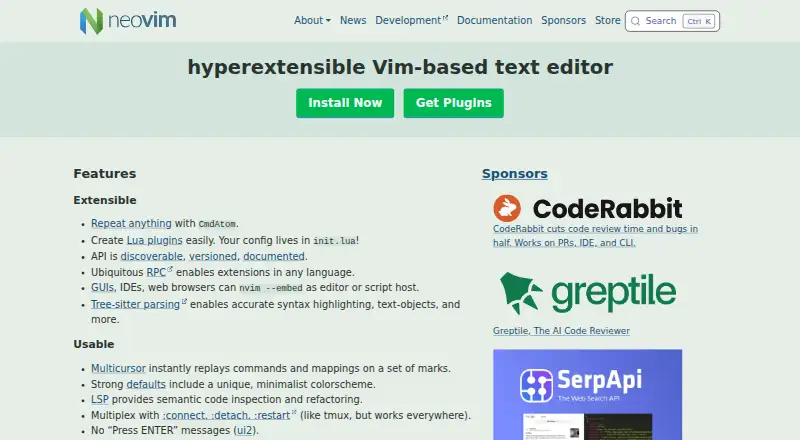
What Neovim is
Neovim is a free, Vim-based text editor designed for extensibility and usability. It keeps Vim’s editing model and Vimscript v1 support, while adding built-in Lua support and a configuration file based on init.lua. Its discoverable, versioned and documented API, together with RPC, lets developers build extensions in different languages; GUIs, IDEs and web browsers can also embed the editor. Tree-sitter supports syntax highlighting and text objects, while built-in language-server support offers semantic code inspection and refactoring. Neovim also includes multicursor editing, macro recording, column editing, large-file handling and a built-in terminal. It supports Vim 8.x plugins and more. Downloads are listed for Linux, macOS and Windows, with x86_64 and arm64 builds for each. Windows 8 or newer is required; Windows 7 and earlier are not supported. Neovim is licensed under Apache 2.0, except for portions contributed under the Vim license. Community support is available through GitHub Discussions and vi.stackexchange.com.
Good
- Supports Vim’s editing model and Vimscript v1.
- Users can create plugins in Lua.
- Built-in LSP supports code inspection and refactoring.
- Includes multicursor editing and macro recording.
- Free to use.
Watch out
- Windows 8 or newer is required.
- Windows 7 and earlier are unsupported.
- Some portions use the Vim license rather than Apache 2.0.
Who it suits
Neovim suits users who want Vim’s editing model alongside Lua plugins, language-server features and an extensible API. It is also relevant to developers embedding an editor in a GUI, IDE or browser.
Verdict
Neovim combines Vim compatibility with Lua plugins, a documented API and built-in language-server features. Check the Windows version requirement before choosing it for a Windows device.
Plans and prices
From Neovim's own pricing page, checked 30 Sep 2026.
| Plan | Price | What it gives you |
|---|---|---|
| Neovim | Free | Apache 2.0 license · Vim-licensed exceptions |
The facts
Each one read from Neovim's own pages, with the date it was checked.
What it does
- API clients
- The documentation lists Node.js, Python, Ruby and Go API clients, plus additional third-party clients.checked 30 Sep 2026
- API Documentation
- The API is discoverable, versioned, and documentedchecked 27 Sep 2026
- API languages
- Neovim provides API access from languages including C, C++, C#, Go, JavaScript, Lua, Python, Ruby and Rust.checked 30 Sep 2026
- Column editing
- Yeschecked 22 Sep 2026
- Community support
- Users can ask questions through GitHub Discussions or vi.stackexchange.com and chat on Matrix or IRC.checked 30 Sep 2026
- Community Support
- Support is available through GitHub Discussions and vi.stackexchange.comchecked 27 Sep 2026
- Configuration File
- Configuration lives in init.luachecked 27 Sep 2026
- Downloads
- Stable downloads are provided for macOS x86_64 and arm64, Linux x86_64 and arm64, and Windows x86_64 and arm64.checked 30 Sep 2026
- Editor features
- Neovim includes multicursor editing, built-in LSP support, a terminal emulator and modern terminal features.checked 30 Sep 2026
- Editor Type
- Hyperextensible Vim-based text editorchecked 27 Sep 2026
- Extensibility
- Neovim provides a discoverable, versioned and documented API, ubiquitous RPC, Lua plugins and Tree-sitter parsing.checked 30 Sep 2026
- Extension Languages
- RPC enables extensions in any languagechecked 27 Sep 2026
- Extension support
- Yeschecked 22 Sep 2026
- GUI integrations
- Neovim works with third-party GUIs including vscode-neovim, Firenvim, Neovide, Goneovim, Neovim-Qt and VimR.checked 30 Sep 2026
- GUI Integrations
- GUIs, IDEs, and web browsers can embed Neovimchecked 27 Sep 2026
- Language Servers
- LSP provides semantic code inspection and refactoringchecked 27 Sep 2026
- Large-file handling
- Yeschecked 22 Sep 2026
- License
- Neovim is licensed under Apache 2.0 except for parts contributed under the Vim license.checked 30 Sep 2026
- Lua Plugins
- Users can create Lua plugins easilychecked 27 Sep 2026
- Multi-cursor editing
- Yeschecked 22 Sep 2026
- Multicursor Editing
- Multicursor replays commands and mappings on marked regionschecked 27 Sep 2026
- Plugin Compatibility
- Supports Vim 8.x plugins and morechecked 27 Sep 2026
Money
- Free plan
- Yeschecked 22 Sep 2026
Where it runs
- Macro recording
- Yeschecked 22 Sep 2026
The full review of Neovim
Neovim is a Vim-based text editor for people who value command-driven editing and want room to tailor or embed their tools. Its broad extension model and built-in language-server features make it compelling for technical users, though its Vim editing model is not the natural fit for everyone.
Overview
Neovim retains Vim’s editing model and Vimscript v1 compatibility while adding Lua plugins, a documented API and modern editor capabilities. Existing Vim users can bring familiar approaches forward, while developers can build extensions without being limited to Vimscript. The current stable release is 0.12.
It is relevant to both Text Editors and Code editors; Go developers may also consider it alongside Go IDEs, though Neovim is a general-purpose editor rather than a dedicated Go IDE.
Key features
Extensibility is the central strength. Configuration lives in init.lua, and Lua plugins are straightforward to create; Vimscript remains supported alongside them. The discoverable, versioned and documented API, paired with RPC, lets extensions be written in languages including C, C++, C#, Go, JavaScript, Lua, Python, Ruby and Rust. Documented clients include Node.js, Python, Ruby and Go, with additional third-party clients. This is useful for developers who want editor integrations to fit the languages and services they already use, but it also makes Neovim’s greatest advantages most relevant to people willing to configure and extend an editor.
Tree-sitter provides syntax highlighting and text objects, while built-in LSP support adds semantic code inspection and refactoring. Together these bring language-aware work into the editor rather than limiting it to basic text manipulation. Multicursor editing replays commands and mappings across marked regions, a distinctive approach that can save repetitive work for users comfortable with Vim’s command model. Macro recording, column editing and large-file handling round out the editing tools.
A built-in terminal emulator includes modern terminal features by default. Neovim can also be embedded in GUIs, IDEs and web browsers, so the editor can serve as a component in a wider tool rather than only as a standalone application. Vim 8.x plugin compatibility gives established Vim extensions a route into that ecosystem.
Pricing
Neovim is free: the Neovim plan costs free. It is licensed under Apache 2.0, with exceptions for parts contributed under the Vim license. There is no paid tier to unlock the editor’s core features, making it a practical choice for individual users and teams that do not need a commercial support plan. Sponsor contributions go entirely to developers.
Platforms
Neovim supports Linux, macOS, Windows and Android, with stable downloads for macOS and Linux on x86_64 and arm64 and Windows on x86_64 and arm64. Tier 1 support covers Linux x86_64 and arm64, macOS x86_64 and arm64, and 64-bit Windows. Windows users need Windows 8 or newer; Windows 7 and earlier are unsupported. That cutoff matters if the editor is being chosen for an older Windows device.
Who it's for
Neovim is a strong choice for Vim users who want to preserve their editing model while gaining Lua-based configuration, language-server tooling and a documented extension API. It also suits developers building custom integrations or embedding an editor in other software. Readers looking for a conventional graphical editing experience, or unwilling to invest in a command-driven workflow and configuration, should look elsewhere.
Pros and cons
- Pro: Vim editing-model, Vimscript v1 and Vim 8.x plugin compatibility make the transition more attractive to users with established Vim habits and extensions.
- Pro: Lua plugins, documented API and RPC across several languages support deep customization and integration without tying extensions to one language.
- Pro: Built-in LSP, Tree-sitter, terminal support and command-replayed multicursor editing combine language-aware development with flexible text manipulation.
- Con: Its Vim-based editing model is a poor fit for users who expect a conventional graphical editor.
- Con: Windows 7 and older are not supported, excluding older Windows devices.
Alternatives
Visual Studio Code is another free option for Linux, macOS, Windows and the web; consider it if browser access is important. Kate is a free text editor for Linux, Windows and macOS, a straightforward alternative if you want a cross-platform editor without choosing Neovim’s Vim-based model.
Zed offers a free Personal plan with 2,000 accepted edit predictions and support for external agents or API keys; choose it if those features matter more than Neovim’s Vim compatibility and extension model. Notepad++ is a free Windows text and source-code editor that supports several programming and natural languages, making it a focused option for Windows users.
BBEdit has a free mode that retains core editing features after evaluation, and is worth considering for macOS users. EmEditor is a Windows alternative with a Professional Monthly Subscription at $6 a month; consider it if you prefer a subscription-based editor. Bluefish is a free, open-source editor for Linux, macOS and Windows. Lapce is a free, open-source code editor for Linux, macOS and Windows.
Verdict
Choose Neovim if you want Vim’s command-driven editing with a flexible Lua and RPC extension model, built-in language-server support and no purchase cost. Its compatibility and integration options reward users who want to shape their editor around their workflow. Look elsewhere if you want a conventional graphical interface or need to support Windows 7 or earlier.
Getting started
- Visit https://neovim.io/.
- Download a stable build for macOS, Linux, or Windows, if using one of those platforms.
- Choose the build matching x86_64 or arm64 where available.
- Configure Neovim through init.lua.
- Use the API and RPC to build extensions in a supported language.
Questions
Is Neovim free?
Yes. The Neovim plan costs nothing.
Which platforms does Neovim support?
Supported platforms include Linux, macOS, Windows, and Android. Stable downloads are listed for Linux, macOS, and Windows.
Does Neovim support Vim plugins and Vimscript?
Yes. Vimscript v1 remains supported, and Neovim supports Vim 8.x plugins and more.
What license does Neovim use?
Neovim is licensed under Apache 2.0, except for parts contributed under the Vim license.
Can I extend Neovim in languages other than Lua?
Yes. Its API and RPC support extensions in languages including C, C++, C#, Go, JavaScript, Lua, Python, Ruby, and Rust.
Which Windows versions are supported?
Windows 8 or newer is required. Windows 7 and older are not supported.
Alternatives to Neovim
- 1

Calmly Writer
Free planAndroidWebLinuxmacOS8.6Free plan - 2

Zed
Free planLinuxmacOSWindows8.3From $10 a month - 3

Visual Studio Code
Free planWebLinuxmacOSWindows8.2Free plan - 4
Geany
Free planOpen sourceLinuxmacOSWindows8.1Free plan - 5
GNU Emacs
Free planAndroidLinuxmacOSWindows8.0Free plan - 6

Lapce
Free planOpen sourceExtensionLinuxmacOSWindows8.0Free plan