Vim
Vim is a configurable text editor for creating and changing text, with uses including programming, composing email and editing configuration files.
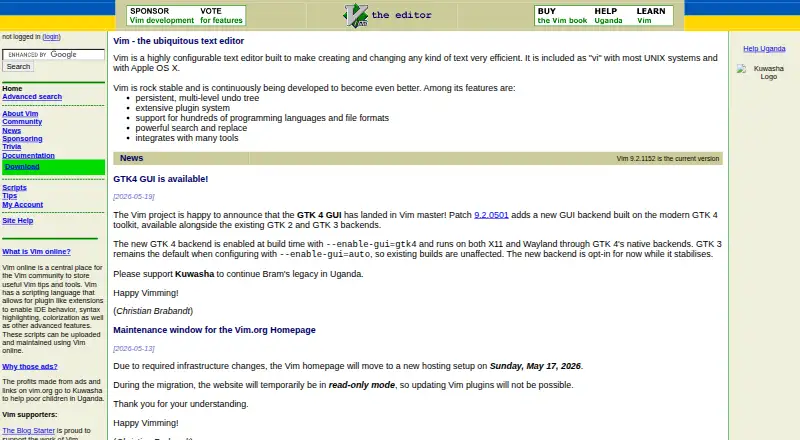
What Vim is
Vim is a configurable text editor for creating and changing text, with uses including programming, composing email and editing configuration files. It supports hundreds of programming languages and file formats, and includes search and replace, column editing, macro recording and a persistent multi-level undo tree. An extensive plugin system and scripting language let users add plugin-like extensions, and Vim integrates with many tools. It runs on Linux, macOS and Windows. Windows downloads include installers and zip packages for x64, x86 and ARM, along with links to Winget packages. For macOS, the download page links to MacVim for a graphical version and Homebrew for a terminal version. On Unix, Vim recommends obtaining it from source and links a daily-built AppImage for many Linux systems. Vim is distributed freely under a GPL-compatible license as charityware; users who find it useful are asked to consider donating to help children in Uganda through Kuwasha. The maker says Vim takes learning and is not a WYSIWYG word processor for typeset documents.
Good
- Supports hundreds of programming languages and formats.
- Includes persistent, multi-level undo.
- Offers macros and column editing.
- Has an extensive plugin system and scripting language.
- Distributed freely under a GPL-compatible license.
Watch out
- Requires users to learn how to use it.
- Not a WYSIWYG word processor for typeset documents.
- Unix users are recommended to obtain it from source.
Who it suits
Vim suits people who want a configurable editor for code, email or configuration files and are prepared to learn its operation. It is not intended for WYSIWYG typeset-document editing.
Verdict
Vim provides extensive editing and extension features across Linux, macOS and Windows, with no listed purchase price. Its learning curve and lack of WYSIWYG typeset-document editing may make it a poor fit for some writing tasks.
Plans and prices
From Vim's own pricing page, checked 7 Oct 2026.
| Plan | Price | What it gives you |
|---|---|---|
| Vim | Free | Distributed freely · Donations requested to support Kuwasha charity |
The facts
Each one read from Vim's own pages, with the date it was checked.
What it does
- Column editing
- Yeschecked 22 Sep 2026
- Editing features
- The maker lists powerful search and replace among Vim's features.checked 7 Oct 2026
- Extensions
- Vim has an extensive plugin system and a scripting language that allows plugin-like extensions.checked 7 Oct 2026
- Extension support
- Yeschecked 22 Sep 2026
- Integrations
- The maker says Vim integrates with many tools.checked 7 Oct 2026
- Languages and formats
- Vim supports hundreds of programming languages and file formats.checked 7 Oct 2026
- Learning curve
- The maker says Vim is a tool users must learn and that it is not a word processor designed for WYSIWYG typeset-document editing.checked 7 Oct 2026
- License and donations
- Vim is charityware, is distributed freely under a GPL-compatible license, and asks users who find it useful to consider donating to help children in Uganda through Kuwasha.checked 7 Oct 2026
- Product
- Vim is a highly configurable text editor built to make creating and changing text efficient.checked 7 Oct 2026
- Security
- The security page says an issue that could have caused account takeover was reviewed, patched, and validated as fixed in November 2025.checked 7 Oct 2026
- Support
- The Vim community page lists mailing lists for user help, development discussion, Mac-specific discussion, and announcements.checked 7 Oct 2026
- Undo
- Vim includes a persistent, multi-level undo tree.checked 7 Oct 2026
- Use cases
- The maker describes Vim as useful for programming, composing email, and editing configuration files.checked 7 Oct 2026
The company
- Founded
- 1991checked 28 Sep 2026
Money
- Free plan
- Yeschecked 22 Sep 2026
Where it runs
- Linux and Unix downloads
- The download page recommends obtaining Vim from source on Unix and links to a daily-built AppImage for many Linux systems.checked 7 Oct 2026
- macOS downloads
- The download page links to MacVim for a GUI version and Homebrew for a terminal version.checked 7 Oct 2026
- Macro recording
- Yeschecked 22 Sep 2026
- Supported platforms
- Windows,macOS,Linuxchecked 22 Sep 2026
- Windows downloads
- The download page lists Windows installers and zip packages for x64, x86, and ARM, and links to Winget packages.checked 7 Oct 2026
The full review of Vim
Vim is a highly configurable editor for code, email, and configuration files. It is best suited to programmers, administrators, and experienced text-focused users willing to learn a keyboard-driven workflow. Choose it for precise, repeatable editing across major desktop systems; look elsewhere for visual page layout or a gentle first-session experience.
Overview
Developed since 1991, Vim is built around efficient creation and modification of plain text. It runs on Linux, macOS, and Windows, making it practical for projects that move between operating systems. The software is charityware: it is distributed freely under a GPL-compatible license, and users who find it useful are asked to consider donations supporting children in Uganda through Kuwasha.
Vim is an editor, not a conventional word processor. Its workflow must be learned, and it is not designed for WYSIWYG typeset-document editing. That distinction makes it a strong fit for source code, configuration files, and text handled directly as text, but a weak choice for writers who need immediate page-oriented formatting.
Key features
- Configurable editing: Vim can be extensively configured, with column editing and macro recording for structured or repetitive work. These tools can turn multi-step transformations into dependable routines, although their value depends on investing time in Vim’s operating model.
- Persistent undo: A multi-level undo tree remains available across editing sessions, giving users more room to inspect and recover earlier changes than a simple linear undo history.
- Search and replacement: Powerful search-and-replace commands support broad or exact changes in large text sets. This favors users who need controlled, repeatable modifications rather than mouse-led formatting.
- Extensions and scripting: An extensive plugin system, together with a scripting language that enables plugin-like additions, lets users tailor the editor and connect it to their preferred workflow. Maintenance and configuration become part of the ownership cost.
- Language coverage: Support for hundreds of programming languages and file formats keeps Vim useful across varied code and text projects. It also integrates with many tools, helping it fit into established development environments.
Pricing
| Plan | Price | What you get |
|---|---|---|
| Vim | free | Distributed freely; donations requested to support the Kuwasha charity. |
There is no paid tier, seat charge, or free-trial expiry to manage. The free plan suits individuals, teams, and organizations that want the full editor without a software budget; the trade-off is that users supply their own learning and configuration time. Donations are optional but form part of Vim’s charityware model.
Platforms
Vim supports Linux, macOS, and Windows. Windows downloads include installers and zip packages for x64, x86, and ARM, plus Winget packages. On macOS, users can choose MacVim for a graphical version or Homebrew for a terminal version. For Linux and Unix, the download guidance points to building from source on Unix and provides a daily-built AppImage for many Linux systems.
Community mailing lists cover user help, development discussion, Mac-specific topics, and announcements. A security issue that could have enabled account takeover was reviewed, patched, and validated as fixed in November 2025.
Who it's for
Vim is for developers, system administrators, and other users who routinely edit code, email, or configuration files and are prepared to learn its command-oriented approach. It also suits teams needing the same editor across Linux, macOS, and Windows, especially when macros, column operations, undo depth, and extensions justify a tailored workflow.
It is not the right choice for users who expect WYSIWYG typeset documents, immediate visual layout, or a minimal learning period. Occasional writers may spend more time learning and configuring Vim than they save through its advanced editing model.
Pros and cons
Pros
- Free across platforms: The complete editor costs nothing on Linux, macOS, and Windows, with no trial deadline or paid-plan limitation.
- Deep recovery and automation: Persistent multi-level undo, macro recording, column editing, and powerful search-and-replace support careful, repeatable changes.
- Broad extensibility: Plugins and scripting allow the environment to grow with a user’s tools and habits.
- Wide text coverage: Hundreds of languages and file formats, plus tool integrations, keep it relevant beyond one programming stack.
Cons
- Steep learning commitment: Vim explicitly requires learning its workflow, which can delay productivity for newcomers.
- No WYSIWYG typesetting: It does not provide the visual document-layout experience needed for print-oriented writing.
- Configuration overhead: Extensions and scripting offer flexibility but require users or teams to maintain their setup.
Alternatives
Visual Studio Code is a free alternative for users who want support on Linux, macOS, Windows, and the web. Neovim is another free Vim-family option, including Android and self-hosted platforms, with an Apache 2.0 license and Vim-licensed exceptions.
Zed suits readers seeking a freemium editor with a free Personal plan, a free trial, and 2,000 accepted edit predictions. VSCodium is a free Linux, macOS, and Windows choice with no paid pricing or billing details stated.
Kate, Pulsar, and CudaText are free cross-platform editors; choose among them when you prefer a different editor workflow. Notepad++ is the focused alternative for Windows users who want a free GPL-licensed text and source-code editor supporting several programming and natural languages.
For broader browsing, see the Code editors, Text Editors, and Go IDEs lists.
Verdict
Vim is an excellent choice for users who will learn and tailor a command-driven editor, particularly when precise text manipulation, durable undo, macros, and extensions matter across Linux, macOS, and Windows. Its zero-cost charityware model removes licensing friction. Look elsewhere if your priority is visual typeset-document editing or an immediately familiar interface.
Alternatives to Vim
- 1

Calmly Writer
Free planAndroidWebLinuxmacOS8.6Free plan - 2

Zed
Free planLinuxmacOSWindows8.3From $10 a month - 3

Visual Studio Code
Free planWebLinuxmacOSWindows8.2Free plan - 4
Neovim
Free planAndroidAPILinuxmacOS8.1Free plan - 5
Geany
Free planOpen sourceLinuxmacOSWindows8.1Free plan - 6
GNU Emacs
Free planAndroidLinuxmacOSWindows8.0Free plan