
Addons Maker for Minecraft PE
Addons Maker for Minecraft PE lets users create, find, and install add-ons for Minecraft PE and several other supported games.
What Addons Maker for Minecraft PE is
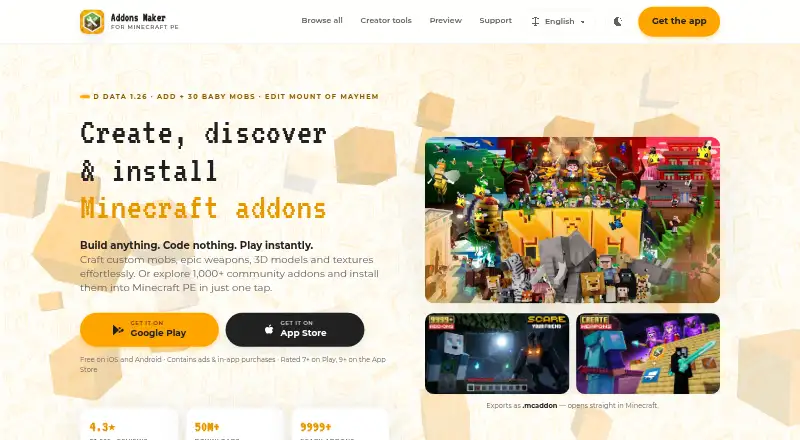
Addons Maker for Minecraft PE lets users create, find, and install add-ons for Minecraft PE and several other supported games. Its visual editors cover mobs, structures, blocks, weapons, armor, recipes, sounds, particles, functions, and Script API hooks. Users adjust items with controls such as sliders while the app generates the source code and resource files. It supports behavior and resource packs; users can import .json and .bbmodel files and export creations as .mcaddon files for compatible Bedrock platforms. The community library offers more than 1,000 add-ons for one-tap installation into Minecraft PE. The app supports Minecraft PE, Craftsman, Mike Craft, Crafting and Building, and Eerskraft on iOS and Android. A profile can store and sync add-ons across devices, and the app includes more than 20 languages. The free plan includes core editors, a template library, and export, with ads. MAM Premium costs $3.99 a month after a three-day free period, removes ads, and unlocks advanced editing tools; subscriptions auto-renew. The maker describes it as an unofficial third-party tool, not approved by or associated with Mojang or Microsoft.
Good
- Visual editors generate code and resource files.
- Community library has more than 1,000 add-ons.
- Imports .json and .bbmodel files.
- Syncs add-ons across devices.
Watch out
- Free plan contains ads.
- Premium subscription auto-renews.
- Unofficial tool, not approved by Mojang or Microsoft.
Who it suits
It suits Minecraft PE players who want to make or install add-ons without writing code, as well as users of the other listed games. Users who need advanced editing tools or an ad-free experience can consider MAM Premium.
Verdict
Addons Maker combines visual add-on creation with a library for finding and installing community content. The free plan covers core editors and export, while advanced editing tools require a paid subscription.
Plans and prices
From Addons Maker for Minecraft PE's own pricing page, checked 3 Oct 2026.
| Plan | Price | What it gives you |
|---|---|---|
| Free | Free | Core editors · template library · export; contains ads |
| MAM Premium | $3.99 a month | Removes ads · unlocks advanced editing tools · First 3 days free, then $3.99/month; subscription auto-renews |
The facts
Each one read from Addons Maker for Minecraft PE's own pages, with the date it was checked.
What it does
- Community library
- The site says users can explore more than 1,000 community add-ons and install them into Minecraft PE in one tap.checked 3 Oct 2026
- Editor features
- Its editors cover custom mobs, structures, blocks, weapons, armor, recipes, sounds, particles, functions, and Script API hooks.checked 3 Oct 2026
- Import and export
- Users can import .json or .bbmodel files and export creations as .mcaddon files for compatible Bedrock platforms.checked 3 Oct 2026
- No-code editing
- The app generates the required source code and resource files while users customize items with controls such as sliders.checked 3 Oct 2026
- Not affiliated with Mojang
- The maker states that Addons Maker is an unofficial third-party tool and is not approved by or associated with Mojang or Microsoft.checked 3 Oct 2026
- Privacy and security
- JoyCraft's privacy policy says it uses industry-standard safeguards, including secured connections and SSL encryption, and notes that no method is completely secure.checked 3 Oct 2026
- Purpose
- The app creates, discovers, and installs Minecraft add-ons, including custom mobs, weapons, 3D models, and textures.checked 3 Oct 2026
- Support and languages
- The app includes more than 20 languages, and the maker's privacy policy provides an email contact for questions or complaints.checked 3 Oct 2026
- Supported games
- The app directly supports Minecraft PE, Craftsman, Mike Craft, Crafting and Building, and Eerskraft on iOS and Android.checked 3 Oct 2026
Where it runs
- Cross-device features
- The site describes a profile that stores and syncs add-ons across devices.checked 3 Oct 2026
The company
- Headquarters
- Ho Chi Minh City, Vietnamchecked 23 Sep 2026
The full review of Addons Maker for Minecraft PE
Addons Maker for Minecraft PE is a mobile app for building, discovering, and installing add-ons for Minecraft PE and several other building games. It is best for players who want visual tools instead of a code-first workflow. Its free tier covers core creation and export, but advanced editing requires a renewing subscription.
Overview
The app turns visual customizations, including slider adjustments, into the source code and resource files an add-on needs. That lowers the barrier to making behavior and resource packs, while .mcaddon export lets users move creations to compatible Bedrock platforms. The workflow is aimed at mobile creators, not people seeking a desktop development environment.
Addons Maker is an unofficial third-party tool and is not approved by or associated with Mojang or Microsoft. That distinction matters to anyone expecting an official product or support relationship.
Key features
Editors cover mobs, structures, blocks, weapons, armor, recipes, sounds, particles, functions, and Script API hooks. This range reaches beyond cosmetic changes, but users who need advanced editing tools must move to Premium. The app imports .json and .bbmodel files, which is useful for bringing existing work into its visual workflow, and exports creations as .mcaddon files.
A library of more than 1,000 community add-ons and one-tap installation gives players a way to find content without creating it themselves. Profiles can store and sync add-ons across devices, and the app supports Minecraft PE, Craftsman, Mike Craft, Crafting and Building, and Eerskraft on iOS and Android. More than 20 languages broaden its accessibility. JoyCraft’s privacy policy describes safeguards including secured connections and SSL encryption, while acknowledging that no method is completely secure.
Pricing
| Plan | Price | What you get |
|---|---|---|
| Free | free | Core editors, template library, and export; contains ads. |
| MAM Premium | $3.99 a month | First 3 days free, then $3.99/month; removes ads and unlocks advanced editing tools. Subscription auto-renews. |
The free plan is the sensible starting point for occasional makers who can work within the core editors and tolerate ads. Premium fits creators who need the advanced tools or want an ad-free experience, but its trial is only three days and the subscription renews automatically unless canceled. The free plan includes export, so paying is not required simply to save a creation as a .mcaddon.
Platforms
Addons Maker runs on iOS and Android. Its exports target compatible Bedrock platforms, and its supported-game range includes Minecraft PE plus four other mobile building games. It is not a desktop editor.
Who it's for
Choose it if you create or collect add-ons on a phone or tablet, want visual controls to generate pack files, or value a built-in community library. Look elsewhere if you need advanced editing without a recurring fee, prefer working in desktop tools, or require an official Mojang- or Microsoft-backed product.
Pros and cons
- Pros: Visual editing generates source and resource files, avoiding a code-first setup for core tasks.
- Pros: Broad editors, file import, and .mcaddon export serve both new projects and existing assets.
- Pros: A library of more than 1,000 add-ons and cross-device profile syncing support discovery and continuity.
- Cons: The free plan contains ads, and advanced editing is reserved for Premium.
- Cons: Premium auto-renews after a three-day trial, so users should track the trial end if they do not intend to continue.
- Cons: Its mobile focus and unofficial status make it a poor fit for desktop-first development or users seeking an official Minecraft tool.
Alternatives
For a broader comparison, see the Minecraft Add-on Editors list.
- bridge. is a free-plan option across Android, iOS, Linux, macOS, web, and Windows for readers who want wider platform coverage.
- Blockception Minecraft Bedrock Development is a free VS Code extension for Minecraft Bedrock Addons and Minecraft Education Edition, suited to readers already working in VS Code.
- Blockbench is free to use for any type of project and runs on mobile, desktop, and web, making it an option for readers wanting a broader 3D tool.
- Crafty Craft is another freemium mobile option, with a three-day trial and a monthly plan at $15.99 a month; choose it if its mobile platform coverage better fits your needs.
- mcbCode is a freemium Android and web option from an active Minecraft Bedrock developer and solo developer; consider it if those platforms or its code-oriented focus appeal.
- AddonCrate Studio is a free option for extension, Linux, macOS, and Windows.
- MCreator is free desktop software for Linux, macOS, and Windows, with voluntary donations.
- Bedrocken is a free VS Code extension for extension, Linux, macOS, and Windows, and requires VS Code ^1.87.0.
Verdict
Addons Maker is a strong fit for mobile players who want to create, import, or install Bedrock add-ons without starting in code. Its combination of visual editors, free export, and a substantial community library is the main reason to choose it. Look elsewhere if you need advanced editing on a free plan or prefer desktop development; Premium’s recurring charge is the clear trade-off for its deeper tools.
Alternatives to Addons Maker for Minecraft PE
- 1

Blockbench
Free planOpen sourceAndroidiOSWebAPI8.1Free plan - 2

Visual Studio Code
Free planWebLinuxmacOSWindows7.4Free plan - 3
Snowstorm
Free planAndroidiOSWebExtension7.0Free plan - 4

mcbCode
Free planAndroidWeb6.9From $4 a month - 5

Tynker
AndroidiOSWeb6.8From $10 a month - 6
JsonForge
Free planWebLinuxmacOSWindows6.7Free plan