
Blockbench
Blockbench is a free, open-source editor for making low-poly 3D models.
What Blockbench is
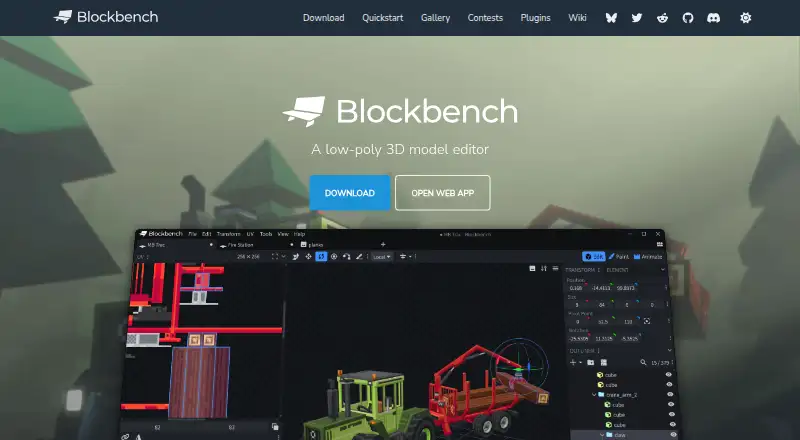
Blockbench is a free, open-source editor for making low-poly 3D models. Its modeling tools support cuboid and mesh shapes, and users can create, edit, and paint textures in the program. It can generate a model’s UV map and template, and connect to an external image editor or pixel-art software. For animation, Blockbench offers rigging, position, rotation, and scale keyframes, along with a graph editor. Its built-in plugin store includes extensions such as tools, export formats, and model generators; users can also make their own plugins. Blockbench is available as a web app and on Windows, macOS, Linux, iOS, and Android, and the project is licensed under the GPL. Its privacy policy says it does not knowingly collect personally identifiable data, though it may collect anonymized usage data such as installation count. Local storage and cookies can remember preferences on a user’s device. When users share a model, Blockbench stores its data for the duration they select; they can request earlier removal.
Good
- Free to use under the GPL project license
- Supports cuboid and mesh modeling
- Includes texture painting and UV map generation
- Animation editor supports rigging and keyframes
- Available on web, desktop, and mobile platforms
Watch out
- Privacy policy says anonymized usage data may be collected
- Shared model data is stored for the selected duration
- Data security is not guaranteed to be absolute
Who it suits
Blockbench suits people creating low-poly models, textures, and animations who want a free editor available on web and several device platforms. Its plugin options may also suit users who want to extend the editor or build their own plugins.
Verdict
Blockbench combines modeling, texturing, and animation tools with plugin support across web, desktop, and mobile platforms. Keep in mind that shared models are stored for the period selected and that the privacy policy allows anonymized usage data collection.
Plans and prices
From Blockbench's own pricing page, checked 28 Sep 2026.
| Plan | Price | What it gives you |
|---|---|---|
| Blockbench | Free | Free to use for any type of project · no strings attached |
| Free | Free | all users · any purpose · no paid edition required |
The facts
Each one read from Blockbench's own pages, with the date it was checked.
What it does
- Animation
- Its animation editor supports rigging, position, rotation and scale keyframes plus a graph editor.checked 14 Oct 2026
- Block Wizard integration
- The Block Wizard generates resource and behavior pack files and lets creators test custom blocks in Bedrock.checked 14 Oct 2026
- Data security
- The privacy policy says Blockbench strives to use commercially acceptable means to protect data but cannot guarantee absolute security.checked 28 Sep 2026
- Desktop systems
- Microsoft lists downloadable desktop applications for Windows, Linux and macOS.checked 14 Oct 2026
- Documentation depth
- The wiki includes guides, format references, plugin tutorials, URL parameters, utility APIs and automatically generated API classes.checked 14 Oct 2026
- Export formats
- Documented exports include Java and Bedrock JSON, Java, JEM, JPM, OBJ, glTF and BBModel.checked 14 Oct 2026
- External editors
- Texture work can be connected to an external image editor or pixel-art application.checked 14 Oct 2026
- Licence
- The source code is GPL version 3, while plugins and themes using the API may be open, proprietary or paid.checked 14 Oct 2026
- License
- The project is open source under the GPL license.checked 28 Sep 2026
- Limit: advanced 3D production
- The independent review says it is less suited to detailed sculpting, cloth simulation and elaborate rendered scenes.checked 14 Oct 2026
- Limit: export compatibility
- The independent review warns that a convincing preview does not ensure a usable Minecraft or game-engine export unless the project format is chosen carefully.checked 14 Oct 2026
- Limit: mobile interaction
- A GitHub issue reported touch navigation problems including hard-to-use visibility controls and drag-sensitive scrolling in the mobile outliner.checked 14 Oct 2026
- Limit: UV controls
- A Minecraft Forum reviewer praised the streamlined workflow but called UV control complicated.checked 14 Oct 2026
- Local storage
- The privacy policy says Local Storage and Cookies are used for functionality such as remembering preferences and are stored locally on the user's device.checked 28 Sep 2026
- Low-poly modeling
- The editor supports cuboids and mesh modeling for simple Minecraft-style or more complex low-poly shapes.checked 14 Oct 2026
- Minecraft formats
- Built-in formats cover Minecraft Java and Bedrock models, including block, item, entity and armor workflows.checked 14 Oct 2026
- Minecraft wizards
- Microsoft documents Entity, Item and Block Wizard plugins that provide project starters for Minecraft add-ons.checked 14 Oct 2026
- Mobile delivery
- Mobile access is provided as a progressive web app installed from a browser rather than an APK or app-store listing.checked 14 Oct 2026
- Modeling
- It supports cuboid modeling and mesh modeling tools for creating low-poly shapes.checked 28 Sep 2026
The company
- Asset ownership
- The repository states that models, textures, animations and screenshots made with Blockbench belong to their creators.checked 14 Oct 2026
- Company identity
- Microsoft identifies the creator as Jannis Petersen and says Blockbench is supplied by external contributors rather than Microsoft or Mojang.checked 14 Oct 2026
- Founded
- 2017checked 28 Sep 2026
- Maker location
- The JannisX11 GitHub profile lists Germany.checked 14 Oct 2026
Money
- Free plan
- Yeschecked 21 Sep 2026
The full review of Blockbench
Overview
Blockbench is a low-poly 3D model editor for shaping, texturing, and animating models. It has cuboid and mesh modeling tools, alongside features for resource packs and custom entities. The project dates to 2017 and is open source under the GPL license.
Its visual editor runs in a browser or on desktop and mobile platforms. The toolset covers more than model geometry: users can generate UV maps and templates, paint textures on a model, build animations, and extend the editor with plugins. Blockbench also supports HD skins and slim (Alex) models.
That breadth makes Blockbench relevant to Minecraft-oriented work as well as low-poly modeling more broadly. Its tools provide a way to move from shaping a model to preparing its textures and animation in one editor, while still allowing connections to external image-editing or pixel-art software.
Key features
Modeling and textures
Blockbench supports both cuboid modeling and mesh modeling for making low-poly shapes. Users can create, edit, and paint textures in the program. It can generate a UV map and model template, helping users work with the model's surfaces. Painting directly on a 3D model is supported, and an external image editor or pixel-art program can be connected when users prefer a separate texture workflow.
Animation tools
The animation editor includes rigging and keyframes for position, rotation, and scale. A graph editor is also available, giving users another tool for working with animation.
Plugins and project support
The built-in plugin store offers extensions including tools, export formats, and model generators. Users can also create plugins of their own. Blockbench supports resource packs, custom entity tools, multiple version targets, HD skins, and slim (Alex) models. It does not support scripting.
Pricing
Blockbench is free to use for any type of project, with no strings attached. Its listed plan costs nothing. There is no free trial because the product is already offered as a free plan.
Platforms
Blockbench is available on Windows, macOS, Linux, iOS, and Android, and it also runs in a browser. The home page links to a web app at web.blockbench.net. Local Storage and Cookies are used for functionality such as remembering preferences, and are stored on the user's device.
Privacy and model sharing
Blockbench's privacy policy says it does not knowingly collect personally identifiable data, though it may collect anonymized usage data such as installation counts. If users choose Model Sharing, Blockbench stores model data for the duration they select; they can contact the project to request earlier removal. The policy says Blockbench strives to protect data using commercially acceptable means but cannot guarantee absolute security. For questions about the policy, it lists info (at) blockbench dot net.
Who it's for
Blockbench suits people who want to create low-poly models and handle textures or animation in the same editor. Its resource-pack support, custom entity tools, skin options, and multiple version targets make it especially relevant to Minecraft creators. The browser, desktop, and mobile availability also gives users several ways to access the editor.
It may also fit users who want to extend their workflow through plugins or connect an external image editor. Those looking for scripting support should note that it is not listed as a capability.
Pros and cons
Pros
- Free for any type of project.
- Combines cuboid and mesh modeling with texture creation and painting.
- Includes rigging, several animation keyframe types, and a graph editor.
- Offers a plugin store and allows users to create plugins.
- Available through browser, desktop, and mobile platforms.
- Open source under the GPL license.
Cons
- No scripting support.
- Model Sharing involves storing model data for a duration chosen by the user.
- The privacy policy does not guarantee absolute data security.
Alternatives
For other options in this area, see The Skindex, Laby Skin Studio, Nova Skin, PMCSkin3D, mcskins.top, MCTools, and SkinMC. Related directories include Minecraft Skin Editors, Minecraft Add-on Editors, Game 3D Modeling Software, Minecraft Mod Development Tools, Game Character Creation Software, and 3D modeling software.
Verdict
Blockbench brings low-poly modeling, texturing, animation, and extensibility together in a free editor that runs across browser, desktop, and mobile platforms. Its Minecraft-focused support is a particular strength for creators working with resource packs, custom entities, or skins. Users should weigh the absence of scripting and review the privacy details if they plan to use Model Sharing.
Getting started
- Open the Blockbench website or its web app at web.blockbench.net.
- Choose the web app or a platform version for Windows, macOS, Linux, iOS, or Android.
- Use the modeling tools to create cuboid or mesh shapes.
- Create or paint textures, and generate a UV map and template as needed.
- Use the animation editor for rigging and keyframes, or browse the plugin store for extensions.
Questions
How much does Blockbench cost?
Blockbench is free to use for any type of project, with a listed price of no cost plan.
Which platforms support Blockbench?
Blockbench is available on the web, Windows, macOS, Linux, iOS, and Android.
Is Blockbench open source?
Yes. The project is open source under the GPL license.
Can Blockbench create textures and UV maps?
Yes. Users can create, edit, and paint textures, and the program can generate a UV map and template for a model.
Can users extend Blockbench?
The built-in plugin store offers extensions, including tools, export formats, and model generators. Users can also create their own plugins.
Alternatives to Blockbench
- 1

IntelliJ IDEA
Free planAPIExtensionLinuxmacOS7.8Free plan - 2

Visual Studio Code
Free planWebLinuxmacOSWindows7.4Free plan - 3

Fabric
Free planAPILinuxmacOSSelf-hosted6.8Free plan - 4
Minecraft Development MCP Server
Free planAPILinuxmacOSSelf-hosted6.6Free plan - 5
Quilt Loom
Free planLinuxmacOSWindows6.6Free plan - 6
Architectury Loom
Free planLinuxmacOSWindows6.5Free plan