
MCTools
MCTools is a free collection of Minecraft tools that runs in a web browser without an account.
What MCTools is
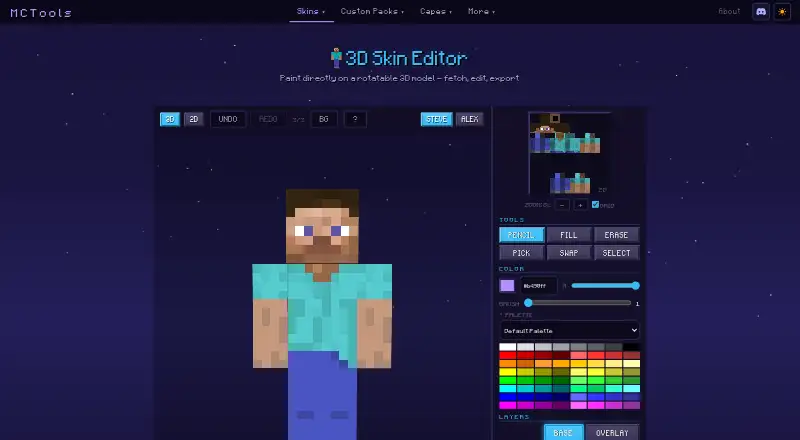
MCTools is a free collection of Minecraft tools that runs in a web browser without an account. Its 3D Skin Editor lets users paint on a rotatable model, switch between 3D and 2D views, and work with Steve or Alex models. Editing controls include undo and redo, pencils, fill and erase, color picking, selection, gradients, palettes, layers, and mirroring. Users can download skins or look them up using Java and Bedrock username options. Other tools cover skin packs, avatars, custom packs, capes, coordinates, and color codes. The Pack Converter supports conversions in both directions between Java and Bedrock, with optional handling for sounds, language files, animated textures, models, and PBR textures. Some Java features, including custom models and shaders, may not convert. MCTools says files are processed in the browser and stay on the device; its policy says it does not store user files or other user data on its infrastructure. A username used for a skin lookup is sent to a public lookup service. The terms describe the tools as-is and advise users to keep their own backups.
Good
- Free to use without an account
- Skin editor supports layers and rotatable 3D views
- Includes skin, avatar, cape, and pack tools
- Files are processed in the browser
Watch out
- Some Java features may not convert to Bedrock
- Terms advise users to keep their own backups
- Username lookups send the username to a public service
Who it suits
MCTools suits Minecraft players who want browser-based skin editing, pack tools, or Java–Bedrock conversion. Its skin editor offers both 2D and 3D views, while conversion may not preserve every Java feature.
Verdict
MCTools offers a broad set of browser-based Minecraft utilities, including a detailed skin editor and pack converter. Check conversion limits and keep your own backups, as the terms advise.
Plans and prices
From MCTools's own pricing page, checked 4 Oct 2026.
| Plan | Price | What it gives you |
|---|---|---|
| MCTools | Free | Free browser-based Minecraft tools |
The facts
Each one read from MCTools's own pages, with the date it was checked.
What it does
- Affiliation
- MCTools states that it is not an official Minecraft service and is not approved by or associated with Mojang or Microsoft.checked 4 Oct 2026
- Conversion limits
- MCTools says some Java features, including custom models, shaders, and other advanced features, may not convert to Bedrock.checked 4 Oct 2026
- Export
- The Skin Editor offers skin download and upload controls and Java and Bedrock options for username lookup.checked 4 Oct 2026
- Other tools
- The site also offers skin pack creation, avatar generation, custom pack tools, cape tools, a coordinate calculator, and color codes.checked 4 Oct 2026
- Pack conversion
- The Pack Converter supports Java-to-Bedrock and Bedrock-to-Java conversion, with optional conversions for sounds, language files, animated textures, models, and PBR textures.checked 4 Oct 2026
- Privacy
- The privacy policy says MCTools does not store user files, IP addresses, usernames, or other user data on its infrastructure, and uses Google Analytics 4 and Cloudflare.checked 4 Oct 2026
- Product
- MCTools is a free, browser-based collection of Minecraft tools.checked 4 Oct 2026
- Skin editor
- The 3D Skin Editor lets users paint on a rotatable model and includes 3D and 2D views, undo and redo, and Steve and Alex models.checked 4 Oct 2026
- Skin editor tools
- The editor includes pencil, fill, erase, color-pick, swap, selection, gradient, palette, layers, and mirror controls.checked 4 Oct 2026
- Support
- The About page links to Ko-fi for supporting the maker.checked 4 Oct 2026
- Terms
- The Terms describe the tools as provided as-is and advise users to keep their own backups.checked 4 Oct 2026
- Third-party lookups
- When a user fetches a player skin by username, the username is sent to a public Minecraft skin-lookup service and is not stored by MCTools.checked 4 Oct 2026
Where it runs
- Browser processing
- The maker says its tools run in the browser and files users work with do not leave their device.checked 4 Oct 2026
The full review of MCTools
Overview
MCTools is a free, browser-based collection of Minecraft utilities, with a particularly capable skin editor alongside pack and coordinate tools. It suits players who want to edit skins or convert packs without installing software; its strongest case is breadth at no cost, while conversion limits and the need to keep your own backups call for care.
Key features
The 3D Skin Editor combines a rotatable character model with 3D and 2D views, undo and redo, and both Steve and Alex models. Its pencil, fill, erase, color-pick, swap, selection, gradient, palette, layer, and mirror controls give skin makers room to work precisely rather than relying on basic pixel painting alone. Layers and mirroring are especially useful for managing complex edits, though the browser format is less suitable for anyone who specifically needs a desktop application.
Users can upload or download skins, and look up skins by username using Java and Bedrock options. MCTools also offers skin-pack creation, avatar generation, custom pack and cape tools, a coordinate calculator, and color codes, making it a practical collection for players who want related utilities in one place.
The Pack Converter handles Java-to-Bedrock and Bedrock-to-Java conversion, with optional handling for sounds, language files, animated textures, models, and PBR textures. That breadth can help when moving a pack between editions, but it is not a promise of full compatibility: custom models, shaders, and other advanced Java features may not convert to Bedrock. Keep the original pack and check the result before relying on a conversion.
The maker says processing happens in the browser and files stay on the user's device. The privacy policy says MCTools does not store user files, IP addresses, usernames, or other user data on its infrastructure, while using Google Analytics 4 and Cloudflare. A username entered for a skin lookup is sent to a public Minecraft skin-lookup service, though MCTools says it does not store it. The terms describe the tools as provided as-is and advise keeping personal backups. MCTools also says it is not an official Minecraft service and is not approved by or associated with Mojang or Microsoft.
Pricing
MCTools costs nothing, with no account needed. The free plan includes the browser-based Minecraft tools, including the skin editor and pack converter; there is no free trial because access is free. There are no paid tiers or seat and quota limits to weigh, so it is an easy choice for occasional use as well as regular skin editing. The trade-off is not a cheaper plan with fewer features, but the possibility that a conversion will not preserve advanced Java content and the as-is terms, which make backups important.
Platforms
MCTools runs in a web browser. That avoids installing a dedicated editor, but means it is not a native desktop or mobile app.
Who it's for
Choose MCTools if you want a free browser-based skin editor with layers, model rotation, and skin lookup, or a set of Minecraft utilities beyond skin creation. It is also worth considering for pack conversion when you can review the converted files and retain a backup. Look elsewhere if you need assurance that advanced Java features will survive conversion, or require an installed application.
Pros and cons
- Pro: The editor's 3D and 2D views, layers, mirror controls, and range of painting tools support detailed skin work.
- Pro: Skin editing, pack conversion, cape tools, and other utilities are free to use in a browser with no account needed.
- Pro: Browser processing and the stated policy of not storing user files on MCTools infrastructure may suit users who prefer local file handling.
- Con: Some advanced Java features, including custom models and shaders, may not convert to Bedrock, limiting the converter for complex packs.
- Con: Username skin lookups send the username to a public third-party service, so that step is not confined to MCTools.
- Con: The tools are provided as-is, and users are advised to keep their own backups.
Alternatives
For a wider platform choice and a free tool described as usable for any project, consider Blockbench. If a browser-based editor with a stated 64×64 PNG export for Minecraft: Java Edition is enough, Laby Skin Studio is another free option. The Skindex offers a free option across web, Android, and iOS. mcskins.top is a free web alternative whose maker describes it as independent and unaffiliated with Mojang Studios or Microsoft. SkinMC, PMCSkin3D, and Nova Skin are also free alternatives.
See Minecraft Skin Editors for more options.
Verdict
MCTools is a strong fit for Minecraft players who want a free, no-account browser toolkit, especially those who value a detailed skin editor alongside pack utilities. Its breadth and layered editing make it a useful first choice for skin work; choose another tool if you need an installed app or dependable conversion of advanced Java features, and keep backups when using its tools.
Getting started
- Open https://mc-tools.net/skin-editor in a browser.
- Choose a tool such as the Skin Editor or Pack Converter.
- For skin work, use the editor controls and Steve or Alex model.
- Download a skin or use a Java or Bedrock username lookup option.
Questions
How much does MCTools cost?
MCTools is free to use, with a listed price of no cost.
Do I need an account?
No. MCTools is available without an account.
Which platforms does it support?
MCTools runs in a web browser.
Can it convert Java and Bedrock packs?
Yes. The Pack Converter supports Java-to-Bedrock and Bedrock-to-Java conversion, with optional conversions for several asset types.
Will every Java feature convert to Bedrock?
No. MCTools says some features, including custom models and shaders, may not convert.
Is MCTools an official Minecraft service?
No. MCTools says it is not approved by or associated with Mojang or Microsoft.
Alternatives to MCTools
- 1
 9.7Free plan
 - 2

Blockbench
Free planOpen sourceAndroidiOSWebAPI8.1Free plan - 3
Godlike.Host
Free planWebWindows7.5Free plan - 4

The Skindex
AndroidiOSWeb6.4 - 5

Laby Skin Studio
Free planWeb6.0Free plan - 6
mcskins.top
Web5.5