
MailTracker
MailTracker is a Gmail email-tracking service delivered through a Chrome extension, with a web platform also listed.
What MailTracker is
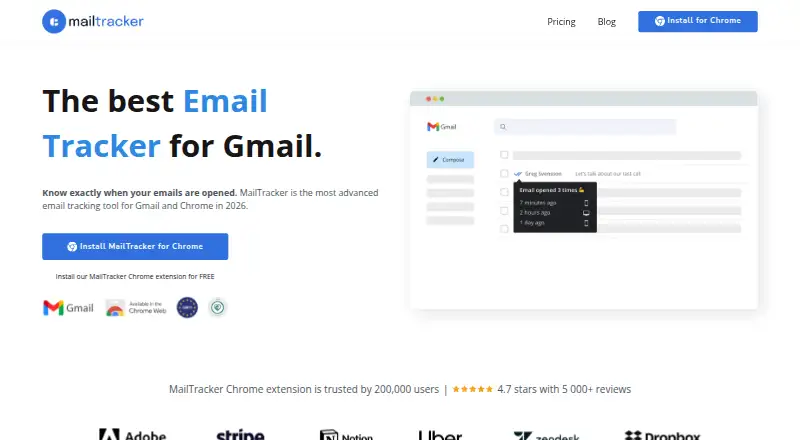
MailTracker is a Gmail email-tracking service delivered through a Chrome extension, with a web platform also listed. It reports when a message is first opened, how many times it is viewed and whether the view came from mobile or desktop. Chrome can show a real-time first-open notification, while email alerts report opens or messages that remain unopened for 48 hours. Tracking can be removed in one click or enabled only for selected emails. Paid plans add link tracking, follow-up reminders, complete tracking history, CSV export and scheduled-email tracking. The free plan allows 20 tracked emails monthly and includes first tracking history, email alerts, Chrome notifications and an activities feed. MailTracker uses Gmail’s API and requests permission to read, compose, send and permanently delete Gmail. Its policy says it processes tracking events, clicks and metadata without storing message contents. Transfers use SSL/TLS encryption and OAuth tokens are encrypted. Tracking can be incomplete when recipients block images, use incompatible clients, access messages across devices, forward mail or load cached content.
Good
- Reports first opens and repeated views
- Provides real-time Chrome notifications
- Allows selective or one-click tracking control
- Paid plans add link tracking and reminders
- Free plan includes 20 tracked emails monthly
Watch out
- Tracking may be incomplete or inaccurate
- Requires broad Gmail API permissions
- Chrome extension delivery limits platform choice
- Free plan limits tracked emails
Who it suits
MailTracker suits Gmail users who need open, click and follow-up signals from a Chrome extension. It is also relevant to users who can manage broad Gmail permissions and tracking limitations.
Verdict
MailTracker adds open and follow-up visibility directly to Gmail, with controls for when tracking is enabled. Review its requested Gmail permissions and the listed causes of incomplete tracking before relying on its activity data.
Plans and prices
From MailTracker's own pricing page, checked 8 Oct 2026.
| Plan | Price | What it gives you |
|---|---|---|
| Free | Free | 20 tracked emails/month · first tracking history · email alerts · no signature · Chrome notifications · email activities feed · Forever Free |
| Starter | $29.99 a month | Unlimited tracked emails · advanced link tracking · full tracking history · follow-up reminders · CSV export · scheduled email tracking · Monthly |
| Advanced | $49 a month | 3 Gmail accounts · AI-powered behaviour alerts · AI smart reply · Monthly |
| Team | — | 2–10 seats · volume discounts · team management · dedicated CSM · priority support · 2 years history · $15–24 /user/month |
The facts
Each one read from MailTracker's own pages, with the date it was checked.
The company
- Company structure
- MailTracker describes itself as an independent company of Hunter.io with a remote team working worldwide.checked 8 Oct 2026
What it does
- Data sharing
- Mail Automation says it does not sell or share Google user data for advertising or marketing, while allowing necessary service-provider disclosures.checked 8 Oct 2026
- Gmail integration
- MailTracker uses Google’s Gmail API and requests OAuth scopes that include reading, composing, sending, and permanently deleting Gmail.checked 8 Oct 2026
- Gmail permission revocation
- Users can revoke MailTracker’s Gmail access through their Google account security settings.checked 8 Oct 2026
- Notifications
- The product offers real-time Chrome notifications when an email is opened for the first time and email alerts when an email is opened or remains unopened for 48 hours.checked 8 Oct 2026
- Open tracking
- It reports when an email was first opened, how many times it was viewed, and whether it was viewed on mobile or desktop.checked 8 Oct 2026
- Paid features
- Paid plans add link tracking, follow-up reminders, full tracking history, CSV export, and tracking for scheduled emails.checked 8 Oct 2026
- Privacy law
- The privacy policy says Mail Automation processes personal data in accordance with GDPR, Spain’s LOPDGDD, and other applicable data protection laws.checked 8 Oct 2026
- Purpose
- MailTracker is an email tracking platform for Gmail delivered through a Chrome extension integrated with Gmail.checked 8 Oct 2026
- Recipient data
- The privacy policy says MailTracker does not store email contents and processes tracking events, clicks, and metadata.checked 8 Oct 2026
- Security
- The company says data transfers use SSL/TLS encryption and OAuth tokens are securely stored and encrypted.checked 8 Oct 2026
- Support
- The contact page invites questions, partnership inquiries, and feature requests by email at [email protected].checked 8 Oct 2026
- Tracking control
- Tracking can be removed in one click or enabled only for specific emails.checked 8 Oct 2026
- Tracking limitations
- Tracking may be incomplete or inaccurate when recipients block images, use incompatible clients or security software, access email across devices, forward messages, or load cached content.checked 8 Oct 2026
Alternatives to MailTracker
- 1
KudosCRM
Free planAndroidiOSWebAPI8.2From $9 a month - 2

Mailbutler Smart Assistant
Free planAndroidiOSWebExtension8.2Free plan - 3

Mailmeteor
Free planAndroidiOSWebAPI8.2From $5.99 a month - 4
Boomerang
Free planAndroidiOSWebAPI8.1From $4.98 a month - 5
Mixmax
Free planWebAPIExtensionLinux8.1From $29 a month - 6

Mailtrack
Free planAndroidiOSWebAPI8.0From $6.99 a month