Lynis
Lynis is a security auditing tool for Linux, macOS, and Unix-based systems.
What Lynis is
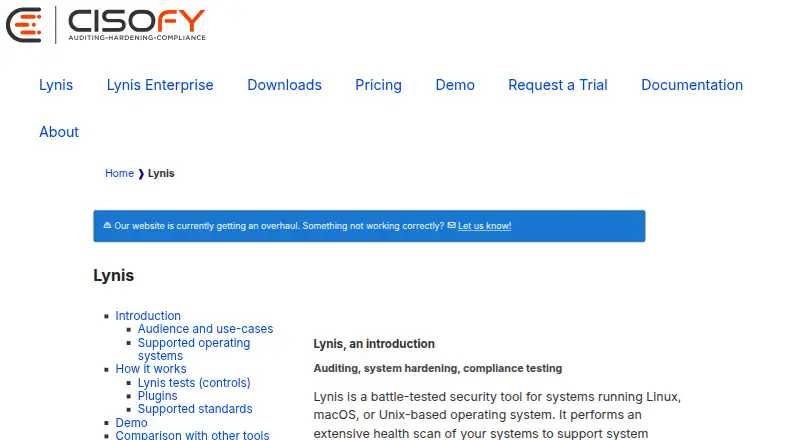
Lynis is a security auditing tool for Linux, macOS, and Unix-based systems. Its scans help teams assess security, check compliance, identify vulnerabilities, support penetration testing, and harden systems. It uses modular, opportunistic checks on components and tools it finds, with almost no dependencies, and includes 300+ built-in tests plus support for custom ones. Results appear on screen; detailed output goes to a log, while warnings and suggestions are saved in a separate report. Lynis can help test or automate security practices drawn from CIS benchmarks, NIST, NSA, OpenSCAP data, and vendor guides. Listed systems include AIX, FreeBSD, HP-UX, Linux, macOS, NetBSD, NixOS, OpenBSD, and Solaris, plus Raspberry Pi, IoT, and QNAP devices. The free GPLv3 version costs nothing and comes without warranties or support. Lynis Enterprise SaaS is $36 a year, billed at $36.00 per system per year; self-hosted Enterprise pricing is available by quote. The package is digitally signed and has a SHA256 hash for integrity checks.
Good
- 300+ built-in tests and support for custom tests
- Checks components and tools found on the system
- Reports results, technical details, warnings, and suggestions
- Can support checks against CIS benchmarks and other guidance
Watch out
- Free version comes without warranties or support
- Some plugins are reserved for Enterprise customers
- Self-hosted Enterprise pricing requires a quote
Who it suits
Lynis suits developers, system administrators, IT auditors, and penetration testers who need system security scans or compliance checks. It requires shell and basic utilities, and normal-user or preferably root permissions.
Verdict
Lynis offers broad system auditing and reporting for security and compliance work across many Unix-based systems. The free version has no support or warranty, so users needing commercial assistance should consider its paid options.
Plans and prices
From Lynis's own pricing page, checked 4 Oct 2026.
| Plan | Price | What it gives you |
|---|---|---|
| Lynis | Free | Free and open source software · GPLv3 |
| Lynis Enterprise - SaaS premium | $36 a year | For companies · SaaS · Security auditing · Dashboard and reporting · Implementation plan · Hardening advice · System integrity tests · Intrusion detection · Configuration management · Compliance and policies · API · $36.00 per system per year (= $3.00 per system/month, billed annually) |
| Lynis Enterprise - Self-hosted | Priced on request | For companies · Hosted in your environment · Volume discount · Request a quote |
The facts
Each one read from Lynis's own pages, with the date it was checked.
What it does
- Adaptive scanning
- Its modular, opportunistic scans test components and tools found on the system, and the maker says it runs with almost no dependencies.checked 4 Oct 2026
- Audit tests
- Lynis includes hundreds of individual tests, and its features page specifies 300+ built-in tests as well as support for custom tests.checked 4 Oct 2026
- Integration
- Lynis can upload scan data to Lynis Enterprise, and the maker describes Lynis Collector as an Enterprise component that batches reports from multiple systems.checked 4 Oct 2026
- Intended users
- The maker identifies developers, system administrators, IT auditors, and penetration testers as audiences for Lynis.checked 4 Oct 2026
- Plugins
- Plugins extend Lynis with additional tests and system information; the maker says some plugins are available to community users while others are for Enterprise customers.checked 4 Oct 2026
- Purpose
- Lynis performs security health scans to support system hardening and compliance testing on Linux, macOS, and Unix based systems.checked 4 Oct 2026
- Reports
- Lynis displays results on screen and writes technical details to a log file, with warnings and suggestions stored in a separate report file.checked 4 Oct 2026
- Requirements
- The download page lists shell and basic utilities as requirements and says normal-user or preferably root permissions are needed.checked 4 Oct 2026
- Security and integrity
- The download page states that the Lynis package is digitally signed and provides a SHA256 hash for integrity verification.checked 4 Oct 2026
- Standards
- The maker says Lynis can help automate or test security best practices from CIS benchmarks, NIST, NSA, OpenSCAP data, and vendor guides.checked 4 Oct 2026
- Supported systems
- Listed systems include AIX, FreeBSD, HP-UX, Linux, macOS, NetBSD, NixOS, OpenBSD, and Solaris; the maker also mentions Raspberry Pi, IoT, and QNAP devices.checked 4 Oct 2026
- Support limit
- The documentation says the free Lynis version comes without warranties or support, while commercial support is available.checked 4 Oct 2026
- Use cases
- The maker lists security auditing, compliance testing, penetration testing, vulnerability detection, and system hardening as typical uses.checked 4 Oct 2026
The company
- Founded
- 2007checked 28 Sep 2026
- Headquarters
- Vlijmen, The Netherlandschecked 28 Sep 2026
The full review of Lynis
Lynis is a shell-based security auditing tool for administrators, developers, IT auditors, and penetration testers working with Unix-like systems. Its strength is adaptable, broad system checking; it is a less suitable fit for teams that need built-in remediation or commercial support without paying.
Overview
Lynis scans for security issues and hardening opportunities, with uses that include compliance testing, vulnerability detection, and penetration testing. Its modular, opportunistic approach checks components and tools found on each machine, making it useful across varied Unix environments while keeping dependencies low. The trade-off is that operators need shell utilities and normal-user or preferably root permissions, so this is a technical tool rather than a turnkey service.
Scan results appear on screen, technical details go to a log, and warnings and suggestions are written to a separate report file. That separation gives administrators material to investigate and act on, but does not itself remediate findings. Lynis can upload scan data to Lynis Enterprise; its Collector component batches reports from multiple systems for centralized reporting.
Key features
- Broad, customizable tests: Lynis provides 300+ built-in tests and supports custom tests. This is a useful foundation for teams that want to tailor checks to their systems, rather than rely on a fixed, unextendable checklist.
- Adaptive scanning: It tests tools and components present on the system and runs with almost no dependencies. That favors mixed Unix estates, though the shell and basic utilities remain prerequisites.
- Hardening and compliance guidance: Lynis can help automate or test practices drawn from CIS benchmarks, NIST, NSA, OpenSCAP data, and vendor guides. It supports CIS benchmarks, but automated remediation is not included, so teams must handle corrective work themselves.
- Extensible plugins: Plugins add tests and system information. Some are available to community users, while others are reserved for Enterprise customers, which limits the free edition's access to the full plugin set.
- Package integrity: The package is digitally signed and a SHA256 hash is provided for verification, giving administrators a way to check download integrity.
Pricing
The free Lynis plan costs nothing and is free and open-source software under GPLv3. It is the natural starting point for individual operators and teams able to run audits and interpret reports without vendor assistance. The free edition carries no warranty or support, so organizations that need commercial help should look to an Enterprise plan.
Lynis Enterprise - SaaS premium costs $36 a year, billed at $36.00 per system per year ($3.00 per system/month, billed annually). It is aimed at companies seeking SaaS security auditing with a dashboard and reporting, an implementation plan, hardening advice, system integrity tests, intrusion detection, configuration management, and compliance capabilities. Per-system annual billing matters for larger fleets; this plan adds centralized reporting and commercial capabilities beyond the free tool.
Lynis Enterprise - Self-hosted uses custom pricing and is hosted in your environment, with volume discounts. It fits companies that need to keep the Enterprise deployment in their own environment; the SaaS plan's published per-system price does not apply to it.
Platforms
Lynis is listed for Linux, macOS, and self-hosted use. Supported systems also include AIX, FreeBSD, HP-UX, NetBSD, NixOS, OpenBSD, and Solaris, with Raspberry Pi, IoT, and QNAP devices also mentioned. This breadth is a practical advantage for administrators responsible for more than mainstream Linux servers, though the operating environment still needs shell and basic utilities.
Who it's for
Lynis is best for system administrators, developers, IT auditors, and penetration testers who need repeatable system-level checks and can work with shell-based reports. It suits organizations building hardening and compliance routines across Unix systems, especially when teams can review warnings and carry out fixes themselves. Those needing vendor support, centralized fleet reporting, or access to Enterprise-only plugins should budget for Enterprise. It is not the right choice for users who need automatic remediation or agentless assessment.
Pros and cons
- Pro: Wide Unix coverage. Support spans Linux and macOS as well as AIX, BSD variants, HP-UX, and Solaris, which helps teams audit varied estates with one tool.
- Pro: Adaptable audit scope. More than 300 built-in tests, custom tests, and plugins give technical teams room to fit checks to their environment.
- Pro: Low dependency footprint. Opportunistic scanning avoids requiring many dependencies, making Lynis practical across different systems.
- Con: No free-plan support or warranty. Teams that need vendor-backed assistance must choose a commercial option.
- Con: No automated remediation or agentless assessment. Operators must address findings and run the tool with suitable permissions on the systems being assessed.
- Con: Fleet reporting is an Enterprise capability. Organizations wanting aggregated reporting across multiple machines need the Enterprise Collector component.
Alternatives
Consider these alternatives when their platform coverage, licensing, or stated focus better matches the job:
- Chef InSpec is another freemium option with a free plan and trial, and supports API, Linux, macOS, self-hosted, and Windows environments. Its free plan is unlimited in duration but limited to non-production workloads and personal, non-commercial use; choose it when those terms fit your intended use.
- Mondoo CSPM offers free open-source tools for cloud, Kubernetes, OS, SaaS, and API scanning, plus a Kubernetes operator, extensible provider system, and asset inventory. Choose it when those scanning targets and inventory capabilities are the priority.
- OpenSCAP is a free set of open-source tools available across Linux, macOS, self-hosted, and Windows platforms. It is a straightforward alternative for teams seeking a free OpenSCAP toolset.
- Qualys External Attack Surface Management has a 30-day no-cost trial of CyberSecurity Asset Management 3.0 with External Attack Surface Management. Choose it when a time-limited trial of that offering is the fit.
- Kubescape is a free, Apache 2.0 open-source option with a CLI and Kubernetes operator that can be self-hosted. It is the more specific choice for teams seeking those Kubernetes-oriented tools.
- Prowler Cloud offers a 15-day free trial with no cloud account limit and every check and compliance framework, alongside a free open-source plan. Consider it when that trial scope or its cloud-oriented offering fits better.
- CloudSploit has a self-hosted open-source version and a hosted commercial version. Choose it when either of those deployment forms is preferable.
- Tanium Deploy is a paid option that requires a Tanium license including Deploy and Tanium Core Platform servers. Consider it if that licensing arrangement suits your environment.
For more options in the broader category, see Security Configuration Management Software.
Verdict
Lynis is a strong choice for technically capable administrators and auditors who want adaptable security checks across Unix systems and can manage findings themselves. Its breadth of tests, low dependency approach, and free GPLv3 edition make it useful for local hardening and compliance work. Look elsewhere—or budget for Enterprise—if you require automatic remediation, agentless assessment, centralized fleet reporting, or vendor support.
Alternatives to Lynis
- 1

Puppet
Free planOpen sourceWebAPILinuxmacOS8.4From $120 a month - 2

Kubescape
Free planOpen sourceAPILinuxmacOSSelf-hosted8.2From $30 a month - 3
Chef InSpec
Free planOpen sourceAPILinuxmacOSSelf-hosted8.0From $59 a year - 4
CIS-CAT Pro Assessor
Free planAPILinuxmacOSSelf-hosted7.7From $2,400 a year - 5

Mondoo CSPM
Free planOpen sourceWebAPIExtensionLinux7.7Free plan - 6
Microsoft Defender for Business
AndroidiOSAPImacOS7.5