
Louper
Louper is a livestreaming and collaboration platform for media professionals reviewing camera feeds and creative software output, including NLE, DAW, VFX, an…
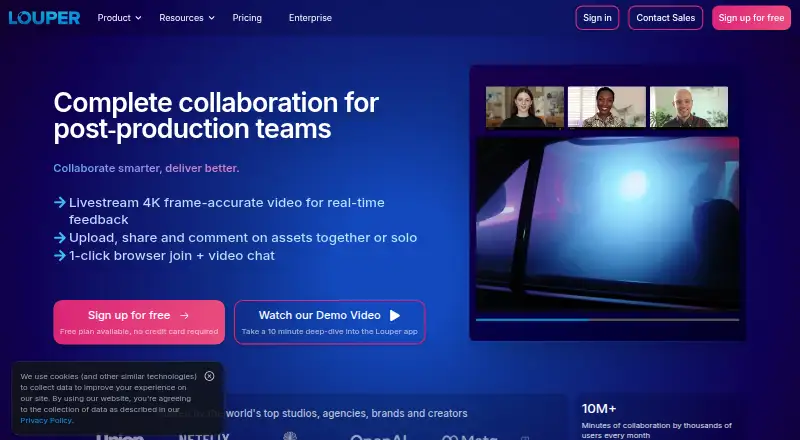
What Louper is
Louper is a livestreaming and collaboration platform for media professionals reviewing camera feeds and creative software output, including NLE, DAW, VFX, and grading sessions. Livestreams support frame-accurate video up to 4K, high bitrates, and 48kHz stereo audio. Teams can upload media, watch together with synchronized playback, and leave comments tied to frames and timestamps. Browser-based rooms include video chat and on-screen annotations; Review Links and Showcases support review and presentation outside a live session. Native streaming plugins are available for Premiere Pro and Avid Media Composer, with additional input options including NDI, screen capture, and compatible HDMI or SDI hardware. Rooms run in a browser, so clients can join without downloading an app. Desktop Encoder is available for macOS and Windows, while StreamConnect supports viewing on Apple TV, iOS, and macOS. Louper states that it is SOC 2 Type 2 compliant and undergoes regular vulnerability and penetration testing.
Good
- Frame-accurate livestreaming supports video up to 4K.
- Synchronized playback supports frame-specific, timestamped comments.
- Browser rooms include video chat and on-screen annotations.
- Native plugins are available for Premiere Pro and Avid Media Composer.
- Free plan is available.
Watch out
- Free plan allows two participants per room.
- Free plan sessions are limited to 20 minutes.
- Starter costs $33/mo when billed annually.
Who it suits
Louper suits editors, VFX artists, sound designers, colorists, and other video professionals who need to review live feeds or shared media. Browser-based rooms may suit teams inviting clients who do not want to download an app.
Verdict
Louper supports both live review and asynchronous presentation, with browser rooms and integrations for common video workflows. The free plan has participant and session-duration limits; paid plans start at $33/mo billed annually.
Plans and prices
From Louper's own pricing page, checked 29 Sep 2026.
| Plan | Price | What it gives you |
|---|---|---|
| Free | Free | 1 Livestream Room · 2 participants per room · 20 min max session duration (limited sessions/day) · 10 Teammate seats · 2GB storage · Billed annually at $0 / year |
| Starter | $33 a month | 1 Livestream Room · 3 participants per room · 2 hr max session duration (unlimited sessions/day) · 3 Teammate seats · 50GB storage · Billed annually at $394 / year |
| Studio | $73 a month | 1 room on base plan (up to 3 max) · 8 participants per room · 8 hr max session duration · 5 teammate seats on base plan (up to 20 max) · 1TB storage on base plan (up to 10TB max) · Billed annually at $876 / year |
| Free — quarterly | Free | — |
| Starter — quarterly | — | — |
| Studio — quarterly | — | — |
| Enterprise — quarterly | — | — |
| Enterprise | Priced on request | Custom rooms, participants, session duration, teammate seats, and storage · Up to 25 participants per room · Up to 24 hour sessions |
The facts
Each one read from Louper's own pages, with the date it was checked.
Where it runs
- Browser access
- Louper rooms run in a browser, so clients can join without downloading an app.checked 29 Sep 2026
- Desktop apps
- Louper Desktop Encoder is available for macOS and Windows and supports NDI, display capture, and Blackmagic hardware for SDI and HDMI streams.checked 29 Sep 2026
- Viewer apps
- Louper StreamConnect provides stream viewing on Apple TV, iOS, and macOS.checked 29 Sep 2026
What it does
- Collaboration tools
- Browser-based rooms include video chat and on-screen annotations, while Review Links and Showcases support asynchronous review and presentation.checked 29 Sep 2026
- Enterprise security
- Enterprise options include client-side watermarking, granular access controls, and enforced livestream encryption; plans are individually structured and included features may vary.checked 29 Sep 2026
- Integrations
- Native streaming plugins are available for Premiere Pro and Avid Media Composer, and Louper supports NDI, screen capture, and HDMI or SDI inputs through compatible hardware.checked 29 Sep 2026
- Intended users
- Louper describes itself as a collaboration platform for editors, VFX artists, sound designers, colorists, and other video professionals.checked 29 Sep 2026
- Live streaming
- Louper supports frame-accurate livestreaming up to 4K with high-bitrate video and 48kHz stereo audio.checked 29 Sep 2026
- MediaSilo integration
- Louper release notes describe a beta MediaSilo integration that syncs timestamped comments between platforms, available only to teams with the integration enabled.checked 29 Sep 2026
- Paid from
- 33checked 20 Sep 2026
- Purpose
- Louper is a livestreaming and real-time collaboration platform for media creators, including teams reviewing camera feeds, NLE and DAW output, VFX, and grading sessions.checked 29 Sep 2026
- Security
- Louper states that it is SOC 2 Type 2 compliant and undergoes regular vulnerability and penetration testing.checked 29 Sep 2026
- Support
- Louper offers email support for setup help, and Enterprise customers have priority access to Customer Success by live chat and email.checked 29 Sep 2026
- Synchronized review
- Users can upload media, watch it together with synchronized playback, and leave frame-specific timestamped comments.checked 29 Sep 2026
The company
- Founded
- 2021checked 28 Sep 2026
Money
- Free plan
- Yeschecked 20 Sep 2026
The full review of Louper
Overview
Louper is a video collaboration platform for production teams that need to review live feeds as well as finished media. It is best suited to editors, VFX artists, sound designers and colorists whose review process depends on synchronized playback or live picture. Its strongest case is connecting those workflows in browser rooms and familiar editing setups; the main trade-off is that the free and entry plans tightly cap room size and session length.
Key features
- Live review: Frame-accurate streams up to 4K, with high-bitrate video and 48kHz stereo audio, suit detailed production review. The Free plan's 20-minute session cap makes it a sampler rather than a practical home for longer sessions.
- Shared playback and feedback: Upload media for synchronized viewing and leave frame-specific, timestamped comments. Approval workflows, version comparison, guest reviewers and custom reviewer roles support structured feedback, though the number of participants and seats still depends on the plan.
- Rooms and presentation: Browser rooms have video chat and on-screen annotations, so clients can join without installing an app. Review Links and Showcases extend the workflow to asynchronous review and presentation.
- Production connections: Native streaming plugins are available for Premiere Pro and Avid Media Composer. Louper also supports NDI, screen capture, and HDMI or SDI inputs through compatible hardware. Its macOS and Windows Desktop Encoder supports NDI, display capture and Blackmagic hardware; StreamConnect provides viewing on Apple TV, iOS and macOS.
- Security and support: Louper states it is SOC 2 Type 2 compliant and undergoes regular vulnerability and penetration testing. Enterprise options include client-side watermarking, granular access controls and enforced livestream encryption. Enterprise plans also include priority Customer Success access by live chat and email; other customers can get setup help by email.
Pricing
Louper is freemium. The Free plan costs nothing and includes one livestream room, two participants per room, 10 teammate seats and 2GB storage. Sessions are limited to 20 minutes, with limited sessions per day. That can work for short, occasional reviews, but not longer calls or a larger viewing group.
Starter costs $33 a month, billed annually at $394 per year. It keeps one room and raises the limit to three participants, with sessions up to two hours and unlimited sessions per day. It includes three teammate seats and 50GB storage. This is the practical step up for small teams needing longer reviews, though room capacity remains modest.
Studio costs $73 a month, billed annually at $876 per year. Its base plan includes one room, up to eight participants, eight-hour sessions, five teammate seats and 1TB storage. The plan can scale to three rooms, 20 teammate seats and 10TB storage, making it better suited to larger or busier teams than Starter.
Enterprise has custom pricing and custom room, participant, teammate and storage allowances, plus a dedicated success manager and enterprise security features. It fits organizations needing tailored capacity or stronger access and stream protections.
Platforms
Louper lists iOS, macOS, web and Windows support. Browser-based rooms let clients participate without downloading an app. The Desktop Encoder is for macOS and Windows, while StreamConnect supports Apple TV, iOS and macOS viewing.
Who it's for
Louper is a strong fit for video professionals who need both live production review and asynchronous feedback, particularly teams already working with Premiere Pro, Avid, NDI or compatible capture hardware. It is less compelling for teams whose reviews routinely exceed three participants on Starter, or who need longer sessions and multiple rooms without moving to Studio.
Pros and cons
- Pro: Combines live, frame-accurate streams with synchronized media review and timestamped comments, covering more than one stage of the review process.
- Pro: Browser room access and Premiere Pro and Avid plugins can reduce friction for clients and production teams.
- Pro: Studio's base 1TB storage and eight-hour sessions give teams more room for extended review than the lower tiers.
- Con: Free is constrained to two participants and 20-minute sessions, with a daily session limit, so it is not a dependable option for regular long-form reviews.
- Con: Starter costs $33 a month on annual billing but still allows only three participants and one room.
- Con: Enterprise capacity and features are individually structured, so teams needing its protections must request custom pricing.
Alternatives
For a different emphasis, consider Ziflow, whose free plan offers unlimited proofs and reviewers but only two users, one workflow stage and 2GB storage. Ashore may suit a very small team focused on file review: its free tier has one user, 30 files per month and 1GB storage. Frame.io is another freemium option, with a free plan for up to two members, two projects and 2GB storage.
Vimeo, Dropbox Replay, Krock.io, QuickReviewer and Cage are also alternatives to consider.
Explore more options in Video Review Software, Live Streaming Software and Live TV streaming services.
Verdict
Choose Louper if your production team needs a single workspace for live, high-quality stream review and asynchronous, frame-specific feedback, with browser access for clients. Its production integrations and Studio capacity are compelling for those workflows. Look elsewhere if a small team needs more than three participants on an entry paid plan, or if custom-priced Enterprise is the only route to the room scale and security controls you require.
Getting started
- Visit https://www.louper.io/.
- Choose the Free plan or a paid plan; Starter is $33/mo billed annually.
- Open a browser-based room for collaborators to join without downloading an app.
- For desktop streaming, use Louper Desktop Encoder on macOS or Windows.
- Connect supported input through NDI, display capture, or compatible HDMI or SDI hardware.
Limits worth knowing
The Free plan provides one livestream room, two participants per room, sessions up to 20 minutes with limited sessions per day, 10 teammate seats and 2GB storage. Starter costs $33/mo billed annually and provides one room, three participants, sessions up to two hours, three teammate seats and 50GB storage.
Questions
Is there a free plan?
Yes. The Free plan costs nothing and includes one livestream room, two participants per room, 10 teammate seats and 2GB storage.
How much do paid plans cost?
Starter costs $33 a month when billed annually at $394 per year. Studio costs $73 a month when billed annually at $876 per year. Enterprise pricing is custom.
Which platforms does Louper support?
Louper lists iOS, macOS, web and Windows. Desktop Encoder is available for macOS and Windows, while StreamConnect supports viewing on Apple TV, iOS and macOS.
Which editing integrations are available?
Native streaming plugins are available for Premiere Pro and Avid Media Composer. Louper also supports NDI, screen capture, and compatible HDMI or SDI inputs.
Does Louper offer enterprise security options?
Enterprise options include client-side watermarking, granular access controls and enforced livestream encryption. Enterprise plans are individually structured, and included features may vary.
Alternatives to Louper
- 1

Restream
Free planAndroidiOSWebAPI9.1From $19 a month - 2
mimoLive
Free planiOSWebAPImacOS8.7From $70 a month - 3

Amazon Interactive Video Service
Free planAndroidiOSWebAPI8.7Free plan - 4

BoxCast
AndroidiOSWebAPI8.6From $8.25 a month - 5
OneStream Live
Free planAndroidiOSWebExtension8.5From $15 a month - 6

StreamYard On-Air
Free planiOSWebExtension8.5From $35.99 a month