Lightscreen
Lightscreen is a screenshot utility that saves and catalogs captures as files on disk according to user preferences.
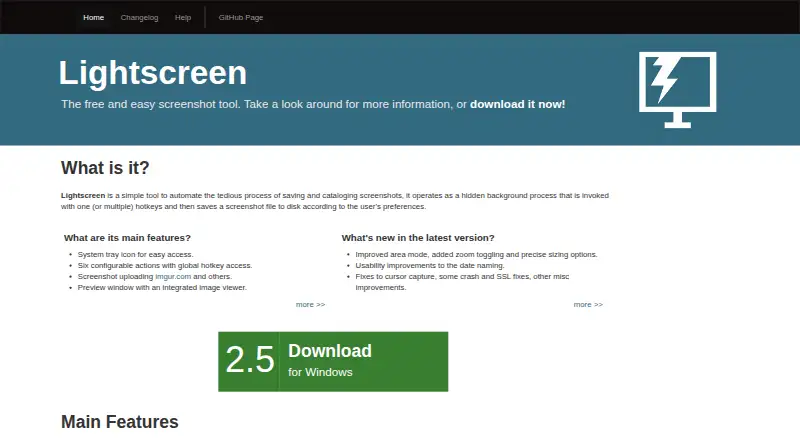
What Lightscreen is
Lightscreen is a screenshot utility that saves and catalogs captures as files on disk according to user preferences. It can run as a hidden background process and respond to global hotkeys, with six configurable capture actions. Users can resize or readjust the capture area, then review captures in a preview window with an integrated image viewer. Screenshots can be uploaded to Imgur and compatible pomf clones; other compatible hosts can be added manually. Imgur uploads are anonymous, and the help information says account uploads were planned for a later version. File names can be sequential or use customizable date and time formats. Portable mode stores preferences in a config.ini file so the installation can be moved without losing settings. Lightscreen supports Windows and Linux, and its code is licensed under GNU General Public License version 2. The listed version is 2.5, with capture improvements and fixes for cursor capture, crashes, and SSL issues. Uploads may require OpenSSL support on Windows or Linux. The software is free.
Good
- Six configurable actions can be assigned global hotkeys.
- Capture area can be resized and readjusted.
- Portable mode keeps preferences in config.ini.
- Supports sequential or customizable date-and-time file names.
Watch out
- Imgur uploads are anonymous; account uploads were planned for a later version.
- Uploads may require OpenSSL support on Windows or Linux.
- Supports Windows and Linux only.
Who it suits
Lightscreen suits Windows or Linux users who want configurable screenshot capture, file naming, and optional uploads to supported image hosts. Portable mode may be useful for users who want to move the installation with its preferences.
Verdict
Lightscreen offers background screenshot capture, local file organization, and optional uploads. Check the OpenSSL requirement for uploads and note the stated limitation on Imgur account uploads.
Plans and prices
From Lightscreen's own pricing page, checked 11 Oct 2026.
| Plan | Price | What it gives you |
|---|---|---|
| Free | Free | Not stated |
The facts
Each one read from Lightscreen's own pages, with the date it was checked.
What it does
- Background operation
- It runs as a hidden background process and can be invoked with one or more hotkeys.checked 11 Oct 2026
- Capture controls
- It offers six configurable actions with global hotkey access and lets users resize and readjust the capture area.checked 11 Oct 2026
- File naming
- Screenshots can be named sequentially or with customizable date and time formats.checked 11 Oct 2026
- Image uploads
- Screenshots can be uploaded to Imgur and other image hosts; Imgur uploads can be anonymous, and the help page says account uploads were planned for a later version.checked 11 Oct 2026
- Imgur account limit
- The help page describes Imgur uploads as anonymous and says account uploads would come in a later version.checked 11 Oct 2026
- Latest listed version
- The site lists version 2.5 and describes improved area capture, date naming usability, and cursor capture, crash, and SSL fixes.checked 11 Oct 2026
- License
- The code is licensed under GNU General Public License version 2.checked 11 Oct 2026
- OpenSSL requirement
- The help page says Windows or Linux users may need to install OpenSSL support for uploads.checked 11 Oct 2026
- Other upload hosts
- Users can download a list of pomf clones and manually add other compatible hosts.checked 11 Oct 2026
- Portable mode
- Portable mode stores preferences in a config.ini file so the installation can be moved without losing settings.checked 11 Oct 2026
- Portable use
- Portable mode stores preferences in a config.ini file so users can move the installation without losing settings.checked 11 Oct 2026
- Previews
- A preview window includes an integrated image viewer.checked 11 Oct 2026
- Purpose
- Lightscreen automates saving and cataloging screenshots as files on disk according to user preferences.checked 11 Oct 2026
- Release
- The maker’s download link leads to the Lightscreen 2.5 release on GitHub, dated June 19 (the release page does not state a year in the opened content).checked 11 Oct 2026
- Screenshot naming
- Screenshots can be named sequentially or by customizable date and time formats.checked 11 Oct 2026
- Security and fixes
- Version 2.5 lists fixes for cursor capture, crashes, and SSL issues.checked 11 Oct 2026
- Upload services
- Lightscreen can upload screenshots to Imgur and compatible pomf clones, and users can add other compatible hosts manually.checked 11 Oct 2026
Money
- Free plan
- Yeschecked 21 Sep 2026
Where it runs
- Linux support
- The changelog lists Linux compatibility, and the help page says Linux users may need to install OpenSSL through their package manager.checked 11 Oct 2026
- Supported platforms
- Windows,Linuxchecked 21 Sep 2026
The company
- Maker
- The site credits Lightscreen to Christian Kaiser.checked 11 Oct 2026
Alternatives to Lightscreen
- 1
GrabzIt
Free planAndroidiOSWebAPI8.2Free plan - 2
Gyazo
Free planAndroidiOSWebExtension8.0Free plan - 37.7Free plan
- 4

Awesome Screenshot
Free planiOSWebExtensionmacOS7.6From $5 a month - 5
 7.5From $7 a month
 - 6

Monosnap
Free planWebExtensionLinuxmacOS7.5From $2.50 a month