Librarika
Librarika is a cloud-based Integrated Library System for cataloguing collections, handling circulation and providing members with an online public access cat…
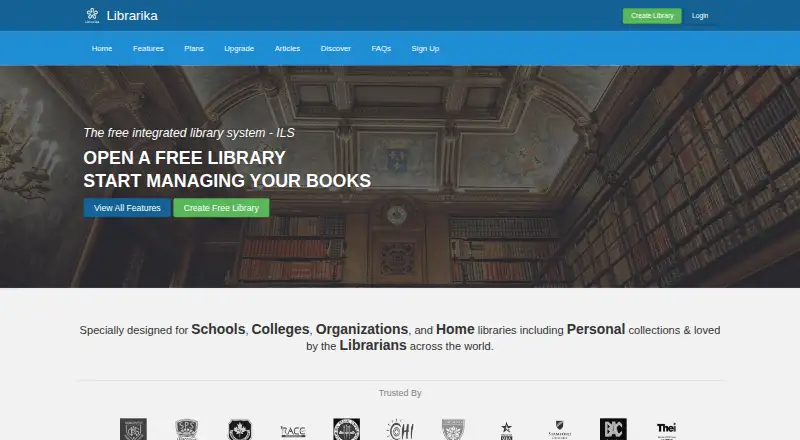
What Librarika is
Librarika is a cloud-based Integrated Library System for cataloguing collections, handling circulation and providing members with an online public access catalog. Cataloguing tools include ISBN-based Smart Add, bulk import and export, and bibliographic data from OpenLibrary. Members can check items in and out, reserve materials online and enter a hold queue for items already checked out. Libraries can manage multiple branches through the same system.
The platform offers SIP2 connections for kiosks and RFID systems, SAML single sign-on with providers such as Azure AD, Google and Okta, and widgets for library websites. Its iOS and Android apps support catalog browsing, holds, self-service checkout, push notifications and library management. A desktop self-service kiosk app is available at no charge for Windows, macOS and Linux, and requires a SIP2 license. Librarika serves educational, public, corporate and community libraries, as well as personal collections. E-book storage is sold separately from library plans.
Good
- Catalog records with ISBN-based Smart Add, bulk import and export.
- Members can reserve items and queue for checked-out materials.
- Manage multiple branches in one system.
- iOS and Android apps support holds and self-service checkout.
- Free Basic plan includes 2,000 records and unlimited patrons.
Watch out
- Free desktop kiosk app requires a SIP2 license.
- E-book storage is a separate add-on, not included in plans.
- Basic Pro costs $139/yr.
Who it suits
Librarika suits schools, universities, public, corporate and community libraries that need cataloguing, circulation and member access in a cloud system. It also serves personal collections and offers tools for multiple branches, member holds and mobile access.
Verdict
Choose Librarika if you need a cloud library system with cataloguing, circulation, member access and support for multiple branches. Its free Basic plan covers 2,000 records, while libraries needing more records or features can consider paid plans; e-book hosting is separate.
Plans and prices
From Librarika's own pricing page, checked 4 Oct 2026.
| Plan | Price | What it gives you |
|---|---|---|
| Basic | Free | 2,000 records · Unlimited Patrons · Unlimited Staff · Unlimited Check-outs · OPAC · Email Reminders |
| Basic Pro | $139 a year | 5,000 records · Basic Features · Custom Greetings · Multiple Color Schemes · No Banner Ads · Hold Queue · More Controls · $139 /yr |
| E-Books Hosting Starter | $249 a year | 5 GB · Separate add-on; e-book storage not included in plans · $249/yr |
| Silver | $299 a year | 10,000 records · Basic Features · Hold Queue · SSO Login (SAML2) · SIP2 Integration (per license) · More Controls · $299 /yr |
| E-Books Hosting Standard | $499 a year | 10 GB · Separate add-on; e-book storage not included in plans · $499/yr |
| Gold | $499 a year | 15,000 records · Basic Features · Hold Queue · SSO Login (SAML2) · SIP2 Integration (1 license included) · More Controls · $499 /yr |
| E-Books Hosting Premium | $999 a year | 20 GB · Separate add-on; e-book storage not included in plans · $999/yr |
The facts
Each one read from Librarika's own pages, with the date it was checked.
What it does
- Branches
- Librarika supports managing multiple library branches through one system.checked 4 Oct 2026
- Cataloguing
- Catalog tools include ISBN-based Smart Add, bulk catalog import and export, and bibliographic data integration with OpenLibrary.checked 4 Oct 2026
- Circulation
- Members can check items in and out, reserve items online, and join a hold queue for checked-out items.checked 4 Oct 2026
- Hosting and transfers
- The privacy policy identifies primary hosting in Amsterdam, Netherlands, and says data may also be processed in Australia, the Netherlands, the UK, the US, Singapore, and Bangladesh.checked 4 Oct 2026
- Integrations
- The feature list names OpenLibrary bibliographic data integration, SIP2 connections for kiosks and RFID systems, and SAML SSO with providers including Azure AD, Google, and Okta.checked 4 Oct 2026
- Intended users
- Librarika says it serves universities, colleges, schools, public, corporate, and community libraries, as well as personal collections.checked 4 Oct 2026
- Privacy and compliance
- Raynux says it handles personal information in line with the Australian Privacy Act and APPs and, where applicable, the GDPR and UK GDPR.checked 4 Oct 2026
- Security
- The current privacy policy says Librarika uses encryption in transit (TLS/SSL), access controls and authentication, role-based permissions, monitoring, and confidentiality obligations for staff and contractors.checked 4 Oct 2026
- Support
- Librarika offers quick how-to videos and FAQs, while its librarian manual is described as being at a very early stage.checked 4 Oct 2026
- Website widgets
- Librarika provides integration widgets for library websites.checked 4 Oct 2026
- What it does
- Librarika is a fully hosted cloud Integrated Library System for cataloguing collections, managing circulation, and publishing an OPAC for members.checked 4 Oct 2026
The company
- Company
- Librarika is operated by Raynux Pty Ltd, an Australian company based in Perth, Western Australia.checked 4 Oct 2026
- Headquarters
- Perth, Western Australia, Australiachecked 28 Sep 2026
Where it runs
- Desktop kiosk
- A free desktop self-service kiosk app is available for Windows, macOS, and Linux, and requires a SIP2 license.checked 4 Oct 2026
- Mobile apps
- The site describes iOS and Android apps for browsing catalogs, placing holds, self-service checkouts, push notifications, and library management.checked 4 Oct 2026
The full review of Librarika
Librarika is a cloud-based integrated library system for organizing collections, managing lending and giving members an online catalog. It is best suited to libraries that want those services and multiple-branch management without running their own server. Its free plan makes it possible to start at no cost, but record limits and separately priced e-book storage shape the upgrade decision.
Overview
Librarika brings cataloguing, circulation and a member-facing online public access catalog (OPAC) into one hosted service. Libraries can manage multiple branches through the system, making it a practical option for organizations that need to coordinate more than one location. Website widgets extend library services to an existing site.
The service is operated by Raynux Pty Ltd in Perth, Australia. Its privacy policy describes TLS/SSL encryption in transit, access controls, authentication and role-based permissions. Primary hosting is in Amsterdam; data may also be processed in Australia, the Netherlands, the UK, the US, Singapore and Bangladesh. Raynux says it handles personal information in line with Australia's Privacy Act and APPs, and where applicable the GDPR and UK GDPR.
Key features
Cataloguing and circulation
ISBN-based Smart Add, bulk catalog import and export, and OpenLibrary bibliographic data integration help with collection setup and upkeep. Librarika supports MARC records as well as circulation. Members can check items in and out, reserve items online and join a queue when an item is already checked out. The Basic plan's unlimited check-outs and patrons remove borrower quotas as an immediate concern, though its 2,000-record cap remains important for growing collections.
Member and staff access
iOS and Android apps cover catalog browsing, holds, self-service checkouts, push notifications and library management. SAML single sign-on is included with Silver and Gold; SIP2 connections support kiosks and RFID systems, but Silver charges per license while Gold includes one. A free desktop self-service kiosk app runs on Windows, macOS and Linux, but still requires a SIP2 license, so “free” does not mean license-free kiosk operation.
Support includes how-to videos and FAQs. The librarian manual is at an early stage, so teams that depend on comprehensive written guidance may need to rely more on those other support materials.
Pricing
Librarika uses a freemium model. Basic is free: it allows 2,000 records and includes unlimited patrons, staff and check-outs, plus an OPAC and email reminders. That is a strong starting point for a small collection, but the record ceiling limits its fit for larger libraries.
Basic Pro costs $139 a year, billed $139 /yr. It raises the limit to 5,000 records and adds custom greetings, multiple color schemes, no banner ads, a hold queue and more controls. It suits a library that needs more capacity and presentation options but does not yet need the higher record limits or named SSO and SIP2 features of upper tiers.
Silver costs $299 a year, billed $299/yr, and permits 10,000 records. It includes basic features, a hold queue, SAML2 SSO, SIP2 integration billed per license and more controls. Gold costs $499 a year, billed $499/yr, for 15,000 records; it includes the same named SSO and integration features, with one SIP2 license included. Gold is the clearer choice when that license would otherwise be needed, while Silver costs less if per-license SIP2 works for the library.
E-book storage is a separate add-on and is not included in the main plans. E-Books Hosting Starter costs $249 a year, billed $249/yr, for 5 GB; Standard costs $499 a year, billed $499/yr, for 10 GB; and Premium costs $999 a year, billed $999/yr, for 20 GB. Libraries planning to host e-books should budget for this on top of a main plan.
Platforms
Librarika supports Android, iOS, Linux, macOS, web and Windows, and provides an API. Its hosted deployment avoids requiring a library to run its own server; the desktop kiosk app is available for Windows, macOS and Linux subject to the SIP2 license requirement.
Who it's for
Librarika is aimed at universities, colleges, schools, public, corporate and community libraries, as well as people managing personal collections. The combination of cataloguing, circulation, member self-service and branch management makes it especially suitable for organizations wanting those functions in a hosted system. Small collections can begin on the free plan; institutions with more records, SSO or SIP2 needs should compare the paid tiers against their required capacity and licensing.
Pros and cons
- Pros: The free plan has unlimited patrons, staff and check-outs, alongside an OPAC and email reminders, so user and lending activity do not hit a stated quota.
- Pros: Smart Add, bulk catalog operations, OpenLibrary integration and MARC support cover useful collection workflows.
- Pros: Multiple branches, member mobile apps and website widgets offer several ways to serve users beyond a single library desk.
- Cons: Basic stops at 2,000 records, and even Basic Pro tops out at 5,000, so growing collections require a paid upgrade.
- Cons: E-book hosting costs extra, and SIP2 licensing can add cost to Silver or a desktop kiosk setup.
- Cons: The librarian manual is at a very early stage, which may leave teams wanting more developed written guidance.
Alternatives
For a broader school-library comparison, see School Library Management Software.
- SLiMS is a free, open-source library management system for Linux, macOS, Windows and web; choose it if you want that software rather than Librarika's hosted service.
- ABCD is free software for libraries and documentation centres, an option to consider if that scope fits your needs.
- Pinakes is free, GPL-3.0 and self-hosted with no recurring fees; consider it if you prefer self-hosting.
- Koha is free software under GNU GPL v3 or later; choose it if you are prepared to self-install on a Linux server with root access and command-line tools.
- OpenLibry is free, open-source school library software that can be installed locally; consider it if local installation is your priority.
- ResourceMate offers a Web OPAC with daily data updates for $220 a year and an additional $75 set-up fee for new accounts; consider it if that OPAC offer suits your needs.
- LibraryWorld offers a 30-day trial subscription with all modules and up to 50,000 catalog records per library; consider it if you want to evaluate a trial with that record capacity.
- Orell Library Management Software has custom pricing.
Verdict
Choose Librarika if you need a hosted library system combining cataloguing, circulation, member access and multi-branch management, especially if the free plan's 2,000-record limit fits your collection. Look elsewhere if you need included e-book hosting, a more developed librarian manual or want to avoid per-license SIP2 costs; paid record capacity and the separate storage add-on can make the total commitment materially higher.
Getting started
- Open https://librarika.com/.
- Choose the free Basic plan or a paid plan.
- Use the web system to catalogue collections and manage circulation.
- For mobile access, use the iOS or Android apps.
- For a desktop self-service kiosk, use the app for Windows, macOS or Linux and obtain a SIP2 license.
Limits worth knowing
The free Basic plan is limited to 2,000 records. The $139/yr Basic Pro plan supports 5,000 records; e-book storage is a separate add-on, and the desktop kiosk requires a SIP2 license.
Questions
Is Librarika free?
Yes. The Basic plan costs nothing and includes 2,000 records, unlimited patrons, unlimited staff, unlimited check-outs, an OPAC and email reminders.
What do paid plans cost?
Basic Pro is $139/yr. Other library plans include Silver at $299/yr and Gold at $499/yr; e-book hosting plans are separate.
Which platforms does Librarika support?
The listed platforms are Android, iOS, Linux, macOS, web, Windows and API.
Does Librarika support circulation and borrower access?
Yes. Members can check items in and out, reserve items and join hold queues. Librarika also lists a borrower portal.
Can I use single sign-on or kiosk integrations?
The feature list names SAML SSO with Azure AD, Google and Okta, plus SIP2 connections for kiosks and RFID systems. The desktop kiosk app requires a SIP2 license.
Who operates Librarika?
Librarika is operated by Raynux Pty Ltd, an Australian company based in Perth, Western Australia.
Alternatives to Librarika
- 1
ResourceMate
WebLinuxmacOSWindows7.0From $220 a year - 2
LibStack
AndroidiOSWeb6.9 - 3
ReadByte
Web6.9From £99 a year - 4
LibraryWorld
AndroidiOSWeb6.8From $550 a year - 5
Pinakes
Free planAndroidWebAPISelf-hosted6.7Free plan - 6
SLiMS
Free planWebLinuxmacOSSelf-hosted6.5Free plan