Leo Editor
Leo Editor is a programmable editor, outliner and knowledge base for organizing code, writing and research in a flexible outline.
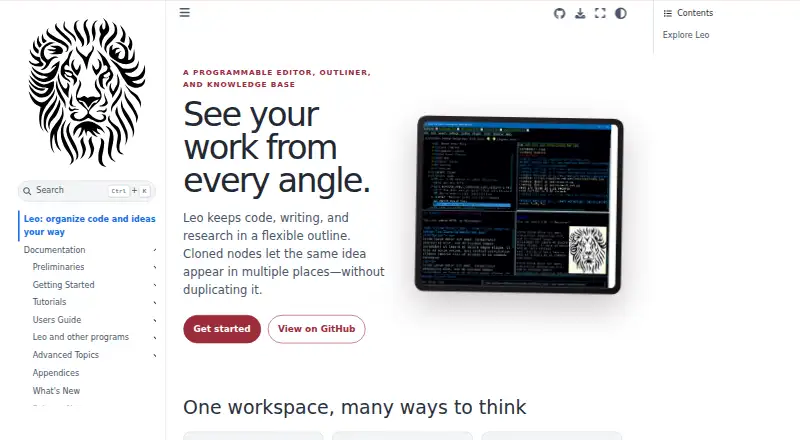
What Leo Editor is
Leo Editor is a programmable editor, outliner and knowledge base for organizing code, writing and research in a flexible outline. Cloned nodes let one idea appear in multiple places while keeping its content synchronized. Users can customize workflows with Python scripts, commands and plugins. The editor supports Markdown and backlinks, and its navigation includes expanding and collapsing, hoisting and dehoisting, promoting and demoting, clones and clickable links. Outlines can be exported to HTML, MORE, Markdown, Org mode, reStructuredText and Vim outline formats. Leo also connects to other tools: @jupytext nodes let users edit notebook cells as outline nodes and write changes back to .ipynb files when saving. The leoBridge module gives Python host programs access to Leo source code, .leo file contents and commanders. A WebSocket server accepts JSON requests from clients in different programming languages to query or change outlines. Leo is free and open source under the MIT license, and the maker permits commercial use. Installation requires Python 3.9 or later.
Good
- Cloned nodes keep repeated content in sync
- Supports Markdown and backlinks
- Exports to six outline formats
- Free for commercial use
Watch out
- Requires Python 3.9 or later
- Asciidoc features require Asciidoc3 or Asciidoctor
- TLS for WebSocket connections is optional
- License disclaims warranties
Who it suits
Leo Editor suits people who organize code, writing or research in outlines and want to adapt workflows with Python, commands or plugins. Its integrations may also suit users working with Jupyter notebooks or Python host programs.
Verdict
Leo Editor offers a flexible outline structure with scripting, plugins and integrations for notebook and Python workflows. Check the Python requirement and optional WebSocket TLS setting before choosing it for a particular setup.
Plans and prices
From Leo Editor's own pricing page, checked 8 Oct 2026.
| Plan | Price | What it gives you |
|---|---|---|
| Leo Editor | Free | Free for commercial use · no stated usage limits |
The facts
Each one read from Leo Editor's own pages, with the date it was checked.
What it does
- Asciidoctor integration
- Leo’s @adoc directive and adoc command require Asciidoc3 or Asciidoctor installed and available in PATH.checked 8 Oct 2026
- Automation
- Users can shape workflows with Python scripts, commands, and plugins.checked 8 Oct 2026
- Cloned nodes
- Cloned nodes let the same idea appear in multiple places while keeping its content in sync.checked 8 Oct 2026
- Jupyter integration
- Leo’s @jupytext nodes let users edit notebook cells as outline nodes and write changes back to .ipynb files when saving.checked 8 Oct 2026
- License
- Leo is distributed under a license described by its maker as the MIT license and allows use, modification, distribution, and resale, including commercial use.checked 8 Oct 2026
- Plugins
- The documentation says plugins in LeoPyRef.leo are part of the official distribution, and highlights a scripting plugin for creating script buttons.checked 8 Oct 2026
- Product
- Leo describes itself as a programmable editor, outliner, and knowledge base for organizing code, writing, and research in a flexible outline.checked 8 Oct 2026
- Python embedding
- The leoBridge module lets independent Python host programs access Leo source code, .leo file contents, and commanders.checked 8 Oct 2026
- Requirements
- The guide requires Python 3.9 or later and describes installation from PyPI or GitHub.checked 8 Oct 2026
- Server authentication
- The WebSocket server requires a password and uses a challenge-response process so the password itself is not sent over the connection.checked 8 Oct 2026
- Support
- The installation guide directs users with installation problems to Leo’s help forum.checked 8 Oct 2026
- Transport security
- TLS encryption is optional for WebSocket connections and is enabled with certificate and key arguments.checked 8 Oct 2026
- Warranty
- The license provides the software as is and disclaims warranties.checked 8 Oct 2026
- WebSocket server
- Leo’s WebSocket server lets clients in different programming languages query or change outline contents using JSON requests and responses.checked 8 Oct 2026
Where it runs
- Platforms
- The installation guide explains how to install and run Leo on Windows, Linux, and MacOS.checked 8 Oct 2026
Alternatives to Leo Editor
- 1

Dynalist
Free planAndroidiOSWebAPI8.1From $95.88 a year - 2

outl
Free planOpen sourceAndroidiOSAPILinux7.9Free plan - 3

Workflowy
Free planAndroidiOSWebAPI7.8From $6.99 a month - 4
Cloud Outliner
Free planiOSmacOS7.7$4.99 one-time - 5

Logseq
Free planAndroidiOSWebLinux7.7From $5 a month - 6

Legend
Free planAndroidiOSWebLinux7.5From $5 a month