kUML
kUML is an open-source modeling tool that expresses UML 2.x, SysML 2, C4, BPMN 2.0 and ERM through a type-safe Kotlin DSL.
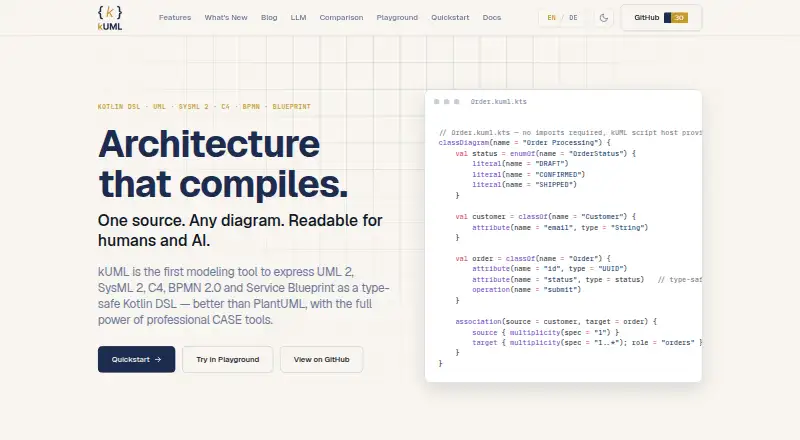
What kUML is
kUML is an open-source modeling tool that expresses UML 2.x, SysML 2, C4, BPMN 2.0 and ERM through a type-safe Kotlin DSL. It supports all 14 UML 2.x diagram types, along with SysML 2 and C4. The DSL provides compile-time validation and IDE support, and built-in transformations can generate JPA, OpenAPI 3.0 YAML, Kubernetes manifests and Dockerfiles. Integrations include CLI, Gradle, IntelliJ, Obsidian, Asciidoctor and VS Code. For interoperability, kUML supports Structurizr DSL round-trip and optional XMI through its kuml-io-emf module. Install choices include Homebrew, Chocolatey, MSI, native DEB/RPM/DMG packages, Docker and Maven Central library modules. A Compose Multiplatform desktop app is distributed as a macOS cask. The project is licensed under Apache 2.0 and offers an online handbook. One important caution: rendering Kotlin scripts runs their source code, so the handbook advises using only scripts or workspaces that are trusted.
Good
- Supports all 14 UML 2.x diagram types.
- DSL offers compile-time validation and IDE support.
- Generates JPA, OpenAPI YAML, Kubernetes manifests and Dockerfiles.
- Integrates with Gradle, IntelliJ and VS Code.
- Apache 2.0 licensed and open source.
Watch out
- Rendering Kotlin scripts executes their source code.
- XMI interoperability requires the optional kuml-io-emf module.
- Desktop app is distributed as a macOS cask.
Who it suits
kUML suits developers and modelers who want UML and related modeling languages in a Kotlin DSL. It may also fit teams connecting models to code generation or existing editor and build workflows.
Verdict
kUML combines several modeling languages with validation, integrations and code generation, and is available under Apache 2.0. Treat model scripts as executable code and use only trusted workspaces.
Plans and prices
From kUML's own pricing page, checked 8 Oct 2026.
| Plan | Price | What it gives you |
|---|---|---|
| Free / open source | Free | Apache 2.0 licensed software; paid plans and feature limits not stated |
The facts
Each one read from kUML's own pages, with the date it was checked.
What it does
- AI workflows
- It includes an MCP server for agent introspection and a kuml ai subcommand for AI-assisted modeling.checked 8 Oct 2026
- Code generation
- Built-in model transformations generate JPA, OpenAPI 3.0 YAML, Kubernetes manifests, and Dockerfiles.checked 8 Oct 2026
- Distribution
- Install options include Homebrew for macOS and Linux, Chocolatey and MSI for Windows, native DEB/RPM/DMG packages, Docker, and Maven Central library modules.checked 8 Oct 2026
- Integrations
- The project lists CLI, Gradle, IntelliJ, Obsidian, Asciidoctor, and VS Code integrations.checked 8 Oct 2026
- Interoperability
- kUML supports Structurizr DSL round-trip and optional XMI interoperability through its kuml-io-emf module.checked 8 Oct 2026
- License
- The project is licensed under Apache 2.0.checked 8 Oct 2026
- Modeling
- It supports all 14 UML 2.x diagram types alongside SysML 2 and C4.checked 8 Oct 2026
- Security
- The MCP authoring server validates scripts with KumlScriptGuard before evaluation, using the same sandboxing applied by the CLI render and validate commands.checked 8 Oct 2026
- Support and documentation
- The project links to an online handbook covering installation, usage, and its features.checked 8 Oct 2026
- Trust limitation
- Rendering Kotlin scripts executes their source code, and the handbook advises running only scripts or workspaces the user trusts.checked 8 Oct 2026
- Validation
- Its Kotlin DSL provides compile-time validation and IDE support.checked 8 Oct 2026
- What it does
- kUML expresses UML 2.x, SysML 2, C4, BPMN 2.0 and ERM as a type-safe Kotlin DSL.checked 8 Oct 2026
Where it runs
- Desktop app
- The project provides a Compose Multiplatform desktop app distributed as a macOS cask.checked 8 Oct 2026
The full review of kUML
kUML is a developer-oriented modeling tool that expresses diagrams and related models as Kotlin code. It suits teams that want modeling in their development workflow, especially when they need several notations or generated artifacts. Its reach is broad for a free Apache 2.0 project, though the code-based approach requires care with trusted workspaces.
Overview
kUML brings UML 2.x, SysML 2, C4, BPMN 2.0 and ERM into a type-safe Kotlin DSL. Support for all 14 UML 2.x diagram types gives software teams room to describe structure, behavior and deployment in one tool. The trade-off is that modeling happens through Kotlin rather than a conventional drawing-first workflow, making it a stronger fit for developers than for occasional diagram authors.
Workflows span the CLI, Gradle, IntelliJ, VS Code, Obsidian and Asciidoctor, with a Compose Multiplatform desktop app distributed as a macOS cask. Structurizr DSL round-trip and optional XMI interoperability help teams exchange models. The online handbook covers installation and usage.
Key features
Modeling and validation
Compile-time validation and IDE support bring familiar feedback into model authoring. That can help teams maintain models alongside source code, where errors can be caught as part of the coding process. Reverse engineering is supported, further suiting software-centered workflows.
AI and code generation
An MCP server supports agent introspection, and the kuml ai subcommand enables AI-assisted modeling. Built-in transformations generate JPA, OpenAPI 3.0 YAML, Kubernetes manifests and Dockerfiles. These outputs make kUML more than a diagram repository for teams that can use generated artifacts in their engineering process; readers seeking only visual documentation may not benefit from that breadth.
Interoperability and execution safety
Structurizr DSL round-trip and optional XMI support provide routes to work across modeling formats. The MCP authoring server validates scripts with KumlScriptGuard before evaluation and uses the same sandboxing as the CLI render and validate commands. Even so, rendering Kotlin scripts executes their source code. The handbook advises using only scripts or workspaces you trust, a real operational consideration when accepting model files from others.
Pricing
kUML is free and open source under Apache 2.0. The Free / open source plan costs nothing and has no stated feature limits. That makes it straightforward for individual developers and teams to adopt without a subscription; there are no paid tiers to weigh.
Platforms
kUML supports Windows, macOS, Linux and web browsers, with both self-hosted and API options. Distribution includes Homebrew for macOS and Linux, Chocolatey and MSI for Windows, native DEB, RPM and DMG packages, Docker, and library modules on Maven Central. The desktop app is distributed as a macOS cask, so the wider platform support comes through the other installation and integration options.
Who it's for
kUML is best for developers and engineering teams comfortable expressing models in Kotlin, particularly those working across multiple modeling notations or wanting diagrams connected to generated implementation artifacts. Its CLI, Gradle and IDE integrations make it a natural candidate for code-centric workflows. It is less suited to users who want to create diagrams without working in source code or evaluating scripts.
Pros and cons
- Broad modeling coverage: UML 2.x, SysML 2, C4, BPMN 2.0 and ERM cover varied software and systems modeling needs.
- Useful development feedback: Compile-time validation and IDE support suit models maintained as part of software work.
- Practical generated outputs: JPA, OpenAPI, Kubernetes and Docker artifacts can connect modeling to implementation.
- Open source with broad integrations: Apache 2.0 licensing and integrations across command-line, build, IDE and documentation workflows give teams flexibility.
- Code execution demands trust: Rendering Kotlin scripts runs source code, so shared or external workspaces require care.
- Developer-centered authoring: The Kotlin DSL is a barrier for users looking for a drawing-first diagramming tool.
Alternatives
For a wider selection of UML tools, browse UML Modeling Software. Consider Sparx Enterprise Architect if its freemium model and free trial better suit your evaluation needs. BESSER is another free, open-source option with no freemium tier or hidden fees. UMLet may fit readers who want a free UML tool available as a standalone desktop app, Eclipse plugin, web app or VS Code extension. ArgoUML is a free, open-source option for Windows, macOS and Linux. BOUML is another free option for those desktop platforms. BridgePoint includes an editor, verifier and model compilers in its free Apache 2.0 open-source edition. Eclipse Papyrus offers a free open-source modeling environment with no usage limits stated. Gaphor is a free, open-source alternative under Apache 2.
Verdict
Choose kUML if you want a free, extensible way to maintain multiple kinds of models in Kotlin and connect them to validation, integrations and code generation. The breadth and development workflow are its strongest reasons to adopt it. Look elsewhere if you need a drawing-first experience or cannot ensure that the Kotlin scripts in your modeling workspace are trusted.
Getting started
- Visit https://kuml.dev/ and read the online handbook
- Install through Homebrew, Chocolatey, MSI, native packages, Docker, or Maven Central
- Use the web interface, API, self-hosted deployment, or supported desktop platform
- Optionally install the Compose Multiplatform desktop app through its macOS cask
- Connect kUML with CLI, Gradle, IntelliJ, Obsidian, Asciidoctor, or VS Code
Questions
Is kUML free?
Yes. kUML is free and open source under the Apache 2.0 license.
Which platforms support kUML?
It supports Windows, macOS, Linux, web, API, and self-hosted use.
What modeling standards does it handle?
It expresses UML 2.x, SysML 2, C4, BPMN 2.0, and ERM, including all 14 UML 2.x diagram types.
Can kUML generate code or infrastructure files?
Its model transformations generate JPA, OpenAPI 3.0 YAML, Kubernetes manifests, and Dockerfiles.
Does kUML integrate with development tools?
Listed integrations include CLI, Gradle, IntelliJ, Obsidian, Asciidoctor, and VS Code.
Is AI support included?
Yes. kUML includes an MCP server for agent introspection and a kuml ai subcommand for AI-assisted modeling.
Alternatives to kUML
- 1

Sparx Enterprise Architect
Free planWebAPILinuxmacOS7.9$245 one-time - 2
BESSER
Free planOpen sourceWebAPILinuxmacOS7.6Free plan - 3
Visual Paradigm
Free planWeb7.3From $4 a month - 4
UMLet
Free planWebExtensionLinuxmacOS6.9Free plan - 5
StarUML
ExtensionLinuxmacOSWindows6.7$129 one-time - 6
Horusec
Free planWebAPIExtensionLinux6.6Free plan