Kubeshark
Kubeshark is a Kubernetes network observability tool that indexes cluster-wide traffic at the kernel level using eBPF and makes it queryable with Kubernetes,…
What Kubeshark is
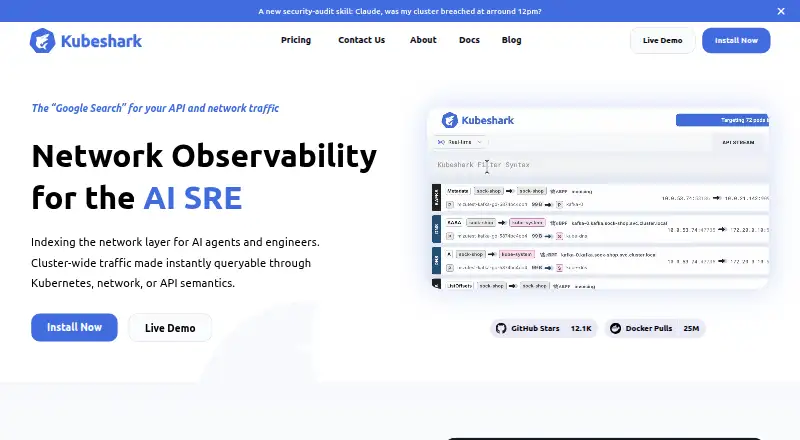
Kubeshark is a Kubernetes network observability tool that indexes cluster-wide traffic at the kernel level using eBPF and makes it queryable with Kubernetes, API, and network context. It can decrypt TLS and service-mesh mTLS traffic without keys, certificates, sidecars, or application changes. Users can capture retrospective traffic snapshots, filter them by time, nodes, workloads, and IPs, then export them as PCAP files. Its KFL query language combines Kubernetes identity, API context, and network attributes. Kubeshark also provides an identity-aware service map and performance indicators for pods, services, nodes, and namespaces. It supports more than 23 protocols, including HTTP, Kafka, Redis, PostgreSQL, gRPC, and DNS. Cluster data can be exposed through MCP to AI assistants such as Claude Code, Cursor, and GitHub Copilot. Deployment uses Helm in Kubernetes; self-hosted air-gapped operation is listed for Enterprise. The free Community plan supports up to 3 nodes or 60 pods and requires internet connectivity.
Good
- Indexes cluster traffic with eBPF.
- Decrypts TLS and service-mesh mTLS without keys or sidecars.
- Traffic snapshots can be filtered and exported as PCAP.
- Supports more than 23 protocols.
- Free Community plan includes unlimited API call capacity.
Watch out
- Community plan is limited to 3 nodes or 60 pods.
- Community plan requires internet connectivity.
- Pro has limited API call capacity.
- Air-gapped operation is listed for Enterprise.
Who it suits
Kubeshark is aimed at SREs and network engineers investigating Kubernetes traffic, incidents, or network reliability. Its MCP integration may also suit teams using compatible AI assistants.
Verdict
Kubeshark provides cluster-wide traffic inspection, filtering, and snapshots for Kubernetes environments. The Community plan has a defined cluster-size limit and requires connectivity, while air-gapped use is reserved for Enterprise.
Plans and prices
From Kubeshark's own pricing page, checked 15 Oct 2026.
| Plan | Price | What it gives you |
|---|---|---|
| Community | Free | Up to 3 nodes or 60 pods · Internet connectivity required · Unlimited API calls · Community support |
| Enterprise | $0.40 a month | Unlimited cluster size · Air-gapped clusters · Unlimited consumption · Dedicated support · per pod / month; quoted range $0.4-$0.9 |
| Micro | $30 a month | 6 nodes / 120 pods · Unlimited capacity · Dev/test clusters · Unlimited API calls · Unlimited clusters · per month |
| Pro | $30 a month | Unlimited environment size · Internet connectivity required · Limited API-call capacity · Community support · per month |
| Dynamic | $190 a month | Unlimited nodes and pods · Unlimited clusters · 100K daily API calls · $50 per extra 100K calls · per month |
| Small | $360 a month | 20 nodes / 400 pods · Unlimited capacity · Small production clusters · Unlimited API calls · Unlimited clusters · per month |
The facts
Each one read from Kubeshark's own pages, with the date it was checked.
What it does
- AI integration
- An MCP server lets compatible AI clients query traffic, inspect API calls, export PCAPs, create snapshots, and apply filters.checked 15 Oct 2026
- cloud storage
- Kubeshark supports storing traffic snapshots in Amazon S3, Azure Blob, and Google Cloud Storage for long-term retention and cross-cluster sharing.checked 1 Oct 2026
- compliance
- Kubeshark's About page displays a SOC 2 compliance confirmation.checked 1 Oct 2026
- deployment
- Kubeshark can be deployed with Helm in Kubernetes and supports self-hosted air-gapped operation on the Enterprise tier.checked 1 Oct 2026
- Documentation depth
- The documentation covers installation, protocol dissection, TLS inspection, dashboard views, KFL, Helm configuration, SAML, OIDC, roles, AI workflows, performance, troubleshooting, and OpenShift or Istio topics.checked 15 Oct 2026
- Funding
- The company About page shows funding logos for Zeev Ventures and Engineering Capital.checked 15 Oct 2026
- GitHub activity
- The public repository page showed about 10.7K stars, 550 forks, and more than 139 issues when opened.checked 15 Oct 2026
- Homebrew availability
- Homebrew distributes Kubeshark as an API traffic analyzer and lists macOS Apple Silicon, macOS Intel, and Linux ARM64 or x86_64 bottles.checked 15 Oct 2026
- Installation methods
- Official installation options include Helm, Homebrew, kubectl manifests, prebuilt CLI binaries, and building from source.checked 15 Oct 2026
- KFL filtering
- Kubeshark provides a Kubernetes-aware filter language called KFL for capture and display queries.checked 15 Oct 2026
- Kubernetes context
- Traffic records include workload identity, service relationships, namespace scope, and node distribution.checked 15 Oct 2026
- License
- The public repository and Homebrew formula identify Kubeshark as Apache License 2.0 software.checked 15 Oct 2026
- Limit: internet dependency
- Community and Pro plans require internet connectivity, so they do not provide the air-gapped option reserved for Enterprise.checked 15 Oct 2026
- Limit: open bugs
- The public issue tracker listed open reports for a broken CLI console command, hub startup failures, snapshot PVC deadlocks, and MCP download or query problems.checked 15 Oct 2026
- Limit: performance overhead
- A 2025 academic comparison measured Kubeshark throughput overhead of 38.7% for HTTP/1.1, 41.5% for HTTP/2, 29.3% for Redis, and 27.5% for DNS in its test setup.checked 15 Oct 2026
- Limit: pricing concern
- A Reddit commenter said Kubeshark was the only decent traffic-monitoring tool they found but was not free above the vendor-defined cluster limits.checked 15 Oct 2026
- MCP clients
- The MCP guide names Claude Desktop, Cursor, and VS Code with Continue as compatible client examples.checked 15 Oct 2026
- MCP data exposed
- MCP exposes live streams, historical calls, full payloads and headers, decrypted TLS, TCP/UDP flow statistics, and Kubernetes mappings.checked 15 Oct 2026
- network observability
- Kubeshark indexes cluster-wide Kubernetes network traffic at the kernel level using eBPF and makes it queryable with Kubernetes, API, and network semantics.checked 1 Oct 2026
- Notable release
- The GitHub releases page lists version 53.5.0 with fixes for resolver-history memory use, batched UI streaming, dropped-traffic visibility, parallel snapshot collection, and dependency alerts.checked 15 Oct 2026
Where it runs
- Air-gapped deployment
- Air-gapped clusters are supported in the Enterprise tier.checked 15 Oct 2026
The company
- Company legal name
- The vendor site copyright notice identifies the company as Kubeshark, Inc.checked 15 Oct 2026
- Company profile
- LinkedIn lists Kubeshark as a privately held computer and network security company founded in 2023, headquartered in San Francisco, with 2-10 employees.checked 15 Oct 2026
Money
- Limit: free-tier size
- The free Community tier is limited to three nodes or 60 pods.checked 15 Oct 2026
The full review of Kubeshark
Kubeshark is a self-hosted Kubernetes network observability tool for teams that need traffic context across workloads, not just isolated packet captures. It is best suited to SREs and network engineers investigating incidents or reliability issues in Kubernetes clusters. Its standout combination of eBPF-based visibility, TLS inspection, and retrospective PCAP capture comes with meaningful cluster and connectivity limits on the free tier.
Overview
Kubeshark indexes cluster-wide Kubernetes traffic at the kernel level with eBPF, then makes it queryable using Kubernetes identity, API context, and network attributes. That framing is useful when an investigation needs to connect a request or flow to the workload and cluster context around it, rather than sift through raw traffic alone.
It also exposes network data to MCP-compatible AI assistants, including Claude Code, Cursor, and GitHub Copilot. That gives teams a way to bring cluster traffic context into AI-assisted workflows, although the tool remains a Kubernetes-focused observability product rather than a general-purpose network monitor.
Key features
Traffic analysis and capture
Kubeshark supports more than 23 protocols, spanning HTTP, HTTP/2, WebSocket, GraphQL, Kafka, AMQP, Redis, MongoDB, MySQL, PostgreSQL, gRPC, DNS, and lower-level protocols such as TCP, UDP, and SCTP. KFL combines Kubernetes identity, API context, and network attributes for filtering; that can make queries more operationally meaningful than filters based on addresses or ports alone.
Retrospective snapshots can be filtered by time, nodes, workloads, and IPs, then exported as PCAP files. This is a strong incident-response feature: teams can inspect a relevant traffic window without treating packet capture as a purely forward-looking activity. TLS and service-mesh mTLS decryption without keys, certificates, sidecars, or application changes further reduces the setup burden, while sensitive-data redaction and authorization rules matter for teams handling traffic that may contain private information.
Cluster context and operations
An identity-aware service map and performance KPIs cover pods, services, nodes, and namespaces, helping teams relate traffic to cluster components. Snapshots can be stored in Amazon S3, Azure Blob, or Google Cloud Storage for longer retention and sharing across clusters. Kubeshark deploys with Helm and supports self-hosted air-gapped use on Enterprise, a useful distinction for environments that cannot connect to the internet.
Security capabilities include encrypted browser communication, ingress TLS, and SAML authentication for self-hosted deployments; its About page displays a SOC 2 compliance confirmation. Support is usually through a dedicated Slack channel, while Enterprise adds dedicated Slack support, on-demand Zoom calls, and premium onboarding.
Pricing
Kubeshark is freemium, with plans billed monthly where stated. Community costs nothing and covers up to 3 nodes or 60 pods, unlimited API call capacity, and community support, but requires internet connectivity. It is a sensible evaluation option for small clusters, not for larger deployments or air-gapped environments.
Pro starts at $30 a month, billed per month, with unlimited nodes and pods but limited API call capacity; it still requires internet connectivity and includes community support. Micro also costs $30 a month, billed per month, and covers 6 nodes or 120 pods, unlimited capacity and API calls, and unlimited clusters. Its stated dev/test focus makes it a better fit than Pro for bounded development clusters, while Pro’s node and pod allowance suits teams needing broader cluster coverage and able to work within limited API capacity.
Dynamic costs $190 a month, billed per month, for unlimited nodes and pods, limited capacity, unlimited clusters, and 100K daily API calls; each extra 100K calls costs $50. Small is $360 a month, billed per month, and covers 20 nodes or 400 pods with unlimited capacity, unlimited API calls, and unlimited clusters, aimed at small production clusters. Enterprise uses custom pricing, billed per pod per month, and offers unlimited cluster size and consumption, unlimited API call capacity, air-gapped clusters, and dedicated support. The choice therefore hinges not just on cluster size but also on API-call and capacity limits, internet requirements, and support needs.
Platforms
Kubeshark is self-hosted and supports Kubernetes. Its listed platforms are API, Linux, macOS, web, and Windows; supported operating systems are Linux, macOS, and Windows.
Who it's for
Kubeshark is a strong fit for SREs and network engineers who need cluster-wide traffic context for root-cause analysis, incident response, or network reliability work. Its Kubernetes-aware queries, service map, and snapshots are most valuable when teams need to move from a flow to the workload behind it. MCP exposure also makes it relevant to teams incorporating AI assistants or agents into that work.
It is less suitable for a small cluster that cannot maintain internet connectivity on Community, or for production teams whose API-call and capacity needs exceed the lower paid tiers. Air-gapped teams need Enterprise.
Pros and cons
- Pros: Cluster-wide eBPF indexing joins network traffic to Kubernetes and API context, which helps investigations stay tied to workloads.
- Pros: TLS and service-mesh mTLS decryption without keys, certificates, sidecars, or application changes avoids several common deployment dependencies.
- Pros: Retrospective snapshots and PCAP export support incident review, while cloud storage options allow longer retention and cross-cluster sharing.
- Cons: Community is capped at 3 nodes or 60 pods and requires internet connectivity, ruling it out for larger or disconnected deployments.
- Cons: Pro and Dynamic have limited API call capacity or limited capacity, so their unlimited cluster-size wording does not mean unlimited use.
- Cons: Air-gapped operation and dedicated support require custom-priced Enterprise, placing those needs outside the published monthly tiers.
Alternatives
- DeepFlow is worth considering for an open-source Community Edition supporting Linux servers and selected Kubernetes, cloud, and container environments.
- Qpoint may fit teams focused on endpoint discovery and monitoring, attribution, and policy plugins, with its Community plan capped at 25 endpoints.
- Coroot offers a self-hosted Apache 2.0 Community Edition with core features, for readers prioritizing that open-source model.
- Inspektor Gadget is a free open-source tools and framework option for Linux 5.10+ systems with BTF when project gadgets are the priority.
- Odigos may suit teams seeking core OpenTelemetry tracing through its free, open-source Apache 2.0 plan.
- bpftrace is a free Linux tracing tool for readers comfortable with a compatible Linux kernel and BPF support.
- Grafana k6 is an alternative for performance testing, with its Free plan limited to 500 virtual user hours per month.
- groundcover is another freemium option, with a Free plan offering 12-hour data retention, Slack Community, and BYOC.
- For more options in this category, see eBPF Observability Tools.
Verdict
Choose Kubeshark if your team needs Kubernetes-wide traffic inspection that connects flows to workloads, supports TLS and mTLS analysis, and can preserve useful incident snapshots. Its free tier provides a bounded way to start, but the internet requirement, cluster caps, and paid-plan capacity limits deserve close attention. Look elsewhere if you need air-gapped use without Enterprise pricing or a tool focused on a different observability or testing workflow.
Getting started
- Open kubeshark.com.
- Deploy Kubeshark with Helm in Kubernetes.
- Choose the Community plan or a paid plan.
- For self-hosted Enterprise use, configure air-gapped operation if needed.
Limits worth knowing
The free Community plan supports up to 3 nodes or 60 pods and requires internet connectivity. Pro starts at $30 a month, has unlimited nodes and pods, but limited API call capacity and requires internet connectivity.
Questions
Is Kubeshark free?
Yes. The Community plan costs nothing and supports up to 3 nodes or 60 pods.
How is Kubeshark deployed?
Kubeshark can be deployed with Helm in Kubernetes and supports self-hosted operation. Enterprise supports air-gapped clusters.
What platforms does it support?
Listed platforms are API, Linux, macOS, self-hosted, web, and Windows.
Can Kubeshark connect to AI assistants?
Yes. It exposes cluster-wide network data through MCP for Claude Code, Cursor, GitHub Copilot, and other MCP-compatible clients.
What security features are documented?
They include sensitive-data redaction, authorization rules, encrypted browser communication, ingress TLS, and SAML authentication for self-hosted deployments.
Alternatives to Kubeshark
- 1
Coroot
Free planOpen sourceWebAPILinuxSelf-hosted8.2From $1 a month - 2
Metoro Kubernetes Profiling
Free planWebAPILinuxSelf-hosted7.5From $20 a month - 3

groundcover
Free planWebLinuxSelf-hosted7.1From $30 a month - 4

DeepFlow
Free planAndroidWebAPILinux6.7Free plan - 5
Pyroscope
Free planWebLinuxmacOSWindows6.7From $19 a month - 6

Parca
Free planWebAPILinuxSelf-hosted6.6Free plan