
Jitsi Meet
Jitsi Meet is open-source software for online video meetings.
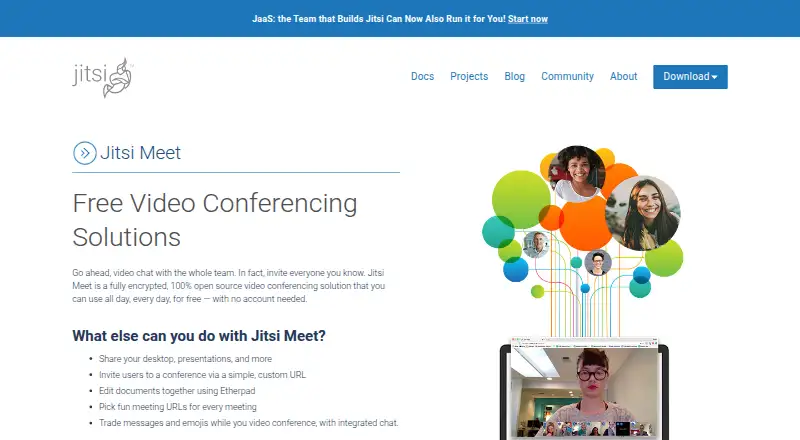
What Jitsi Meet is
Jitsi Meet is open-source software for online video meetings. Participants can share desktops and presentations, use screen sharing, exchange messages and emojis in integrated chat, and collaborate on Etherpad documents. It supports meeting recording and breakout rooms, with HD audio using Opus. Audio and video traffic is encrypted in transit with DTLS-SRTP. Optional end-to-end encryption covers audio, video and screen sharing, but not chat or polls. Jitsi Meet is available on the web, Windows, macOS, Linux, iOS and Android, as well as through an API or self-hosted deployment. It integrates with Etherpad, YouTube Live, Dropbox, callstats.io and SIP telephony. An External API can embed meetings in webpages, and the FAQ describes an SDK for Android and iOS apps. On meet.jit.si, meeting chat and speaker statistics are removed when a meeting ends. The free meet.jit.si service is limited to 25 monthly active endpoints in aggregate across a user's accounts. All users in its rooms are moderators; self-hosted deployments can configure strong authentication to restrict that role.
Good
- Supports recording and breakout rooms.
- Desktop and presentation sharing are available.
- Self-hosted deployment is supported.
- Integrates with Etherpad and SIP telephony.
- Meeting chat and speaker statistics are deleted when meetings end.
Watch out
- meet.jit.si is limited to 25 monthly active endpoints across accounts.
- Optional end-to-end encryption excludes chat and polls.
- All meet.jit.si room users are moderators.
- Commercial support is not provided by Jitsi or 8x8.
Who it suits
Jitsi Meet suits people seeking open-source video meetings with options for self-hosting or embedding. Teams should note the meet.jit.si endpoint limit and that optional end-to-end encryption does not cover chat or polls.
Verdict
Jitsi Meet offers conferencing, sharing and self-hosting options across desktop, mobile and web platforms. The public meet.jit.si service has endpoint and moderation limitations to weigh against self-hosting.
Plans and prices
From Jitsi Meet's own pricing page, checked 5 Oct 2026.
| Plan | Price | What it gives you |
|---|---|---|
| Jitsi Meet | Free | Free video conferences · meet.jit.si use limited to 25 monthly active endpoints across accounts |
The facts
Each one read from Jitsi Meet's own pages, with the date it was checked.
What it does
- API deployment limit
- Jitsi says meet.jit.si is for testing API integrations and is not intended for production applications.checked 5 Oct 2026
- Audio
- The product offers HD audio with Opus.checked 5 Oct 2026
- Breakout rooms
- Yeschecked 20 Sep 2026
- Data handling
- On meet.jit.si, meeting chat and speaker statistics are retained for the meeting and destroyed when it ends.checked 5 Oct 2026
- Encryption
- Audio and video traffic is encrypted in transit with DTLS-SRTP; optional end-to-end encryption covers audio, video, and screen sharing, but not chat or polls.checked 5 Oct 2026
- Integrations
- Jitsi Meet includes an External API for embedding meetings in webpages, and its FAQ says it can be embedded in Android and iOS apps as an SDK.checked 5 Oct 2026
- JaaS
- Jitsi as a Service offers an iFrame API, webhooks, recordings, analytics, and transcriptions, with free unlimited minutes for up to 25 endpoints.checked 5 Oct 2026
- Key integrations
- Etherpad,YouTube Live,Dropbox,callstats.io,SIP telephonychecked 20 Sep 2026
- Meeting recording
- Yeschecked 20 Sep 2026
- Room moderation
- On meet.jit.si, all users are moderators; self-hosted deployments can configure strong authentication to restrict moderator roles.checked 5 Oct 2026
- Screen sharing
- Yeschecked 20 Sep 2026
- Self-hosting
- Users can self-host Jitsi Meet, with stable and nightly Ubuntu and Debian packages available.checked 5 Oct 2026
- Sharing and chat
- Users can share desktops and presentations, collaborate on Etherpad documents, and exchange messages and emojis in integrated chat.checked 5 Oct 2026
- Support
- The Jitsi team and 8x8 do not provide commercial support for Jitsi; the FAQ points users to community providers for paid help.checked 5 Oct 2026
- Usage limit
- The meet.jit.si free service is limited to 25 monthly active endpoints in aggregate across a user's accounts.checked 5 Oct 2026
- Video meetings
- Jitsi Meet is an open-source video conferencing solution for online meetings.checked 5 Oct 2026
Money
- Free plan
- Yeschecked 20 Sep 2026
The company
- Maker
- Jitsi is a trademark of 8x8, Inc.; 8x8's company facts list its headquarters as Campbell, California, and its founding year as 1987.checked 5 Oct 2026
Where it runs
- Mobile apps
- Jitsi offers mobile apps through the App Store, Google Play, and F-Droid.checked 5 Oct 2026
- Supported platforms
- web,windows,macos,linux,ios,android,api,self_hostedchecked 20 Sep 2026
The full review of Jitsi Meet
Jitsi Meet is an open-source video meeting service with browser, mobile, and self-hosted options. It is best suited to teams that want to embed conferencing or operate their own deployment. Its flexibility is a strength, but the public service’s usage cap and open moderator policy are material trade-offs.
Overview
Jitsi brings meetings, sharing, chat, and Etherpad collaboration together, with recording and breakout rooms for more structured sessions. Teams can use the public meet.jit.si service or self-host; the latter offers control over moderator access, but requires an organization willing to take responsibility for deployment. The public service is positioned for testing API integrations, not production applications.
On meet.jit.si, chat and speaker statistics last only for the meeting and are destroyed when it ends. That short retention may suit privacy-conscious groups, but does not provide a lasting meeting record. All participants are moderators on the public service, which makes it a poor fit when hosts need exclusive control; self-hosted deployments can use strong authentication to restrict moderator roles.
Key features
- Meeting collaboration: Participants can share desktops and presentations, use chat and emoji, and work together on Etherpad documents. Recording and breakout rooms support follow-up and smaller group sessions, while HD audio uses Opus. These tools cover common collaboration needs without requiring a separate document pad.
- Embedding and integrations: The External API supports embedding meetings in webpages, and Jitsi's FAQ describes SDK embedding in Android and iOS apps. Integrations include YouTube Live, Dropbox, callstats.io, and SIP telephony. This makes Jitsi relevant to teams building meetings into an existing product or workflow, rather than only looking for a standalone meeting app.
- JaaS and encryption: Jitsi as a Service offers an iFrame API, webhooks, recordings, analytics, and transcriptions, with free unlimited minutes for up to 25 endpoints. Audio and video are encrypted in transit with DTLS-SRTP; optional end-to-end encryption also covers screen sharing, but not chat or polls. Teams needing end-to-end protection for all meeting content should account for that gap.
- Self-hosting: Stable and nightly packages are available for Ubuntu and Debian. Self-hosting can let an organization configure moderator authentication, but it also shifts deployment responsibility to that organization.
Pricing
Jitsi Meet — free. The free plan provides video conferences through meet.jit.si. Its limit is 25 monthly active endpoints in aggregate across a user's accounts, so it is better suited to modest or occasional use than broad ongoing deployment. The service is not intended for production API applications.
JaaS includes free unlimited minutes for up to 25 endpoints. Jitsi and 8x8 do not provide commercial support for Jitsi; organizations seeking paid help are directed to community providers.
Platforms
Jitsi Meet supports web, Windows, macOS, Linux, iOS, Android, API, and self-hosted deployments. Mobile apps are available through the App Store, Google Play, and F-Droid. The breadth suits mixed-device teams, while the API and self-hosted options serve developers and operators with integration needs.
Who it's for
Jitsi Meet is a strong fit for teams that value open-source conferencing, want to embed meetings in a webpage or mobile app, or can operate a self-hosted deployment. It is less suitable for organizations that need commercial support, strict host control on a shared public service, or a production API deployment on meet.jit.si.
Pros and cons
- Pro: Self-hosting and webpage or app embedding give technical teams meaningful deployment flexibility.
- Pro: Recording, breakout rooms, Etherpad collaboration, and multiple integrations make it more than a basic video call.
- Pro: Public-service chat and speaker statistics are deleted when the meeting ends.
- Con: meet.jit.si is capped at 25 monthly active endpoints across accounts and is not intended for production API integrations.
- Con: Every user is a moderator on meet.jit.si, limiting host control unless the organization self-hosts and configures authentication.
- Con: Optional end-to-end encryption excludes chat and polls, and commercial support is not provided by Jitsi or 8x8.
Alternatives
Choose Microsoft Teams if its free plan's 100 participants, 60-minute group meetings, and 5 GB of cloud storage better suit a bounded meeting and storage need. VSee is another freemium option with a free plan for one provider. Consider TeamLink if its free tier's 20 participants, 45-minute meetings, and one meeting room fit your sessions.
TrueConf is an alternative with a perpetual-license free server plan. Webex App offers free meetings for up to 100 attendees with a 40-minute limit. Zoho Meeting has a free plan for 100 participants and 60-minute meetings. 8x8 Meet is a free alternative with a 500-participant plan. Daily provides a free monthly allowance of 10,000 participant minutes.
Browse more options in Video Conferencing Software or Secure Video Conferencing Software.
Verdict
Choose Jitsi Meet if you want flexible, open-source conferencing that can be embedded or self-hosted, and you can manage the deployment trade-offs. Its main draw is control over how meetings fit into your stack; look elsewhere if you need a production-ready public API service, tighter moderation on the hosted service, or commercial support.
Getting started
- Open Jitsi Meet on the web or install its App Store, Google Play, or F-Droid app
- Create or join a meeting room
- Share your desktop, presentation, or screen
- Use chat, emojis, or an Etherpad document during the meeting
- Enable recording or breakout rooms when needed
- For self-hosting, deploy the Ubuntu or Debian package
- For embedding, use the External API or mobile SDK
Limits worth knowing
The free meet.jit.si service is limited to 25 monthly active endpoints in aggregate across a user's accounts. Jitsi says meet.jit.si is for testing API integrations rather than production applications; free JaaS offers unlimited minutes for up to 25 endpoints.
Questions
Is Jitsi Meet free?
Yes. Jitsi Meet has a free plan listed as free.
Which platforms support Jitsi Meet?
It supports web, Windows, macOS, Linux, iOS, Android, API access, and self-hosted deployments.
Can Jitsi Meet be self-hosted?
Yes. Stable and nightly Ubuntu and Debian packages are available for self-hosting.
What integrations are available?
Integrations include Etherpad, YouTube Live, Dropbox, callstats.io, and SIP telephony.
How does encryption work?
Audio and video are encrypted in transit with DTLS-SRTP. Optional end-to-end encryption covers audio, video, and screen sharing, but not chat or polls.
Is commercial support provided?
The Jitsi team and 8x8 do not provide commercial support; the FAQ points users to community providers for paid help.
Alternatives to Jitsi Meet
- 1
Microsoft Teams
Free planAndroidiOSWebLinux9.0Free plan - 2

8x8 Meet
Free planAndroidiOSWebAPI8.9From $24 a month - 3

FreeConferenceCall.com
Free planAndroidiOSWebAPI8.7From $2 a month - 4
Webex App
Free planAndroidiOSWebmacOS8.5Free plan - 5
Google Meet
AndroidiOSWebLinux8.4From $7 a month - 6

TrueConf
Free planAndroidiOSWebAPI8.4From $10 a year