
Intake
Intake collects client forms, signed PDFs, documents, and payments through a single request link.
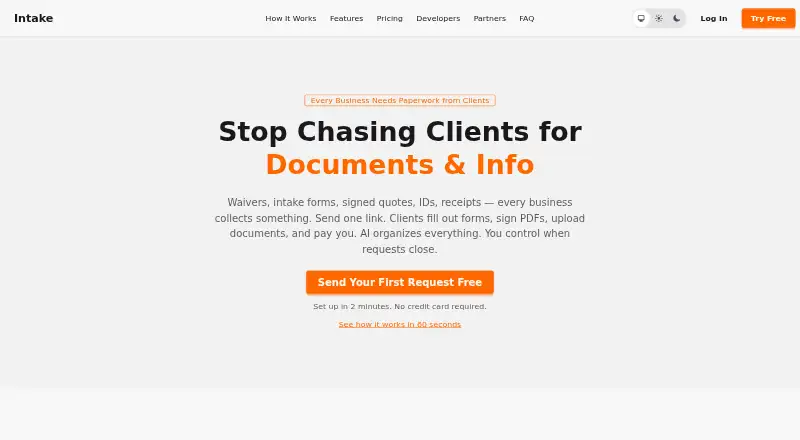
What Intake is
Intake collects client forms, signed PDFs, documents, and payments through a single request link. Its form builder supports conditional fields and validation, while clients can fill and sign PDFs in a browser. Businesses can publish reusable links on websites, in email signatures, or as QR codes. Clients open those links without creating accounts and can upload documents or capture them with a mobile camera. Intake says its AI identifies document types with over 95% accuracy and flags uncertain cases for review. It provides a REST API, webhooks, and a native MCP server, and names Make.com, Zapier, Claude, and GPT as integration options. Payments use a connected Stripe account and carry a 1% platform fee per successful payment, plus Stripe processing fees. The Free plan supports up to 10 clients. Professional costs $19 a month; Team costs $49 a month. Enterprise pricing is not listed. Intake is available on web, Android, iOS, and API.
Good
- Clients can complete and sign PDFs in a browser.
- Reusable links can be shared through websites or QR codes.
- AI flags uncertain document classifications for review.
- Free plan supports up to 10 clients.
Watch out
- Payments incur a 1% platform fee plus Stripe fees.
- Team includes three seats, with additional seats billed separately.
- Enterprise pricing is not listed.
Who it suits
It is intended for businesses collecting client information, including tax and accounting, mortgage and lending, real estate, immigration, and bookkeeping workflows. It suits teams that want clients to submit forms and documents through a link without creating an account.
Verdict
Intake brings client forms, document collection, signatures, and payments into a link-based workflow. Its free tier is limited to 10 clients, and payment collection adds platform and processor fees.
Plans and prices
From Intake's own pricing page, checked 14 Oct 2026.
| Plan | Price | What it gives you |
|---|---|---|
| Free | Free | Up to 10 clients · forms, fillable PDFs, e-signatures · AI classification · reminders · Stripe payments with 1% platform fee · public links · $0 /month |
| Professional | $19 a month | Unlimited clients, requests and deals · custom branding · REST API, webhooks and MCP · deal management · $190/year — 2 months free |
| Team | $49 a month | 3 seats included · $15/seat/month thereafter · roles · assignments · per-person API keys and MCP access · $490/year — 2 months free |
| Enterprise | Priced on request | Custom integrations · dedicated support · volume pricing · SSO · SLAs · Custom pricing |
The facts
Each one read from Intake's own pages, with the date it was checked.
What it does
- AI classification
- Intake says its AI identifies document types with more than 95% accuracy and flags uncertain cases for review.checked 14 Oct 2026
- AI data use
- Uploaded document content is processed for classification and is not used to train AI models or shared with third parties, according to the privacy policy.checked 14 Oct 2026
- AI limitation
- The terms warn that AI document classifications can be wrong and should be checked when accuracy matters.checked 14 Oct 2026
- API authentication
- API keys are sent as Bearer tokens and support read, write and webhook scopes.checked 14 Oct 2026
- API coverage
- Documentation covers clients, requests, checklist items, uploads, forms, PDFs, signatures, payments, deals, public pages, parties, activity and webhooks.checked 14 Oct 2026
- API rate limit
- Each API key is limited to 120 requests per minute, with HTTP 429 responses and Retry-After headers when exceeded.checked 14 Oct 2026
- Branding
- Customers can add their logo and brand colors to the portal and emails.checked 14 Oct 2026
- Client access
- Clients use a link without creating an account, and the portal supports mobile uploads and camera capture.checked 30 Sep 2026
- Data retention
- The privacy policy says account data is deleted within 30 days after account deletion, uploaded documents are permanently deleted, and backup copies may persist for up to 90 days.checked 30 Sep 2026
- Deal templates
- Deal templates can save forms, PDFs, documents and payments for multi-party transactions.checked 14 Oct 2026
- Document preview
- PDFs, images and signed documents can be previewed in the browser without downloading.checked 14 Oct 2026
- Form builder
- The drag-and-drop builder supports text, email, phone, SSN and dropdown fields, validation and conditional fields.checked 14 Oct 2026
- Forms and signatures
- Its form builder supports conditional fields and validation, and clients can complete and sign fillable PDFs in a browser.checked 30 Sep 2026
- G2 listing identity
- The G2 page links its Intake product website to intake.io and says it has served customers since 2013.checked 14 Oct 2026
- G2 review praise (different product listing)
- The sole G2 reviewer for intake.io described its user interface as easy to use and maintenance as easy.checked 14 Oct 2026
- Integrations
- The maker says Intake can connect with Make.com, Zapier, CRMs, Claude and GPT.checked 14 Oct 2026
- Legal entity
- The terms identify the operator as Intake LLC, a Wisconsin limited liability company.checked 14 Oct 2026
- MCP server
- An MCP server is documented for MCP-compatible clients such as Claude and Cursor.checked 14 Oct 2026
- Mobile experience
- The client portal works on any device and supports taking document photos directly from a phone.checked 14 Oct 2026
- Multi-signer envelopes
- One PDF can be routed to multiple signers in sequence with a completed document and signing certificate.checked 14 Oct 2026
- Payments
- Stripe-connected requests can collect retainers, deposits or fees; Intake charges a 1% platform fee per successful payment.checked 14 Oct 2026
Where it runs
- GetApp platform listing
- The GetApp page lists Join Intake as supporting web, Android and iPhone/iPad platforms.checked 14 Oct 2026
- GetApp product description
- GetApp says Join Intake handles inbound calls, captures caller information, routes intent and supports live transfers.checked 14 Oct 2026
- GetApp support listing
- GetApp lists email/help-desk, 24/7 live-representative and phone support for Join Intake.checked 14 Oct 2026
The full review of Intake
Overview
Intake is a client-collection service for businesses that need forms, signed PDFs, documents, and payments gathered through a shared link. It is best suited to professional services such as tax and accounting, mortgage and lending, real estate, immigration, and bookkeeping. Its strongest case is combining client submissions and payment collection in one workflow; the 10-client free-plan ceiling and payment fees make it less compelling for larger or fee-sensitive operations.
Businesses can create reusable intake links for a website, email signature, or QR code, so prospective clients can start without waiting for a one-off request. Clients open the link without creating an account, and can upload documents or use a mobile camera to capture them.
See our Client Intake Software directory for more options in this category.
Key features
Forms, PDFs, and document handling
The form builder supports conditional fields and validation, useful when the next questions depend on a client's answers or submissions need basic checks. Clients can also complete and sign fillable PDFs in a browser. This mix can reduce the need to collect form answers and signed documents through separate channels.
Classification and integrations
Intake says its AI identifies document types with over 95% accuracy and flags uncertain cases for review. That may help sort incoming paperwork, though the review flags mean it is not a reason to remove human oversight. The privacy policy says document content is processed for classification, is not used to train AI models, and is not shared with third parties.
A REST API, webhooks, and native MCP server support custom connections, while Make.com, Zapier, Claude, and GPT are named integration options. These tools give teams ways to connect Intake with other systems, but the most relevant path will depend on their existing setup.
Payments and safeguards
Clients can pay through a connected Stripe account. Intake charges 1% per successful payment in addition to Stripe processing fees, so payment collection adds a variable cost that grows with transaction volume. The site says data is encrypted in transit and at rest using 256-bit encryption; its privacy policy also describes TLS/SSL encryption, access controls, authentication, and regular security assessments.
After account deletion, account data is deleted within 30 days, uploaded documents are permanently deleted, and backup copies may remain for up to 90 days. Enterprise customers can request dedicated support; support requests are directed to Intake by email.
Pricing
Intake uses a freemium model, with paid plans from $19 a month. The Free plan costs nothing, requires no credit card, and allows up to 10 clients. That cap makes it suitable for a small trial or very low-volume practice, but not a growing client roster.
Professional costs $19 a month, or $190/year with two months free. It includes unlimited requests and clients, which removes the free plan's core volume constraint. The 1% platform fee still applies to payments, on top of Stripe processing fees.
Team costs $49 a month, or $490/year with two months free. It includes three seats; additional seats cost $15/seat/month and are prorated. This is the clearer fit for a small team sharing intake work, though headcount beyond three raises the subscription cost.
Enterprise has custom pricing and adds custom integrations, dedicated support, volume pricing, SSO, and SLAs. It is aimed at organizations that need those operational or contractual provisions rather than a standard self-serve plan.
Platforms
Intake is available on Android, iOS, and the web, and offers an API. The mobile client portal's upload and camera-capture support is particularly relevant when clients submit paperwork away from a desktop.
Who it's for
Intake fits businesses that regularly request a bundle of information, paperwork, signatures, or payment from clients. Its reusable links suit organizations that want intake to begin from their public-facing channels, while conditional forms and document classification can help structure incoming submissions. Firms that mainly need a basic form, do not collect payments, or exceed the free tier's client ceiling should weigh whether Intake's broader workflow is worth its paid plan and transaction charges.
Pros and cons
- Pros: A single client link can combine conditional forms, signed PDFs, document uploads, and payment collection, reducing the need to split those steps across services.
- Pros: Clients do not need an account, and mobile uploads include camera capture, lowering friction for document submission.
- Pros: The free plan costs nothing and needs no credit card, giving small practices a way to start without an upfront subscription.
- Cons: The free plan stops at 10 clients, so even modest growth may require Professional.
- Cons: Successful payments incur Intake's 1% fee plus Stripe processing fees, which can make payment collection costly at higher transaction volumes.
- Cons: Team's three included seats may not cover larger groups; each additional seat costs $15/seat/month.
Alternatives
Choose ClientLoop if a lower client cap is acceptable in exchange for a free plan that includes one team member, unlimited document and form requests, 1 GB of storage, and 100 uploads per month; files are kept for six months. Consider FormsHQ for a form-focused starting point: its free Starter Form allows one published form and 50 responses per month, with basic templates, email notifications, CSV export, and FormsHQ branding.
PlatoForms is worth comparing for a free form-oriented tier with one live form, 100 submissions per month, 100 MB storage, two members, and 10,000 AI credits per month. Portico may suit onboarding volumes of up to three active onboardings per month, with e-signatures limited to three per month, 1 GB of storage, and unlimited team members on its free plan.
For form creation without a free-trial requirement, FlowyForm offers a free Standard plan with unlimited forms and submissions, e-signatures, file uploads, and conditional logic. Onvoy is another onboarding option, with five onboardings per month, one team member, forms, file uploads, templates, and automated email reminders on its free plan.
Clustdoc is a paid option with a PRO plan at $190 a month, including three user seats, 50 new applications per month, and 25 GB of storage; some e-signatures and reminders have limited usage. ClientEnforce is another freemium option.
Verdict
Intake is a strong match for small professional-service businesses that want clients to submit forms, signed documents, uploads, and payments through one account-free link. The free tier offers a low-risk start, and Professional removes client and request limits, but payment fees remain and the free plan's 10-client cap is restrictive. Choose it when consolidating intake matters more than minimizing transaction costs; look elsewhere if you only need forms or expect payment fees to outweigh the convenience.
Getting started
- Visit https://dointake.com/.
- Choose the Free, Professional, Team, or Enterprise plan.
- Build a form with conditional fields or validation, or use fillable PDFs.
- Share a request link or publish a reusable link on a website, in an email signature, or as a QR code.
- Connect a Stripe account if you want to collect payments.
Limits worth knowing
The Free plan supports up to 10 clients. Professional costs $19 a month and Team costs $49 a month; Team includes three seats, with additional seats at $15 per seat per month. Successful payments incur a 1% platform fee plus Stripe processing fees.
Questions
Is there a free plan?
Yes. The Free plan costs nothing, supports up to 10 clients, and does not require a credit card.
How much do the paid plans cost?
Professional is $19 a month, or $190/year. Team is $49 a month, or $490/year. Enterprise has custom integrations, dedicated support, volume pricing, SSO, and SLAs.
Which platforms does Intake support?
Intake is available on web, Android, and iOS, and provides an API.
Can clients sign PDFs and upload documents?
Yes. Clients can complete and sign fillable PDFs in a browser, upload documents, and use mobile camera capture.
How does payment collection work?
Clients pay through a connected Stripe account. Intake charges a 1% fee per successful payment, in addition to Stripe processing fees.
What integrations are available?
Intake provides a REST API, webhooks, and a native MCP server. It names Make.com, Zapier, Claude, and GPT as integration options.
Alternatives to Intake
- 1

PlatoForms
Free planAndroidWebAPI7.7From $10 a month - 2
CaseDesk
AndroidiOSWebAPI7.5From $29 a month - 3
FormsHQ
Free planWeb7.3From $29 a month - 4

Portico
Free planWebAPI7.3From $29 a month - 5
GatherMonk
WebExtension7.2From $29 a month - 6
Leverage
Free planWebAPI7.2$24 one-time