FlowyForm
FlowyForm is a web-based builder for forms and surveys used to collect information for tasks such as lead generation, registrations, quizzes, and client inta…
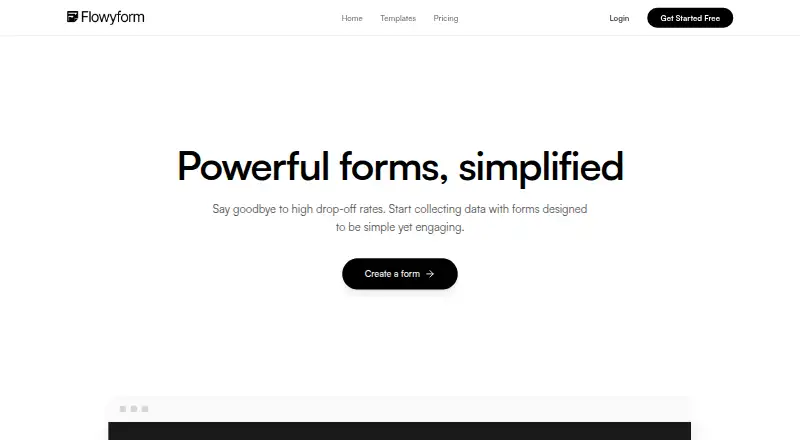
What FlowyForm is
FlowyForm is a web-based builder for forms and surveys used to collect information for tasks such as lead generation, registrations, quizzes, and client intake. Forms can gather contact details, signatures, files, ratings, rankings, and date or time selections. Conditional logic, calculators, and answer piping can adapt a form using earlier responses. The site offers more than 300 templates and supports embedding forms on websites with embed code. Listed connections include Google Sheets, Slack, Zapier, and webhooks; FlowyForm says Zapier connects it with over 5,000 apps. Its free Standard plan includes unlimited forms and submissions, with features such as conditional logic, file uploads, signatures, spam protection, and Google Sheets sync. Professional costs $29 per month and adds branding removal, partial submissions, advanced analytics, workspaces, team collaboration, and higher file upload limits. Data is encrypted in transit using TLS 1.2 and encrypted at rest. FlowyForm is available on the web; it does not offer a free trial.
Good
- Free Standard plan includes unlimited forms and submissions.
- Forms support signatures, file uploads, and conditional logic.
- More than 300 templates are offered.
- Professional includes team collaboration and workspaces.
Watch out
- No free trial is offered.
- Professional file upload limits are not numerically specified.
Who it suits
FlowyForm suits people who need forms for surveys, registrations, quizzes, lead generation, or client intake. It may also suit teams that want conditional forms, integrations, and collaboration features.
Verdict
FlowyForm covers a broad range of form and survey needs, and its free plan includes unlimited forms and submissions. Consider the $29 per month Professional plan if you need branding removal, workspaces, or team collaboration.
Plans and prices
From FlowyForm's own pricing page, checked 2 Oct 2026.
| Plan | Price | What it gives you |
|---|---|---|
| Standard | Free | Unlimited forms · Unlimited submissions · e-signatures · file uploads · conditional logic · answer piping · Google Sheets sync · Zapier & Slack · webhooks |
| Professional | $29 a month | Remove branding · partial submissions · custom SMTP and email branding · increased file upload limits · advanced analytics · workspaces · team collaboration |
The facts
Each one read from FlowyForm's own pages, with the date it was checked.
What it does
- Authentication
- The security article describes Google sign-in and email/password authentication, with passwords required to be at least eight characters and include a number and a special character.checked 2 Oct 2026
- Embedding
- Forms can be embedded on websites using embed code, including sites built with major frameworks and site builders.checked 2 Oct 2026
- Integrations
- The integrations page lists Google Sheets, Slack, Zapier, and webhooks; it says Zapier connects FlowyForm to over 5,000 apps.checked 2 Oct 2026
- Product
- FlowyForm is a form and survey builder designed to collect data through engaging forms.checked 2 Oct 2026
- Professional limits
- The Professional plan lists increased file upload limits, but the pricing page does not specify a numeric cap.checked 2 Oct 2026
- Question types
- Forms can collect contact details, signatures, file uploads, ratings and rankings, and date and time selections.checked 2 Oct 2026
- Security
- The security help article says data is encrypted in transit using TLS 1.2 and encrypted at rest.checked 2 Oct 2026
- Smart forms
- The builder supports conditional logic, calculators, and piping answers from earlier questions into later ones.checked 2 Oct 2026
- Support
- The maker provides a Help Center with guides on form building, workflows, embedding, security, refunds, and fair usage.checked 2 Oct 2026
- Templates
- The homepage says FlowyForm offers over 300 templates.checked 2 Oct 2026
- Use cases
- The maker describes uses including lead generation, surveys, quizzes, registrations, and client intake.checked 2 Oct 2026
The company
- Company location
- The privacy policy identifies Alberta, Canada as the country associated with FlowyForm.checked 2 Oct 2026
Money
- Free usage
- The pricing page says the free Standard plan has unlimited forms and submissions and includes core features such as conditional logic, file uploads, signatures, and spam protection.checked 2 Oct 2026
The full review of FlowyForm
FlowyForm is a web-based form and survey builder for people collecting information through lead forms, quizzes, registrations, or client intake. It suits users who need adaptable questions and varied response types, especially when a submission cap would be restrictive. Its free plan is generous on volume, but its branding and collaboration tools require a paid upgrade.
Overview
FlowyForm handles more than simple contact forms: respondents can provide signatures and files, give ratings or rankings, and select dates and times. That range makes it useful for intake, surveys, and registrations in one tool. It is less compelling for teams that need a branded presentation or shared workspaces without paying for Professional.
Key features
Conditional logic lets a form change direction based on answers, answer piping carries an earlier response into a later question, and calculators support computed results. Together, these features can make longer or branching forms more relevant to each respondent. More than 300 templates offer a head start, although specialized workflows may still need tailoring.
Embed code lets users place forms on websites, including those built with major frameworks and site builders. Google Sheets sync, Slack, Zapier, and webhooks provide response-routing options; Zapier can connect FlowyForm with more than 5,000 apps. These integrations broaden its usefulness, though the listed options may not match every organization’s preferred tools.
Security includes TLS 1.2 encryption in transit and encryption at rest. Users can sign in with Google or email and password; passwords must be at least eight characters and include a number and special character. A Help Center covers form building, workflows, embedding, security, refunds, and fair usage.
Pricing
The Standard plan costs nothing and includes unlimited forms and submissions, e-signatures, file uploads, conditional logic, answer piping, Google Sheets sync, Zapier, Slack, and webhooks. It also includes spam protection. This is a strong fit for individuals or organizations that can accept FlowyForm branding and do not need the paid plan’s collaboration or analytics tools.
Professional costs $29 a month. It removes branding and adds partial submissions, custom SMTP and email branding, advanced analytics, workspaces, team collaboration, and increased file upload limits. The larger upload allowance has no published numeric cap, so users with demanding upload needs should confirm it meets their requirements. There is no free trial; the free Standard plan offers a way to use core features without a paid commitment.
Standard gives up branding removal, partial submissions, custom email branding, advanced analytics, workspaces, team collaboration, and Professional’s increased file limits. Choose Professional when presentation or shared team work is essential; otherwise, Standard’s unlimited forms and submissions make the paid upgrade harder to justify.
Platforms
FlowyForm is available on the web. Its forms can also be embedded on websites using embed code.
Who it's for
FlowyForm is a good fit for people building lead-generation forms, surveys, quizzes, registrations, and client-intake flows who want varied question types and branching logic. The free plan is particularly suitable for users who need unlimited submissions and can live with branding. Teams that need collaboration, workspaces, or a more polished branded experience should budget for Professional.
Pros and cons
- Pro: Standard includes unlimited forms and submissions, so growing response volume does not itself force an upgrade.
- Pro: Signatures, file uploads, conditional logic, calculators, and answer piping support more involved intake and survey flows than basic forms.
- Pro: Google Sheets, Slack, Zapier, and webhooks give responses several routes into other tools.
- Con: Standard retains branding and lacks workspaces and team collaboration, making it a poorer fit for teams seeking a shared, polished workflow.
- Con: Professional’s increased file upload limits are not accompanied by a numeric cap, which complicates planning for upload-heavy work.
- Con: There is no free trial of the paid plan.
Alternatives
For client-intake software, compare Client Intake Software. If intake is the primary task, Intake has a free plan for up to 10 clients and supports Android, iOS, web, and API platforms, while FlowyForm is web-based and allows unlimited forms and submissions on its free plan. Portico is another option, with a free plan that allows three active onboardings per month, e-signatures, 1 GB of storage, and unlimited team members; it also offers a free trial.
ClientLoop may suit a small team seeking a client-based free allowance: its free plan covers up to five clients and one team member, with unlimited document and form requests, 1 GB storage, and 100 uploads per month. FormsHQ is worth considering if one published form and up to 50 monthly responses are enough: its free Starter Form plan includes basic templates, email notifications, CSV export, and FormsHQ branding.
Onvoy offers a free plan for five onboardings per month, one team member, forms and file uploads, onboarding templates, and automated email reminders; it also has a free trial. PlatoForms has a free allowance of one live form, 100 submissions per month, 100 MB storage, two members, and 10,000 AI credits per month, with a free trial. Synerdeck is another client-intake alternative, with a free plan for up to 10 clients, two templates, 500 MB storage, manual reminders, and a basic client portal. Leverage is a paid-model alternative with a free plan for up to three users and 500 outbound emails, plus a free trial.
Verdict
Choose FlowyForm if you need flexible forms and surveys with branching, varied response types, and no free-plan submission ceiling. The free Standard plan is its clearest advantage. Look elsewhere if free branding removal or team collaboration is essential, or choose Professional at $29 a month when those additions justify the upgrade.
Getting started
- Open the FlowyForm website
- Choose the free Standard plan or Professional
- Create forms from a template or start building
- Add questions, logic, uploads or signatures
- Embed the form on your website with the provided code
- Connect Google Sheets, Slack, Zapier or webhooks
Limits worth knowing
Standard is free with unlimited forms and submissions and core features. Professional adds increased file upload limits, but the listed pricing information gives no numeric cap.
Questions
Is FlowyForm free?
Yes. Standard costs nothing and includes unlimited forms and submissions.
What does Professional cost?
Professional costs $29 a month.
Does FlowyForm offer a trial?
No free trial is listed.
Which integrations are available?
The listed integrations are Google Sheets, Slack, Zapier and webhooks. Zapier is described as connecting FlowyForm to over 5,000 apps.
Can forms be embedded?
Yes. Forms can be embedded on websites with embed code, including sites built with major frameworks and site builders.
How is data protected?
The security article describes TLS 1.2 encryption in transit and encryption at rest. Sign-in supports Google authentication or email and password.
Alternatives to FlowyForm
- 1

Intake
Free planAndroidiOSWebAPI7.9From $19 a month - 2

PlatoForms
Free planAndroidWebAPI7.7From $10 a month - 3
CaseDesk
AndroidiOSWebAPI7.5From $29 a month - 4
FormsHQ
Free planWeb7.3From $29 a month - 5

Portico
Free planWebAPI7.3From $29 a month - 6
GatherMonk
WebExtension7.2From $29 a month