
Portico
Portico is a client onboarding platform that combines intake, document uploads, signatures, and payments in a guided process.
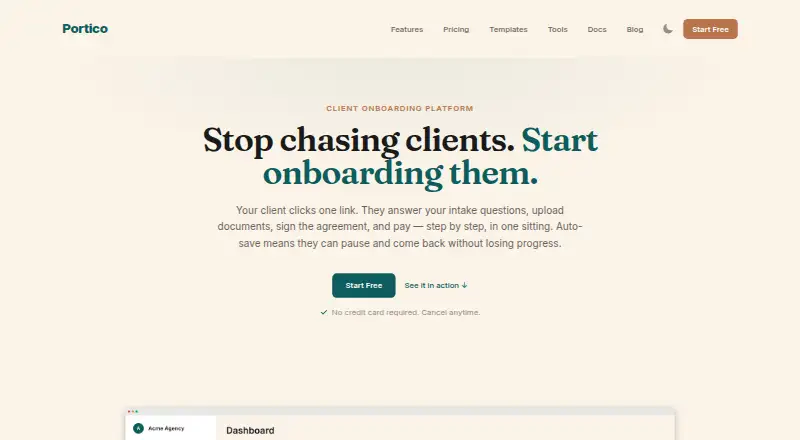
What Portico is
Portico is a client onboarding platform that combines intake, document uploads, signatures, and payments in a guided process. Its multi-step forms offer conditional logic, validation, file uploads, and automatic saving. Clients can follow progress in a branded portal and access their submitted responses and signed documents through magic-link access. Embedded e-signatures are described as supporting the ESIGN Act and eIDAS, with timestamps and IP address logging. Portico can collect deposits, retainers, or project fees through Stripe during onboarding. Listed integrations include QuickBooks Online, Xero, HubSpot, Pipedrive, Slack, Gmail, Zapier, and Make. A REST API and webhooks support programmatic onboarding management and real-time event notifications. The maker lists consent collection, data export, erasure, and configurable retention as GDPR features; SOC 2 Type II and ISO 27001 are marked planned. Free accounts allow three active onboardings per month, defined as those not completed or archived. Each plan begins with a 14-day Pro trial without a credit card, after which the account moves to Free automatically. Annual-billing prices are $29/mo for Starter, $59/mo for Pro, and $119/mo for Business.
Good
- Free plan includes three active onboardings per month.
- Forms support conditional logic and file uploads.
- Clients get a branded portal with magic-link access.
- Payments can be collected through Stripe.
- REST API and webhooks are available.
Watch out
- Free plan is limited to three active onboardings monthly.
- Starter is $29/mo billed annually.
- SOC 2 Type II and ISO 27001 are planned, not listed as current.
Who it suits
Portico is presented for service businesses such as agencies, accountants, bookkeepers, legal practices, consultants, coaches, and freelancers. It suits teams that want forms, documents, signatures, and payments in a guided client onboarding process.
Verdict
Portico combines intake forms, client document access, signatures, and Stripe payments in one onboarding flow. Its free tier has a small active-onboarding allowance, while the listed paid prices are annual-billing rates.
Plans and prices
From Portico's own pricing page, checked 15 Oct 2026.
| Plan | Price | What it gives you |
|---|---|---|
| Free | Free | 3 active onboardings/month · unlimited team members · conditional forms · file collection · 3 e-signatures/month · email reminders · magic-link access · 1 GB storage · forever |
| Starter | $29 a month | 25 active onboardings/month · unlimited team members · Stripe payments · branding · template library · basic automations · webhooks · 50 GB storage · annually |
| Lifetime Solo | $49, paid once | 5 new onboardings/month · 10 GB storage · unlimited e-signatures/team members · portal · Stripe payments · branding · webhooks · 5 custom fields · one-time |
| Pro | $59 a month | 100 active onboardings/month · SMS reminders (100/month) · Zapier and Make · REST API · persistent portal · advanced automations/reporting · 250 GB storage · annually |
| Lifetime Practice | $119, paid once | 15 new onboardings/month · 50 GB storage · Solo features · REST API and Zapier · nine client-facing languages · 15 custom fields · one-time |
| Business | $119 a month | Unlimited onboardings · unlimited team members · SMS reminders (500/month) · white-label custom domain · custom templates · priority support · unlimited storage · annually |
| Lifetime Firm | $229, paid once | 30 new onboardings/month · 100 GB storage · Practice features · white-label custom-domain portal · 20 custom fields · one-time |
The facts
Each one read from Portico's own pages, with the date it was checked.
What it does
- API
- Portico offers a REST API and webhooks for programmatic onboarding management and real-time event notifications.checked 30 Sep 2026
- Client portal
- Starter and higher plans provide a persistent portal showing onboardings, files and signatures through magic-link access.checked 15 Oct 2026
- Compliance
- Portico describes GDPR consent, export, erasure and configurable retention tools; SOC 2 Type II and ISO 27001 are marked planned.checked 15 Oct 2026
- Dashboard
- The dashboard tracks progress and flags overdue, at-risk and stale onboardings.checked 15 Oct 2026
- Developer documentation
- The docs navigation includes API reference and webhook guides, alongside setup, template, client and billing documentation.checked 15 Oct 2026
- E-signatures
- Signatures are embedded in the flow and Portico stores a SHA-256 record hash for signed records.checked 15 Oct 2026
- File collection
- Clients can upload requested documents inside the onboarding flow and later access submitted files in the portal.checked 15 Oct 2026
- Form builder
- The builder supports multi-step forms, conditional logic, required fields, validation and automatic saving.checked 15 Oct 2026
- Forms
- Its multi-step forms support conditional logic, validation, file uploads, and automatic saving.checked 30 Sep 2026
- Founder
- Portico blog author pages identify Vlad Kuzin as founder and describe 15 years in UX, content design and information architecture at SAP and Intel.checked 15 Oct 2026
- Independent directory deployment
- Capterra lists web, Android and iPhone/iPad deployment for the product.checked 15 Oct 2026
- Independent directory integrations
- Capterra lists Make, Slack and Zapier as Portico integrations.checked 15 Oct 2026
- Independent directory support
- Capterra lists email/help-desk, FAQ/forum and knowledge-base support options, with documentation and videos as training formats.checked 15 Oct 2026
- Infrastructure
- The service says it uses Supabase PostgreSQL and AWS S3 on AWS infrastructure with team-scoped database access.checked 15 Oct 2026
- Integrations
- Official integration pages name QuickBooks Online, Xero, HubSpot, Pipedrive, Slack, Gmail, Zapier and Make.checked 15 Oct 2026
- Intended users
- The site presents Portico for service businesses including agencies, accountants, bookkeepers, legal practices, consultants, coaches, and freelancers.checked 30 Sep 2026
- Limit
- Free plan accounts include three active onboardings per month, and active means an onboarding that has not been completed or archived.checked 30 Sep 2026
- Limit: Independent review coverage
- Capterra reports no user reviews, so there is no reviewer evidence on that directory for recurring praise or complaints.checked 15 Oct 2026
- Limit: Review detail
- GetApp shows one rating and a 4.0 score but exposes no substantive review text in the listing extract.checked 15 Oct 2026
- Localization
- Portico says its client-facing experience supports nine locales across 46 countries and includes RTL readiness.checked 15 Oct 2026
- Payments
- Stripe-powered payment steps collect deposits, retainers or fees without Portico taking a payment percentage.checked 15 Oct 2026
The company
- Headquarters
- Almaty, Kazakhstanchecked 23 Sep 2026
- Maker headquarters
- The privacy policy gives the operator address as 22/2 Akseleu Seidimbek St., Nauryzbay District, Almaty, Kazakhstan.checked 15 Oct 2026
- Maker legal entity
- The privacy policy identifies TOO "Solid Code" as the operator.checked 15 Oct 2026
The full review of Portico
Portico is an onboarding tool for service businesses that want to move clients from intake to payment in one guided process. It suits teams that handle repeatable client setup; businesses that only need a basic form may find its wider workflow unnecessary.
Overview
Portico brings multi-step intake, document uploads, signatures and Stripe payments together, with a branded portal clients can revisit using a magic link. That makes it a credible fit for firms that want clients to submit information, sign documents and pay without splitting those steps across separate tools. Conditional logic and validation help tailor forms to different cases, while automatic saving reduces the risk of losing progress.
The persistent portal gives clients a place to check progress and retrieve their submitted responses and signed documents. For providers managing ongoing relationships, that is more useful than a one-off form link. The trade-off is that Portico is built around onboarding as a workflow, so it may be more than a solo operator needs for occasional information gathering.
Key features
Intake, signatures and payments
Forms support conditional logic, validation, file uploads and automatic saving. Embedded e-signatures are described as supporting the ESIGN Act and eIDAS, with timestamps and IP address logging. Portico can collect deposits, retainers or project fees through Stripe as part of the same process. This combination is most compelling when a business regularly needs both signed paperwork and an initial payment; it is less relevant to teams that only need to collect responses.
Integrations, API and security
Portico lists integrations with QuickBooks Online, Xero, HubSpot, Pipedrive, Slack, Gmail, Zapier and Make. Its REST API and webhooks support programmatic onboarding management and real-time event notifications, making the product more adaptable for teams connecting onboarding to other systems.
Stored data is encrypted with AES-256, data in transit uses TLS 1.2+, and audit events are cryptographically linked using SHA-256 hashing. GDPR features include consent collection, data export, erasure and configurable retention. SOC 2 Type II and ISO 27001 are planned, rather than current certifications. Its infrastructure uses Supabase on AWS, PostgreSQL with team-scoped access and AWS S3 file storage.
Pricing
Every plan begins with a 14-day Pro trial without a credit card. After the trial, the account moves automatically to Free, so users can evaluate paid features without an unexpected paid renewal, though they should account for the Free plan's tighter limits afterward.
- Free: $0/forever, with three active onboardings per month, three e-signatures per month, 1 GB of storage and unlimited team members. An active onboarding is one that has not been completed or archived. This is suitable for light or occasional use, but the small monthly cap limits it as a continuing option for a busy practice.
- Starter: $29/mo, billed annually — save 26%. It allows 25 active onboardings per month, 50 GB of storage and unlimited team members. This is the entry paid tier for firms whose intake volume exceeds Free but does not require the larger monthly allowances.
- Pro: $59/mo, billed annually — save 25%. It includes 100 active onboardings per month, 100 SMS reminders per month, 250 GB of storage and unlimited team members. The added reminders and capacity suit a higher-volume operation that wants to prompt clients by SMS.
- Business: $119/mo, billed annually — save 20%. It provides unlimited onboardings, 500 SMS reminders per month, unlimited storage and unlimited team members. This is the clearest fit for organizations that would otherwise have to manage monthly onboarding or storage ceilings.
The quoted paid rates are annual-billing prices; the stated paid starting rate is $29/mo.
Platforms
Portico is available on web and through an API. The API and webhooks make it relevant to teams that want programmatic control, while its web portal serves clients completing the onboarding flow.
Who it's for
Portico is aimed at agencies, accountants, bookkeepers, legal practices, consultants, coaches and freelancers. It is strongest for service businesses that repeatedly collect client details, documents, signatures and an initial payment. A business with only occasional, simple forms is unlikely to benefit as much from a dedicated end-to-end onboarding platform.
Pros and cons
- Pro: Intake, uploads, signatures and Stripe payments share one guided flow, reducing the need to separate those client-facing steps.
- Pro: A branded, persistent portal lets clients return to track progress and access responses and signed documents.
- Pro: Unlimited team members are included across the plans, while higher tiers expand onboarding and storage capacity.
- Con: Free is capped at three active onboardings and three signatures per month, too little for many recurring business workflows.
- Con: Paid prices are annual-billing rates, and Starter is already $29/mo; teams needing only basic forms may be paying for more workflow than they use.
- Con: SOC 2 Type II and ISO 27001 are planned, which may matter to buyers requiring those certifications today.
Alternatives
Browse Client Intake Software for more options. Choose Intake instead if you need Android or iOS access, or prefer its free allowance of up to 10 clients; its Professional plan is $19 a month, below Portico's entry paid rate.
Onvoy is worth considering for a smaller team: its free plan allows five onboardings per month and includes one team member, forms, file uploads, templates and automated email reminders. PlatoForms may suit a form-centered workload, with a free plan allowing one live form and 100 submissions per month.
FormsHQ offers a free Starter Form plan with one published form and 50 responses per month, making it a more focused option for limited form use. ClientLoop is another free-plan alternative; its free tier allows up to five clients and one team member.
IntakeQ is a paid alternative starting at $49.90 a month, with low-volume discounted plans available by contacting the provider. FlowyForm is a free alternative with unlimited forms and submissions, e-signatures, file uploads and conditional logic. LaunchBay is another paid, web-based alternative.
Verdict
Portico is a strong choice for service businesses that want one client-facing path for intake, documents, signatures and Stripe payments, especially when clients need a persistent portal. Its main drawback is the narrow Free allowance and annual billing for paid plans. Choose it when the joined-up onboarding flow matters; look elsewhere if you only need basic forms or need a free plan for regular client volume.
Getting started
- Open https://www.portico.run/ in a web browser or use the API.
- Start a plan to receive a 14-day Pro trial without a credit card.
- Build an onboarding flow with forms, uploads, signatures, or payments as needed.
- Connect listed services such as QuickBooks Online, Xero, HubSpot, or Slack if useful.
- After the trial, continue on the Free plan or choose a paid plan.
Limits worth knowing
The Free plan permits three active onboardings per month, three e-signatures per month, and 1 GB of storage. Active means an onboarding that has not been completed or archived. All plans begin with a 14-day Pro trial, after which the account moves to Free automatically.
Questions
Does Portico have a free plan?
Yes. The Free plan is billed at $0 forever and includes three active onboardings per month.
How much do paid plans cost?
Starter is $29/mo billed annually, Pro is $59/mo billed annually, and Business is $119/mo billed annually.
Is there a free trial?
Yes. Every plan starts with a 14-day Pro trial without a credit card, then the account automatically moves to Free.
Which platforms does Portico support?
The listed platforms are web and API.
Which integrations are listed?
QuickBooks Online, Xero, HubSpot, Pipedrive, Slack, Gmail, Zapier, and Make.
Who makes Portico, and where is it based?
Portico lists its headquarters in Almaty, Kazakhstan.
Alternatives to Portico
- 1

Intake
Free planAndroidiOSWebAPI7.9From $19 a month - 2

PlatoForms
Free planAndroidWebAPI7.7From $10 a month - 3
CaseDesk
AndroidiOSWebAPI7.5From $29 a month - 4
FormsHQ
Free planWeb7.3From $29 a month - 5
GatherMonk
WebExtension7.2From $29 a month - 6
Leverage
Free planWebAPI7.2$24 one-time