FormsHQ
FormsHQ turns forms into workflows for collecting information, qualifying leads, routing submissions, managing payments and signatures, and sending data to o…
What FormsHQ is
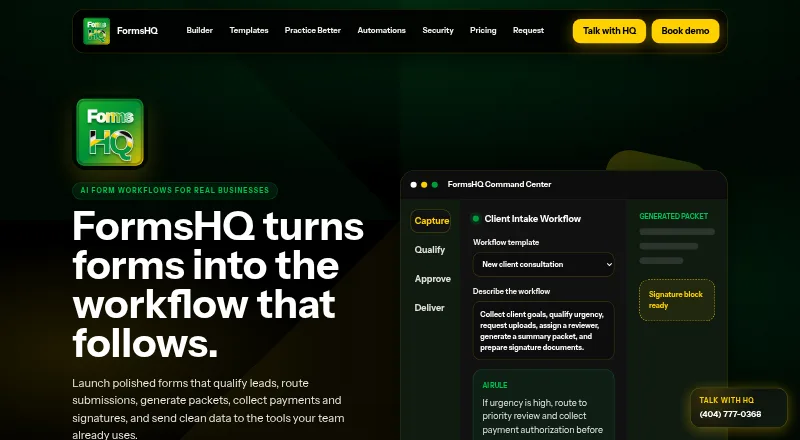
FormsHQ turns forms into workflows for collecting information, qualifying leads, routing submissions, managing payments and signatures, and sending data to other tools. Its AI-assisted form design can create questions, helper text, validation, conditional pages, and review criteria from a plain-language brief. Teams can score submissions, assign owners, track status and deadlines, and route records for review. Submitted information can be shaped into summaries, PDFs, agreements, disclosures, internal memos, or client-ready packets. Review controls include role-based paths, consent and signature checkpoints, structured exports, and human approval before generated packets are sent. FormsHQ runs on the web and offers a free Starter Form plan with one published form and 50 responses per month. Smart Forms costs $29 a month and allows five forms and 1,000 monthly responses. Growth Workflows is $99 a month, and Business Portal is $249 a month. The site describes use cases including legal and health intake, agency onboarding, loan prequalification, HR onboarding, and events or bookings. It also offers done-for-you workflow builds as one-time setup projects, without listing a setup price.
Good
- AI can draft form components from a plain-language brief.
- Supports assignment, status tracking, and review routing.
- Can generate PDFs and client-ready document packets.
- Free plan allows 50 responses per month.
- Payment collection and signature-ready documents are supported.
Watch out
- Free plan is limited to one published form.
- Starter Form has a 50-response monthly limit.
- Done-for-you workflow setup has no listed price.
Who it suits
FormsHQ suits teams that need structured intake, submission review, document generation, or payment and signature steps. Its described use cases include legal and health intake, HR onboarding, loan prequalification, and bookings.
Verdict
FormsHQ combines form creation with workflow handling and document generation, with plans ranging from a limited free tier to paid team options. Check response limits and plan capabilities against the volume and review steps you need.
Plans and prices
From FormsHQ's own pricing page, checked 15 Oct 2026.
| Plan | Price | What it gives you |
|---|---|---|
| Starter Form | Free | 1 published form · 50 responses/month · basic templates · email notifications · CSV export · FormsHQ branding |
| Smart Forms | $29 a month | 5 forms · 1,000 responses/month · custom branding · conditional logic · file uploads · payments · redirects |
| Growth Workflows | $99 a month | 25 forms · 10,000 responses · approval routing · PDF packets · CRM handoffs · team seats · workflow analytics |
| Business Portal | $249 a month | multi-form portals · reviewer roles · advanced document mapping · payment/signature gates · priority support · launch QA |
The facts
Each one read from FormsHQ's own pages, with the date it was checked.
What it does
- AI form design
- A plain-language brief can generate questions, helper text, validation, conditional pages and review criteria.checked 15 Oct 2026
- Assignment
- Records can be routed to owners with status, notes, attachments and response deadlines.checked 15 Oct 2026
- Automation limitation
- The FAQ says sensitive documents are not sent automatically by AI; human review is expected first.checked 15 Oct 2026
- Branded forms
- The service publishes branded, mobile-ready forms for firms, clinics, agencies and local businesses.checked 15 Oct 2026
- Contact
- FormsHQ publishes [email protected] and telephone number (404) 777-0368.checked 15 Oct 2026
- Corporate footer
- The site footer identifies the organization as FormsHQ / SETTEROS and shows a 2026 SETTEROS copyright.checked 15 Oct 2026
- Document generation
- The workflow can create summaries, PDFs, agreements, disclosures, internal memos and client-ready packets.checked 15 Oct 2026
- Documents
- FormsHQ can generate summaries, PDFs, agreements, disclosures, internal memos, and client-ready packets from submissions.checked 28 Sep 2026
- Human review
- Generated packets and signature documents are intended to receive human approval before being sent.checked 15 Oct 2026
- Integrations
- The site says data can be sent to email, spreadsheets, CRMs, calendars, payment tools and automation platforms.checked 15 Oct 2026
- Intended users
- The site presents workflows for legal and health intake, agency onboarding, loan prequalification, HR onboarding, and events or bookings.checked 28 Sep 2026
- Payments and signatures
- FormsHQ supports deposits, payment authorizations, disclosures and signature-ready documents inside workflows.checked 15 Oct 2026
- Practice Better use
- For wellness and coaching practices, FormsHQ describes treatment trackers, recurring check-ins, results lists, intake rebuilds, and follow-up workflows.checked 28 Sep 2026
- Practice Better workflow
- A dedicated page describes treatment trackers, six- and twelve-month check-ins, results masterlists, intake rebuilds and CRM follow-up for Practice Better professionals.checked 15 Oct 2026
- Purpose
- FormsHQ turns forms into workflows for lead qualification, submission routing, document packets, payments, signatures, and sending data to other tools.checked 28 Sep 2026
- Qualification
- Submissions can be scored using urgency, fit, budget, location, service type and missing information.checked 15 Oct 2026
The company
- Company and location
- The site identifies FormsHQ with SETTEROS and gives an Atlanta, Georgia address at 3715 Northside Parkway Northwest, Building 100, Suite 500.checked 28 Sep 2026
- Company operator
- The related SETTEROS site states that SETTEROS is operated by FORMSHQ INC.checked 15 Oct 2026
- Headquarters
- Atlanta, Georgia, United Stateschecked 28 Sep 2026
- Headquarters address
- The footer gives 3715 Northside Parkway Northwest, Building 100, Suite 500, Atlanta, Georgia 30327.checked 15 Oct 2026
Money
- Free-tier branding limit
- The free Starter Form plan keeps FormsHQ branding on the form.checked 15 Oct 2026
- Free-tier response limit
- Starter Form allows 50 responses per month and one published form.checked 15 Oct 2026
Where it runs
- Related platform capability
- SETTEROS is described as combining conversational AI, CRM-connected messaging, automated follow-up, calendar booking, analytics and voice AI support.checked 15 Oct 2026
- Related platform pricing
- SETTEROS lists a Starter plan at $79/mo, billed monthly, with one sub-account and three AI agents.checked 15 Oct 2026
The full review of FormsHQ
Overview
FormsHQ is a web-based platform that turns submitted forms into routed, reviewed workflows and finished documents. It fits teams handling intake, qualification, onboarding, approvals, or bookings where a response must trigger several coordinated steps. Choose it when consolidating collection, review, payments, signatures, and document output matters more than keeping form costs at zero.
Key features
AI-assisted design can turn a plain-language brief into questions, helper text, validation, conditional pages, and review criteria. This is useful for getting a structured intake started quickly, while Smart Forms adds conditional logic and file uploads for more controlled respondent experiences.
After submission, teams can score records, assign owners, track status and deadlines, and route items for review. Role-based paths, consent checkpoints, signature checkpoints, structured exports, and human approval provide useful controls when generated material should not be sent automatically. Conditional workflow automation is a strength, but the more advanced coordination is reserved for higher tiers.
FormsHQ generates summaries, PDFs, agreements, disclosures, internal memos, and client-ready packets from collected data. It can collect deposits or payment authorizations and prepare signature-ready documents at workflow stages. Data can be sent to email, sheets, CRMs, calendars, payment tools, and automation platforms, although no specific products are identified. Wellness and coaching practices can use treatment trackers, recurring check-ins, results lists, intake rebuilds, and follow-up workflows.
Pricing
The free Starter Form plan costs nothing and includes one published form, 50 responses per month, basic templates, email notifications, CSV export, and FormsHQ branding. It is suitable for a small-volume trial or a simple internal intake, but the response ceiling and branding make it unsuitable for regular public-facing programs.
Smart Forms costs $29 a month, billed $29/mo. It raises capacity to five forms and 1,000 responses per month, removes the branding constraint with custom branding, and adds conditional logic, file uploads, payments, and redirects. This is the practical entry point for a small operation collecting meaningful volume without team workflow requirements.
Growth Workflows costs $99 a month, billed $99/mo. Its 25 forms and 10,000 responses per month support larger programs, while approval routing, PDF packets, CRM handoffs, team seats, and workflow analytics address shared operational processes. It is the better choice when submissions need accountable ownership and measurable progress.
Business Portal costs $249 a month, billed $249/mo. Multi-form portals, reviewer roles, advanced document mapping, payment and signature gates, priority support, and launch QA target organizations running formal client-facing operations. FormsHQ also offers done-for-you workflow builds as one-time setup projects with custom pricing.
Platforms
FormsHQ runs on the web. It includes a client portal, document uploads, payment collection, e-signatures, custom branding, and workflow automation that can be conditional.
Who it's for
Legal and health intake teams, agencies onboarding clients, lenders handling prequalification, HR departments, and event or booking operators are the clearest fits. It also suits practices that need intake data to become reviewed records and polished packets rather than remain in a response spreadsheet. Solo users with occasional, low-volume forms should start with Starter Form or consider a simpler form tool instead.
Pros and cons
- Pros: AI can draft a complete form structure from a brief, reducing setup work.
- Pros: Review assignment, scoring, deadlines, routing, payments, signatures, and document generation connect collection to action.
- Pros: Growth Workflows adds team seats, approval routing, analytics, CRM handoffs, and PDF packets for coordinated operations.
- Pros: Business Portal includes reviewer roles, advanced document mapping, priority support, and launch QA.
- Cons: Starter Form allows only one published form and 50 responses monthly, with FormsHQ branding.
- Cons: Higher response volumes and serious collaboration begin at $99 a month, while the most managed portal features cost $249 a month.
- Cons: Specific third-party integration products are not identified, so compatibility should be confirmed before committing.
Alternatives
For a broader directory of intake-focused products, see Client Intake Software.
Choose Intake instead if you need Android and iOS apps alongside web and API access, with a free tier for up to 10 clients and a 19.00 USD monthly Professional plan.
Portico is a better fit when onboarding volume is modest and its free tier covers three active onboardings per month, three e-signatures, 1 GB storage, and unlimited team members.
Pick ClientLoop for a smaller client roster: its free plan supports up to five clients, one team member, 100 uploads monthly, and 1 GB storage.
FlowyForm suits readers seeking a free web form plan with unlimited forms and submissions, e-signatures, conditional logic, file uploads, and Google Sheets, Zapier, and Slack connections.
Onvoy is an alternative for onboarding teams whose free plan covers five onboardings per month, one team member, templates, uploads, and automated email reminders.
PlatoForms offers a free live form, 100 submissions monthly, 100 MB storage, two members, and 10,000 AI credits, making it worth considering for smaller AI-assisted form projects.
Synerdeck is another client-workflow option with a free tier for 10 clients, two templates, 500 MB storage, manual reminders, and a basic client portal.
Leverage is a paid-oriented alternative with a free plan for up to three users and 500 outbound emails.
Verdict
FormsHQ is recommended for teams that need intake submissions to move through ownership, approvals, payments or signatures, and automatically assembled documents. Its main reason to choose it is the breadth of that connected workflow; its main reason to look elsewhere is the sharp jump from a tightly capped free plan to paid tiers, especially when you only need straightforward form collection.
Alternatives to FormsHQ
- 1

Intake
Free planAndroidiOSWebAPI7.9From $19 a month - 2

PlatoForms
Free planAndroidWebAPI7.7From $10 a month - 3
CaseDesk
AndroidiOSWebAPI7.5From $29 a month - 4

Portico
Free planWebAPI7.3From $29 a month - 5
GatherMonk
WebExtension7.2From $29 a month - 6
Leverage
Free planWebAPI7.2$24 one-time