InstallerClean
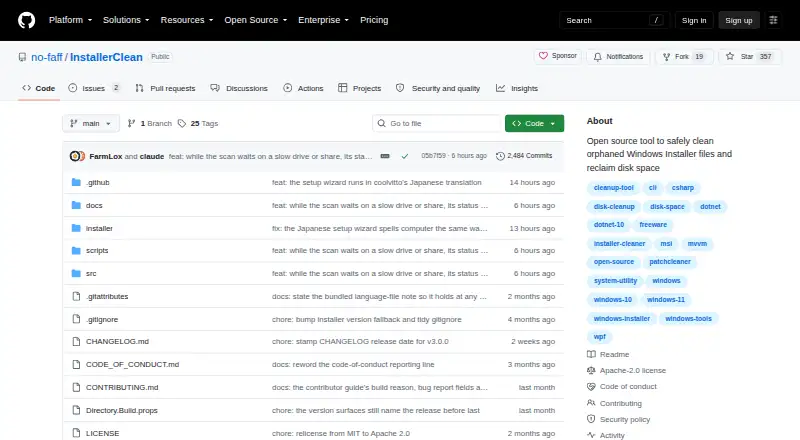
InstallerClean scans .msi and .msp files directly in C:\Windows\Installer to find files that may no longer be needed and reclaim disk space.
What InstallerClean is
InstallerClean scans .msi and .msp files directly in C:\Windows\Installer to find files that may no longer be needed and reclaim disk space. It checks Windows Installer records and registry information, holding back files when it cannot establish that removing them is safe. Users can move identified files to a chosen backup folder or delete them permanently.
Downloads include portable, setup, and command-line builds; the setup version includes both the graphical interface and CLI. The command-line tool supports scan, move, and delete operations for scripting, and reports exit codes and Windows Event Log events. InstallerClean requires 64-bit Windows 10 version 1607 or later, or Windows 11, and administrator privileges. It is free and open source under Apache 2.0. The program does not scan subfolders or clean WinSxS, and it has no background service, scheduled task, or automatic cleanup. Downloads are unsigned, so Windows may show an unknown-publisher warning; release pages provide SHA-256 hashes and VirusTotal results.
Good
- Portable, setup, and command-line builds
- Can move files to a chosen backup folder
- Checks installer records and registry information
- Keyboard and screen-reader support
Watch out
- Requires 64-bit Windows and administrator privileges
- Does not clean the WinSxS folder
- No background, scheduled, or automatic cleanup
- Downloads are unsigned
Who it suits
InstallerClean is for Windows users whose C:\Windows\Installer folder may contain unneeded files, including users of MSI-based software or people who often install and remove software. Its CLI may suit users who want scan and cleanup operations for scripts.
Verdict
InstallerClean offers cautious identification and gives users a choice between backing up candidates and deleting them. Its limits include no WinSxS cleanup or automatic operation, and Windows may warn about the unsigned downloads.
Plans and prices
From InstallerClean's own pricing page, checked 11 Oct 2026.
| Plan | Price | What it gives you |
|---|---|---|
| InstallerClean | Free | Windows 10 version 1607 or later · 64-bit Windows · Administrator privileges |
The facts
Each one read from InstallerClean's own pages, with the date it was checked.
What it does
- Accessibility
- The maker says the app supports keyboard and screen-reader use and that its dark-theme text meets WCAG AA contrast.checked 11 Oct 2026
- Automation
- The command-line build supports scan, move and delete operations for scripting and scheduled tasks.checked 11 Oct 2026
- Builds
- Downloads include portable, setup, and command-line builds; setup bundles both the GUI and CLI.checked 11 Oct 2026
- Builds and integrations
- Downloads include portable, setup and command-line builds, with installation also available through winget and Scoop.checked 11 Oct 2026
- Cleanup options
- Users can move identified files to a chosen backup folder or delete them permanently.checked 11 Oct 2026
- File types
- It scans .msi and .msp files located directly in C:\Windows\Installer, without scanning subfolders.checked 11 Oct 2026
- Intended users
- The maker describes it for Windows users whose C:\Windows\Installer folder has accumulated unneeded files, including machines with heavy MSI-based software or frequent software installs and removals.checked 11 Oct 2026
- Known limits
- InstallerClean does not clean the WinSxS folder and does not run as a background service, scheduled task or automatic cleaner.checked 11 Oct 2026
- License
- The project is open source under the Apache 2.0 license.checked 11 Oct 2026
- Network activity
- The app checks GitHub for updates when run, and that check can be turned off in About.checked 11 Oct 2026
- Notable limit
- InstallerClean does not clean the Windows WinSxS folder and has no background service, scheduled task, or automatic cleanup.checked 11 Oct 2026
- Privacy
- A first-run anonymous report is sent unless unticked; it excludes file names, folder names, account names, and machine identifiers.checked 11 Oct 2026
- Purpose
- InstallerClean scans C:\Windows\Installer for unneeded Windows Installer files so users can reclaim disk space.checked 11 Oct 2026
- Removal options
- Users can move offered files to a chosen backup folder or delete them permanently.checked 11 Oct 2026
- Report contents
- The optional report contains scan and cleanup results, app and language versions, and Windows version, but no file names, folder names or account name.checked 11 Oct 2026
- Requirements
- It requires 64-bit Windows 10 version 1607 or later, or Windows 11, and administrator privileges.checked 11 Oct 2026
- Safe file checks
- It checks Windows Installer and registry records and holds back files when those records cannot establish that they are safe to remove.checked 11 Oct 2026
- Safe identification
- It checks Windows Installer records and the registry, and holds back files when it cannot determine whether they are needed.checked 11 Oct 2026
- Scripting
- The CLI supports scan-only, move, and permanent-delete operations, and reports exit codes and Windows Event Log events.checked 11 Oct 2026
- Security
- The downloads are unsigned, and release pages provide SHA-256 hashes and VirusTotal scan results.checked 11 Oct 2026
- Security checks
- The maker says each download has a SHA-256 hash on its release page and builds are scanned by VirusTotal before release.checked 11 Oct 2026
- Security support
- Only the latest release receives fixes, and vulnerability reports should be submitted through a private GitHub security advisory.checked 11 Oct 2026
- Signing status
- The downloads are unsigned and Windows may show an unknown-publisher warning; the project says it has been accepted for free code signing, but the certificate has not yet been issued.checked 11 Oct 2026
- Support
- Users can report bugs or suggestions through GitHub issues or discussions; donations are optional.checked 11 Oct 2026
The full review of InstallerClean
InstallerClean is a free, narrowly focused Windows utility for auditing the system Installer directory. It best suits administrators of PCs with heavy MSI-based software activity who want to approve each candidate themselves. Its value is controlled recovery of identifiable installer leftovers, not all-purpose Windows cleanup or unattended maintenance.
Overview
The program examines C:\Windows\Installer for .msi and .msp files located directly in that folder. It cross-checks Windows Installer records and registry entries, withholding files when those records cannot show that removal is safe. This restraint is reassuring when disk space matters but certainty matters more; it also leaves potentially reclaimable files untouched when their status is ambiguous. Subfolders are outside the scan.
For candidates it does present, you choose between moving files to a backup folder and deleting them permanently. A backup-first workflow gives cautious users a way back, while permanent deletion is available for a decisive cleanup. InstallerClean does not remove WinSxS content and does not provide a background service, scheduled task or automatic cleaner, so it is a deliberate, one-off utility rather than continuous housekeeping.
Key features
Focused identification
Registry and Windows Installer validation makes the scan more useful than a simple age-based purge for PCs where installers may still be needed for repair or updates. The conservative holdback policy favors safety over maximum reclaimed space.
Backup or permanent removal
Moving selected files to a folder you specify is the sensible choice when testing a cleanup policy or supporting a machine whose software requirements may change. Permanent deletion saves the extra storage but removes that recovery option.
Portable, graphical and command-line builds
Portable, setup and command-line downloads cover different deployment styles; the setup package includes both GUI and CLI. The CLI can scan, move or permanently delete, returns exit codes and records Windows Event Log events, making it suitable for scripts and scheduled tasks you manage yourself. Installation is also offered through winget and Scoop.
Privacy and security controls
An anonymous first-run report is enabled unless you untick it. The report can include scan and cleanup results, application and language versions, and Windows version, while excluding file names, folder names, account names and machine identifiers. The application checks GitHub for updates at launch, with an option in About to disable that check.
Downloads are unsigned, so Windows may display an unknown-publisher warning. Release pages provide SHA-256 hashes and VirusTotal results for verification, but the signing certificate has not yet been issued. Only the latest release receives fixes; vulnerability reports should go through a private GitHub security advisory. The Apache 2.0 license permits open-source use, and the maker states that keyboard, screen-reader and dark-theme WCAG AA contrast support are included.
Pricing
InstallerClean: free. The free plan has no trial period because the product is free, and it covers one Windows utility rather than tiered seats or quotas. It includes the scanner, backup-or-delete choices, portable and command-line builds, and the scripting controls described above. Administrator privileges are required, along with 64-bit Windows 10 version 1607 or later, or Windows 11. There is no paid tier to add automation, broader folder coverage or forced uninstall functions, so readers seeking those capabilities must choose another product.
Platforms
InstallerClean supports 64-bit Windows 10 (version 1607 or later) and Windows 11, and requires administrator access. A portable build avoids installation; setup and command-line packages support installed or scripted deployment.
Who it's for
Choose it when a Windows Installer folder has expanded after frequent software installation and removal, particularly on systems dependent on MSI packages. It is also a good fit for technically confident users who want to inspect proposed files, retain backups and integrate scans into their own scripts. It is a poor match for people wanting a general disk cleaner, WinSxS reduction, automatic recurring jobs or forced, batch and monitored application uninstall features.
Pros and cons
- Pro: Cross-checking installer records and the registry, with uncertain files withheld, limits reckless deletion.
- Pro: Moving files to a chosen backup folder provides a practical fallback before permanent removal.
- Pro: CLI operations, exit codes and Event Log reporting support controlled administration and scripting.
- Pro: Free Apache 2.0 software with portable, setup, winget and Scoop distribution gives flexible deployment.
- Con: Scanning only .msi and .msp files directly in C:\Windows\Installer leaves subfolders and other storage untouched.
- Con: No WinSxS cleanup or built-in background, scheduled or automatic operation means ongoing maintenance is manual.
- Con: Unsigned downloads can trigger an unknown-publisher warning and require hash or VirusTotal verification.
- Con: The mandatory administrator context and Windows-only support exclude non-Windows users and standard-account workflows.
Alternatives
For a wider shortlist, see Software Uninstaller Tools.
- IObit Uninstaller is the better choice when you need a freemium Windows uninstaller with batch removal, Windows app removal, drag-and-drop uninstall and automatic leftover cleanup.
- Argente Uninstall Manager suits readers wanting a freemium Windows manager with a free one-PC plan and higher tiers for additional PCs.
- Bulk Crap Uninstaller is preferable for free private or commercial Windows desktop use under Apache 2.0, including Windows 10 or newer.
- Geek Uninstaller fits users seeking a small free personal-use build, or a paid PRO edition with support.
- Jharu is an alternative free option for both macOS and Windows.
- Soft Organizer is worth considering for personal or educational use with optional home-license Pro plans.
- Uninstalr offers a freemium Windows approach with paid Pro and bundle licenses.
- Wise Program Uninstaller is a freemium Windows alternative with a free tier and optional PRO plan.
Verdict
InstallerClean is a sensible pick for an administrator who specifically needs to reclaim space in C:\Windows\Installer and wants conservative identification plus a backup path. Its free, scriptable builds add practical value without imposing a subscription. Look elsewhere if you expect broad Windows storage cleanup, unattended scheduling or a full application-uninstaller toolkit; InstallerClean deliberately stays narrower.
Alternatives to InstallerClean
- 1
Argente Uninstall Manager
Free planWindows7.4From €9 a year - 2
IObit Uninstaller
Free planWindows7.4Free plan - 3

Wise Program Uninstaller
Free planWindows7.3From $14.95 a year - 4

Geek Uninstaller
Free planWindows7.0Free plan - 5

Uninstalr
Free planWindows6.9$39 one-time - 6

Uninstall Tool
Windows6.8$24.95 one-time